Hi All, I am trying to connect multi datasources in my web application with Spring Boot v3.0.4. However, as I ran my web application the error below occurred.
org.springframework.beans.factory.BeanCreationException: Error creating bean with name 'flyway' defined in class path resource [org/springframework/boot/autoconfigure/flyway/FlywayAutoConfiguration$FlywayConfiguration.class]:
Failed to instantiate [org.flywaydb.core.Flyway]:
Factory method 'flyway' threw exception with message: Error creating bean with name 'routingDataSource' defined in class path resource [CouponDbConfig.class]:
Failed to instantiate [javax.sql.DataSource]:
Factory method 'routingDataSource' threw exception with message: dataSource or dataSourceClassName or jdbcUrl is required.
This is my source code.
    @Bean
    @ConfigurationProperties(prefix = "spring.datasource.coupon.writer")
    fun couponDatasourceWriter(): DataSource = DataSourceBuilder.create().build()
   // ...

    @FlywayDataSource
    @Bean
    fun routingDataSource(): DataSource {
        val writerDataSource: DataSource = couponDatasourceWriter()
    //...
   }
And here is my application.yml file.
spring:
  datasource:
    coupon:
      writer:
        driver-class-name: org.postgresql.Driver
        jdbc-url: jdbc:postgresql://localhost:xxx/test
        username: xxx
        password: xxx
At first, I suspected that @ConfigurationProperties annotation cannot inject my application properties(myapplication.yml). So, I tested with the below code and the application can be run successfully.
    @Bean
    fun couponDatasourceWriter(): DataSource = DataSourceBuilder.create()
        .driverClassName("org.postgresql.Driver")
        .url("jdbc:postgresql://localhost:xxx/test")
        .username("xxx")
        .password("xxx")
        .build()
   // ...

    @FlywayDataSource
    @Bean
    fun routingDataSource(): DataSource {
        val writerDataSource: DataSource = couponDatasourceWriter()
    //...
   }
The thing is that in Spring Boot v2.6.6 the above code which error had occurred has been worked successfully without an issue. I think there might be a problem on Spring Boot v3.0.x version on its own. I found some issues regarding @ConfigurationProperties annotation with Spring Boot v3.0.x not exactly the same but the similar one. Could you all check this issue?
Comment From: philwebb
From the snippet you've included it appears that DataSourceBuilder.create().build() is being used to create the DataSource which you then expect configuration properties to be applied to. I'm surprised that worked in 2.6.
I'd recommend changing your @Configuration so that you inject DataSourceProperties and use them to create the builder. You can find an example in https://docs.spring.io/spring-boot/docs/3.0.x/reference/htmlsingle/#howto.data-access.configure-two-datasources.
If that doesn't work for you, could you please provide a sample application that works in 2.7 but fails in 3.0.
Comment From: AnneMayor
Hi @philwebb , thanks for your comment. I had tried two different things with Spring Boot v2.7.0(+JVM version 11) and Spring Boot v3.0.4(+JVM version 17). The first one is the sample code which has been succeeded in Spring Boot v2.7.0 but failed in Spring Boot v3.0.4.
@Configuration(proxyBeanMethods = false)
class DbConfig {

    @Bean
    @Primary
    @FlywayDataSource
    @ConfigurationProperties(prefix = "spring.datasource.coupon.writer")
    fun couponDatasourceWriter(): DataSource = DataSourceBuilder.create().build()

}
spring.config.activate.on-profile: local
spring:

  datasource:
    coupon:
      writer:
        driver-class-name: org.postgresql.Driver
        jdbc-url: jdbc:postgresql://localhost:54322/couponWriter
        username: coupon
        password: coupon
      reader:
        driver-class-name: org.postgresql.Driver
        jdbc-url: jdbc:postgresql://localhost:54321/couponReader
        username: coupon
        password: coupon
The second is the sample code which has been failed both Spring Boot v2.7.0 and v3.0.4.
@Configuration(proxyBeanMethods = false)
class DbConfig {
    @Bean
    @ConfigurationProperties(prefix = "spring.datasource.coupon.writer")
    fun couponDatasourceProperty(): DataSourceProperties = DataSourceProperties()

    @Bean
    @Primary
    @ConfigurationProperties("spring.datasource.coupon")
    fun firstDataSource(couponDatasourceProperty: DataSourceProperties): DataSource {
        return couponDatasourceProperty.initializeDataSourceBuilder().build()
    }
spring.config.activate.on-profile: local
spring:

  datasource:
    coupon:
      writer:
        driver-class-name: org.postgresql.Driver
        jdbc-url: jdbc:postgresql://localhost:54322/couponWriter
        username: coupon
        password: coupon
      reader:
        driver-class-name: org.postgresql.Driver
        jdbc-url: jdbc:postgresql://localhost:54321/couponReader
        username: coupon
        password: coupon
The error message is like the below.
Failed to configure a DataSource: 'url' attribute is not specified and no embedded datasource could be configured.
Reason: Failed to determine suitable jdbc url
Consider the following:
    If you want an embedded database (H2, HSQL or Derby), please put it on the classpath.
    If you have database settings to be loaded from a particular profile you may need to activate it (the profiles local are currently active).
Make sure that there are no other settings such as flyway. I just tested if my sample application could be connected with my local postgre database. Please, let me know if you need more information about this issue.
I assume that there might be a problem on Spring Bean proxy mechanism.
Comment From: philwebb
@AnneMayor Could you please attach the project as a zip file or share a GitHub repository.
Comment From: AnneMayor
No problem, I had attached zip files for you, @philwebb Spring Boot 2.7.x : demo.zip Spring Boot v3.0.x: demo-spring-boot-3.zip
Thanks 🙂
Comment From: wilkinsona
Thanks for the samples, @AnneMayor, but they both appear to fail in the same way:
Here's the Boot 2.7-based app:
$ ./gradlew bootRun

> Task :bootRun FAILED

  .   ____          _            __ _ _
 /\\ / ___'_ __ _ _(_)_ __  __ _ \ \ \ \
( ( )\___ | '_ | '_| | '_ \/ _` | \ \ \ \
 \\/  ___)| |_)| | | | | || (_| |  ) ) ) )
  '  |____| .__|_| |_|_| |_\__, | / / / /
 =========|_|==============|___/=/_/_/_/
 :: Spring Boot ::                (v2.7.0)

2023-03-28 16:55:38.017  INFO 90699 --- [           main] com.spring.demo.DemoApplicationKt        : Starting DemoApplicationKt using Java 17.0.6 on wilkinsonaGMD6R.vmware.com with PID 90699 (/Users/awilkinson/Downloads/demo/build/classes/kotlin/main started by awilkinson in /Users/awilkinson/Downloads/demo)
2023-03-28 16:55:38.019  INFO 90699 --- [           main] com.spring.demo.DemoApplicationKt        : No active profile set, falling back to 1 default profile: "default"
2023-03-28 16:55:38.439  INFO 90699 --- [           main] .s.d.r.c.RepositoryConfigurationDelegate : Multiple Spring Data modules found, entering strict repository configuration mode!
2023-03-28 16:55:38.440  INFO 90699 --- [           main] .s.d.r.c.RepositoryConfigurationDelegate : Bootstrapping Spring Data JDBC repositories in DEFAULT mode.
2023-03-28 16:55:38.445  INFO 90699 --- [           main] .s.d.r.c.RepositoryConfigurationDelegate : Finished Spring Data repository scanning in 3 ms. Found 0 JDBC repository interfaces.
2023-03-28 16:55:38.451  INFO 90699 --- [           main] .s.d.r.c.RepositoryConfigurationDelegate : Multiple Spring Data modules found, entering strict repository configuration mode!
2023-03-28 16:55:38.451  INFO 90699 --- [           main] .s.d.r.c.RepositoryConfigurationDelegate : Bootstrapping Spring Data JPA repositories in DEFAULT mode.
2023-03-28 16:55:38.455  INFO 90699 --- [           main] .s.d.r.c.RepositoryConfigurationDelegate : Finished Spring Data repository scanning in 0 ms. Found 0 JPA repository interfaces.
2023-03-28 16:55:38.776  INFO 90699 --- [           main] o.s.b.w.embedded.tomcat.TomcatWebServer  : Tomcat initialized with port(s): 8080 (http)
2023-03-28 16:55:38.783  INFO 90699 --- [           main] o.apache.catalina.core.StandardService   : Starting service [Tomcat]
2023-03-28 16:55:38.783  INFO 90699 --- [           main] org.apache.catalina.core.StandardEngine  : Starting Servlet engine: [Apache Tomcat/9.0.63]
2023-03-28 16:55:38.863  INFO 90699 --- [           main] o.a.c.c.C.[Tomcat].[localhost].[/]       : Initializing Spring embedded WebApplicationContext
2023-03-28 16:55:38.863  INFO 90699 --- [           main] w.s.c.ServletWebServerApplicationContext : Root WebApplicationContext: initialization completed in 815 ms
2023-03-28 16:55:38.898  WARN 90699 --- [           main] ConfigServletWebServerApplicationContext : Exception encountered during context initialization - cancelling refresh attempt: org.springframework.beans.factory.UnsatisfiedDependencyException: Error creating bean with name 'dataSourceScriptDatabaseInitializer' defined in class path resource [org/springframework/boot/autoconfigure/sql/init/DataSourceInitializationConfiguration.class]: Unsatisfied dependency expressed through method 'dataSourceScriptDatabaseInitializer' parameter 0; nested exception is org.springframework.beans.factory.BeanCreationException: Error creating bean with name 'firstDataSource' defined in class path resource [com/spring/demo/DbConfig.class]: Bean instantiation via factory method failed; nested exception is org.springframework.beans.BeanInstantiationException: Failed to instantiate [javax.sql.DataSource]: Factory method 'firstDataSource' threw exception; nested exception is org.springframework.boot.autoconfigure.jdbc.DataSourceProperties$DataSourceBeanCreationException: Failed to determine a suitable driver class
2023-03-28 16:55:38.900  INFO 90699 --- [           main] o.apache.catalina.core.StandardService   : Stopping service [Tomcat]
2023-03-28 16:55:38.911  INFO 90699 --- [           main] ConditionEvaluationReportLoggingListener :

Error starting ApplicationContext. To display the conditions report re-run your application with 'debug' enabled.
2023-03-28 16:55:38.922 ERROR 90699 --- [           main] o.s.b.d.LoggingFailureAnalysisReporter   :

***************************
APPLICATION FAILED TO START
***************************

Description:

Failed to configure a DataSource: 'url' attribute is not specified and no embedded datasource could be configured.

Reason: Failed to determine a suitable driver class


Action:

Consider the following:
        If you want an embedded database (H2, HSQL or Derby), please put it on the classpath.
        If you have database settings to be loaded from a particular profile you may need to activate it (no profiles are currently active).
And here's the 3.0-based app:
$ ./gradlew bootRun

> Task :bootRun FAILED

  .   ____          _            __ _ _
 /\\ / ___'_ __ _ _(_)_ __  __ _ \ \ \ \
( ( )\___ | '_ | '_| | '_ \/ _` | \ \ \ \
 \\/  ___)| |_)| | | | | || (_| |  ) ) ) )
  '  |____| .__|_| |_|_| |_\__, | / / / /
 =========|_|==============|___/=/_/_/_/
 :: Spring Boot ::                (v3.0.4)

2023-03-28T16:56:04.850+01:00  INFO 90770 --- [           main] c.d.d.DemoSpringBoot3ApplicationKt       : Starting DemoSpringBoot3ApplicationKt using Java 17.0.6 with PID 90770 (/Users/awilkinson/Downloads/demo-spring-boot-3/build/classes/kotlin/main started by awilkinson in /Users/awilkinson/Downloads/demo-spring-boot-3)
2023-03-28T16:56:04.852+01:00  INFO 90770 --- [           main] c.d.d.DemoSpringBoot3ApplicationKt       : No active profile set, falling back to 1 default profile: "default"
2023-03-28T16:56:05.216+01:00  INFO 90770 --- [           main] .s.d.r.c.RepositoryConfigurationDelegate : Multiple Spring Data modules found, entering strict repository configuration mode
2023-03-28T16:56:05.216+01:00  INFO 90770 --- [           main] .s.d.r.c.RepositoryConfigurationDelegate : Bootstrapping Spring Data JDBC repositories in DEFAULT mode.
2023-03-28T16:56:05.225+01:00  INFO 90770 --- [           main] .s.d.r.c.RepositoryConfigurationDelegate : Finished Spring Data repository scanning in 6 ms. Found 0 JDBC repository interfaces.
2023-03-28T16:56:05.232+01:00  INFO 90770 --- [           main] .s.d.r.c.RepositoryConfigurationDelegate : Multiple Spring Data modules found, entering strict repository configuration mode
2023-03-28T16:56:05.233+01:00  INFO 90770 --- [           main] .s.d.r.c.RepositoryConfigurationDelegate : Bootstrapping Spring Data JPA repositories in DEFAULT mode.
2023-03-28T16:56:05.236+01:00  INFO 90770 --- [           main] .s.d.r.c.RepositoryConfigurationDelegate : Finished Spring Data repository scanning in 1 ms. Found 0 JPA repository interfaces.
2023-03-28T16:56:05.532+01:00  INFO 90770 --- [           main] o.s.b.w.embedded.tomcat.TomcatWebServer  : Tomcat initialized with port(s): 8080 (http)
2023-03-28T16:56:05.539+01:00  INFO 90770 --- [           main] o.apache.catalina.core.StandardService   : Starting service [Tomcat]
2023-03-28T16:56:05.539+01:00  INFO 90770 --- [           main] o.apache.catalina.core.StandardEngine    : Starting Servlet engine: [Apache Tomcat/10.1.5]
2023-03-28T16:56:05.607+01:00  INFO 90770 --- [           main] o.a.c.c.C.[Tomcat].[localhost].[/]       : Initializing Spring embedded WebApplicationContext
2023-03-28T16:56:05.608+01:00  INFO 90770 --- [           main] w.s.c.ServletWebServerApplicationContext : Root WebApplicationContext: initialization completed in 725 ms
2023-03-28T16:56:05.655+01:00  WARN 90770 --- [           main] ConfigServletWebServerApplicationContext : Exception encountered during context initialization - cancelling refresh attempt: org.springframework.beans.factory.UnsatisfiedDependencyException: Error creating bean with name 'dataSourceScriptDatabaseInitializer' defined in class path resource [org/springframework/boot/autoconfigure/sql/init/DataSourceInitializationConfiguration.class]: Unsatisfied dependency expressed through method 'dataSourceScriptDatabaseInitializer' parameter 0: Error creating bean with name 'dataSource' defined in class path resource [org/springframework/boot/autoconfigure/jdbc/DataSourceConfiguration$Hikari.class]: Failed to instantiate [com.zaxxer.hikari.HikariDataSource]: Factory method 'dataSource' threw exception with message: Failed to determine a suitable driver class
2023-03-28T16:56:05.656+01:00  INFO 90770 --- [           main] o.apache.catalina.core.StandardService   : Stopping service [Tomcat]
2023-03-28T16:56:05.668+01:00  INFO 90770 --- [           main] .s.b.a.l.ConditionEvaluationReportLogger :

Error starting ApplicationContext. To display the condition evaluation report re-run your application with 'debug' enabled.
2023-03-28T16:56:05.678+01:00 ERROR 90770 --- [           main] o.s.b.d.LoggingFailureAnalysisReporter   :

***************************
APPLICATION FAILED TO START
***************************

Description:

Failed to configure a DataSource: 'url' attribute is not specified and no embedded datasource could be configured.

Reason: Failed to determine a suitable driver class


Action:

Consider the following:
        If you want an embedded database (H2, HSQL or Derby), please put it on the classpath.
        If you have database settings to be loaded from a particular profile you may need to activate it (no profiles are currently active).
Can you please share something that works with Spring Boot 2.7 but fails with Spring Boot 3.0?
Comment From: spring-projects-issues
If you would like us to look at this issue, please provide the requested information. If the information is not provided within the next 7 days this issue will be closed.
Comment From: AnneMayor
Oh, I am sorry. I didn't know that. I will let you know after figuring it out. Thanks.
Comment From: spring-projects-issues
If you would like us to look at this issue, please provide the requested information. If the information is not provided within the next 7 days this issue will be closed.
Comment From: AnneMayor
Sorry for the late response.
Could you rewirte DbConfig.kt code like the below and rerun it in Spring boot v2.7 project(demo)? It would definitely work as we expected.
package com.spring.demo

import org.springframework.boot.context.properties.ConfigurationProperties
import org.springframework.boot.jdbc.DataSourceBuilder
import org.springframework.context.annotation.Bean
import org.springframework.context.annotation.Configuration
import javax.sql.DataSource

@Configuration(proxyBeanMethods = false)
class DbConfig {
    @Bean
    @ConfigurationProperties(prefix = "spring.datasource.coupon.writer")
    fun couponDatasourceWriter(): DataSource = DataSourceBuilder.create().build()
}
Comment From: jmirc
@philwebb I found an issue today related to this bug.
I have a property that is set to true by default. I am overriding this value to false in the properties.yml file.
I dug a bit and found the binder.bind(bean) is returning the bean with the appropriate value which is false. However, the original bean is not updated and the registered bean is not updated too.
I can't share the code but I added a screenshot. As you can see, the instance of the original bean and the bean returned by the binder are not the same.
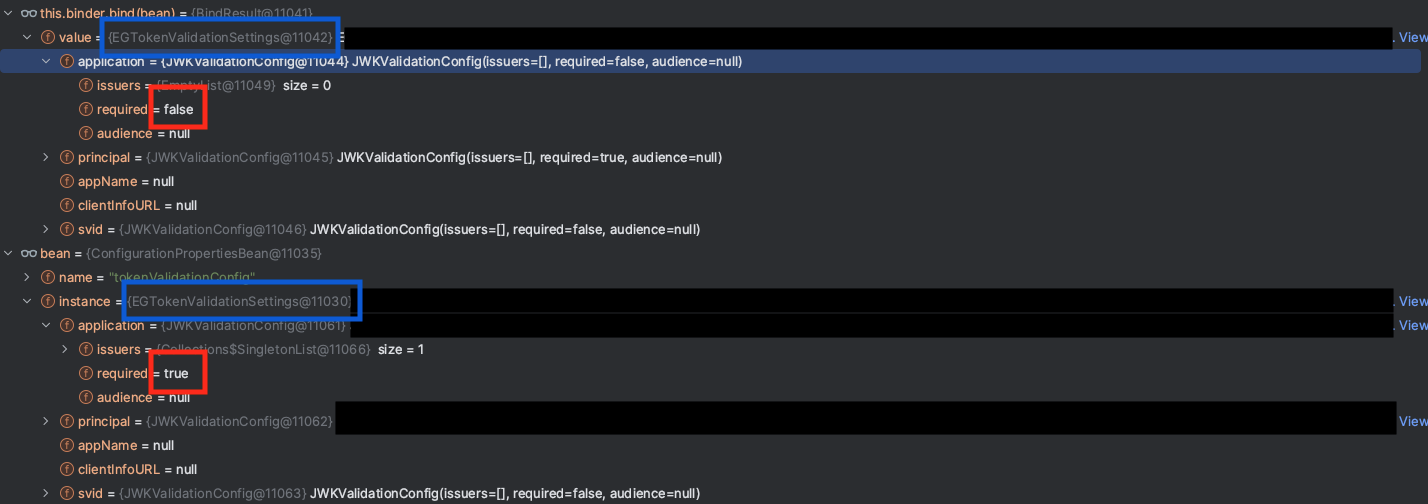
I did a test with two different ways to initialize the ConfigurationProperties. As you can see, the one defined with a @Bean function doesn't work.
Where application.yml
security.token.validation.application.required: true
And TokenValidationConfig.kt
@ConfigurationProperties(prefix = "security.token.validation")
data class CustomEGTokenValidationSettings constructor(
    var application: JWKValidationConfig = JWKValidationConfig()
)

data class JWKValidationConfig(
    var required: Boolean = true
)

@Configuration
@EnableConfigurationProperties(CustomEGTokenValidationSettings::class)
class TokenValidationConfig {

    @Autowired
    private lateinit var customEGTokenValidationSettings: CustomEGTokenValidationSettings

    @Bean
    @ConfigurationProperties(prefix = "security.token.validation")
    fun issueCustomEGTokenValidationSettings() = CustomEGTokenValidationSettings()

    @Bean
    fun commandLineRunner(issueCustomEGTokenValidationSettings: CustomEGTokenValidationSettings) = CommandLineRunner {
        println(issueCustomEGTokenValidationSettings) // CustomEGTokenValidationSettings(application=JWKValidationConfig(required=true))
        println(customEGTokenValidationSettings) // CustomEGTokenValidationSettings(application=JWKValidationConfig(required=false))
    }
}
Comment From: AnneMayor
Wow, awesome @jmirc I will double check too as best as I can. Thank you so much.
p.s. If I have a chance to contribute this open source, I hope I can join in 😄
Comment From: wilkinsona
@AnneMayor I've tried your 2.7.0 app again with the change to DbConfig. It still fails:
  .   ____          _            __ _ _
 /\\ / ___'_ __ _ _(_)_ __  __ _ \ \ \ \
( ( )\___ | '_ | '_| | '_ \/ _` | \ \ \ \
 \\/  ___)| |_)| | | | | || (_| |  ) ) ) )
  '  |____| .__|_| |_|_| |_\__, | / / / /
 =========|_|==============|___/=/_/_/_/
 :: Spring Boot ::                (v2.7.0)

2023-05-09 15:29:56.015  INFO 6752 --- [           main] com.spring.demo.DemoApplicationKt        : Starting DemoApplicationKt using Java 17.0.6 on wilkinsonaGMD6R.vmware.com with PID 6752 (/Users/awilkinson/dev/temp/gh-34594/build/classes/kotlin/main started by awilkinson in /Users/awilkinson/dev/temp/gh-34594)
2023-05-09 15:29:56.017  INFO 6752 --- [           main] com.spring.demo.DemoApplicationKt        : No active profile set, falling back to 1 default profile: "default"
2023-05-09 15:29:56.494  INFO 6752 --- [           main] .s.d.r.c.RepositoryConfigurationDelegate : Multiple Spring Data modules found, entering strict repository configuration mode!
2023-05-09 15:29:56.496  INFO 6752 --- [           main] .s.d.r.c.RepositoryConfigurationDelegate : Bootstrapping Spring Data JDBC repositories in DEFAULT mode.
2023-05-09 15:29:56.504  INFO 6752 --- [           main] .s.d.r.c.RepositoryConfigurationDelegate : Finished Spring Data repository scanning in 4 ms. Found 0 JDBC repository interfaces.
2023-05-09 15:29:56.512  INFO 6752 --- [           main] .s.d.r.c.RepositoryConfigurationDelegate : Multiple Spring Data modules found, entering strict repository configuration mode!
2023-05-09 15:29:56.513  INFO 6752 --- [           main] .s.d.r.c.RepositoryConfigurationDelegate : Bootstrapping Spring Data JPA repositories in DEFAULT mode.
2023-05-09 15:29:56.521  INFO 6752 --- [           main] .s.d.r.c.RepositoryConfigurationDelegate : Finished Spring Data repository scanning in 1 ms. Found 0 JPA repository interfaces.
2023-05-09 15:29:56.935  INFO 6752 --- [           main] o.s.b.w.embedded.tomcat.TomcatWebServer  : Tomcat initialized with port(s): 8080 (http)
2023-05-09 15:29:56.944  INFO 6752 --- [           main] o.apache.catalina.core.StandardService   : Starting service [Tomcat]
2023-05-09 15:29:56.944  INFO 6752 --- [           main] org.apache.catalina.core.StandardEngine  : Starting Servlet engine: [Apache Tomcat/9.0.63]
2023-05-09 15:29:57.030  INFO 6752 --- [           main] o.a.c.c.C.[Tomcat].[localhost].[/]       : Initializing Spring embedded WebApplicationContext
2023-05-09 15:29:57.030  INFO 6752 --- [           main] w.s.c.ServletWebServerApplicationContext : Root WebApplicationContext: initialization completed in 975 ms
2023-05-09 15:29:57.152 ERROR 6752 --- [           main] com.zaxxer.hikari.HikariConfig           : HikariPool-1 - dataSource or dataSourceClassName or jdbcUrl is required.
2023-05-09 15:29:57.153  WARN 6752 --- [           main] ConfigServletWebServerApplicationContext : Exception encountered during context initialization - cancelling refresh attempt: org.springframework.beans.factory.BeanCreationException: Error creating bean with name 'entityManagerFactory' defined in class path resource [org/springframework/boot/autoconfigure/orm/jpa/HibernateJpaConfiguration.class]: Bean instantiation via factory method failed; nested exception is org.springframework.beans.BeanInstantiationException: Failed to instantiate [org.springframework.orm.jpa.LocalContainerEntityManagerFactoryBean]: Factory method 'entityManagerFactory' threw exception; nested exception is java.lang.IllegalArgumentException: dataSource or dataSourceClassName or jdbcUrl is required.
2023-05-09 15:29:57.155  INFO 6752 --- [           main] o.apache.catalina.core.StandardService   : Stopping service [Tomcat]
2023-05-09 15:29:57.168  INFO 6752 --- [           main] ConditionEvaluationReportLoggingListener :

Error starting ApplicationContext. To display the conditions report re-run your application with 'debug' enabled.
2023-05-09 15:29:57.189 ERROR 6752 --- [           main] o.s.boot.SpringApplication               : Application run failed

org.springframework.beans.factory.BeanCreationException: Error creating bean with name 'entityManagerFactory' defined in class path resource [org/springframework/boot/autoconfigure/orm/jpa/HibernateJpaConfiguration.class]: Bean instantiation via factory method failed; nested exception is org.springframework.beans.BeanInstantiationException: Failed to instantiate [org.springframework.orm.jpa.LocalContainerEntityManagerFactoryBean]: Factory method 'entityManagerFactory' threw exception; nested exception is java.lang.IllegalArgumentException: dataSource or dataSourceClassName or jdbcUrl is required.
        at org.springframework.beans.factory.support.ConstructorResolver.instantiate(ConstructorResolver.java:658) ~[spring-beans-5.3.20.jar:5.3.20]
        at org.springframework.beans.factory.support.ConstructorResolver.instantiateUsingFactoryMethod(ConstructorResolver.java:638) ~[spring-beans-5.3.20.jar:5.3.20]
        at org.springframework.beans.factory.support.AbstractAutowireCapableBeanFactory.instantiateUsingFactoryMethod(AbstractAutowireCapableBeanFactory.java:1352) ~[spring-beans-5.3.20.jar:5.3.20]
        at org.springframework.beans.factory.support.AbstractAutowireCapableBeanFactory.createBeanInstance(AbstractAutowireCapableBeanFactory.java:1195) ~[spring-beans-5.3.20.jar:5.3.20]
        at org.springframework.beans.factory.support.AbstractAutowireCapableBeanFactory.doCreateBean(AbstractAutowireCapableBeanFactory.java:582) ~[spring-beans-5.3.20.jar:5.3.20]
        at org.springframework.beans.factory.support.AbstractAutowireCapableBeanFactory.createBean(AbstractAutowireCapableBeanFactory.java:542) ~[spring-beans-5.3.20.jar:5.3.20]
        at org.springframework.beans.factory.support.AbstractBeanFactory.lambda$doGetBean$0(AbstractBeanFactory.java:335) ~[spring-beans-5.3.20.jar:5.3.20]
        at org.springframework.beans.factory.support.DefaultSingletonBeanRegistry.getSingleton(DefaultSingletonBeanRegistry.java:234) ~[spring-beans-5.3.20.jar:5.3.20]
        at org.springframework.beans.factory.support.AbstractBeanFactory.doGetBean(AbstractBeanFactory.java:333) ~[spring-beans-5.3.20.jar:5.3.20]
        at org.springframework.beans.factory.support.AbstractBeanFactory.getBean(AbstractBeanFactory.java:208) ~[spring-beans-5.3.20.jar:5.3.20]
        at org.springframework.context.support.AbstractApplicationContext.getBean(AbstractApplicationContext.java:1154) ~[spring-context-5.3.20.jar:5.3.20]
        at org.springframework.context.support.AbstractApplicationContext.finishBeanFactoryInitialization(AbstractApplicationContext.java:908) ~[spring-context-5.3.20.jar:5.3.20]
        at org.springframework.context.support.AbstractApplicationContext.refresh(AbstractApplicationContext.java:583) ~[spring-context-5.3.20.jar:5.3.20]
        at org.springframework.boot.web.servlet.context.ServletWebServerApplicationContext.refresh(ServletWebServerApplicationContext.java:147) ~[spring-boot-2.7.0.jar:2.7.0]
        at org.springframework.boot.SpringApplication.refresh(SpringApplication.java:734) ~[spring-boot-2.7.0.jar:2.7.0]
        at org.springframework.boot.SpringApplication.refreshContext(SpringApplication.java:408) ~[spring-boot-2.7.0.jar:2.7.0]
        at org.springframework.boot.SpringApplication.run(SpringApplication.java:308) ~[spring-boot-2.7.0.jar:2.7.0]
        at org.springframework.boot.SpringApplication.run(SpringApplication.java:1306) ~[spring-boot-2.7.0.jar:2.7.0]
        at org.springframework.boot.SpringApplication.run(SpringApplication.java:1295) ~[spring-boot-2.7.0.jar:2.7.0]
        at com.spring.demo.DemoApplicationKt.main(DemoApplication.kt:13) ~[main/:na]
Caused by: org.springframework.beans.BeanInstantiationException: Failed to instantiate [org.springframework.orm.jpa.LocalContainerEntityManagerFactoryBean]: Factory method 'entityManagerFactory' threw exception; nested exception is java.lang.IllegalArgumentException: dataSource or dataSourceClassName or jdbcUrl is required.
        at org.springframework.beans.factory.support.SimpleInstantiationStrategy.instantiate(SimpleInstantiationStrategy.java:185) ~[spring-beans-5.3.20.jar:5.3.20]
        at org.springframework.beans.factory.support.ConstructorResolver.instantiate(ConstructorResolver.java:653) ~[spring-beans-5.3.20.jar:5.3.20]
        ... 19 common frames omitted
Caused by: java.lang.IllegalArgumentException: dataSource or dataSourceClassName or jdbcUrl is required.
        at com.zaxxer.hikari.HikariConfig.validate(HikariConfig.java:1029) ~[HikariCP-4.0.3.jar:na]
        at com.zaxxer.hikari.HikariDataSource.getConnection(HikariDataSource.java:109) ~[HikariCP-4.0.3.jar:na]
        at org.springframework.jdbc.datasource.DataSourceUtils.fetchConnection(DataSourceUtils.java:159) ~[spring-jdbc-5.3.20.jar:5.3.20]
        at org.springframework.jdbc.datasource.DataSourceUtils.doGetConnection(DataSourceUtils.java:117) ~[spring-jdbc-5.3.20.jar:5.3.20]
        at org.springframework.jdbc.datasource.DataSourceUtils.getConnection(DataSourceUtils.java:80) ~[spring-jdbc-5.3.20.jar:5.3.20]
        at org.springframework.jdbc.core.JdbcTemplate.execute(JdbcTemplate.java:330) ~[spring-jdbc-5.3.20.jar:5.3.20]
        at org.springframework.boot.jdbc.EmbeddedDatabaseConnection.isEmbedded(EmbeddedDatabaseConnection.java:162) ~[spring-boot-2.7.0.jar:2.7.0]
        at org.springframework.boot.autoconfigure.orm.jpa.HibernateDefaultDdlAutoProvider.getDefaultDdlAuto(HibernateDefaultDdlAutoProvider.java:42) ~[spring-boot-autoconfigure-2.7.0.jar:2.7.0]
        at org.springframework.boot.autoconfigure.orm.jpa.HibernateJpaConfiguration.lambda$getVendorProperties$1(HibernateJpaConfiguration.java:130) ~[spring-boot-autoconfigure-2.7.0.jar:2.7.0]
        at org.springframework.boot.autoconfigure.orm.jpa.HibernateSettings.getDdlAuto(HibernateSettings.java:41) ~[spring-boot-autoconfigure-2.7.0.jar:2.7.0]
        at org.springframework.boot.autoconfigure.orm.jpa.HibernateProperties.determineDdlAuto(HibernateProperties.java:143) ~[spring-boot-autoconfigure-2.7.0.jar:2.7.0]
        at org.springframework.boot.autoconfigure.orm.jpa.HibernateProperties.getAdditionalProperties(HibernateProperties.java:103) ~[spring-boot-autoconfigure-2.7.0.jar:2.7.0]
        at org.springframework.boot.autoconfigure.orm.jpa.HibernateProperties.determineHibernateProperties(HibernateProperties.java:95) ~[spring-boot-autoconfigure-2.7.0.jar:2.7.0]
        at org.springframework.boot.autoconfigure.orm.jpa.HibernateJpaConfiguration.getVendorProperties(HibernateJpaConfiguration.java:132) ~[spring-boot-autoconfigure-2.7.0.jar:2.7.0]
        at org.springframework.boot.autoconfigure.orm.jpa.JpaBaseConfiguration.entityManagerFactory(JpaBaseConfiguration.java:132) ~[spring-boot-autoconfigure-2.7.0.jar:2.7.0]
        at java.base/jdk.internal.reflect.NativeMethodAccessorImpl.invoke0(Native Method) ~[na:na]
        at java.base/jdk.internal.reflect.NativeMethodAccessorImpl.invoke(NativeMethodAccessorImpl.java:77) ~[na:na]
        at java.base/jdk.internal.reflect.DelegatingMethodAccessorImpl.invoke(DelegatingMethodAccessorImpl.java:43) ~[na:na]
        at java.base/java.lang.reflect.Method.invoke(Method.java:568) ~[na:na]
        at org.springframework.beans.factory.support.SimpleInstantiationStrategy.instantiate(SimpleInstantiationStrategy.java:154) ~[spring-beans-5.3.20.jar:5.3.20]
        ... 20 common frames omitted
Can you please provide a complete yet minimal example that reproduces the behavior you have described without us having to copy-paste or modify anything?
Comment From: wilkinsona
@jmirc I think your problem has already been resolved. With Spring Boot 3.0.4 I see this output:
  .   ____          _            __ _ _
 /\\ / ___'_ __ _ _(_)_ __  __ _ \ \ \ \
( ( )\___ | '_ | '_| | '_ \/ _` | \ \ \ \
 \\/  ___)| |_)| | | | | || (_| |  ) ) ) )
  '  |____| .__|_| |_|_| |_\__, | / / / /
 =========|_|==============|___/=/_/_/_/
 :: Spring Boot ::                (v3.0.4)

2023-05-09T15:43:45.841+01:00  INFO 11270 --- [           main] c.e.g.Gh34594JmircApplicationKt          : Starting Gh34594JmircApplicationKt using Java 17 with PID 11270 (/Users/awilkinson/dev/temp/gh-34594-jmirc/gh-34594-jmirc/build/classes/kotlin/main started by awilkinson in /Users/awilkinson/dev/temp/gh-34594-jmirc/gh-34594-jmirc)
2023-05-09T15:43:45.844+01:00  INFO 11270 --- [           main] c.e.g.Gh34594JmircApplicationKt          : No active profile set, falling back to 1 default profile: "default"
2023-05-09T15:43:46.630+01:00  INFO 11270 --- [           main] c.e.g.Gh34594JmircApplicationKt          : Started Gh34594JmircApplicationKt in 1.259 seconds (process running for 1.814)
CustomEGTokenValidationSettings(application=JWKValidationConfig(required=true))
CustomEGTokenValidationSettings(application=JWKValidationConfig(required=false))
With 3.0.5 (and 3.0.6), things then work as expected:
  .   ____          _            __ _ _
 /\\ / ___'_ __ _ _(_)_ __  __ _ \ \ \ \
( ( )\___ | '_ | '_| | '_ \/ _` | \ \ \ \
 \\/  ___)| |_)| | | | | || (_| |  ) ) ) )
  '  |____| .__|_| |_|_| |_\__, | / / / /
 =========|_|==============|___/=/_/_/_/
 :: Spring Boot ::                (v3.0.5)

2023-05-09T15:44:55.933+01:00  INFO 11508 --- [           main] c.e.g.Gh34594JmircApplicationKt          : Starting Gh34594JmircApplicationKt using Java 17 with PID 11508 (/Users/awilkinson/dev/temp/gh-34594-jmirc/gh-34594-jmirc/build/classes/kotlin/main started by awilkinson in /Users/awilkinson/dev/temp/gh-34594-jmirc/gh-34594-jmirc)
2023-05-09T15:44:55.936+01:00  INFO 11508 --- [           main] c.e.g.Gh34594JmircApplicationKt          : No active profile set, falling back to 1 default profile: "default"
2023-05-09T15:44:56.435+01:00  INFO 11508 --- [           main] c.e.g.Gh34594JmircApplicationKt          : Started Gh34594JmircApplicationKt in 0.719 seconds (process running for 1.282)
CustomEGTokenValidationSettings(application=JWKValidationConfig(required=false))
CustomEGTokenValidationSettings(application=JWKValidationConfig(required=false))
Comment From: spring-projects-issues
If you would like us to look at this issue, please provide the requested information. If the information is not provided within the next 7 days this issue will be closed.
Comment From: spring-projects-issues
Closing due to lack of requested feedback. If you would like us to look at this issue, please provide the requested information and we will re-open the issue.
Comment From: marwin1991
I have same problem with:
    @Bean
    @Primary
    @ConfigurationProperties("tm")
    public DataSourceProperties tmDataSourceProperties() {
        return new DataSourceProperties();
    }

    @Bean(name = "tmDataSource")
    @Primary
    @ConfigurationProperties("tm.configuration")
    public DataSource tmDataSource(@Qualifier("tmDataSourceProperties") DataSourceProperties tmDataSourceProperties) {
        HikariDataSource ds = tmDataSourceProperties.initializeDataSourceBuilder().type(HikariDataSource.class).build();
        ds.setConnectionTestQuery("SELECT 1");
        ds.setConnectionInitSql("SELECT 1");
        ds.setPoolName("jdbc/tm");
        return ds;
    }
and this:
tm.url=jdbc:h2:mem:main;DB_CLOSE_DELAY=-1;Mode=LEGACY;DB_CLOSE_ON_EXIT=false;CASE_INSENSITIVE_IDENTIFIERS=TRUE
tm.driverClassName=org.h2.Driver
tm.configuration.maximum-pool-size=33
tm.configuration.minIdle=3
Comment From: wilkinsona
@marwin1991 this issue ended up discussing a few different things, some of which were never 100% clear so I'm not sure what you mean when you say "same problem". If you believe that you've found a bug, please open a new issue and include an explanation of the problem that both describes and shows what you expected to happen and what actually happened.
Comment From: marwin1991
@wilkinsona my mistake. @ConfigurationProperties executes after method finish and I was debugging inside method and properties was not set
Comment From: gurkanucar
Same problem
Comment From: wilkinsona
@gurkanucar Unfortunately, "same problem" doesn't tell us anything:
this issue ended up discussing a few different things, some of which were never 100% clear so I'm not sure what you mean when you say "same problem". If you believe that you've found a bug, please open a new issue and include an explanation of the problem that both describes and shows what you expected to happen and what actually happened.
Comment From: G3A
Hi @wilkinsona
I have the same problem as @gurkanucar and @marwin1991.
What’s the problem?
Based on the official documentation: https://docs.spring.io/spring-boot/docs/3.0.x/reference/htmlsingle/#howto.data-access.configure-two-datasources this works well ->
    @Bean
    @Primary
    @ConfigurationProperties("app.datasource.first")
    public DataSourceProperties firstDataSourceProperties() {
        return new DataSourceProperties();
    }
but this not! ->
    @Bean
    @Primary
    @ConfigurationProperties("app.datasource.first.configuration")
    public HikariDataSource firstDataSource(DataSourceProperties firstDataSourceProperties) {
        return firstDataSourceProperties.initializeDataSourceBuilder().type(HikariDataSource.class).build();
    }
Only takes the parameters of the DataSourceProperties object but not of HikariDataSource, those of the firstDataSource bean have default values.
Debugging I realize that something is wrong with the build() method;
Step 1:
Before calling firstDataSource correctly calls @ConfigurationProperties("app.datasource.first")
Step 2:
The execution is translated to the firstDataSource function where the return line’s build() function is finally called from the firstDataSourceProperties.initializeDataSourceBuilder(). type(HikariDataSource.class). build();
Step 3:
Then run it in the org.springframework.boot.context.properties.bind.Binder class to one of the bind functions to set properly the parameters that contains application.yml from the prefix="app.datasource.first.configuration"
Step 4:
Re-run the firstDataSource function where you finally call the build() function of the return line firstDataSourceProperties.initializeDataSourceBuilder(). type(HikariDataSource.class). build();
Conclusion:
The problem is that the @ConfigurationProperties("app.datasource.first.configuration") annotation is not merging the properties that the bean takes and it is not replacing the definition of the bean called firstDataSource.
Comment From: wilkinsona
@G3A As I requested above, please open a new issue. If you do so, please provide a complete yet minimal sample that reproduces the behavior you have described.