Please do a quick search on GitHub issues first, there might be already a duplicate issue for the one you are about to create. If the bug is trivial, just go ahead and create the issue. Otherwise, please take a few moments and fill in the following sections:
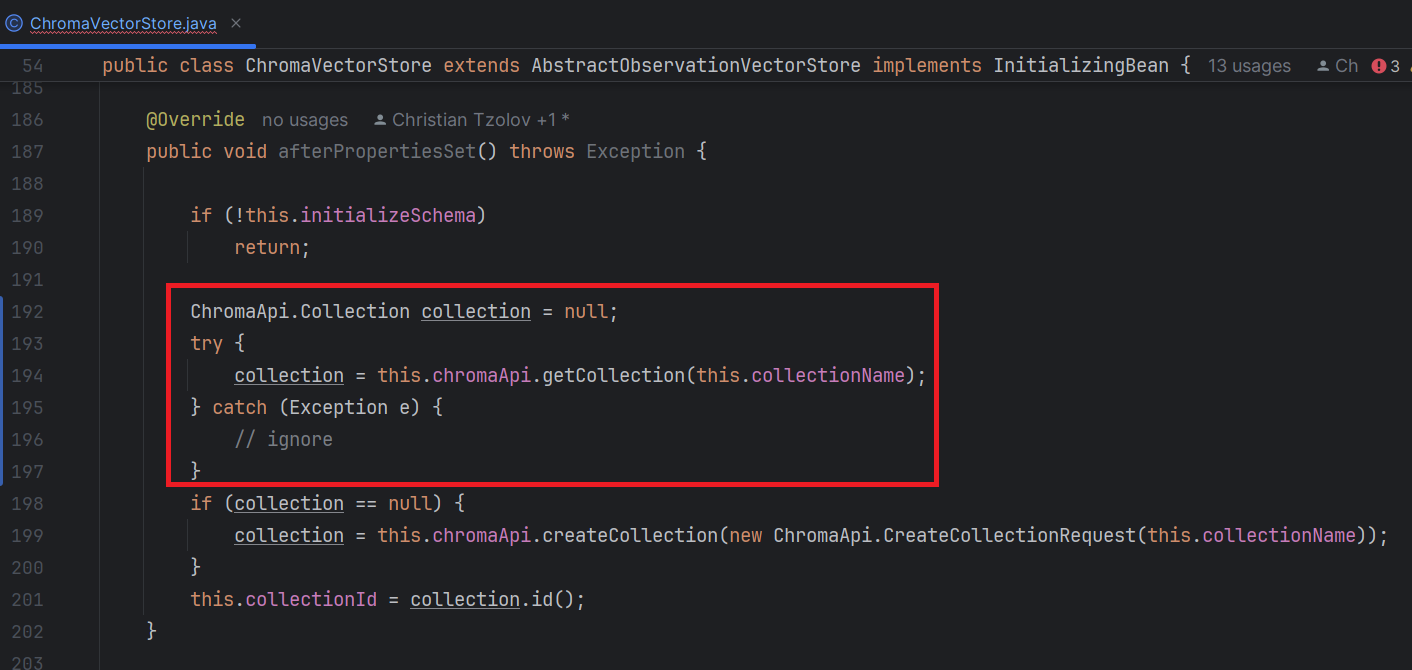
Bug description I'm developing the local ChromaDB on my docker. However, it always failed to start Spring AI on afterPropertiesSet method in ChromaVectorStore. It throws 400 from my local ChromaDB. After I put try/catch block on this code, it solved. When existing code try to find existing collection name and it got an HttpClientErrorException with 400 bad request.
Could you please consider this fix?
This is the error: org.springframework.web.client.HttpClientErrorException$BadRequest: 400 Bad Request: "{"error":"InvalidCollection","message":"Collection SpringAiCollection does not exist."}" at org.springframework.web.client.HttpClientErrorException.create(HttpClientErrorException.java:103) ~[spring-web-6.1.6.jar:6.1.6]
Comment From: ThomasVitale
@NineWoranop thanks for reporting this issue. Which version of Spring AI are you using? Could you try to check if you still have problems when using version 1.0.0-SNAPSHOT? The initialisation logic for vector stores has been reviewed and improved since the initial milestone.
Also, what version of Chroma are you using?
Comment From: NineWoranop
@ThomasVitale
This is the version.
Confirmed this issue have been fixed on master branch (version 1.0.0-SNAPSHOT). I just verified this.
Comment From: markpollack
ok, great. we looked into it as well and can see an opportunity for some improvement in how we detect the collection not existing. Will create a new issue for that. Thanks for reporting.
Comment From: mitocode21
Hello, the error persit in 1.0.0-M4 and 1.0.0-SNAPSHOT , also with the new Builder configuration
``` @Bean public VectorStore chromaVectorStore(EmbeddingModel embeddingModel, ChromaApi chromaApi) { return ChromaVectorStore.builder() .embeddingModel(embeddingModel) .chromaApi(chromaApi) .collectionName("new-collection") .initializeSchema(true) .build();
} ```
Output: 400 - {"error":"InvalidCollection","message":"Collection new-collection does not exist."}