While make test redis-2.8.1 on slow virtualbox environment, centos 6.4 x86_64, tests/integration/replication-psync.tcl fails randomly.
I could not reproduce this on much faster machine. Possibly 50% limited 1vCPU might cause this.
[err]: Test replication partial resync: no backlog in tests/integration/replication-psync.tcl
Expected condition '[s -1 sync_partial_err] > 0' to be true ([s -1 sync_partial_err] > 0)
Comment From: antirez
Hello, yes this is a false positive due to slow computers. I'll try to fix, thanks.
Comment From: s34gull
Hi - I was just working on a Jenkins job to build an RPM (including tests), when I ran into this issue - tests failing when being run within a Centos 6.5 VM. Is there an update on the issue?
Comment From: ghost
run "make test" occur this error, centos6.5x86_64
* [err]: Test replication partial resync: no backlog in tests/integration/replication-psync.tcl Expected condition '[s -1 sync_partial_err] > 0' to be true ([s -1 sync_partial_err] > 0) Cleanup: may take some time... OK make[1]: * [test] error 1 make[1]: Leaving directory `/software/redis-2.8.7/src' make: *** [test] error 2
Comment From: riegie
I ran into the same issue, but as antirez mentioned, this only occurs on slow machines. I did the same text on another machine with better specs, and didn't get the error.
Comment From: rholder
I'm also seeing this failure with Ubuntu 12.04 while building on an m1.medium in AWS.
Comment From: TheCloudlessSky
:+1: Had the same problem on Ubuntu 14.04 on an m3.medium in AWS.
Comment From: choas
I see this error on a Raspberry Pi (700 MHz).
Comment From: aphexddb
Seeing this in a Docker container with Ubuntu 14.04 with 1GB ram and 1 core
Comment From: yeongsheng-tan
I'm seeing this error on Debian Wheezy running on m1.small instance in AWS ap-southeast-1a, with redis-2.8.12 make test post make.
Comment From: badboy
antirez: Hello, yes this is a false positive due to slow computers. I'll try to fix, thanks.
Yes, the test suite could be improved here to have less false positives. More and more :+1: reports won't help tho
Comment From: antirez
Ok, enough... fixing right now.
Comment From: agucova
Keeps happening, 2015. And is definitely not a performance issue, 36 cores and 128gb RAM.... And not a VM.
Comment From: kiendt7
Still got this issues, on delicate server 12 cores, 64G RAM, Ubuntu 14.04
Comment From: antirez
Apparently e7887e6 was not enough to fix it. Doing another round of investigation to check if the test can be made more reliable.
Comment From: kiendt7
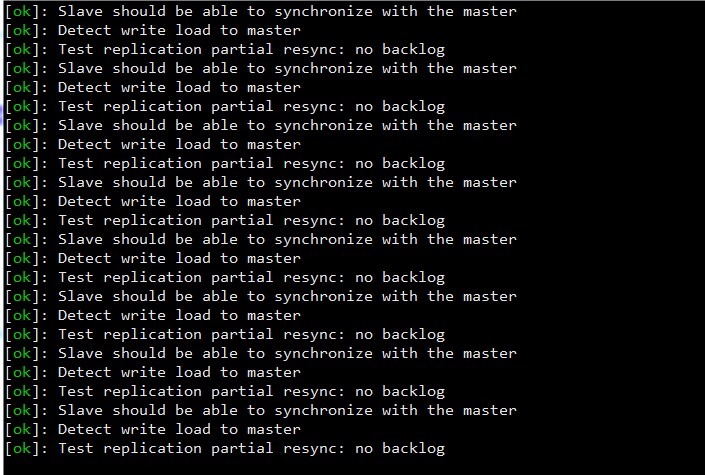
retest with https://github.com/antirez/redis/commit/e7887e60609be05f4390c4671d910ff700705aae
round 37 maybe loop
Comment From: antirez
So it's fixed for you so far @kiendt7, thanks for testing.
Comment From: jeanmichelramseyer
I've tested on a multicore dedicated server with Ubuntu 12.04 and I still have the problem
[ok]: Slave should be able to synchronize with the master
[ok]: Detect write load to master
[ok]: Test replication partial resync: backlog expired (diskless: no, reconnect: 1)
[ok]: Slave should be able to synchronize with the master
[ok]: Detect write load to master
[ok]: Test replication partial resync: no reconnection, just sync (diskless: yes, reconnect: 0)
[ok]: Slave should be able to synchronize with the master
[ok]: Detect write load to master
[err]: Test replication partial resync: ok psync (diskless: yes, reconnect: 1) in tests/integration/replication-psync.tcl
Expected condition '[s -1 sync_partial_ok] > 0' to be true ([s -1 sync_partial_ok] > 0)
[ok]: Slave should be able to synchronize with the master
[ok]: Detect write load to master
[ok]: Connect multiple slaves at the same time (issue #141), diskless=yes
[ok]: Test replication partial resync: no backlog (diskless: yes, reconnect: 1)
Waiting for process 32413 to exit...
Waiting for process 32404 to exit...
[ok]: Slave should be able to synchronize with the master
[ok]: Detect write load to master
Waiting for process 32394 to exit...
Waiting for process 32365 to exit...
[39/40 done]: integration/replication (85 seconds)
Comment From: Salgat
Same issue, the only failure for Ubuntu Server 15.10 right after a fresh install. Let me know if there is any information I can provide that is helpful.
Comment From: moqiguzhu
Same issue, only failure for MacBook Pro, version 10.11.2
Comment From: krishnathon2006
Same issue, the only failure for Ubuntu 14.04 LTS, for redis 3.0.7.
*** [err]: Test replication partial resync: ok psync (diskless: yes, reconnect: 1) in tests/integration/replication-psync.tcl Expected condition '[s -1 sync_partial_ok] > 0' to be true ([s -1 sync_partial_ok] > 0)
Comment From: xuelvming
Same issue, the only failure for Ubuntu 14.04 LTS, for redis 3.0.7. !!! WARNING The following tests failed:
* [err]: Test replication partial resync: ok psync (diskless: yes, reconnect: 1) in tests/integration/replication-psync.tcl Expected condition '[s -1 sync_partial_ok] > 0' to be true ([s -1 sync_partial_ok] > 0) Cleanup: may take some time... OK make[1]: * [test] Error 1
Comment From: nafaabout
this does not have anything to do with slow machines, it appears for me on Ubuntu 14.04.2 running on an i7 skylike machine with 16G of Ram. here how to run it without issues.
specify which processor to run the test on with this command
taskset -c 1 make test
where 1 is the zero-based index of the processor on which to run the task.
Comment From: mehany
@NafaaBout this indeed got the test to pass without the above mentioned error. without taskset -c It was failing on a 24 core, 48G Ram.
Comment From: goog
has the issue too on mint17.3 , taskset -c 1 make test works for me
Comment From: maxl28
Same here:
*** [err]: Test replication partial resync: ok psync (diskless: yes, reconnect: 1) in tests/integration/replication-psync.tcl Expected condition '[s -1 sync_partial_ok] > 0' to be true ([s -1 sync_partial_ok] > 0)
I'm running a decent machine with a 2. gen i7 and 16GB Ram on Ubuntu 14.04.3 LTS.
Comment From: thedataking
Same error here on fast machine running 14.04 LTS in VM. Using taskset as suggested by @goog seems to make the issue go away.
Comment From: dpineiden
OpenSuse Leal 42
Same here:
[err]: Test replication partial resync: ok psync (diskless: yes, reconnect: 1) in tests/integration/replication-psync.tcl Expected condition '[s -1 sync_partial_ok] > 0' to be true ([s -1 sync_partial_ok] > 0) [ok]: Slave should be able to synchronize with the master [ok]: Detect write load to master [ok]: Test replication partial resync: no backlog (diskless: yes, reconnect: 1) [ok]: Slave should be able to synchronize with the master [ok]: Detect write load to master [ok]: Connect multiple slaves at the same time (issue #141), diskless=yes
Comment From: kesin
has the issue too on Ubuntu 15.04 \n \l,taskset -c 1 make test works for me
Comment From: LudwikJaniuk
Same here (2016):
* [err]: Test replication partial resync: ok psync (diskless: yes, reconnect: 1) in tests/integration/replication-psync.tcl Expected condition '[s -1 sync_partial_ok] > 0' to be true ([s -1 sync_partial_ok] > 0) Cleanup: may take some time... OK Makefile:215: recipe for target 'test' failed make[1]: * [test] Error 1 make[1]: Leaving directory '/home/janiuk/Code/redis/redis-stable/src' Makefile:6: recipe for target 'test' failed make: *** [test] Error 2
And it's on my gaming laptop, which I wouldn't call a slow machine.
Comment From: LudwikJaniuk
I was using Ubuntu 16, and yes, taskset -c 1 make test worked for me too. Thanks @kesin.
Comment From: pavelkalin
has the issue too on Ubuntu 16.04 \n \l,taskset -c 1 make test works for me
Comment From: mbazyar
"taskset -c 1 make test" laso works for me on Centos7. Thanks.
Comment From: radicalloop
taskset -c 1 make test worked for me on Ubuntu 16.04. Thanks
Comment From: Noah-Heil
Intel Xenon 3.4GHz Physical: quad core Hyper Threaded: octa core 16GB RAM running Ubuntu 64 bit 16.04.1 LTS is getting the same error in the tests unless I run tests with taskset -c 1 make test When the I run the test suite with taskset -c 1 make test everything passes.
Comment From: GrandmasterGrogu
Also, the solution works on OpenSuse 13.1 x86_64.
Comment From: Nolapete
Works on Linux Mint 17.3 x86_64
Comment From: OswinNathanial
I was having this issue on a 16 core machine with 64GB RAM and 'taskset -c 1 make test' fixes it for me too.
Comment From: NODICKHILL
ESXi VM Ubuntu 14.04.4 LTS with 8GB RAM and 8 core Xeon CPU
\o/ All tests passed without errors! - All thanks to "taskset -c 1" (:
Before i got the following errors when I ran: make test
[ok]: Test replication partial resync: backlog expired (diskless: no, reconnect: 1) [ok]: Slave should be able to synchronize with the master [ok]: Detect write load to master [ok]: Test replication partial resync: no reconnection, just sync (diskless: yes, reconnect: 0) [ok]: Slave should be able to synchronize with the master [ok]: Detect write load to master [err]: Test replication partial resync: ok psync (diskless: yes, reconnect: 1) in tests/integration/replication-psync.tcl Expected condition '[s -1 sync_partial_ok] > 0' to be true ([s -1 sync_partial_ok] > 0) [ok]: Slave should be able to synchronize with the master [ok]: Detect write load to master [ok]: Test replication partial resync: no backlog (diskless: yes, reconnect: 1) [ok]: Stress tester for #3343-alike bugs [ok]: Slave should be able to synchronize with the master [ok]: Detect write load to master [ok]: ziplist implementation: value encoding and backlink [ok]: Test replication partial resync: ok after delay (diskless: yes, reconnect: 1) [ok]: ziplist implementation: encoding stress testing
./runtest --clients 1
Testing integration/replication-psync [ok]: Slave should be able to synchronize with the master [ok]: Detect write load to master [ok]: Test replication partial resync: no reconnection, just sync (diskless: no, reconnect: 0) [ok]: Slave should be able to synchronize with the master [ok]: Detect write load to master [err]: Test replication partial resync: ok psync (diskless: no, reconnect: 1) in tests/integration/replication-psync.tcl Expected condition '[s -1 sync_partial_ok] > 0' to be true ([s -1 sync_partial_ok] > 0) [ok]: Slave should be able to synchronize with the master [ok]: Detect write load to master [ok]: Test replication partial resync: no backlog (diskless: no, reconnect: 1) [ok]: Slave should be able to synchronize with the master [ok]: Detect write load to master [ok]: Test replication partial resync: ok after delay (diskless: no, reconnect: 1) [ok]: Slave should be able to synchronize with the master [ok]: Detect write load to master [ok]: Test replication partial resync: backlog expired (diskless: no, reconnect: 1) [ok]: Slave should be able to synchronize with the master [ok]: Detect write load to master [ok]: Test replication partial resync: no reconnection, just sync (diskless: yes, reconnect: 0) [ok]: Slave should be able to synchronize with the master [ok]: Detect write load to master [err]: Test replication partial resync: ok psync (diskless: yes, reconnect: 1) in tests/integration/replication-psync.tcl Expected condition '[s -1 sync_partial_ok] > 0' to be true ([s -1 sync_partial_ok] > 0) [ok]: Slave should be able to synchronize with the master [ok]: Detect write load to master [ok]: Test replication partial resync: no backlog (diskless: yes, reconnect: 1) [ok]: Slave should be able to synchronize with the master [ok]: Detect write load to master [ok]: Test replication partial resync: ok after delay (diskless: yes, reconnect: 1) [ok]: Slave should be able to synchronize with the master [ok]: Detect write load to master [ok]: Test replication partial resync: backlog expired (diskless: yes, reconnect: 1)
Comment From: kiss187
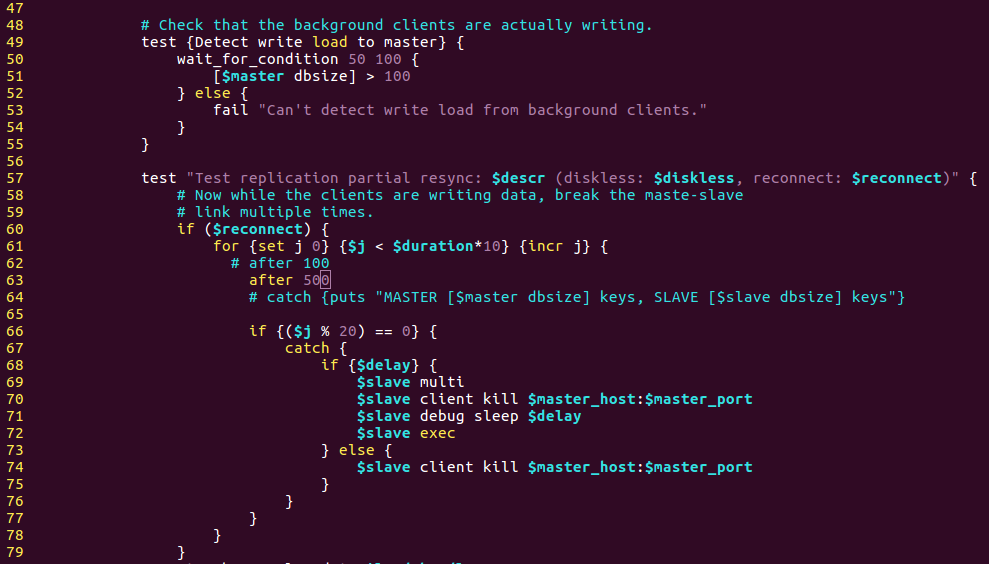
have googled on this problem, there are two method: 1) run test on single cpu core
taskset -c 1 sudo make test
2) change the test file tests/integration/replication-psync.tcl
at the 62 line, change the
after 100to a larger number, for exampleafter 500.
Comment From: goog
@Samsen what is the meaning of 500
Comment From: kiss187
@goog sorry, I don't dig this parameter deeply
Comment From: brianjang
Corresponding to the error code during the after Behind the figures, from 100 into 500 . I personally think that this argument looks like the number of milliseconds to wait.
please see : http://www.dnsdizhi.com/post-244.html and https://vendor2.nginfotpdx.net/gitlab/upstream/redis/commit/16f2c3ea144384e7713e9e10b48da129f9b67d1e
Comment From: brianjang
but does this change (from 100 to 500) remove the root cause of this issue? please anyone confirm it. thanks.
Comment From: brucezlata
Change 100 to 500 cannot work for me. but it passed by using single cpu core.
Comment From: joarobles
Same happening here with MacbookPro (16 GB Ram) with Sierra 10.12.1, ./runtest --clients 1 won't solve the issue
Comment From: pashinde
$ taskset -c 1 make test
This solution works on Ubuntu Server 16.04.
Comment From: yangzhichina
taskset -c 1 make test works on Cent OS 7.
Comment From: noahehall
@NafaaBout resolution taskset -c 1 make test worked for ubuntu 16.10
Comment From: max-reznichenko
Just tested on Amazon AMI "4.9.17-8.31.amzn1.x86_64" and the error is still there. Redis version: 3.2.0
Comment From: samliu
Failed locally on redis stable downloaded today, Ubuntu 16.04.
Computer is not slow; i7-4790 @ 3.6GHz x 8, 16gb ram
Comment From: antirez
On Sun, Apr 9, 2017 at 8:50 PM, Max Reznichenko notifications@github.com wrote:
Just tested on Amazon AMI "4.9.17-8.31.amzn1.x86_64" and the error is still there. Redis version: 3.2.0
So is it reproducible in this way?! Thanks! It's just a false positive but I can fix it easily if it happens again and again with a given AMI.
-- Salvatore 'antirez' Sanfilippo open source developer - Redis Labs https://redislabs.com
"If a system is to have conceptual integrity, someone must control the concepts." — Fred Brooks, "The Mythical Man-Month", 1975.
Comment From: wen-fei
this does not have anything to do with slow machines, it appears for me on Ubuntu 14.04.2 running on an i7 skylike machine with 16G of Ram. here how to run it without issues. specify which processor to run the test on with this command
taskset -c 1 make testwhere 1 is the zero-based index of the processor on which to run the task. work for me. Maybe not 1, my is 0
Comment From: faoziaziz
Slave should be able to synchronize with the master in tests/integration/replication-psync.tcl