my purpose:use redis-cli latency-history command, if find max value >=100 , save this record with the time to a file.
The following is my operation
Setup1:
use this command
redis-cli -c -h 10.100.45.33 -p 10180 --latency-history -i 1
I find the output is
min: 0, max: 1, avg: 0.28 (97 samples) -- 1.00 seconds range
min: 0, max: 2, avg: 0.33 (96 samples) -- 1.00 seconds range
min: 0, max: 1, avg: 0.32 (97 samples) -- 1.01 seconds range
min: 0, max: 2, avg: 0.33 (96 samples) -- 1.00 seconds range
min: 0, max: 2, avg: 0.34 (96 samples) -- 1.00 seconds range
min: 0, max: 1, avg: 0.34 (96 samples) -- 1.00 seconds range
min: 0, max: 1, avg: 0.31 (97 samples) -- 1.01 seconds range
min: 0, max: 1, avg: 0.34 (97 samples) -- 1.01 seconds range
min: 0, max: 1, avg: 0.22 (9 samples)^C
This is OK.
Setup2:
I want filter max value > 100(or a specific value),so I use awk. the command is:
// just for test,use >1
redis-cli -c -h 10.100.45.33 -p 10180  --latency-history -i 1 |awk -F '[:,]'  '$4 >1 {print $0 "  "strftime("%y/%m/%d %T") }'
this command work wrong!
Setup3:
I guess the awk command is wrong,so I save the output to a file,the name is test.data. this is the file content:
min: 0, max: 1, avg: 0.37 (97 samples) -- 1.00 seconds range
min: 0, max: 2, avg: 0.22 (96 samples) -- 1.01 seconds range
min: 0, max: 1, avg: 0.29 (96 samples) -- 1.00 seconds range
min: 0, max: 1, avg: 0.32 (97 samples) -- 1.01 seconds range
min: 0, max: 1, avg: 0.31 (97 samples) -- 1.01 seconds range
min: 0, max: 1, avg: 0.29 (97 samples) -- 1.01 seconds range
min: 0, max: 1, avg: 0.31 (97 samples) -- 1.01 seconds range
min: 0, max: 1, avg: 0.29 (96 samples) -- 1.00 seconds range
min: 0, max: 1, avg: 0.32 (96 samples) -- 1.00 seconds range
min: 0, max: 1, avg: 0.35 (97 samples) -- 1.01 seconds range
min: 0, max: 1, avg: 0.36 (97 samples) -- 1.01 seconds range
min: 0, max: 1, avg: 0.31 (97 samples) -- 1.01 seconds range
min: 0, max: 1, avg: 0.31 (97 samples) -- 1.01 seconds range
min: 0, max: 1, avg: 0.30 (96 samples) -- 1.00 seconds range
min: 0, max: 1, avg: 0.35 (96 samples) -- 1.00 seconds range
min: 0, max: 1, avg: 0.26 (97 samples) -- 1.01 seconds range
min: 0, max: 1, avg: 0.29 (97 samples) -- 1.01 seconds range
min: 0, max: 2, avg: 0.28 (97 samples) -- 1.01 seconds range
min: 0, max: 1, avg: 0.35 (96 samples) -- 1.01 seconds range
min: 0, max: 1, avg: 0.33 (96 samples) -- 1.01 seconds range
min: 0, max: 5, avg: 0.60 (94 samples) -- 1.01 seconds range
min: 0, max: 1, avg: 0.30 (96 samples) -- 1.00 seconds range
min: 0, max: 1, avg: 0.35 (96 samples) -- 1.00 seconds range
min: 0, max: 1, avg: 0.28 (96 samples) -- 1.00 seconds range
min: 0, max: 1, avg: 0.32 (96 samples) -- 1.00 seconds range
min: 0, max: 1, avg: 0.25 (97 samples) -- 1.01 seconds range
min: 0, max: 1, avg: 0.27 (97 samples) -- 1.01 seconds range
min: 0, max: 1, avg: 0.25 (97 samples) -- 1.01 seconds range
min: 0, max: 1, avg: 0.32 (96 samples) -- 1.00 seconds range
Then use this awk command:
awk -F '[:,]' '$4 >1 {print $0 " "strftime("%y/%m/%d %T") }' test.data
This output is correct,the output is
min: 0, max: 2, avg: 0.22 (96 samples) -- 1.01 seconds range  18/12/11 20:24:23
min: 0, max: 2, avg: 0.28 (97 samples) -- 1.01 seconds range  18/12/11 20:24:23
min: 0, max: 5, avg: 0.60 (94 samples) -- 1.01 seconds range  18/12/11 20:24:23
Setup4:
I use this command:
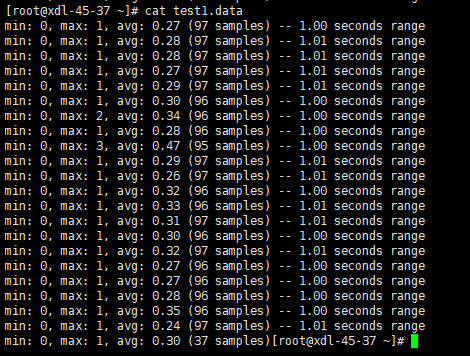
redis-cli -c -h 10.100.45.33 -p 10180 --latency-history -i 1 > test1.data
if I use command 'cat test1.data',the output is :
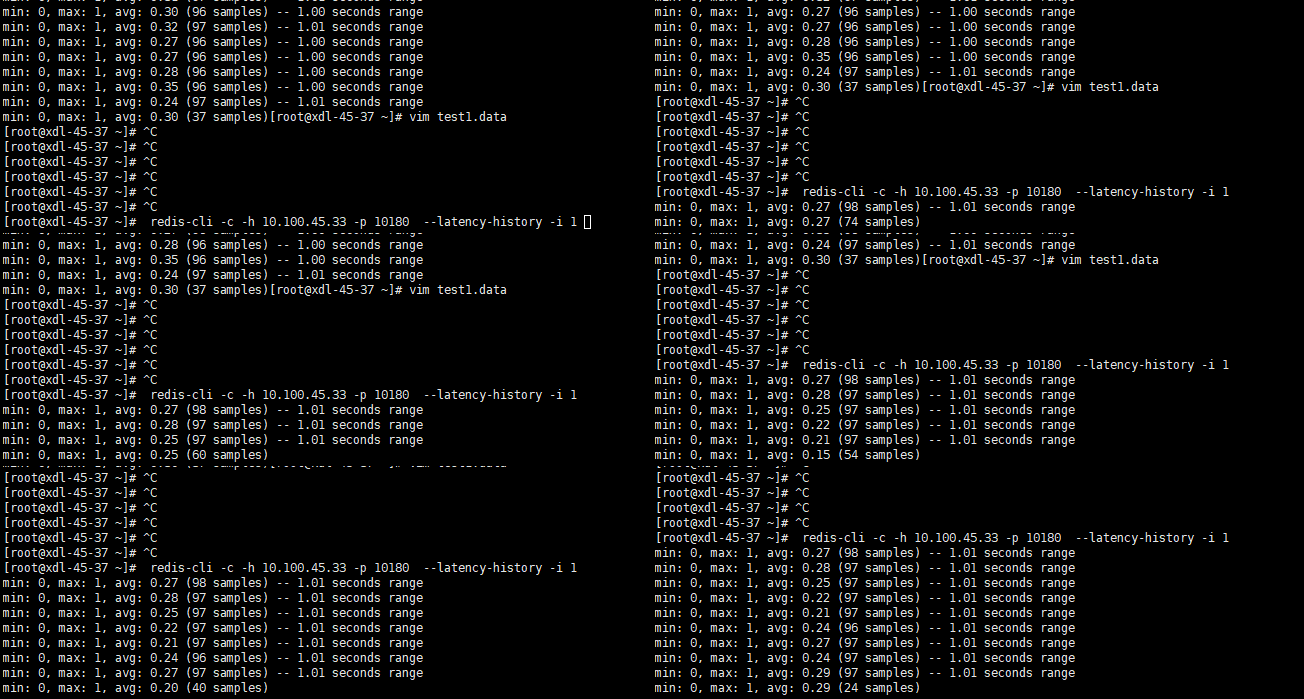
but if I use command 'vim test1.data',the out put is

Maybe I know what the reason is, but I don't know how to solve it. So can someone help me?
Comment From: zuosc
Comment From: marksugar
Coincidentally, I monitored redis on zabbix, and encountered such confusion using redis-cli --latency -h 127.0.0.1.
Unfortunately, --latency does not support the time parameter, it will continue to run until you ctrl + c. For simple grabbing this parameter via shell script or awk, the output format is not friendly
@zuosc Have you solved this problem
Comment From: zuosc
@marksugar no 2 years later, I still konw what happened.😂
finally I wrote the program in java and solved it.