Hi,
We had an issue with our redis cluster. At the time to unlink/delete keys the RAM memory doesn't free up. This is very conflictive to us because the only way to keep the service up is scale horizontally with other node to distribute slots.
Redis cluster information:
- Version: redis-6.0.1.
- All the nodes are linux vm running on azure platform. Ubuntu Server 18.04, 128GB RAM and 4 CPU.
This is a capture of our actual memory consume:
ubuntu@redis-1:~$ redis-cli -c -p 7379 info memory | grep memory
used_memory:72655912904
used_memory_human:67.67G
used_memory_rss:74243231744
used_memory_rss_human:69.14G
used_memory_peak:72663585720
used_memory_peak_human:67.67G
used_memory_peak_perc:99.99%
used_memory_overhead:24105906111
used_memory_startup:2624664
used_memory_dataset:48550006793
used_memory_dataset_perc:66.82%
total_system_memory:135068250112
total_system_memory_human:125.79G
used_memory_lua:37888
used_memory_lua_human:37.00K
used_memory_scripts:0
used_memory_scripts_human:0B
maxmemory:128849018880
maxmemory_human:120.00G
maxmemory_policy:noeviction
This is our active configuration in the redis.conf file:
bind 10.0.0.22 127.0.0.1
protected-mode no
port 7379
tcp-backlog 511
timeout 0
tcp-keepalive 300
daemonize yes
supervised no
pidfile /var/run/redis_6379_v6.pid
loglevel notice
logfile "/var/log/redis/redis-server.log"
databases 16
always-show-logo yes
stop-writes-on-bgsave-error yes
rdbcompression yes
rdbchecksum yes
dbfilename dump.rdb
rdb-del-sync-files no
dir "/redisfs/junar_service"
replica-serve-stale-data yes
replica-read-only yes
repl-diskless-sync no
repl-diskless-sync-delay 5
repl-diskless-load disabled
repl-disable-tcp-nodelay no
replica-priority 100
acllog-max-len 128
maxclients 32000
maxmemory 100gb
maxmemory-policy noeviction
maxmemory-samples 5
lazyfree-lazy-eviction yes
lazyfree-lazy-expire yes
lazyfree-lazy-server-del yes
replica-lazy-flush no
lazyfree-lazy-user-del yes
io-threads 3
io-threads-do-reads yes
appendonly no
appendfilename "appendonly.aof"
appendfsync everysec
no-appendfsync-on-rewrite no
auto-aof-rewrite-percentage 100
auto-aof-rewrite-min-size 64mb
aof-load-truncated yes
aof-use-rdb-preamble yes
lua-time-limit 5000
cluster-enabled yes
cluster-config-file nodes-7379-v6.conf
cluster-node-timeout 120000
cluster-require-full-coverage no
cluster-allow-reads-when-down yes
slowlog-log-slower-than 10000
slowlog-max-len 128
latency-monitor-threshold 0
notify-keyspace-events ""
hash-max-ziplist-entries 1024
hash-max-ziplist-value 512kb
list-max-ziplist-size -2
list-compress-depth 0
set-max-intset-entries 1024
zset-max-ziplist-entries 1024
zset-max-ziplist-value 512kb
hll-sparse-max-bytes 3000
stream-node-max-bytes 4096
stream-node-max-entries 100
activerehashing no
client-output-buffer-limit normal 0 0 0
client-output-buffer-limit replica 256mb 64mb 60
client-output-buffer-limit pubsub 32mb 8mb 60
hz 100
dynamic-hz yes
aof-rewrite-incremental-fsync yes
rdb-save-incremental-fsync yes
activedefrag yes
This is a normal behavior by redis? Or which is the best way to decrease our consume of ram memory after unlink/delete keys? The no eviction policy it's ok in our case, because all the data in the server it's important to us, and we cannot remove keys with the algorithms explained in that's policies.
Regards! Fidel Gonzalez.
Comment From: itamarhaber
Hello @fidelgonzalez
Please share the full output of your INFO memory.
Comment From: fidelgonzalez
Hi @itamarhaber ! Thanks for the answer.
This is the complete output:
ubuntu@redis-1:~$ redis-cli -c -p 7379 info memory
# Memory
used_memory:83290251424
used_memory_human:77.57G
used_memory_rss:85165199360
used_memory_rss_human:79.32G
used_memory_peak:83290521096
used_memory_peak_human:77.57G
used_memory_peak_perc:100.00%
used_memory_overhead:27186403808
used_memory_startup:2624664
used_memory_dataset:56103847616
used_memory_dataset_perc:67.36%
allocator_allocated:83290788216
allocator_active:83468578816
allocator_resident:85182345216
total_system_memory:135068250112
total_system_memory_human:125.79G
used_memory_lua:37888
used_memory_lua_human:37.00K
used_memory_scripts:0
used_memory_scripts_human:0B
number_of_cached_scripts:0
maxmemory:128849018880
maxmemory_human:120.00G
maxmemory_policy:noeviction
allocator_frag_ratio:1.00
allocator_frag_bytes:177790600
allocator_rss_ratio:1.02
allocator_rss_bytes:1713766400
rss_overhead_ratio:1.00
rss_overhead_bytes:-17145856
mem_fragmentation_ratio:1.02
mem_fragmentation_bytes:1875009968
mem_not_counted_for_evict:0
mem_replication_backlog:0
mem_clients_slaves:0
mem_clients_normal:1902432
mem_aof_buffer:0
mem_allocator:jemalloc-5.1.0
active_defrag_running:0
lazyfree_pending_objects:0
Comment From: oranagra
@fidelgonzalez how can you tell that DEL doesn't free up memory?
maybe do MULTI; INFO memory; DEL <key>; INFO MEMORY; EXEC to verify that?
or alternatively, create a spare replica for one of your shards, then disconnect it from the cluster and experiment on it (e.g. check if FLUSHDB does release the memory or not).
p.s. looking at used_memory_dataset_perc i see the hashtable overheads consume about 30% of your used memory.
not sure how many keys you have (lots of small ones, or few bigger ones).
possibly DEBUG HTSTATS 0 can shade some light, but it can hung your server, so if wanna try it, better try it on a replica (preferably on a spare one).
Comment From: javierpajaro
Hi @oranagra
We tested same redis version on same ubuntu version with same data but using an stand alone node, and UNLINK or DELETE worked. Both released used memory inmediately after executing the command.
In production we store millions of small hashes (2 members, < 1Mb size)
An good example of a key may be "HMSET" "758cb0a9-dd6a-3638-93f5-80ef83a5add2:1594207079579:61085:5" "data" "Solar Cha\xc3\xb1ares" "href" ""
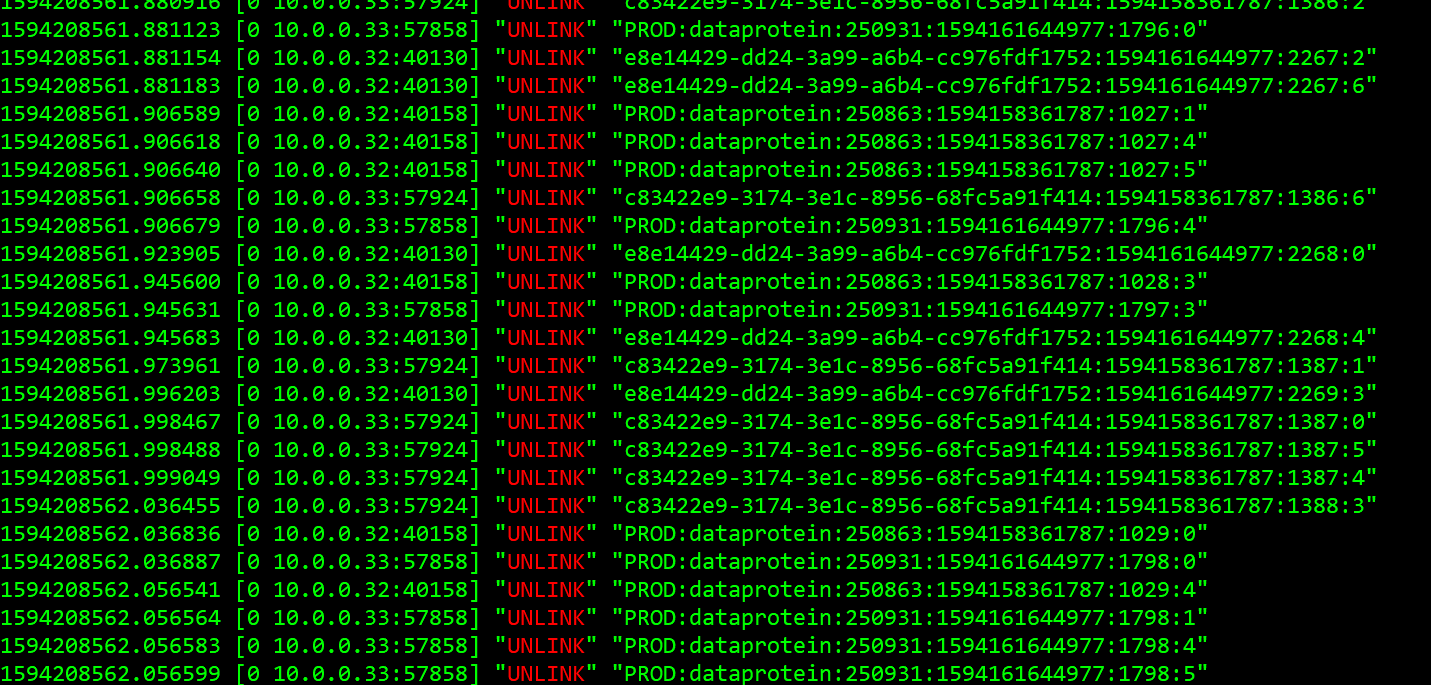
90% of our keys have TTL set. Most of them, not lasting more than one day. Also, when data is updated we UNLINK previous version. Attached an example of UNLINK trying to erase keys bellonging to data that was updated. So, we SET/DELETE keys almost in the same proportion.
Comment From: fidelgonzalez
Hi @oranagra
it's possible that this issue is generated by the version of redis? Change our redis version to the last one available could help?
Comment From: oranagra
@javierpajaro so if UNLINK worked in a stand alone node, how did you reach a conclusions that it doesn't free memory on your production?
if you have a lot of volatile keys, maybe there's another problem of the active expiration code not getting to handle them fast enough?
@fidelgonzalez i'm not aware of any changes that affect this since 6.0.1. the only thing remotely in that area is https://github.com/redis/redis/pull/7234 but i don't think it applies to you.
Comment From: javierpajaro
@oranagra because in prod we executed info memory before and after running unlink commands and memory used never decrease. It stays equal or increase. Conversely, in the case of standalone we saw memory decreasing inmediately after unlinking keys.
Doing a redis monitor we can see UNLINK commands executing in both environments.
Comment From: oranagra
@javierpajaro for UNLINK you're not expected to see immediate decrease of memory, it may happen later. however i did see that your INFO has lazyfree_pending_objects:0 which means the lazy free thread seems to be working.
I suggest testing it with DEL, but if the DEL and INFO are not pipelined or better yet, wrapped in MULTI-EXEC, you can't be sure that the memory changes you're observing are not due to other commands that were executed at that time.
can you try that?
Comment From: javierpajaro
@oranagra we have set the use of laziness for DEL commands. Is that ok?
Comment From: javierpajaro
We can also try to send unlink commands pipelined or multiexec.
Comment From: oranagra
what do you mean by "laziness for DEL commands"? do you mean lazyfree-lazy-user-del?
the only way to really measure the memory effect of DEL is by using DEL with the above mentioned flag off, and use it in MULTI-EXEC.
but anyway, you mentioned most of your objects are small (hashes with just a few fields), these will never really use the lazy free mechanism, even if you use UNLINK.
UNLINK will match them against LAZYFREE_THRESHOLD and conclude that it can delete them on the spot (not by thread). since your hash objects are likely to be ziplist encoded, they actually contain only one allocation anyway.
so please try to use DEL with MULTI-EXEC, to know if it really doesn't free memory.
Comment From: javierpajaro
@oranagra
First of all, we deactivated laziness.
Second, now I am executing DEL commands inside a pipeline. As you can see bellow, I am unsing java. I am also using Lettuce redis client.
Using redis monitor I can see lot of DEL commands executing. There are tons of MHSET commands too. And finally, several MIGRATE because we are moving slots to a new node to avoid out of memory error.
So, I am starting to think that there is nothing to do with it. Maybe it is the normal consumption of our solution. We handle thounsands of datasets, many of them containing more than 100k rows and several columns. Contents of each cell is stored using HMSET.
        this.fRedisTemplate.executePipelined(new SessionCallback<List<Object>>() {

            @SuppressWarnings({ "rawtypes", "unchecked" })
            public List<Object> execute(RedisOperations pOperations) throws DataAccessException {

                try {

                    long lTimestamp = lDataProtein.getTimestamp();
                    int lRowsCount  = lDataProtein.getRowsCount();
                    int lColsCount  = lDataProtein.getColsCount(lMaxColsEver);

                    String lKey = RedisDataProteinKey.create(lDataProtein);

                    pOperations.delete(lKey);

                    for(int lRowIndex=0; lRowIndex < lRowsCount; lRowIndex++) {

                        for (int lColIndex=0; lColIndex < lColsCount; lColIndex++) {
                            pOperations.delete(RedisValueKey.create(lKey, lTimestamp, lRowIndex, lColIndex));
                        }

                    }

                    Field lTable = lDataProtein.getTable();

                    for (int lColIndex=0; lColIndex < lColsCount; lColIndex++) {
                        pOperations.delete(RedisColumnIndexKey.create(lDataProtein, lTable.getColumn(lColIndex)));
                    }
                }
                catch (java.lang.Exception lException) {

                    throw new DataRetrievalFailureException(lException.getLocalizedMessage()
                                                        , (com.junar.exceptions.Exception) AppContext.createException("dataProteinDAOException"
                                                                                                                    , new String[] { "source" }
                                                                                                                    , new Object[] { lException }));
                }

                return null;
            }
        });
Comment From: javierpajaro
@oranagra
Some good news.
We added more cores to redis nodes and left more of them to non io-threads.
We shortened ttls for short-lived data.
We enclosed DEL commands in pipelines.
Now memory consumption remains steady around 50gb in each node.
I think you can close the issue.
Regards,