Describe the bug
We have a 17 node cluster in AWS that we recently migrated from redis 5.something to 6.0.9. Old nodes were z1d.xlarge instances, new ones are r6gd.xlarge (ARM). 8 masters, 8 replicas, 1 spare node.
We have a backup script that essentially sends a bgsave command hourly to the replicas, waits for it to finish, and uploads the resulting rdb to S3 for safekeeping.
Since transitioning to the new setup we've noticed that some of the rdb files are corrupt in some way. After ruling out several possibilities it appears the problem is indeed the rdb file generated by redis. I've used redis-check-rdb on one such file and got:
[root@replica redis]# /usr/local/bin/redis-check-rdb 6379.rdb
[offset 0] Checking RDB file 6379.rdb
[offset 26] AUX FIELD redis-ver = '6.0.9'
[offset 40] AUX FIELD redis-bits = '64'
[offset 52] AUX FIELD ctime = '1606926304'
[offset 74] AUX FIELD used-mem = '21751524832'
[offset 92] AUX FIELD repl-stream-db = '0'
[offset 142] AUX FIELD repl-id = '2e55a21448bdf08b1679fe2f916e1f6d82f06020'
[offset 168] AUX FIELD repl-offset = '108785130317'
[offset 184] AUX FIELD aof-preamble = '0'
[offset 186] Selecting DB ID 0
--- RDB ERROR DETECTED ---
[offset 2382879483] Server crash checking the specified RDB file!
[additional info] While doing: read-object-value
[additional info] Reading key 'artist:33654978'
[additional info] Reading type 13 (hash-ziplist)
[info] 10471199 keys read
[info] 42807 expires
[info] 144 already expired
Using a rdb parsing tools we've determined that the technical reason for the failure is duplicate keys. The reason there's duplicates is because multiple keys are being saved as blanks, apparently.
redacted and incomplete but should give you the idea of the structure being saved:
{"key":"music:11683167","value":{"usertags":"","dominant_color":"#4b3330","accounting_code_id":"","":"","stream_url":"","single_songs":"","":"","":"",...},"db":0,"type":"hash"}
(to be clear, the "":"","":"" is what the parser got from the rdb, and those weren't modified by me here, I just cut out some fields that were more sensitive or showed user data)
I've queried the replica servers directly in readonly mode for the full data for the broken key and the data is correct in memory. I've also manually re-run the bgsave and redis-check-rdb and it completed without errors, so it's not happening consistently, but we have seen it across a fair number of our backups and from multiple different nodes in the cluster. I haven't gathered the stats yet to say what percent of bgsave attempts are failing.
To reproduce
Honestly not sure. It's happening to us often but not consistently. I don't know the exact circumstances that causes redis to create the invalid rdb file.
Expected behavior
rdb files that aren't a broken mess.
Comment From: karock
noticed this in the log, our hourly backup happens by cron at 25 past the hour, so it lines up. Also a successful bgsave is taking roughly 160 seconds to complete, so looks like it crashed about a quarter of the way in. The RDB file above shows 1M keys read and our cluster nodes have 3-4M keys each, so that lines up proportionately as well.
1318:S 02 Dec 2020 06:25:04.502 * Background saving started by pid 24398
=== REDIS BUG REPORT START: Cut & paste starting from here ===
24398:C 02 Dec 2020 06:25:38.329 # Redis 6.0.9 crashed by signal: 11, si_code: 1
24398:C 02 Dec 2020 06:25:38.329 # Crashed running the instruction at: 0xffffa291c92c
24398:C 02 Dec 2020 06:25:38.329 # Accessing address: (nil)
24398:C 02 Dec 2020 06:25:38.329 # Killed by PID: 0, UID: 0
24398:C 02 Dec 2020 06:25:38.329 # Failed assertion: <no assertion failed> (<no file>:0)
------ STACK TRACE ------
EIP:
/lib64/libc.so.6(+0x3792c)[0xffffa291c92c]
Backtrace:
redis-rdb-bgsave 0.0.0.0:6379 [cluster](logStackTrace+0x54)[0x47c758]
redis-rdb-bgsave 0.0.0.0:6379 [cluster](sigsegvHandler+0xbc)[0x47cf7c]
linux-vdso.so.1(__kernel_rt_sigreturn+0x0)[0xffffa2c54668]
/lib64/libc.so.6(+0x3792c)[0xffffa291c92c]
redis-rdb-bgsave 0.0.0.0:6379 [cluster](rdbTryIntegerEncoding+0x28)[0x458e90]
redis-rdb-bgsave 0.0.0.0:6379 [cluster](rdbSaveRawString+0xb0)[0x459390]
redis-rdb-bgsave 0.0.0.0:6379 [cluster](rdbSaveObject+0x130)[0x45a370]
redis-rdb-bgsave 0.0.0.0:6379 [cluster](rdbSaveKeyValuePair+0x80)[0x45ac00]
redis-rdb-bgsave 0.0.0.0:6379 [cluster](rdbSaveRio+0x230)[0x45b370]
redis-rdb-bgsave 0.0.0.0:6379 [cluster](rdbSave+0x90)[0x45d650]
redis-rdb-bgsave 0.0.0.0:6379 [cluster](rdbSaveBackground+0xc4)[0x45d924]
redis-rdb-bgsave 0.0.0.0:6379 [cluster](bgsaveCommand+0x144)[0x45ee2c]
redis-rdb-bgsave 0.0.0.0:6379 [cluster](call+0x9c)[0x43573c]
redis-rdb-bgsave 0.0.0.0:6379 [cluster](processCommand+0x5b8)[0x436238]
redis-rdb-bgsave 0.0.0.0:6379 [cluster](processCommandAndResetClient+0x20)[0x4445e8]
redis-rdb-bgsave 0.0.0.0:6379 [cluster](processInputBuffer+0xd4)[0x448b74]
redis-rdb-bgsave 0.0.0.0:6379 [cluster][0x4caa74]
redis-rdb-bgsave 0.0.0.0:6379 [cluster](aeProcessEvents+0x204)[0x42eb64]
redis-rdb-bgsave 0.0.0.0:6379 [cluster](aeMain+0x20)[0x42efb0]
redis-rdb-bgsave 0.0.0.0:6379 [cluster](main+0x3ec)[0x42b2ec]
/lib64/libc.so.6(__libc_start_main+0xe4)[0xffffa2904c64]
redis-rdb-bgsave 0.0.0.0:6379 [cluster][0x42b680]
Comment From: oranagra
@karock so you're saying redis crashes while producing the rdb, and that's the cause of the empty strings? incomplete rdb file (with no valid checksum footer) sounds like a different problem. can you please check maybe the end of the rdb file is just padded with zeros for some reason?
can you upload the redis-server binary you were using so we can analyze the stack trace, and see which key type it was saving at the time of the crash?
are you saying that the same redis server that crashed on one rdb saving attempt will succeed on another attempt in the future, and the rdb file would be intact (no duplicate / empty fields)?
Comment From: karock
I'm going to answer your first question in another comment.
Here's the redis-server binary off of one of the affected machines. should be 6.0.9 compiled for ARM. redis-server.zip
Yeah, if we just keep retrying it'll work eventually. As a hopefully temporary bandaid yesterday we modified our backup script to check the RDB with redis-check-rdb and loop up to 10 times over the bgsave/redis-check-rdb portion until it got a good one. So far looks like it's only taken max three attempts to get a good one. We're allowing up to 10.
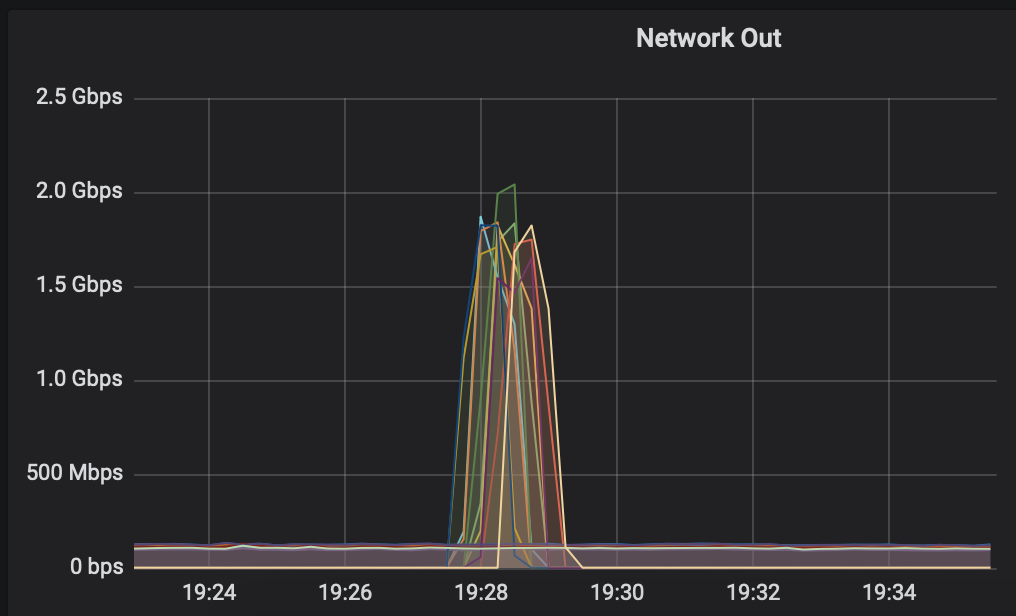
As a sort of graphical representation here's how backup time used to look with redis 5 and z1d hardware:
And here's how it looks now with redis 6 and r6gd hardware:
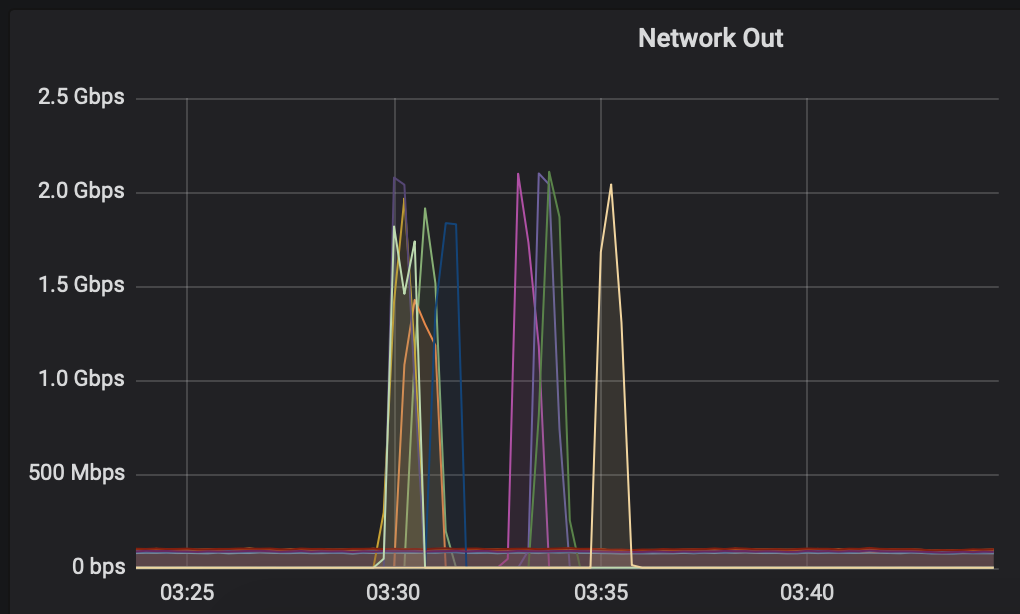
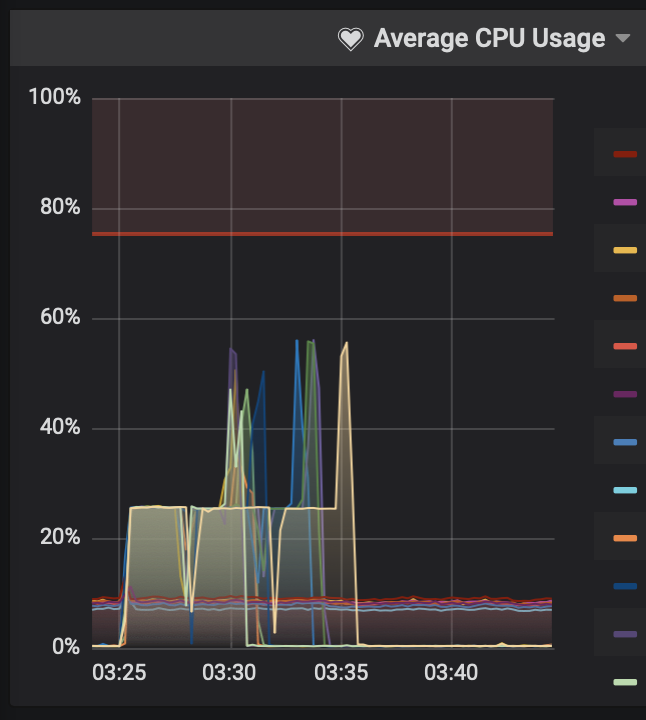
Our RDBs take ~160 sec to make, checking them takes a bit of time as well. Figure 3 minutes delay or so per retry. ~In this particular case you can see that the yellow box took three attempts, 3 others took 2 attempts.~
Edit: I was wrong. Looking at the logs we've not had a machine require a third attempt yet. The drops in the CPU graph are where our 20 sec polling for RDB finished leaves the machine with nothing to do, and then it picks back up again to run redis-check-rdb. So there's a drop in cpu in the middle of each attempt, not between attempts.
Comment From: karock
redis-check-rdb output from a failed RDB from replica 10.1.7.76:
/usr/local/bin/redis-check-rdb daily-backup-2020-12-02T01:25:04-slots-10880-13106-10_1_7_76-slave.rdb
[offset 0] Checking RDB file daily-backup-2020-12-02T01:25:04-slots-10880-13106-10_1_7_76-slave.rdb
[offset 26] AUX FIELD redis-ver = '6.0.9'
[offset 40] AUX FIELD redis-bits = '64'
[offset 52] AUX FIELD ctime = '1606890304'
[offset 74] AUX FIELD used-mem = '21739706624'
[offset 92] AUX FIELD repl-stream-db = '0'
[offset 142] AUX FIELD repl-id = '2e55a21448bdf08b1679fe2f916e1f6d82f06020'
[offset 168] AUX FIELD repl-offset = '108631084210'
[offset 184] AUX FIELD aof-preamble = '0'
[offset 186] Selecting DB ID 0
23762:C 03 Dec 2020 08:33:02.635 # ziplist with dup elements dump (hexdump of 560 bytes):
30020000d60100003800000875736572746167730a00020e646f6d696e616e745f636f6c6f72100002126163636f756e74696e675f636f64655f6964140002000200020a73747265616d5f75726c0c00020c73696e676c655f736f6e67730e000205616c62756d070002000200020870726f64756365720a00020973747265616d696e670b332f747261636b732f626c61636b2d6f776e2d726164696f2f7468652d696e6469652d657870657269656e63652d35312e6d703335086275795f6c696e6b0a0002000208636f6d706c6574650a077570646174656409d0e831c75f060875706c6f616465640ad0e431c75f060b73747265616d5f6f6e6c790d000210696d6167655f70726f63657373696e67120002107072656d69756d5f646f776e6c6f616412000209666561747572696e670b00020863665f696d6167650a00020766696c653332300900021161646d696e5f6465736372697074696f6e13000200021454484520494e44494520455850455249454e4345160875706c6f616465720af07bf1230514736f756e64636c6f75645f757365725f6e616d651600020f666f6c6c6f775f646f776e6c6f616411000211736f756e64636c6f75645f666f6c6c6f77130002047479706506000205696d6167650740562f626c61636b2d6f776e2d726164696f2f623563623564646238653836353937313230396338353834373936343636346338613732383164303163623331343635643066643236633032336431353730352e6a706567ff


=== REDIS BUG REPORT START: Cut & paste starting from here ===
23762:C 03 Dec 2020 08:33:02.635 # ------------------------------------------------
23762:C 03 Dec 2020 08:33:02.635 # !!! Software Failure. Press left mouse button to continue
23762:C 03 Dec 2020 08:33:02.635 # Guru Meditation: Ziplist corruption detected #t_hash.c:488
23762:C 03 Dec 2020 08:33:02.635 # (forcing SIGSEGV in order to print the stack trace)
23762:C 03 Dec 2020 08:33:02.635 # ------------------------------------------------
--- RDB ERROR DETECTED ---
[offset 1316779089] Server crash checking the specified RDB file!
[additional info] While doing: read-object-value
[additional info] Reading key 'music:11683174'
[additional info] Reading type 4 (hash-hashtable)
[info] 5786930 keys read
[info] 21750 expires
[info] 21750 already expired
~the '5786930 keys read' was interesting to me because most of our cluster nodes hold about 4M keys.~ so I ran a redis-check-rdb on a successful RDB from that node:
[ec2-user@ip-10-1-7-76 redis]$ redis-check-rdb 6379.rdb
[offset 0] Checking RDB file 6379.rdb
[offset 26] AUX FIELD redis-ver = '6.0.9'
[offset 40] AUX FIELD redis-bits = '64'
[offset 52] AUX FIELD ctime = '1607002130'
[offset 74] AUX FIELD used-mem = '21756455208'
[offset 92] AUX FIELD repl-stream-db = '0'
[offset 142] AUX FIELD repl-id = '2e55a21448bdf08b1679fe2f916e1f6d82f06020'
[offset 168] AUX FIELD repl-offset = '109130879395'
[offset 184] AUX FIELD aof-preamble = '0'
[offset 186] Selecting DB ID 0
[offset 9122647899] Checksum OK
[offset 9122647899] \o/ RDB looks OK! \o/
[info] 39927886 keys read
[info] 58065 expires
[info] 690 already expired
That matches the expected number of keys. ~So my guess is that there's something quite mangled in there and hash fields maybe are being read as keys? I'm really not sure and beyond my knowledge to even speculate there.~
Edit: reading large numbers is hard I guess. Each of our nodes holds ~40M keys, not 4M. So nevermind, it probably would've had the correct number of keys if it hadn't run into an issue 5.78M keys in. I apparently need some more caffeine in me this morning.
Another piece that struck me as interesting is that the file sizes of the failure and the correct one are about the same: 9113783862 bytes for the failure, 9122647899 for the correct one (and these were separated by a day or so, not sequential, so general data growth would explain the difference imo).
I also noticed in the logs that not every redis-check-rdb failure in our backup script is matched with a redis bgsave crash, so I'm afraid that the crash dump above may not tell the whole story here. I'm going to try to set up some alerting to catch one in the act and see what the RDB file looks like on a crash, because the ones that we have are all about the correct size and if I tail them through xxd the end of the file looks "normal", to me at least. No zeroed out data anyway, or obviously weird patterns.
Comment From: oranagra
i translated the stack trace from the crash log to have line numbers (lucky your binary had debug info) it crashes while trying to save a list (ziplist node), and attempting to see if it can be encoded as a number in the rdb.
0x458e90 is in rdbTryIntegerEncoding (rdb.c:314).
0x459390 is in rdbSaveRawString (rdb.c:420).
0x45a370 is in rdbSaveObject (rdb.c:801).
0x45ac00 is in rdbSaveKeyValuePair (rdb.c:1087).
0x45b370 is in rdbSaveRio (rdb.c:1241).
0x45d650 is in rdbSave (rdb.c:1340).
0x45d924 is in rdbSaveBackground (rdb.c:1397).
0x45ee2c is in bgsaveCommand (rdb.c:2647).
0x43573c is in call (server.c:1117).
0x436238 is in processCommand (server.c:3785).
0x4445e8 is in processCommandAndResetClient (networking.c:1857).
0x448b74 is in processInputBuffer (networking.c:1940).
0x4caa74 is in connSocketEventHandler (connhelpers.h:65).
0x42eb64 is in aeProcessEvents (ae.c:481).
0x42efb0 is in aeMain (ae.c:538).
you're right that the crash and corruption might be two different things, but i'm betting they're somehow related.
Comment From: oranagra
@karock can you try to run the redis test suite with valgrind on your platform?
make valgrind && ./runtest --valgrind
Comment From: karock
several errors followed by a crash due to bgsave already in progress (probably due to not being aborted earlier):
[err]: MULTI / EXEC is propagated correctly (write command, no effect) in tests/unit/multi.tcl
Expected 'ping' to match 'select *' (context: type source line 762 file /usr/local/src/redis-stable/tests/test_helper.tcl cmd {assert_match [lindex $patterns $j] [read_from_replication_stream $s]} proc ::assert_replication_stream level 1)

[err]: Slave should be able to synchronize with the master in tests/integration/replication-psync.tcl
Replication not started.

[err]: Test FLUSHALL aborts bgsave in tests/integration/rdb.tcl
bgsave not aborted
Let me know if there's a good way to avoid the crash and get it to continue running past the point where it failed here. I ran it twice btw and got this same result both times.
Comment From: oranagra
these are all probably timing issues in the tests, ad we're after a memory corruption or invalid memory access, so let's ignore them.
you can work around that test crash by adding --durable, and maybe also work around the timing issues by adding --clients 1
Comment From: karock
thanks will try
Comment From: karock
./runtest without --valgrind passed without errors, as expected. I was pretty sure I'd run the basic test suite before putting this new setup into production.
./runtest --valgrind --durable just finished, found one valgrind error:
!!! WARNING The following tests failed:

*** [err]: SET - use EX/PX option, TTL should not be reseted after loadaof in tests/unit/expire.tcl

ERR
    while executing
"[srv $level "client"] {*}$args"
    (procedure "r" line 7)
    invoked from within
"r debug loadaof"
    ("uplevel" body line 5)
    invoked from within
"uplevel 1 $code"
*** [err]: MULTI / EXEC is propagated correctly (write command, no effect) in tests/unit/multi.tcl
Expected 'ping' to match 'select *' (context: type source line 762 file /usr/local/src/redis-stable/tests/test_helper.tcl cmd {assert_match [lindex $patterns $j] [read_from_replication_stream $s]} proc ::assert_replication_stream level 1)
*** [err]: Slave should be able to synchronize with the master in tests/integration/replication-psync.tcl
Replication not started.
*** [err]: Server is able to generate a stack trace on selected systems in tests/integration/logging.tcl
reading reply
I/O error reading reply
    while executing
"[srv $level "client"] {*}$args"
    (procedure "r" line 7)
    invoked from within
"r debug sleep 1"
    ("uplevel" body line 3)
    invoked from within
"uplevel 1 $code"
*** [err]: Valgrind error: ==2577== Memcheck, a memory error detector
==2577== Copyright (C) 2002-2017, and GNU GPL'd, by Julian Seward et al.
==2577== Using Valgrind-3.13.0 and LibVEX; rerun with -h for copyright info
==2577== Command: src/redis-server ./tests/tmp/redis.conf.18890.12
==2577==
==2577== Invalid read of size 4
==2577==    at 0x4DE0650: ??? (in /usr/lib64/libgcc_s-7-20180712.so.1)
==2577==    by 0x4DE1D2B: _Unwind_Backtrace (in /usr/lib64/libgcc_s-7-20180712.so.1)
==2577==    by 0x4B131AF: backtrace (in /usr/lib64/libc-2.26.so)
==2577==    by 0x476453: logStackTrace (debug.c:1450)
==2577==    by 0x4764C7: watchdogSignalHandler (debug.c:1773)
==2577==    by 0x5805AD73: ??? (in /usr/lib64/valgrind/memcheck-arm64-linux)
==2577==  Address 0x6769666e6f63 is not stack'd, malloc'd or (recently) free'd
==2577==
==2577==
==2577== Process terminating with default action of signal 11 (SIGSEGV)
==2577==  Access not within mapped region at address 0x6769666E6F63
==2577==    at 0x4DE0650: ??? (in /usr/lib64/libgcc_s-7-20180712.so.1)
==2577==    by 0x4DE1D2B: _Unwind_Backtrace (in /usr/lib64/libgcc_s-7-20180712.so.1)
==2577==    by 0x4B131AF: backtrace (in /usr/lib64/libc-2.26.so)
==2577==    by 0x476453: logStackTrace (debug.c:1450)
==2577==    by 0x476BDB: sigsegvHandler (debug.c:1648)
==2577==    by 0x5805AD73: ??? (in /usr/lib64/valgrind/memcheck-arm64-linux)
==2577==  If you believe this happened as a result of a stack
==2577==  overflow in your program's main thread (unlikely but
==2577==  possible), you can try to increase the size of the
==2577==  main thread stack using the --main-stacksize= flag.
==2577==  The main thread stack size used in this run was 8388608.
==2577==
==2577== HEAP SUMMARY:
==2577==     in use at exit: 914,998 bytes in 12,485 blocks
==2577==   total heap usage: 17,009 allocs, 4,524 frees, 1,098,337 bytes allocated
==2577==
==2577== LEAK SUMMARY:
==2577==    definitely lost: 0 bytes in 0 blocks
==2577==    indirectly lost: 0 bytes in 0 blocks
==2577==      possibly lost: 44,373 bytes in 553 blocks
==2577==    still reachable: 870,625 bytes in 11,932 blocks
==2577==         suppressed: 0 bytes in 0 blocks
==2577== Reachable blocks (those to which a pointer was found) are not shown.
==2577== To see them, rerun with: --leak-check=full --show-leak-kinds=all
==2577==
==2577== For counts of detected and suppressed errors, rerun with: -v
==2577== ERROR SUMMARY: 59 errors from 58 contexts (suppressed: 0 from 0)


*** [err]: Test FLUSHALL aborts bgsave in tests/integration/rdb.tcl
bgsave not aborted
*** [err]: bgsave resets the change counter in tests/integration/rdb.tcl
ound save already in progress
ERR Background save already in progress
    while executing
"[srv $level "client"] {*}$args"
    (procedure "r" line 7)
    invoked from within
"r bgsave"
    ("uplevel" body line 3)
    invoked from within
"uplevel 1 $code"
*** [err]: Slave should be able to synchronize with the master in tests/integration/replication-psync.tcl
Replication not started.
*** [err]: Test replication partial resync: ok after delay (diskless: no, disabled, reconnect: 1) in tests/integration/replication-psync.tcl
Expected [s -1 sync_partial_ok] > 0 (context: type eval line 2 cmd {assert {[s -1 sync_partial_ok] > 0}} proc ::test)
*** [err]: Slave should be able to synchronize with the master in tests/integration/replication-psync.tcl
Replication not started.
*** [err]: Slave should be able to synchronize with the master in tests/integration/replication-psync.tcl
Replication not started.
*** [err]: Slave should be able to synchronize with the master in tests/integration/replication-psync.tcl
Replication not started.
*** [err]: Slave should be able to synchronize with the master in tests/integration/replication-psync.tcl
Replication not started.
*** [err]: SLAVE can reload "lua" AUX RDB fields of duplicated scripts in tests/integration/replication-3.tcl
Replication not started.
Comment From: karock
We pulled a sample of the different crash errors seen so far:
11428:C 02 Dec 2020 18:29:00.006 # ziplist with dup elements dump (hexdump of 895773976 bytes):
11477:C 02 Dec 2020 18:28:28.448 # ziplist with dup elements dump (hexdump of 1953068072 bytes):
13663:C 02 Dec 2020 19:30:37.586 # Guru Meditation: Ziplist corruption detected #t_hash.c:488
14556:C 02 Dec 2020 19:28:55.016 # Guru Meditation: Invalid integer encoding 0xFF #ziplist.c:316
14925:C 02 Dec 2020 19:28:29.739 # ==> t_zset.c:794 '_sptr != NULL' is not true
16556:C 03 Dec 2020 05:28:14.303 # Guru Meditation: Invalid integer encoding 0xEF #ziplist.c:316
21661:C 03 Dec 2020 07:28:29.235 # Guru Meditation: Ziplist corruption detected #t_hash.c:488
21679:C 02 Dec 2020 21:28:30.530 # ziplist with dup elements dump (hexdump of 7302672 bytes):
23740:C 02 Dec 2020 22:29:59.238 # ziplist with dup elements dump (hexdump of 1953068072 bytes):
2646:C 03 Dec 2020 01:28:10.449 # ==> t_hash.c:370 'vptr != NULL' is not true
2692:C 02 Dec 2020 16:29:24.981 # ziplist with dup elements dump (hexdump of 842215728 bytes):
28277:C 02 Dec 2020 23:28:16.814 # Guru Meditation: Invalid integer encoding 0xFF #ziplist.c:316
30195:C 03 Dec 2020 09:28:08.871 # Guru Meditation: Invalid integer encoding 0xC7 #ziplist.c:316
32198:C 03 Dec 2020 10:29:42.659 # Guru Meditation: Invalid integer encoding 0xC7 #ziplist.c:316
3377:C 02 Dec 2020 16:28:28.236 # Guru Meditation: Ziplist corruption detected #t_hash.c:488
3468:C 02 Dec 2020 16:28:30.218 # Guru Meditation: Invalid integer encoding 0xC8 #ziplist.c:316
4816:C 03 Dec 2020 02:29:25.913 # ziplist with dup elements dump (hexdump of 1635021616 bytes):
7984:C 02 Dec 2020 17:28:04.503 # ==> t_zset.c:1204 'dictAdd(zs->dict,ele,&node->score) == DICT_OK' is not true
9259:C 03 Dec 2020 03:28:44.023 # Guru Meditation: Invalid integer encoding 0xFF #ziplist.c:316
9443:C 03 Dec 2020 03:28:26.294 # Guru Meditation: Ziplist corruption detected #t_hash.c:488
9661:C 03 Dec 2020 03:28:16.141 # Guru Meditation: Invalid integer encoding 0xE7 #ziplist.c:316
let me know if you want the full info from any of those. just adding it this way to show that it's not always the same crash cause/location.
Comment From: oranagra
these are all consistent with a theory that there's something generating random memory corruptions. any chance you're using any 3rd party module?
Comment From: karock
no extra modules. just a basic redis build and install.
Comment From: karock
ARM amazon linux 2 base AMI, redis built via ansible:
- name: download Latest stable redis release
  become: true
  shell: cd /usr/local/src/ ;   wget https://download.redis.io/redis-stable.tar.gz


- name: unarchive
  become: true
  shell: cd /usr/local/src/ ; tar vxzf redis-stable.tar.gz


- name: run make
  become: true
  shell: cd /usr/local/src/redis-stable ; make USE_SYSTEMD=yes ; cd src && make install
the SYSTEMD stuff is all we really had to mess with just to get it to play nice on ARM.
redis.conf:
supervised no
pidfile /var/run/redis/6379.pid
dir /var/lib/redis/
port 6379
bind 0.0.0.0
timeout 0
tcp-keepalive 300
tcp-backlog 10000
loglevel notice
logfile /var/log/redis/redis.log
syslog-enabled yes
syslog-ident redis
syslog-facility USER
# Snapshotting
save ""
stop-writes-on-bgsave-error no
rdbcompression yes
rdbchecksum yes
dbfilename 6379.rdb
appendonly no
# Replication
replica-serve-stale-data yes
replica-read-only yes
repl-disable-tcp-nodelay no
replica-priority 100
min-replicas-max-lag 10
repl-diskless-sync yes
repl-diskless-sync-delay 5
repl-ping-slave-period 10
repl-timeout 1800
repl-disable-tcp-nodelay no
repl-backlog-size 1mb
repl-backlog-ttl 3600
# Security
protected-mode no
# Limits
maxclients 90000
maxmemory 0
maxmemory-policy volatile-ttl
lazyfree-lazy-eviction yes
lazyfree-lazy-expire yes
lazyfree-lazy-server-del yes
replica-lazy-flush yes
# Cluster Support
cluster-enabled yes
cluster-config-file nodes.conf
cluster-node-timeout 5000
cluster-require-full-coverage no
# Lua
lua-time-limit 5000
# Slow Log
slowlog-log-slower-than 10000
slowlog-max-len 128
# Event Notification
notify-keyspace-events ""
# Advanced
hash-max-ziplist-entries 1024
hash-max-ziplist-value 128
list-max-ziplist-size -2
set-max-intset-entries 1024
zset-max-ziplist-entries 256
zset-max-ziplist-value 128
activerehashing yes
client-output-buffer-limit normal 0 0 0
client-output-buffer-limit replica 512mb 512mb 0
client-output-buffer-limit pubsub 32mb 8mb 60
hz 10
aof-rewrite-incremental-fsync yes
redis.service:
[Unit]
Description=Redis
After=network.target  disable-thp.service

[Service]
ExecStart=/usr/local/bin/redis-server /etc/redis/redis.conf --supervised systemd
ExecStop=/usr/local/bin/redis-cli shutdown
TimeoutStartSec=5
Type=notify
[Install]
WantedBy=multi-user.target
Comment From: oranagra
it's interesting to note that all the crashes are in the child process. had the corruption been in the parent, i imagine it would sometimes crash too (maybe not as soon since the child is actively iterating on all the data, and the parent might not). but also, considering that the same replica can sometimes crash while doing bgsave, and then later succeed, that means that the corruption must be happening in the child.
however, several of the assertions you reported don't make sense to me, as far as i know the child should not reach to execute these portions of the code. @karock can you share full stack trace for these? or even full crash logs.
for instance:
4816:C 03 Dec 2020 02:29:25.913 # ziplist with dup elements dump (hexdump of 1635021616 bytes):
7984:C 02 Dec 2020 17:28:04.503 # ==> t_zset.c:1204 'dictAdd(zs->dict,ele,&node->score) == DICT_OK' is not true
9259:C 03 Dec 2020 03:28:44.023 # Guru Meditation: Invalid integer encoding 0xFF #ziplist.c:316
the first one happens when converting a ziplist hash to a hashtable encoding (usually when something i added to it). should not happen in a child. the second one is similar (for sorted sets) the third one is an invalid encoding that's only detected when iterating on a ziplist, but the child shouldn't be iterating on the ziplist, it just saves it as it (blob of bytes) to the disk.
Comment From: karock
ok to clarify... these were the errors reported by redis-check-rdb, not the bgsave child process crashes. I misunderstood that myself from the engineer who collected this info and passed it along to me. I can pass along the details of that if you want to see it, but I suspect from context you probably aren't as interested in that.
He's going to go look for the bgsave crashes now and I'll report back with details on those.
Comment From: karock
=== REDIS BUG REPORT START: Cut & paste starting from here ===
12794:C 01 Dec 2020 14:27:34.253 # Redis 6.0.9 crashed by signal: 11, si_code: 1
12794:C 01 Dec 2020 14:27:34.253 # Crashed running the instruction at: 0x459510
12794:C 01 Dec 2020 14:27:34.253 # Accessing address: 0xffffffffffffffff
12794:C 01 Dec 2020 14:27:34.253 # Failed assertion: <no assertion failed> (<no file>:0)
------ STACK TRACE ------
EIP:
redis-rdb-bgsave 0.0.0.0:6379 [cluster](rdbSaveStringObject+0x20)[0x459510]
Backtrace:
redis-rdb-bgsave 0.0.0.0:6379 [cluster](logStackTrace+0x54)[0x47c758]
redis-rdb-bgsave 0.0.0.0:6379 [cluster](sigsegvHandler+0xbc)[0x47cf7c]
linux-vdso.so.1(__kernel_rt_sigreturn+0x0)[0xffffaeffd668]
redis-rdb-bgsave 0.0.0.0:6379 [cluster](rdbSaveStringObject+0x20)[0x459510]
redis-rdb-bgsave 0.0.0.0:6379 [cluster](rdbSaveObject+0x1a4)[0x45a3e4]
redis-rdb-bgsave 0.0.0.0:6379 [cluster](rdbSaveKeyValuePair+0x80)[0x45ac00]
redis-rdb-bgsave 0.0.0.0:6379 [cluster](rdbSaveRio+0x230)[0x45b370]
redis-rdb-bgsave 0.0.0.0:6379 [cluster](rdbSave+0x90)[0x45d650]
redis-rdb-bgsave 0.0.0.0:6379 [cluster](rdbSaveBackground+0xc4)[0x45d924]
redis-rdb-bgsave 0.0.0.0:6379 [cluster](bgsaveCommand+0x144)[0x45ee2c]
redis-rdb-bgsave 0.0.0.0:6379 [cluster](call+0x9c)[0x43573c]
redis-rdb-bgsave 0.0.0.0:6379 [cluster](processCommand+0x5b8)[0x436238]
redis-rdb-bgsave 0.0.0.0:6379 [cluster](processCommandAndResetClient+0x20)[0x4445e8]
redis-rdb-bgsave 0.0.0.0:6379 [cluster](processInputBuffer+0xd4)[0x448b74]
redis-rdb-bgsave 0.0.0.0:6379 [cluster][0x4caa74]
redis-rdb-bgsave 0.0.0.0:6379 [cluster](aeProcessEvents+0x204)[0x42eb64]
redis-rdb-bgsave 0.0.0.0:6379 [cluster](aeMain+0x20)[0x42efb0]
redis-rdb-bgsave 0.0.0.0:6379 [cluster](main+0x3ec)[0x42b2ec]
/lib64/libc.so.6(__libc_start_main+0xe4)[0xffffaecadc64]
redis-rdb-bgsave 0.0.0.0:6379 [cluster][0x42b680]
///////////////////////////////////////////////////////////////////////////////
=== REDIS BUG REPORT START: Cut & paste starting from here ===
10408:C 01 Dec 2020 16:25:54.086 # Redis 6.0.9 crashed by signal: 11, si_code: 1
10408:C 01 Dec 2020 16:25:54.086 # Crashed running the instruction at: 0x431500
10408:C 01 Dec 2020 16:25:54.087 # Accessing address: (nil)
10408:C 01 Dec 2020 16:25:54.087 # Killed by PID: 0, UID: 0
10408:C 01 Dec 2020 16:25:54.087 # Failed assertion: <no assertion failed> (<no file>:0)
------ STACK TRACE ------
EIP:
redis-rdb-bgsave 0.0.0.0:6379 [cluster](dictNext+0x160)[0x431500]
Backtrace:
redis-rdb-bgsave 0.0.0.0:6379 [cluster](logStackTrace+0x54)[0x47c758]
redis-rdb-bgsave 0.0.0.0:6379 [cluster](sigsegvHandler+0xbc)[0x47cf7c]
linux-vdso.so.1(__kernel_rt_sigreturn+0x0)[0xffff9d9f0668]
redis-rdb-bgsave 0.0.0.0:6379 [cluster](dictNext+0x160)[0x431500]
redis-rdb-bgsave 0.0.0.0:6379 [cluster](rdbSaveObject+0x3c8)[0x45a608]
redis-rdb-bgsave 0.0.0.0:6379 [cluster](rdbSaveKeyValuePair+0x80)[0x45ac00]
redis-rdb-bgsave 0.0.0.0:6379 [cluster](rdbSaveRio+0x230)[0x45b370]
redis-rdb-bgsave 0.0.0.0:6379 [cluster](rdbSave+0x90)[0x45d650]
redis-rdb-bgsave 0.0.0.0:6379 [cluster](rdbSaveBackground+0xc4)[0x45d924]
redis-rdb-bgsave 0.0.0.0:6379 [cluster](bgsaveCommand+0x144)[0x45ee2c]
redis-rdb-bgsave 0.0.0.0:6379 [cluster](call+0x9c)[0x43573c]
redis-rdb-bgsave 0.0.0.0:6379 [cluster](processCommand+0x5b8)[0x436238]
redis-rdb-bgsave 0.0.0.0:6379 [cluster](processCommandAndResetClient+0x20)[0x4445e8]
redis-rdb-bgsave 0.0.0.0:6379 [cluster](processInputBuffer+0xd4)[0x448b74]
redis-rdb-bgsave 0.0.0.0:6379 [cluster][0x4caa74]
redis-rdb-bgsave 0.0.0.0:6379 [cluster](aeProcessEvents+0x204)[0x42eb64]
redis-rdb-bgsave 0.0.0.0:6379 [cluster](aeMain+0x20)[0x42efb0]
redis-rdb-bgsave 0.0.0.0:6379 [cluster](main+0x3ec)[0x42b2ec]
/lib64/libc.so.6(__libc_start_main+0xe4)[0xffff9d6a0c64]
redis-rdb-bgsave 0.0.0.0:6379 [cluster][0x42b680]
///////////////////////////////////////////////////////////////////////////////
=== REDIS BUG REPORT START: Cut & paste starting from here ===
4524:C 02 Dec 2020 00:25:54.488 # Redis 6.0.9 crashed by signal: 11, si_code: 1
4524:C 02 Dec 2020 00:25:54.488 # Crashed running the instruction at: 0x45a4a8
4524:C 02 Dec 2020 00:25:54.488 # Accessing address: 0xffffffffffffffff
4524:C 02 Dec 2020 00:25:54.488 # Failed assertion: <no assertion failed> (<no file>:0)
------ STACK TRACE ------
EIP:
redis-rdb-bgsave 0.0.0.0:6379 [cluster](rdbSaveObject+0x268)[0x45a4a8]
Backtrace:
redis-rdb-bgsave 0.0.0.0:6379 [cluster](logStackTrace+0x54)[0x47c758]
redis-rdb-bgsave 0.0.0.0:6379 [cluster](sigsegvHandler+0xbc)[0x47cf7c]
linux-vdso.so.1(__kernel_rt_sigreturn+0x0)[0xffff9d9f0668]
redis-rdb-bgsave 0.0.0.0:6379 [cluster](rdbSaveObject+0x268)[0x45a4a8]
redis-rdb-bgsave 0.0.0.0:6379 [cluster](rdbSaveKeyValuePair+0x80)[0x45ac00]
redis-rdb-bgsave 0.0.0.0:6379 [cluster](rdbSaveRio+0x230)[0x45b370]
redis-rdb-bgsave 0.0.0.0:6379 [cluster](rdbSave+0x90)[0x45d650]
redis-rdb-bgsave 0.0.0.0:6379 [cluster](rdbSaveBackground+0xc4)[0x45d924]
redis-rdb-bgsave 0.0.0.0:6379 [cluster](bgsaveCommand+0x144)[0x45ee2c]
redis-rdb-bgsave 0.0.0.0:6379 [cluster](call+0x9c)[0x43573c]
redis-rdb-bgsave 0.0.0.0:6379 [cluster](processCommand+0x5b8)[0x436238]
redis-rdb-bgsave 0.0.0.0:6379 [cluster](processCommandAndResetClient+0x20)[0x4445e8]
redis-rdb-bgsave 0.0.0.0:6379 [cluster](processInputBuffer+0xd4)[0x448b74]
redis-rdb-bgsave 0.0.0.0:6379 [cluster][0x4caa74]
redis-rdb-bgsave 0.0.0.0:6379 [cluster](aeProcessEvents+0x204)[0x42eb64]
redis-rdb-bgsave 0.0.0.0:6379 [cluster](aeMain+0x20)[0x42efb0]
redis-rdb-bgsave 0.0.0.0:6379 [cluster](main+0x3ec)[0x42b2ec]
/lib64/libc.so.6(__libc_start_main+0xe4)[0xffff9d6a0c64]
redis-rdb-bgsave 0.0.0.0:6379 [cluster][0x42b680]
///////////////////////////////////////////////////////////////////////////////
=== REDIS BUG REPORT START: Cut & paste starting from here ===
15182:C 02 Dec 2020 13:25:41.003 # Redis 6.0.9 crashed by signal: 11, si_code: 1
15182:C 02 Dec 2020 13:25:41.003 # Crashed running the instruction at: 0x45a4a8
15182:C 02 Dec 2020 13:25:41.003 # Accessing address: 0xffffffffffffffff
15182:C 02 Dec 2020 13:25:41.003 # Failed assertion: <no assertion failed> (<no file>:0)
------ STACK TRACE ------
EIP:
redis-rdb-bgsave 0.0.0.0:6379 [cluster](rdbSaveObject+0x268)[0x45a4a8]
Backtrace:
redis-rdb-bgsave 0.0.0.0:6379 [cluster](logStackTrace+0x54)[0x47c758]
redis-rdb-bgsave 0.0.0.0:6379 [cluster](sigsegvHandler+0xbc)[0x47cf7c]
linux-vdso.so.1(__kernel_rt_sigreturn+0x0)[0xffff9d9f0668]
redis-rdb-bgsave 0.0.0.0:6379 [cluster](rdbSaveObject+0x268)[0x45a4a8]
redis-rdb-bgsave 0.0.0.0:6379 [cluster](rdbSaveKeyValuePair+0x80)[0x45ac00]
redis-rdb-bgsave 0.0.0.0:6379 [cluster](rdbSaveRio+0x230)[0x45b370]
redis-rdb-bgsave 0.0.0.0:6379 [cluster](rdbSave+0x90)[0x45d650]
redis-rdb-bgsave 0.0.0.0:6379 [cluster](rdbSaveBackground+0xc4)[0x45d924]
redis-rdb-bgsave 0.0.0.0:6379 [cluster](bgsaveCommand+0x144)[0x45ee2c]
redis-rdb-bgsave 0.0.0.0:6379 [cluster](call+0x9c)[0x43573c]
redis-rdb-bgsave 0.0.0.0:6379 [cluster](processCommand+0x5b8)[0x436238]
redis-rdb-bgsave 0.0.0.0:6379 [cluster](processCommandAndResetClient+0x20)[0x4445e8]
redis-rdb-bgsave 0.0.0.0:6379 [cluster](processInputBuffer+0xd4)[0x448b74]
redis-rdb-bgsave 0.0.0.0:6379 [cluster][0x4caa74]
redis-rdb-bgsave 0.0.0.0:6379 [cluster](aeProcessEvents+0x204)[0x42eb64]
redis-rdb-bgsave 0.0.0.0:6379 [cluster](aeMain+0x20)[0x42efb0]
redis-rdb-bgsave 0.0.0.0:6379 [cluster](main+0x3ec)[0x42b2ec]
/lib64/libc.so.6(__libc_start_main+0xe4)[0xffff9d6a0c64]
redis-rdb-bgsave 0.0.0.0:6379 [cluster][0x42b680]
///////////////////////////////////////////////////////////////////////////////
=== REDIS BUG REPORT START: Cut & paste starting from here ===
23763:C 03 Dec 2020 10:25:48.091 # Redis 6.0.9 crashed by signal: 11, si_code: 1
23763:C 03 Dec 2020 10:25:48.091 # Crashed running the instruction at: 0x45a4a8
23763:C 03 Dec 2020 10:25:48.091 # Accessing address: 0xffffffffffffffff
23763:C 03 Dec 2020 10:25:48.091 # Failed assertion: <no assertion failed> (<no file>:0)
------ STACK TRACE ------
EIP:
redis-rdb-bgsave 0.0.0.0:6379 [cluster](rdbSaveObject+0x268)[0x45a4a8]
Backtrace:
redis-rdb-bgsave 0.0.0.0:6379 [cluster](logStackTrace+0x54)[0x47c758]
redis-rdb-bgsave 0.0.0.0:6379 [cluster](sigsegvHandler+0xbc)[0x47cf7c]
linux-vdso.so.1(__kernel_rt_sigreturn+0x0)[0xffff9d9f0668]
redis-rdb-bgsave 0.0.0.0:6379 [cluster](rdbSaveObject+0x268)[0x45a4a8]
redis-rdb-bgsave 0.0.0.0:6379 [cluster](rdbSaveKeyValuePair+0x80)[0x45ac00]
redis-rdb-bgsave 0.0.0.0:6379 [cluster](rdbSaveRio+0x230)[0x45b370]
redis-rdb-bgsave 0.0.0.0:6379 [cluster](rdbSave+0x90)[0x45d650]
redis-rdb-bgsave 0.0.0.0:6379 [cluster](rdbSaveBackground+0xc4)[0x45d924]
redis-rdb-bgsave 0.0.0.0:6379 [cluster](bgsaveCommand+0x144)[0x45ee2c]
redis-rdb-bgsave 0.0.0.0:6379 [cluster](call+0x9c)[0x43573c]
redis-rdb-bgsave 0.0.0.0:6379 [cluster](processCommand+0x5b8)[0x436238]
redis-rdb-bgsave 0.0.0.0:6379 [cluster](processCommandAndResetClient+0x20)[0x4445e8]
redis-rdb-bgsave 0.0.0.0:6379 [cluster](processInputBuffer+0xd4)[0x448b74]
redis-rdb-bgsave 0.0.0.0:6379 [cluster][0x4caa74]
redis-rdb-bgsave 0.0.0.0:6379 [cluster](aeProcessEvents+0x204)[0x42eb64]
redis-rdb-bgsave 0.0.0.0:6379 [cluster](aeMain+0x20)[0x42efb0]
redis-rdb-bgsave 0.0.0.0:6379 [cluster](main+0x3ec)[0x42b2ec]
/lib64/libc.so.6(__libc_start_main+0xe4)[0xffff9d6a0c64]
redis-rdb-bgsave 0.0.0.0:6379 [cluster][0x42b680]
///////////////////////////////////////////////////////////////////////////////
=== REDIS BUG REPORT START: Cut & paste starting from here ===
11000:C 02 Dec 2020 09:26:56.374 # Redis 6.0.9 crashed by signal: 11, si_code: 1
11000:C 02 Dec 2020 09:26:56.374 # Crashed running the instruction at: 0x45a4a8
11000:C 02 Dec 2020 09:26:56.374 # Accessing address: 0xffffffffffffffff
11000:C 02 Dec 2020 09:26:56.374 # Failed assertion: <no assertion failed> (<no file>:0)
------ STACK TRACE ------
EIP:
redis-rdb-bgsave 0.0.0.0:6379 [cluster](rdbSaveObject+0x268)[0x45a4a8]
Backtrace:
redis-rdb-bgsave 0.0.0.0:6379 [cluster](logStackTrace+0x54)[0x47c758]
redis-rdb-bgsave 0.0.0.0:6379 [cluster](sigsegvHandler+0xbc)[0x47cf7c]
linux-vdso.so.1(__kernel_rt_sigreturn+0x0)[0xffffb9aef668]
redis-rdb-bgsave 0.0.0.0:6379 [cluster](rdbSaveObject+0x268)[0x45a4a8]
redis-rdb-bgsave 0.0.0.0:6379 [cluster](rdbSaveKeyValuePair+0x80)[0x45ac00]
redis-rdb-bgsave 0.0.0.0:6379 [cluster](rdbSaveRio+0x230)[0x45b370]
redis-rdb-bgsave 0.0.0.0:6379 [cluster](rdbSave+0x90)[0x45d650]
redis-rdb-bgsave 0.0.0.0:6379 [cluster](rdbSaveBackground+0xc4)[0x45d924]
redis-rdb-bgsave 0.0.0.0:6379 [cluster](bgsaveCommand+0x144)[0x45ee2c]
redis-rdb-bgsave 0.0.0.0:6379 [cluster](call+0x9c)[0x43573c]
redis-rdb-bgsave 0.0.0.0:6379 [cluster](processCommand+0x5b8)[0x436238]
redis-rdb-bgsave 0.0.0.0:6379 [cluster](processCommandAndResetClient+0x20)[0x4445e8]
redis-rdb-bgsave 0.0.0.0:6379 [cluster](processInputBuffer+0xd4)[0x448b74]
redis-rdb-bgsave 0.0.0.0:6379 [cluster][0x4caa74]
redis-rdb-bgsave 0.0.0.0:6379 [cluster](aeProcessEvents+0x204)[0x42eb64]
redis-rdb-bgsave 0.0.0.0:6379 [cluster](aeMain+0x20)[0x42efb0]
redis-rdb-bgsave 0.0.0.0:6379 [cluster](main+0x3ec)[0x42b2ec]
/lib64/libc.so.6(__libc_start_main+0xe4)[0xffffb979fc64]
redis-rdb-bgsave 0.0.0.0:6379 [cluster][0x42b680]
///////////////////////////////////////////////////////////////////////////////
=== REDIS BUG REPORT START: Cut & paste starting from here ===
3271:C 02 Dec 2020 16:27:24.862 # Redis 6.0.9 crashed by signal: 11, si_code: 1
3271:C 02 Dec 2020 16:27:24.862 # Crashed running the instruction at: 0x459510
3271:C 02 Dec 2020 16:27:24.862 # Accessing address: 0xffffffffffffffff
3271:C 02 Dec 2020 16:27:24.862 # Failed assertion: <no assertion failed> (<no file>:0)
------ STACK TRACE ------
EIP:
redis-rdb-bgsave 0.0.0.0:6379 [cluster](rdbSaveStringObject+0x20)[0x459510]
Backtrace:
redis-rdb-bgsave 0.0.0.0:6379 [cluster](logStackTrace+0x54)[0x47c758]
redis-rdb-bgsave 0.0.0.0:6379 [cluster](sigsegvHandler+0xbc)[0x47cf7c]
linux-vdso.so.1(__kernel_rt_sigreturn+0x0)[0xffffaeffd668]
redis-rdb-bgsave 0.0.0.0:6379 [cluster](rdbSaveStringObject+0x20)[0x459510]
redis-rdb-bgsave 0.0.0.0:6379 [cluster](rdbSaveObject+0x1a4)[0x45a3e4]
redis-rdb-bgsave 0.0.0.0:6379 [cluster](rdbSaveKeyValuePair+0x80)[0x45ac00]
redis-rdb-bgsave 0.0.0.0:6379 [cluster](rdbSaveRio+0x230)[0x45b370]
redis-rdb-bgsave 0.0.0.0:6379 [cluster](rdbSave+0x90)[0x45d650]
redis-rdb-bgsave 0.0.0.0:6379 [cluster](rdbSaveBackground+0xc4)[0x45d924]
redis-rdb-bgsave 0.0.0.0:6379 [cluster](bgsaveCommand+0x144)[0x45ee2c]
redis-rdb-bgsave 0.0.0.0:6379 [cluster](call+0x9c)[0x43573c]
redis-rdb-bgsave 0.0.0.0:6379 [cluster](processCommand+0x5b8)[0x436238]
redis-rdb-bgsave 0.0.0.0:6379 [cluster](processCommandAndResetClient+0x20)[0x4445e8]
redis-rdb-bgsave 0.0.0.0:6379 [cluster](processInputBuffer+0xd4)[0x448b74]
redis-rdb-bgsave 0.0.0.0:6379 [cluster][0x4caa74]
redis-rdb-bgsave 0.0.0.0:6379 [cluster](aeProcessEvents+0x204)[0x42eb64]
redis-rdb-bgsave 0.0.0.0:6379 [cluster](aeMain+0x20)[0x42efb0]
redis-rdb-bgsave 0.0.0.0:6379 [cluster](main+0x3ec)[0x42b2ec]
/lib64/libc.so.6(__libc_start_main+0xe4)[0xffffaecadc64]
redis-rdb-bgsave 0.0.0.0:6379 [cluster][0x42b680]
Comment From: oranagra
@karock i'm still in the dark here, the only way i can think of to move forward is to try to eliminate some factors. since you're the only one that can reproduce it, and does so somewhat consistently, and you say it started when you moved between redis version and also platform and architecture, maybe you can try to move away from one of these changes? i.e. downgrade to redis 5.0.x or move back to x86-64 based systems?
AFAIR, since there was no rdb format version change between 5.0 and 6.0, as long as you don't rely on the new commands that exist in 6.0, you should be able to set up 5.0 to replicate from 6.0.
alternatively, maybe you can somehow isolate portions of your workload and provide a script that can reproduce this on a a new empty database (that would be a bliss).
Comment From: karock
we spent some time today setting up a test box based on our AMI with several random write scripts running concurrently, a master/replica setup (locally), our modified "backup" script running a loop off the replica port and checking the generated rdb. so far haven't been able to replicate but the DB is still small. will let it run overnight and see where we end up.
was also unable to replicate by loading the test box with a backup file from another node in the cluster and run bgsave/check rdb in a loop off of that. seems likely that some type of read/write activity is necessary to trigger the problem. additionally when we look at which keys are responsible for the failed rdb it's generally something 'new', within the past hour or so since the last rdb made anyway. not necessarily right up to the second though.
Comment From: karock
so we haven't been able to replicate the issue starting from an empty DB yet. the two bits of new info I have are:
1) bgsave can and will fail on a master node, not just on a replica. we ran our backup script from one of the masters and it failed on the first attempt (with a crash, not just a malformed rdb).
2) we created an x86 version of the same setup, launched a z1d.xlarge, attached it the same way as a replica, ran the same backup script there in a loop and it succeeded 50 out of 50 times. it's probably an ARM issue we're dealing with.
Comment From: oranagra
I have two other random ideas that might get us somewhere:
1. maybe the data in your main db is already corrupt and shows no symptoms, but when modified slightly it does show symptoms. i.e. the corruption in one part of the data, can cause some innocent piece of code that processes the corrupt data, to corrupt data in other regions and only then we notice it.
so to try and smoke that out, we can take a valid RDB file (one that looks good), and try to load in into the unstable redis which now has #7807 merged. (set sanitize-dump-payload to yes in the config file).
2. maybe it is somehow possible to add a dedicated VM with a replica that runs with valgrind. chances are that it'll be too slow to process all the requests coming from the master, but maybe there's a way for it to still work, in which case valgrind will help us find the code that does the corruption.
Comment From: karock
there instructions somewhere for running redis-server with valgrind? is it just adding a --valgrind flag or is there more to it at compile-time?
Comment From: oranagra
you can compile redis with make valgrind but that doesn't do much (just disables all compiler optimizations, and uses libc malloc instead of jemalloc).
the real magic happens when you prefix the redis-server call with valgrind (possibly even without a special build of redis, although it can help).
for instance you can run:
valgrind --track-origins=yes --trace-children=yes --suppressions=<redis_src_dir>/valgrind.sup --show-reachable=no --show-possibly-lost=no --log-file=<path_to_a_valgrind.log> <path_to/redis-server> <redis_config_file.conf>
but note that valgrind can cause redis to be about 100 times slower, so not sure how good it'll work. p.s. you'll obviously need to install valgrind (apt / yum).
Comment From: karock
ok, will play with some of these suggestions today. going to get the unstable branch installed and see about the sanitize-dump-payload thing because that seems easy enough. I strongly suspect our RDBs are actually fine and there's no corruption in memory, but doesn't hurt to check. then we'll see about valgrind on a spare live replica.
Comment From: karock
btw you never said anything about the error turned up by valgrind in the test suite I reported in this comment https://github.com/redis/redis/issues/8124#issuecomment-738106856
wasn't sure if you missed it due to my subsequent comment about the bgsave crashes or if it wasn't interesting info. just making sure you did see it in case it's useful.
Comment From: karock
well that seems interesting, unstable is complaining about an rdb that 6.0.9 is fine with. starting with sanitize-dump-payload complains the same way as redis-check-rdb does:
[root@ip-10-1-7-58 redis]# /usr/local/src/redis-stable/src/redis-check-rdb 6379.rdb
[offset 0] Checking RDB file 6379.rdb
[offset 26] AUX FIELD redis-ver = '6.0.9'
[offset 40] AUX FIELD redis-bits = '64'
[offset 52] AUX FIELD ctime = '1607495339'
[offset 74] AUX FIELD used-mem = '21806660600'
[offset 92] AUX FIELD repl-stream-db = '0'
[offset 142] AUX FIELD repl-id = '440eb2f8943b9cc7e7d9557a9f754cdef477f1f8'
[offset 167] AUX FIELD repl-offset = '16348624602'
[offset 183] AUX FIELD aof-preamble = '0'
[offset 185] Selecting DB ID 0
[offset 9007525028] Checksum OK
[offset 9007525028] \o/ RDB looks OK! \o/
[info] 36473550 keys read
[info] 109893 expires
[info] 7169 already expired
[root@ip-10-1-7-58 redis]# /usr/local/src/redis-unstable/src/redis-check-rdb 6379.rdb
[offset 0] Checking RDB file 6379.rdb
[offset 26] AUX FIELD redis-ver = '6.0.9'
[offset 40] AUX FIELD redis-bits = '64'
[offset 52] AUX FIELD ctime = '1607495339'
[offset 74] AUX FIELD used-mem = '21806660600'
[offset 92] AUX FIELD repl-stream-db = '0'
[offset 142] AUX FIELD repl-id = '440eb2f8943b9cc7e7d9557a9f754cdef477f1f8'
[offset 167] AUX FIELD repl-offset = '16348624602'
[offset 183] AUX FIELD aof-preamble = '0'
[offset 185] Selecting DB ID 0
--- RDB ERROR DETECTED ---
[offset 13120] Internal error in RDB reading offset 0, function at rdb.c:1909 -> Zset ziplist integrity check failed.
[additional info] While doing: read-object-value
[additional info] Reading key 'playlist_tracks:1607351'
[additional info] Reading type 12 (zset-ziplist)
[info] 62 keys read
[info] 0 expires
[info] 0 already expired
3033:C 09 Dec 2020 08:39:21.612 # Terminating server after rdb file reading failure.
tried it on 2 different RDB files to be sure and it failed almost immediately into both.
I also tried it on our x86-64 instance that is replicating an ARM node in the cluster (so this RDB was created by an x86 instance):
[root@ip-10-1-6-52 redis]# /usr/local/src/redis-unstable/src/redis-check-rdb 6379.rdb
[offset 0] Checking RDB file 6379.rdb
[offset 26] AUX FIELD redis-ver = '6.0.9'
[offset 40] AUX FIELD redis-bits = '64'
[offset 52] AUX FIELD ctime = '1607457214'
[offset 74] AUX FIELD used-mem = '22028028176'
[offset 92] AUX FIELD repl-stream-db = '0'
[offset 142] AUX FIELD repl-id = 'b3188d5d925b556ec9f73e8acff65c014467ed6c'
[offset 168] AUX FIELD repl-offset = '109829379750'
[offset 184] AUX FIELD aof-preamble = '0'
[offset 186] Selecting DB ID 0
--- RDB ERROR DETECTED ---
[offset 62658] Internal error in RDB reading offset 0, function at rdb.c:1909 -> Zset ziplist integrity check failed.
[additional info] While doing: read-object-value
[additional info] Reading key 'playlist_tracks:14113573'
[additional info] Reading type 12 (zset-ziplist)
[info] 259 keys read
[info] 2 expires
[info] 1 already expired
3462:C 09 Dec 2020 08:44:04.809 # Terminating server after rdb file reading failure.
is there something I can get you from this rdb that would help determine what's going on without sending the whole 8.5G thing?
Comment From: oranagra
first, regarding that valgrind error you got from the tests, that's a problem in the tests (already resolved in unstable).
secondly i think we found the problem, but sadly (not the root of the problem). this test using unstable confirmed my theory that your data is already corrupt in some way that goes undetected. but then some commands that modify the data are confused by this corruption and this can cause them to create further corruption, the one we notice.
we can try to look into what's exactly corrupt in this key (add prints inside ziplistValidateIntegrity wherever it returns 0. or try to DUMP this key (from a replica since it can crash) and look at it.
but at the end of the day, it doesn't really matter what's the corruption, what we need to learn is how it happened.
do you happen to have an RDB file from before you moved to ARM (to see if the corruption existed then too)?
please try to run the testsuite from unstable on this platform, for the odd chance it'll reveal something.
few other random questions: can you please share your command stats (so that i can see what kind of commands you're using). did you use any questionably tools to import keys (using RESTORE commands that may be generated badly)?
Comment From: karock
I ran the test suite from unstable on ARM after make before doing anything with the executables, everything passed. I didn't run with valgrind, can if you want me to.
I checked the keys it complained about here and they both seemed fine to me. zrange <key> 0 -1 withscores in both cases returned valid-looking stuff. I don't know if there should be more to them and it's protecting me from it somehow but on the surface they seem fine.
Then I took that first RDB from the comment above, started redis from it without the sanitize-dump-payload setting and ran a new bgsave. redis-check-rdb on this new one complains about a different key (which also seems fine when queried via redis-cli):
[root@ip-10-1-7-58 redis]# redis-check-rdb 6379.rdb
[offset 0] Checking RDB file 6379.rdb
[offset 32] AUX FIELD redis-ver = '255.255.255'
[offset 46] AUX FIELD redis-bits = '64'
[offset 58] AUX FIELD ctime = '1607522914'
[offset 80] AUX FIELD used-mem = '21849866120'
[offset 96] AUX FIELD aof-preamble = '0'
[offset 98] Selecting DB ID 0
--- RDB ERROR DETECTED ---
[offset 7376] Internal error in RDB reading offset 0, function at rdb.c:1909 -> Zset ziplist integrity check failed.
[additional info] While doing: read-object-value
[additional info] Reading key 'favorite:13819283'
[additional info] Reading type 12 (zset-ziplist)
[info] 36 keys read
[info] 0 expires
[info] 0 already expired
3214:C 09 Dec 2020 09:11:25.541 # Terminating server after rdb file reading failure.
dumped keys that are being complained about:
127.0.0.1:6379> dump favorite:13819283
"\x0c\xc3@n@\x8d\x04\x8d\x00\x00\x00\x86 \x03\x1b\x16\x00\x00\xf0\x85\xcfs\x05\xd0\x16\xe8\xce]\x06\xd0\x0c\xac\x8a\x00\x06\xd0\xbbA\x9a^\x06\xd0\x11`\x0b\x00\xc8`\x0b\x00\x13`\x0b\x00\xca`\x0b\x00\x14\xe0\x01\x0b\x06\xf0|\xa5\x7f\x05\xd0\xe0`\x16\x00\x18`\x16\x00\xe1`\x0b\x02\xfd\xe3\x89 F\x00\xe5`\x0b\x00\x1b`\x17\x00\xe8`\x0b\x00\x1a`\x0b\x00\xfa`\x0b\x00\x1f`\x0b\x04\x0fB\x9a^\xff\t\x00\xa0A\xf5\x9a\xc1|@\xec"
127.0.0.1:6379> dump playlist_tracks:1607351
"\x0c@\xc7\xc7\x00\x00\x00\xc1\x00\x00\x00.\x00\x00\xf0m\xf2\x1f\x05\xf2\x02\xf0\x0cG(\x05\xf3\x02\xf0\xdd\x16'\x05\xf4\x02\xf0\xe7\x17\x1f\x05\xf6\x02\xf0\xe2\xf0%\x05\xf9\x02\xf0\xb7\x9b)\x05\xfb\x02\xf0\xda\xbe)\x05\xfc\x02\xf0\xd9\x06'\x05\xfe\x10\x03\xf0C\x0f$\x05\xfe\x12\x03\xf0\xe3\xdc*\x05\xfe\x15\x03\xf0\xe5NG\x05\xfe\x17\x03\xf0+\xd7*\x05\xfe\x19\x03\xd0\xd0k\x9f\x00\x06\xfe\x1a\x03\xf0\x00X+\x05\xfe\x1a\x03\xf0\\6)\x05\xfe\x1b\x03\xf0\xc3D6\x05\xfe \x03\xf01@\x01\x05\xfe!\x03\xd09\xda\x8e\x00\x06\xfe\"\x03\xf0V\xfb)\x05\xfe#\x03\xf0\xd0\xad-\x05\xfe#\x03\xd0\"\xf6KY\x06\xf004&\x05\xd0V\xe0\xbeX\x06\xf0\xe5\xc4'\x05\xd0:=\xd9X\x06\xf0\x17\xd2+\xff\t\x00>\xbb\xde\xde3D\xf0&"
we do have RDB files from before the move, I'll pull one and see how things go.
I don't think we've used any questionable tools to do anything. most invasive operation we've done is move slots around the cluster to balance things out, or to prepare for cluster growth. I didn't do that myself but I believe our engineer used best practices. we ran into a couple timeout issues on slots with huge keys but recovered fine and it would've only affected keys from like 2-3 slots.
Comment From: oranagra
i don't think it's necessary to run unstable with valgrind on ARM. although who knows.. maybe it'll surprise me.
the reason that after a re-save of the RDB you fail on another key is that the order of the keys in the RDB change every time it is generates (or actually loaded).
the command stats i asked for are from INFO COMMANDSTATS (not COMMAND output).
i'll try to look into the key dumps you sent, and report soon.
Comment From: karock
10.1.6.169:6379> info commandstats
# Commandstats
cmdstat_unlink:calls=11781,usec=106245,usec_per_call=9.02
cmdstat_zscan:calls=4,usec=30,usec_per_call=7.50
cmdstat_multi:calls=271610,usec=73777,usec_per_call=0.27
cmdstat_zcount:calls=47411362,usec=114409107,usec_per_call=2.41
cmdstat_hsetnx:calls=1297248,usec=4882648,usec_per_call=3.76
cmdstat_get:calls=1165147809,usec=959301335,usec_per_call=0.82
cmdstat_slowlog:calls=102066,usec=260746,usec_per_call=2.55
cmdstat_sadd:calls=1029491,usec=3764914,usec_per_call=3.66
cmdstat_zrangebyscore:calls=101530,usec=811274,usec_per_call=7.99
cmdstat_readonly:calls=126398,usec=19106,usec_per_call=0.15
cmdstat_scard:calls=634603481,usec=984170800,usec_per_call=1.55
cmdstat_hmget:calls=1328468814,usec=3114778440,usec_per_call=2.34
cmdstat_zrevrangebyscore:calls=1482175,usec=9119091,usec_per_call=6.15
cmdstat_command:calls=753,usec=410487,usec_per_call=545.14
cmdstat_psync:calls=5,usec=421,usec_per_call=84.20
cmdstat_exec:calls=271610,usec=1814650,usec_per_call=6.68
cmdstat_sismember:calls=1447789,usec=1128926,usec_per_call=0.78
cmdstat_config:calls=51215,usec=2594524,usec_per_call=50.66
cmdstat_llen:calls=5406870,usec=7921482,usec_per_call=1.47
cmdstat_zscore:calls=438298,usec=2008555,usec_per_call=4.58
cmdstat_del:calls=919055,usec=2688323,usec_per_call=2.93
cmdstat_zrevrange:calls=202065870,usec=332257368,usec_per_call=1.64
cmdstat_readwrite:calls=2411,usec=410,usec_per_call=0.17
cmdstat_info:calls=132321,usec=8855720,usec_per_call=66.93
cmdstat_setex:calls=29128,usec=182245,usec_per_call=6.26
cmdstat_hgetall:calls=8866321930,usec=47114995692,usec_per_call=5.31
cmdstat_echo:calls=1248518,usec=669704,usec_per_call=0.54
cmdstat_zrem:calls=3732583,usec=15949208,usec_per_call=4.27
cmdstat_exists:calls=3644,usec=3376,usec_per_call=0.93
cmdstat_replconf:calls=1540166,usec=999067,usec_per_call=0.65
cmdstat_select:calls=1,usec=1,usec_per_call=1.00
cmdstat_hset:calls=38340748,usec=106928128,usec_per_call=2.79
cmdstat_lrange:calls=1539628858,usec=1731864799,usec_per_call=1.12
cmdstat_dump:calls=1,usec=114,usec_per_call=114.00
cmdstat_cluster:calls=25370717,usec=5045692032,usec_per_call=198.88
cmdstat_hget:calls=704974675,usec=1405789244,usec_per_call=1.99
cmdstat_zadd:calls=1735835,usec=17112221,usec_per_call=9.86
cmdstat_set:calls=1562484,usec=10160882,usec_per_call=6.50
cmdstat_hdel:calls=24004,usec=122180,usec_per_call=5.09
cmdstat_zrank:calls=2,usec=3,usec_per_call=1.50
cmdstat_zrange:calls=181830856,usec=506157399,usec_per_call=2.78
cmdstat_hexists:calls=133270930,usec=93821410,usec_per_call=0.70
cmdstat_rpush:calls=1,usec=9,usec_per_call=9.00
cmdstat_expire:calls=1569133,usec=1749315,usec_per_call=1.11
cmdstat_lpush:calls=658804,usec=2282510,usec_per_call=3.46
cmdstat_zcard:calls=566302271,usec=771501501,usec_per_call=1.36
cmdstat_hmset:calls=216194,usec=3707474,usec_per_call=17.15
cmdstat_lrem:calls=3534,usec=25199,usec_per_call=7.13
cmdstat_latency:calls=51033,usec=58244,usec_per_call=1.14
cmdstat_smembers:calls=455619901,usec=1899674586,usec_per_call=4.17
cmdstat_bgsave:calls=4,usec=946200,usec_per_call=236550.00
cmdstat_client:calls=24305922,usec=15785703,usec_per_call=0.65
cmdstat_srem:calls=408480,usec=1618211,usec_per_call=3.96
cmdstat_ping:calls=717,usec=84,usec_per_call=0.12
cmdstat_zincrby:calls=616714,usec=3918418,usec_per_call=6.35
Comment From: karock
our backups > 1 month old are in glacier so I'm requesting one from january to be restored to S3. I'll grab the oldest still in S3 to compare with as well, it should be from 5.x pre-ARM I think.
edit: guess not, oldest we have in S3 is Dec 1. Will just have to wait for glacier to restore one from Jan.
Comment From: oranagra
sorry about that. there was a silly bug in unstable (#8167), forget about the conclusions from loading your dumps into that version and try again (pulling a new unstable). the dumps you share are good.
Comment From: karock
yeah I was wondering if that was the case. will give it another go and report back.
Comment From: karock
no complaints under the new unstable build:
[root@ip-10-1-7-58 redis]# redis-check-rdb working-under-609.rdb
[offset 0] Checking RDB file working-under-609.rdb
[offset 26] AUX FIELD redis-ver = '6.0.9'
[offset 40] AUX FIELD redis-bits = '64'
[offset 52] AUX FIELD ctime = '1607495339'
[offset 74] AUX FIELD used-mem = '21806660600'
[offset 92] AUX FIELD repl-stream-db = '0'
[offset 142] AUX FIELD repl-id = '440eb2f8943b9cc7e7d9557a9f754cdef477f1f8'
[offset 167] AUX FIELD repl-offset = '16348624602'
[offset 183] AUX FIELD aof-preamble = '0'
[offset 185] Selecting DB ID 0
[offset 9007525028] Checksum OK
[offset 9007525028] \o/ RDB looks OK! \o/
[info] 36473550 keys read
[info] 109893 expires
[info] 7974 already expired
[root@ip-10-1-7-58 redis]# redis-server --version
Redis server v=255.255.255 sha=00000000:0 malloc=jemalloc-5.1.0 bits=64 build=ad299e4ee8e656be

[root@ip-10-1-7-58 redis]# cp working-under-609.rdb 6379.rdb

[root@ip-10-1-7-58 redis]# systemctl start redis

7845:C 09 Dec 2020 10:20:44.765 * Supervised by systemd. Please make sure you set appropriate values for TimeoutStartSec and TimeoutStopSec in your service unit.
7845:C 09 Dec 2020 10:20:44.765 # oO0OoO0OoO0Oo Redis is starting oO0OoO0OoO0Oo
7845:C 09 Dec 2020 10:20:44.765 # Redis version=255.255.255, bits=64, commit=00000000, modified=0, pid=7845, just started
7845:C 09 Dec 2020 10:20:44.765 # Configuration loaded
7845:M 09 Dec 2020 10:20:44.766 * Increased maximum number of open files to 90032 (it was originally set to 65535).
7845:M 09 Dec 2020 10:20:44.766 * monotonic clock: POSIX clock_gettime
7845:M 09 Dec 2020 10:20:44.782 * Node configuration loaded, I'm 55e244907b9c0046f241417d4374d2fe061f2823
7845:M 09 Dec 2020 10:20:44.783 * Running mode=cluster, port=6379.
7845:M 09 Dec 2020 10:20:44.783 # Server initialized
7845:M 09 Dec 2020 10:20:44.783 * Loading RDB produced by version 6.0.9
7845:M 09 Dec 2020 10:20:44.783 * RDB age 31905 seconds
7845:M 09 Dec 2020 10:20:44.783 * RDB memory usage when created 20796.45 Mb
7845:M 09 Dec 2020 10:25:02.745 * DB loaded from disk: 257.962 seconds
7845:M 09 Dec 2020 10:25:02.745 * Ready to accept connections
7845:M 09 Dec 2020 10:25:04.748 # Cluster state changed: ok

[root@ip-10-1-7-58 redis]# redis-cli config get sanitize-dump-payload
1) "sanitize-dump-payload"
2) "yes"
Comment From: oranagra
ok then. you can cancel the request to fetch the old backups. and the only idea i have left for now is Valgrind.
Comment From: karock
would there be any point in having an unstable build replica and running backups off of that without valgrind to see if anything changed from 6.0.9?
Comment From: oranagra
I have a feeling that unstable will behave the same way as 6, but I guess it won't hurt to try. If for some reason it'll be immune to the problem, we can bisect the commit log.
Comment From: karock
so very preliminary results, but we've attached the unstable-build ARM instance to the cluster as a replica and I've been executing a dump/check loop script on it. so far it is 13 for 13 successful attempts. compared to an ARM 6.0.9 instance running the same script which started off with a failure and is now 1 for 3. will leave them running overnight to grow the sample size. fingers crossed the unstable build fixed something...
Comment From: karock
bummer.
2020-12-09T17:09:18: Starting Dump
2020-12-09T17:14:21: Failure dumping Redis on 10_1_7_58.
so I guess unstable branch isn't immune. tomorrow will try to get it added to the cluster running valgrind unless you've got any other ideas.
Comment From: madolson
AWS Engineer here, we have seen some similar issues with the version of jemalloc used by redis not playing nicely with Graviton 2 instances. Can you try compiling it with libc and trying it again?
make MALLOC=libc
Comment From: karock
will give it a go, thanks
Comment From: ohadshacham
I am also from AWS, you can try to disable the use of MADV_FREE in jemalloc as was done in this commit: https://github.com/jemalloc/jemalloc/commit/8e9a613122251d4c519059f8e1e11f27f6572b4c This should solve the issue.
Jemalloc 5.2/5.2.1 has disable the use of muzzy state as was introduced in https://github.com/jemalloc/jemalloc/issues/521 therefore, upgrading to a newer version of jemalloc should also solve the issue.
Comment From: oranagra
@ohadshacham how did you reach that conclusion? in your experience does that really completely eliminate the problem?
@jasone are you aware of any bug in that mechanism (above mentioned MADV_FREE) in jemalloc (5.1) that could cause jemalloc to corrupt memory, or lead to the application corrupting memory?
What's interesting here is that it seems to happen only in the forked child process (and only on Graviton or maybe ARM). So i actually suspect some kernel related CoW issue, but maybe this madvise feature triggers that.
Comment From: ohadshacham
@oranagra, I was also able to reproduce the issue only on Graviton. I found out that I cannot reproduce the issue on jemalloc 5.2.1 and then looked for the root cause.
It happens in each execution while MADV_FREE is being used while not reproduced in hundreds of executions without it. I don't have formal proof though...
I am reproducing the issue in a very simple scenario using only a single master. Launch a master, with eviction policy allkeys-lru, start feeding it using redis-benchmark until it reaches maxmemory and starts eviction and then run redis-cli bgsave while still feeding it. Just make sure to set the maxmemory s.t. the copy-on-write will cause the processes to reach out of memory. The weird thing is that it happens only on the first bgsave, and always, running additional forks afterwards don't cause the crash and the fork just gets sigkill from the os and terminates. This is at least what we have experienced.
Stop feeding, run bgsave and then start feeding it again also causes the crash.
Comment From: ohadshacham
@oranagra, this of course can either be a bug in redis, jemalloc or the way the os handles MADV_FREE (or hardware). I tried unsuccessfully to reproduce the issue on Graviton without redis.
Comment From: karock
overnight we ran the dump/check loop on two replicas on 6.0.9: one using libc and one on the default version of jemalloc. It seems that the tighter loop fails less often (compared to our normal backup schedule of hourly), but the jemalloc one had 1 failure out of 157 and the libc had 0 failures out of 174.
wondering your opinion on best path forward. if the new info reported here overnight is likely to result in a fix to using graviton+redis+jemalloc in the near term I don't mind riding it out, but if that's unlikely we may move some nodes over to libc to see if it's stable there and then migrate the rest. thoughts?
Comment From: oranagra
@karock i estimate that this will be resolved soon, but "soon" may still take a few weeks (who knows).
By now we know the problem is probably related to CoW, but please note that your risk now is not just having a backup that contains corrupt data (one that can in theory go undetected by redis-check-rdb), there's a that a replica will perform a full sync from a master, get a corrupt rdb while will load successfully (either contain corrupt ziplist data that can later lead to crash, or just a corrupt value that can harm your data integrity). if this replica becomes promoted, this corruption is now part of your main data.
If i were you, i would not wait that long and look for a safe way to move the data to a corruption free environment. from what we think we know now, this is either by using libc malloc (which is a inferior to jemalloc), or maybe by disabling the use of MADV_FREE (i'm actually not sure what are the implications for jemalloc).
Maybe you wanna wait another day for Jasone to respond, or test it yourself before moving.
Comment From: ohadshacham
@oranagra @karock https://github.com/jemalloc/jemalloc/commit/8e9a613122251d4c519059f8e1e11f27f6572b4c commit disables the muzzy decay and thus the use of MADV_FREE in jemalloc so versions 5.2 and 5.2.1 do not use MADV_FREE in madvise. Therefore, I assume it is safe but I would wait for Jason's response. I applied this commit to 5.1 and I was not able to reconstruct this bug. @oranagra is there an intention to upgrade to 5.2.1?
Comment From: oranagra
@ohadshacham the implications of such a change on jemalloc 5.1 could in theory be different than what it did when applied in 5.2 (maybe depends on other changes, i didn't bother to look, too busy elsewhere). let's wait for Jasone, unless @karock wants to test it on a disposable replica to check the theory. Note that switching to libc malloc also has implications (more fragmentation or other unexpected side effects).
Regarding updating jemalloc, we need update it some day, there's no concrete plan for that at the moment (unless there's an urgent bug to solve), and it should probably be released in some major version release (due to a concern of undesired side effects).
Comment From: jasone
I don't know of any outstanding flaws in jemalloc's use of MADV_FREE. As a general comment, I have received several reports over the years of similar problems, and it seems more than one was in the context of new ARM-based FreeBSD platforms as they were being brought up. If there are kernel virtual memory bugs in MADV_FREE, jemalloc is likely to expose them.
That said, there are multiple possible explanations for crashes when using MADV_FREE, and given the evidence I wouldn't completely rule out any of them here:
- A flaw in the kernel's virtual memory subsystem. Given these crashes are specific to ARM-based systems, this seems very plausible.
- A flaw in jemalloc. But if the crashes go away with 'muzzy' decay disabled using the same version of jemalloc, it seems unlikely to be a problem in jemalloc.
- A flaw in the application, either reading memory after freeing it, or reading newly allocated memory without initializing it (in which case a subsequent read can see a different value). The more relaxed memory ordering on ARM can expose missing data dependencies in application code, though I have no idea if this is a plausible explanation in the context of redis.
Comment From: karock
I'm more than happy to set up another replica to test a jemalloc change, just need someone to let me know the best way to get the right code in the right place to do such a thing.
Comment From: karock
wasn't getting the expected number of failures from our test that looped over bgsave -> check rdb, so we put all the test boxes back on the normal hourly backup schedule.
10.1.7.58 is graviton ARM running 6.0.9 compiled with libc memory allocator 10.1.6.52 is x86 running 6.0.9 with jmalloc 10.1.6.211 is graviton ARM 6.0.9 with jmalloc
output lines are:
# dump attempts
# attempts where rdb looks ok via `redis-check-rdb`
# attempts where bgsave crashes
# attempts where `redis-check-rdb` finds issue with rdb
any attempt where there is a problem will immediately restart the process until success (or 10 tries).
so far libc on ARM haven't had any issues, x86 hasn't had any issues, jmalloc on ARM has crashed on the first attempt every hour and succeeded the second. I expect it to not crash every time, based on behavior in the rest of the cluster, but it will be frequent. we set them up so they're all replicas of the same master node.
I'll be happy to throw other test cases into the mix here, just let me know what's useful.
ssh 10.1.7.58 'cd /var/log/redis/ && date && grep "Starting Dump" redis-backup.log | wc -l && grep "RDB looks OK" redis-backup.log | wc -l && grep "Failure dumping" redis-backup.log | wc -l && grep "Server crash checking" redis-backup.log | wc -l' && \
ssh 10.1.6.52 'cd /var/log/redis/ && date && grep "Starting Dump" redis-backup.log | wc -l && grep "RDB looks OK" redis-backup.log | wc -l && grep "Failure dumping" redis-backup.log | wc -l && grep "Server crash checking" redis-backup.log | wc -l' && \
ssh 10.1.6.211 'cd /var/log/redis/ && date && grep "Starting Dump" redis-backup.log | wc -l && grep "RDB looks OK" redis-backup.log | wc -l && grep "Failure dumping" redis-backup.log | wc -l && grep "Server crash checking" redis-backup.log | wc -l'
Warning: Permanently added '10.1.7.58' (ECDSA) to the list of known hosts.
Thu Dec 10 15:30:53 EST 2020
2
2
0
0
Warning: Permanently added '10.1.6.52' (ECDSA) to the list of known hosts.
Thu Dec 10 15:30:54 EST 2020
2
2
0
0
Warning: Permanently added '10.1.6.211' (ECDSA) to the list of known hosts.
Thu Dec 10 15:30:54 EST 2020
6
3
0
3
Comment From: oranagra
Thanks @jasone few quick followup questions: 1. I assume jemalloc doesn't care if the process was forked (everything including 'muzzy' decay works the same as it does in the parent process). 2. why was 'muzzy' decay disabled in newer versions? 3. is it safe to also disable it in 5.1?
@karock i suggest to spin one replica in which you'll test if in your case too, applying https://github.com/jemalloc/jemalloc/commit/8e9a613122251d4c519059f8e1e11f27f6572b4c causes the problem to disappear.
Comment From: karock
Warning: Permanently added '10.1.7.58' (ECDSA) to the list of known hosts.
Fri Dec 11 07:58:11 EST 2020
18
18
0
0
Warning: Permanently added '10.1.6.52' (ECDSA) to the list of known hosts.
Fri Dec 11 07:58:12 EST 2020
18
18
0
0
Warning: Permanently added '10.1.6.211' (ECDSA) to the list of known hosts.
Fri Dec 11 07:58:12 EST 2020
33
19
0
12
gonna say libc avoids the problem, x86 doesn't have it. will be attempting to set things up again with the change to jemalloc this morning.
Comment From: karock
so far so good...
Warning: Permanently added '10.1.7.58' (ECDSA) to the list of known hosts.
Fri Dec 11 12:57:32 EST 2020
5
5
0
0
redis_version:6.0.9
os:Linux 4.14.203-156.332.amzn2.aarch64 aarch64
mem_allocator:jemalloc-5.1.0
only change I made was the one line to arena_types.h, then recompiled via make clean && make MALLOC=jemalloc
Comment From: oranagra
@ohadshacham @madolson considering the problem only manifest on Graviton together with COW, I think it's unlikely to be a redis or jemalloc bug. I'd suspect the kernel or hyervisor. I think the next steps should be to try and isolate it, see if it reproduces on other ARM platforms, bare metal Graviton, and maybe other OSes/kernels.
Comment From: karock
we've now had 27 successful bgdump/rdb checks and things seem stable with the muzzy change on 7.58. as a reminder 6.52 is x86 and 6.211 is graviton with default build of 6.0.9, which has continued to fail on the first attempt each hour at least half of the time while the others succeed.
let me know if anything else would be useful to know out of our setup, but sounds like you guys have a handle on what solves this, if not why.
Warning: Permanently added '10.1.7.58' (ECDSA) to the list of known hosts.
Sat Dec 12 11:02:46 EST 2020
27
27
0
0
Warning: Permanently added '10.1.6.52' (ECDSA) to the list of known hosts.
Sat Dec 12 11:02:46 EST 2020
45
45
0
0
Warning: Permanently added '10.1.6.211' (ECDSA) to the list of known hosts.
Sat Dec 12 11:02:47 EST 2020
78
46
0
30
Comment From: madolson
@oranagra I mostly concur, I'm not convinced it's not a problem in Redis though. There could be a very low key memory ordering issue we have been missing for a long time since everyone else optimizes it correctly, and Graviton is exposing it for some reason. An issue with Amazon Linux 2 or the Nitro hypervisor is probably more likely. I guess we'll keep following up on that front.
In the meantime, I think we should try to upgrade to jemalloc 5.2. I know there is another issue that was reported about memory fragmentation under certain circumstances.
Comment From: karock
I take it the jemalloc bump didn't make it into the upcoming 6.2 release?
Comment From: oranagra
No, I think it may be too late to introduce that change in Redis 6.2
Comment From: madolson
From an internal communication:
I was able to reproduce the crash on Linux v5.8.1. I was not able to reproduce it on v5.10.1.

I bisected the commits and it looks like a kernel bug that has been fixed in this commit:

commit ff1712f953e27f0b0718762ec17d0adb15c9fd0b
Author: Will Deacon <will@kernel.org>
Date:   Fri Nov 20 13:57:48 2020 +0000

    arm64: pgtable: Ensure dirty bit is preserved across pte_wrprotect()

    With hardware dirty bit management, calling pte_wrprotect() on a writable,
    dirty PTE will lose the dirty state and return a read-only, clean entry.

    Move the logic from ptep_set_wrprotect() into pte_wrprotect() to ensure that
    the dirty bit is preserved for writable entries, as this is required for
    soft-dirty bit management if we enable it in the future.
Comment From: madolson
I think we should do something for 6.2 and future versions, since this seems like a significant bug. Disabling muzzy decay on ARM64 seems like the most straight forward thing to do for now, we can decide to merge jemalloc in the future or find some other fix.
Comment From: oranagra
As suspected, a kernel CoW bug. thanks for finding and reporting. I wonder how at all it is able to run Linux and get that far without crashing a lot sooner, and why it wasn't detected before being released. (i suppose that combination of MADV_FREE and CoW is not that common).
Anyway, I'm not sure it is Redis's job to work around that bug, It seems to me that everyone affected should upgrade his kernel ASAP! I do want to upgrade jemalloc, but i'm afraid of unexpected side effects due to change, so i'd rather do that long time before a release..
If we do wanna take action, I think it would be best to detect this combination and warn the user, i.e. we know the version of jemalloc we're using, and the kernel version, and the fact it's ARM, print a message to the log telling the user to upgrade the kernel (referring to this issue) and exit(1).
Users that can't upgrade will patch their redis / jemalloc (after reading the details here).
The other alternative is as you suggested to add a patch to our jemalloc that disable MUZZY_DECAY in our internal jemalloc (possibly only on ARM targets), but i want to remind us that in some cases (debian distro for example, IIRC), redis uses jemalloc from the system, and not the bundled one.
Comment From: yossigo
Kernel version checking may be tricky because major distros maintain their own kernel and backport fixes, so we may end up with false positives.
We can disable it by default on arm64 and maybe try to do a runtime check and produce a warning, to cover system jemalloc cases.
Comment From: AGSaidi
i agree with with oranagra@. This workaround doesn't belong in Redis, it should be fixed in the kernel and the fix was CCed to stable. All the distros should pick it up for their stable releases. I'll personally chase this with the popular distros to make sure it's applied in their kernels.
Comment From: karock
I guess Amazon Linux 2 is still using the 4.14 kernel? I know this probably isn't the best place to ask but any idea if the fix will get incorporated into older kernels now that it's been figured out and fixed in 5.10.x?
Comment From: AGSaidi
Both AL2 kernels will have the fix in the near future.
Comment From: oranagra
Regarding a redis patch, here's what i think should be done: 1. we need to get some reassurance that applying that change on Jemalloc 5.1 is safe, and learn what exactly are the implications. Then we can decide if we want to blindly apply that patch on all ARM64 builds or not.
even if that patch is safe and has no drastic implications, applying it in redis is not enough for two reasons: a) it doesn't help if jemalloc is the external one. b) it means that the user is still using a bad kernel and we may want to warn him to upgrade ASAP.
- for these two reasons i think we may want to try to detect if the kernel is affected. as Yossi mentioned looking at the kernel version is not a good idea, but maybe there's a better one.
we can add a small piece of code that runs when redis starts on arm64, this code will create an allocation, then fork, and do what's necessary so that that when it exits the parent process can detect if it got corrupted.
it might be that it's very easy and reliable and quick way to detect if the kernel is affected, in which case we would want to
exit(1).
Comment From: prekageo
I am attaching a simple PoC redis_8124.c.txt that demonstrates the sequence of events that lead to this condition.
It is tricky to get the right conditions to reproduce the bug because Linux must reclaim pages at a certain point and I do not know if there is a way to force it to do that. If it prints PoC failed to reclaim pages. ignore results., then it means that the PoC was not able to force page reclamation.
sudo mkdir -p /sys/fs/cgroup/memory/cgroup1
sudo sh -c "echo 1000000000 > /sys/fs/cgroup/memory/cgroup1/memory.limit_in_bytes"
sh <<"EOF"
sudo sh -c "echo $$ > /sys/fs/cgroup/memory/cgroup1/tasks"
./redis_8124
EOF
Comment From: karock
@prekageo we noticed that if we ran the bgsave/redis-check-rdb loop continuously it rarely had failures, but if we backed it off to once per hour like our production backup script uses it failed > 50% of the time. we suspected some kind of page reclamation delay was involved somehow so that line of thinking seems to match our experience.
Comment From: prekageo
I came up with a better test for the bug which does not require cgroups and runs successfully every time. It uses /proc/self/smaps to check if the PTE in the child process is dirty or not.
Comment From: oranagra
@prekageo thanks a lot for implementing this check!
can i ask for a few more modifications, so that I can just take it and embed it in redis and I don't have to test it myself on the two kernels? 1. i assume this can work all the same with a 2mb (or even 16k) memory map rather than 500mb. if not, we'll need some code to check what's a save size to allocate on the current system. 2. i would like the parent process be the one that detects the issue and not the child. if this is not possible, maybe we'll have to open a pipe for the child to communicate that conclusion to the parent, since AFAIR we can't access the other process's smaps without CAP_SYS_PTRACE. 3. after the detection (especially of a bug free kernel), i would like the check to clean up (release the memory) after it, so that redis can resume normal execution.
If you can even take it a step further and make a pull request to redis (attributing this commit to you), that would be great. thanks a lot.
Comment From: karock
appreciate everyone's contributions here. looking forward to the kernel updates and this check within redis to confirm it's working as it should!
Comment From: AGSaidi
Amazon Linux2 includes the fix as of 4.14.209-160.339.amzn2 and 5.4.80-40.140.amzn2 Ubuntu has also released updated kernel
Comment From: karock
awesome, I appreciate that info. went looking for release notes a couple weeks ago and didn't come up with a clear answer.