Hellow Team, @yossigo , thanks for releasing the 6.2.0 with sentinel host name support and fixing all the related issues.
https://github.com/redis/redis/issues/8507 https://github.com/redis/redis/pull/8517 https://github.com/redis/redis/pull/8481 https://github.com/redis/redis/issues/8300
We are evaluating to run sentinel based redis cluster on kubernetes, so went ahead and verified 6.2.0 from Docker Hub , but surprisingly find out that, upon replica pod restart, sentinel replicas mymaster stuck with 9) "flags"
10) "s_down,slave" state and never recovered.
127.0.0.1:26379> sentinel replicas mymaster
1) 1) "name"
2) "redis-1.redis.FQDN"
3) "ip"
4) "redis-1.redis.FQDN"
5) "port"
6) "6379"
7) "runid"
8) "7b69bdd9dec849aa17bd9912b7e994cb6095b524"
9) "flags"
   10) "s_down,slave"
11) "link-pending-commands"
12) "39"
13) "link-refcount"
14) "1"
15) "last-ping-sent"
   16) "704052"
   17) "last-ok-ping-reply"
   18) "704597"
   19) "last-ping-reply"
   20) "704597"
21) "s-down-time"
22) "699026"
23) "down-after-milliseconds"
24) "5000"
25) "info-refresh"
26) "706516"
27) "role-reported"
28) "slave"
29) "role-reported-time"
30) "887409"
31) "master-link-down-time"
32) "0"
33) "master-link-status"
34) "ok"
35) "master-host"
36) "redis-0.redis.FQDN"
37) "master-port"
38) "6379"
39) "slave-priority"
40) "100"
41) "slave-repl-offset"
42) "66025"
last log on sentinel
1:X 23 Feb 2021 21:21:47.545 # +sdown slave redis-1.redis.FQDN:6379 redis-1.redis.FQDN 6379 @ mymaster redis-0.redis.FQDN 6379
happy to provide more details if required, thanks!
Comment From: yossigo
@satheeshaGowda It seems like sentinel still considers the connection up. This can happen if your instance changed an IP and the underlying network doesn't respond with ICMP or RST to packets of an old connection. Can you confirm this is the case?
Not very familiar with the Sentinel code base - I'd expect a reconnect timeout or at least a way to configure TCP keepalive on the sockets but I see none of that. @hwware maybe you're aware of something?
Comment From: satheeshaGowda
Hi @yossigo, thanks for taking a look and would like to confirm that indeed IP got changed but not sure about underneath network behavior, if required we can take tcp dump and analyze.
Comment From: hwware
@yossigo from my observation the link was down in 704 s ago, please see the following fields:
15) "last-ping-sent"
16) "704052"
17) "last-ok-ping-reply"
18) "704597"
19) "last-ping-reply"
20) "704597"
@satheeshaGowda I think there is something wrong with your k8 network settings, can you confirm this is the case? Also it would be great if you can tell us your topology of your deployments for master, slaves and sentinels, thanks!
Comment From: hwware
@satheeshaGowda , sorry just saw your message, thanks for confirming...
Comment From: satheeshaGowda
Here is our topology and relevant config.
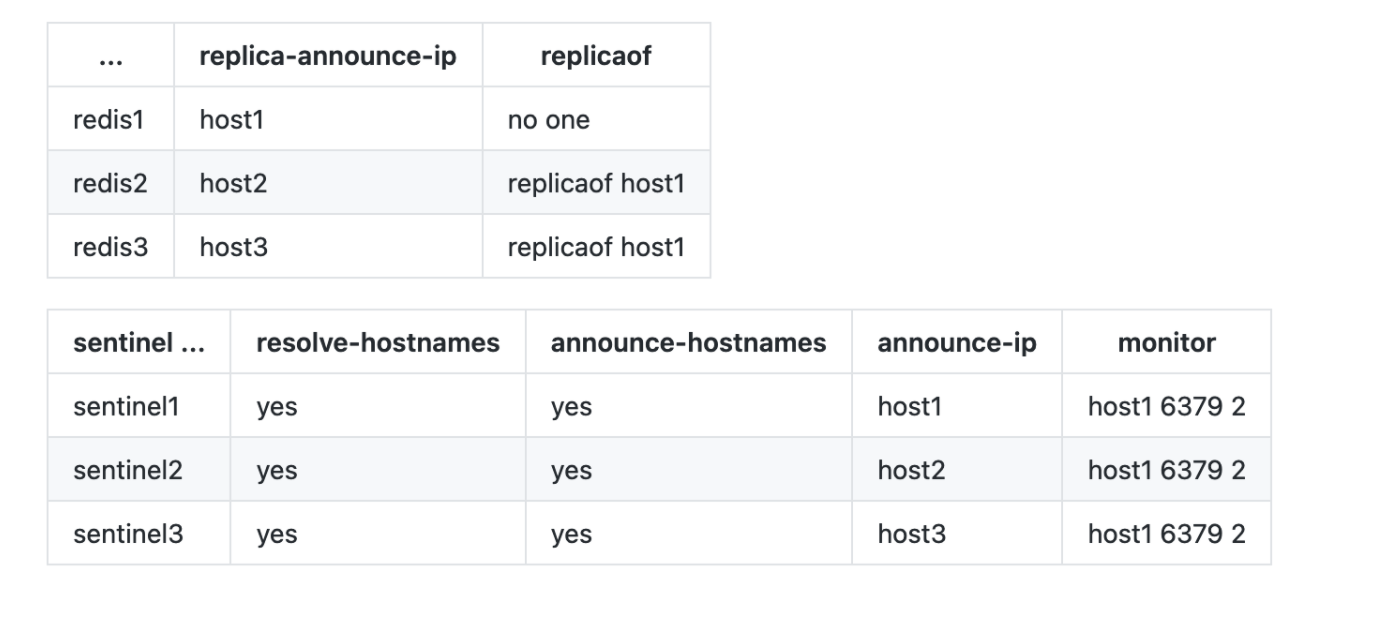
Redis Kube Spec
apiVersion: apps/v1
kind: StatefulSet
metadata:
  name: redis
spec:
  serviceName: redis
  replicas: 3
  selector:
    matchLabels:
      app: redis
  template:
    metadata:
      labels:
        app: redis
    spec:
      initContainers:
      - name: config
        image: redis:6.2.0
        command: [ "bash", "-c" ]
        args:
          - |
            cp /tmp/redis/redis.conf /etc/redis/redis.conf

            MASTER_FQDN=redis-0.redis.REDACTED
            POD_FQDN=$(hostname -f)
            echo "replica-announce-ip  $POD_FQDN" >> /etc/redis/redis.conf
            echo "replica-announce-port 6379" >> /etc/redis/redis.conf
            if [ "$POD_FQDN" =  "$MASTER_FQDN" ]; then
                echo "this is master, not updating config..."
            else
                echo "updating replica redis.conf..."
                echo "replicaof $MASTER_FQDN 6379" >> /etc/redis/redis.conf
            fi
            cat /etc/redis/redis.conf
        volumeMounts:
        - name: redis-config
          mountPath: /etc/redis/
        - name: config
          mountPath: /tmp/redis/
      containers:
      - name: redis
        image: redis:6.2.0
        command: ["redis-server"]
        args: ["/etc/redis/redis.conf"]
        ports:
        - containerPort: 6379
          name: redis
        volumeMounts:
        - name: data
          mountPath: /data
        - name: redis-config
          mountPath: /etc/redis/
      volumes:
      - name: redis-config
        emptyDir: {}
      - name: config
        configMap:
          name: redis-config
  volumeClaimTemplates:
  - metadata:
      name: data
    spec:
      accessModes: [ "ReadWriteOnce" ]
      storageClassName: scaleio
      resources:
        requests:
          storage: 100Mi

---
apiVersion: v1
kind: Service
metadata:
  name: redis
spec:
  clusterIP: None
  ports:
  - port: 6379
    targetPort: 6379
    name: redis
  selector:
    app: redis
Sentinel Kube Spec
apiVersion: apps/v1
kind: StatefulSet
metadata:
  name: sentinel
spec:
  serviceName: sentinel
  replicas: 3
  selector:
    matchLabels:
      app: sentinel
  template:
    metadata:
      labels:
        app: sentinel
    spec:
      initContainers:
      - name: config
        image: redis:6.2.0
        command: [ "sh", "-c" ]
        args:
          - |
            REDIS_PASSWORD=testpassword
            MASTER_FQDN=redis-0.redis.REDACTED
            POD_FQDN=$(hostname -f)
            echo "port 26379
            protected-mode no
            sentinel resolve-hostnames yes
            sentinel announce-hostnames yes
            sentinel announce-ip $POD_FQDN
            sentinel announce-port 26379
            sentinel monitor mymaster $MASTER_FQDN 6379 2
            sentinel down-after-milliseconds mymaster 5000
            sentinel failover-timeout mymaster 60000
            sentinel parallel-syncs mymaster 1
            sentinel auth-pass mymaster $REDIS_PASSWORD
            " > /etc/redis/sentinel.conf
            cat /etc/redis/sentinel.conf
        volumeMounts:
        - name: redis-config
          mountPath: /etc/redis/
      containers:
      - name: sentinel
        image: redis:6.2.0
        command: ["redis-server", "/etc/redis/sentinel.conf", "--sentinel"]
        ports:
        - containerPort: 26379
          name: sentinel
        volumeMounts:
        - name: redis-config
          mountPath: /etc/redis/
        - name: data
          mountPath: /data
      volumes:
      - name: redis-config
        emptyDir: {}
  volumeClaimTemplates:
  - metadata:
      name: data
    spec:
      accessModes: [ "ReadWriteOnce" ]
      storageClassName: scaleio
      resources:
        requests:
          storage: 100Mi

---
apiVersion: v1
kind: Service
metadata:
  name: sentinel
spec:
  clusterIP: None
  ports:
  - port: 26379
    targetPort: 26379
    name: sentinel
  selector:
    app: sentinel
Comment From: hwware
@satheeshaGowda I did not find something specifically goes wrong in your config, maybe is there any change happens during runtime?
Comment From: satheeshaGowda
No, not really, and its always reproducible @hwware
Comment From: yossigo
@satheeshaGowda I think the best way to confirm this is to use netstat on the sentinel node and see if there are still TCP connections established with the Redis at the old address. Assuming that's the case, we'll have to address that in one of two ways:
1) Make Sentinel explicitly reconnect after some inactivity time. 2) Use TCP_KEEPALIVE to make the socket drop itself after some time.
[1] will probably be a better fix in the long run, but [2] is easier.
This is a fairly fundamental issue, I guess this never came up before because any situation where the instance's IP changed could not be supported anyway.
Comment From: juris
Having this issue on Kubernetes with AWS CNI plugin. Can confirm that old IP address still appears in netstat output.
The same applies to replicas. If I delete a replica pod, Sentinel does not pick up the replica with the new IP. Connection to the old one is still present with SYN_SENT status.
Comment From: kenlee1988
Having this issue on Kubernetes 1.20
![Redis [BUG]Sentinel stuck with +sdown upon replica pod restart](https://www.nineya.com/upload/2025/1/2051054070293631)
![Redis [BUG]Sentinel stuck with +sdown upon replica pod restart](https://www.nineya.com/upload/2025/1/2051061254735772)
![Redis [BUG]Sentinel stuck with +sdown upon replica pod restart](https://www.nineya.com/upload/2025/1/2051102075977608)
Comment From: yossigo
@juris A SYN_SENT entry in netstat implies it's attempting to reconnect, I was actually expecting to find an ESTABLISHED entry which would indicate the connection did not drop and hangs in there due to lack of timeout.
@kenlee1988 I'm not sure your report is related to the previous issues but there's certainly a real issue there. I've put together a quick patch, but unfortunately I don't have the bandwidth at the moment to set up an environment and test it properly or validate that all similar cases are indeed covered. I'll PR that and if anyone can pick this up and test/improve that can be a great help.
Comment From: troyanov
Might be the same issue as https://github.com/redis/redis/issues/9103?
Comment From: moticless
Hope this PR will fix it. Thanks