Describe the bug
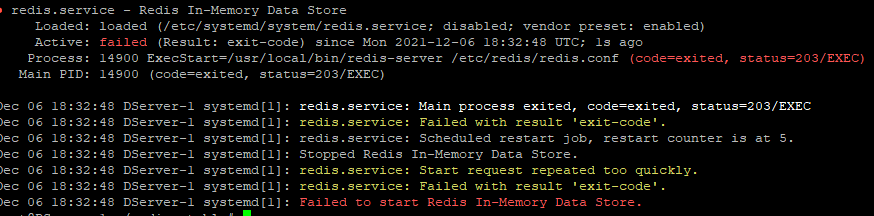
wont let me start redis
To reproduce
sudo apt install build-essential tcl pkg-config -y curl -O http://download.redis.io/redis-stable.tar.gz tar xzvf redis-stable.tar.gz cd redis-stable make
sudo mkdir /etc/redis sudo cp redis.conf /etc/redis nano /etc/redis/redis.conf
Change: supervised no to: supervised systemd and: dir ./ to: dir /var/lib/redis
Create systemd file:
sudo nano /etc/systemd/system/redis.service add the following: [Unit] Description=Redis In-Memory Data Store After=network.target
[Service] User=redis Group=redis ExecStart=/usr/local/bin/redis-server /etc/redis/redis.conf ExecStop=/usr/local/bin/redis-cli shutdown Restart=always
[Install] WantedBy=multi-user.target Create a system user and group for redis user:
sudo adduser --system --group --no-create-home redis sudo mkdir /var/lib/redis sudo chown redis:redis /var/lib/redis sudo chmod 770 /var/lib/redis Start redis:
sudo systemctl start redis Check Redis status:
sudo systemctl status redis
Expected behavior
Should just work
Additional information
Comment From: oranagra
@TimyIsCool please set the logfile config in redis.conf, and check what's in the log file
Comment From: TimyIsCool
@TimyIsCool please set the
logfileconfig in redis.conf, and check what's in the log file
how would i do that?
Comment From: oranagra
similar to your own instructions above (nano /etc/redis/redis.conf)
Comment From: TimyIsCool
what do i set it as? a dir of a file?
Comment From: oranagra
file name (read the embedded doc in that conf file)
Comment From: TimyIsCool
sorry, but i dont know what to do
Comment From: TimyIsCool
file name (read the embedded doc in that conf file)

Comment From: sundb
Do you forget to copy redis-server to /usr/local/bin.
You need to run make install after make.