Crash report
=== REDIS BUG REPORT START: Cut & paste starting from here ===
1:M 24 Feb 2022 13:48:00.049 # Redis 6.2.6 crashed by signal: 11, si_code: 1
1:M 24 Feb 2022 13:48:00.050 # Accessing address: 0x34643234333035
1:M 24 Feb 2022 13:48:00.050 # Crashed running the instruction at: 0x4000049fc3

------ STACK TRACE ------
EIP:
/opt/bitnami/redis/bin/redis-server 0.0.0.0:6379(dictSdsKeyCompare+0x33)[0x4000049fc3]

Backtrace:
/lib/x86_64-linux-gnu/libpthread.so.0(+0x12730)[0x4002182730]
/opt/bitnami/redis/bin/redis-server 0.0.0.0:6379(dictSdsKeyCompare+0x33)[0x4000049fc3]
/opt/bitnami/redis/bin/redis-server 0.0.0.0:6379(dictAddRaw+0x15d)[0x4000048f4d]
/opt/bitnami/redis/bin/redis-server 0.0.0.0:6379(dictAdd+0x1a)[0x40000490fa]
/opt/bitnami/redis/bin/redis-server 0.0.0.0:6379(zsetAdd+0x16c)[0x400008c44c]
/opt/bitnami/redis/bin/redis-server 0.0.0.0:6379(zaddGenericCommand+0x38d)[0x400008d1ad]
/opt/bitnami/redis/bin/redis-server 0.0.0.0:6379(call+0xa1)[0x400004e1e1]
/opt/bitnami/redis/bin/redis-server 0.0.0.0:6379(execCommand+0x1f4)[0x40000a0524]
/opt/bitnami/redis/bin/redis-server 0.0.0.0:6379(loadAppendOnlyFile+0x639)[0x400009e419]
/opt/bitnami/redis/bin/redis-server 0.0.0.0:6379(loadDataFromDisk+0x13c)[0x40000543fc]
/opt/bitnami/redis/bin/redis-server 0.0.0.0:6379(main+0x2b8)[0x4000043698]
/lib/x86_64-linux-gnu/libc.so.6(__libc_start_main+0xeb)[0x40021b509b]
/opt/bitnami/redis/bin/redis-server 0.0.0.0:6379(_start+0x2a)[0x4000043bea]

------ REGISTERS ------
1:M 24 Feb 2022 13:48:00.060 #
RAX:000000400004a080 RBX:000000400a2111cb
RCX:0000000000000024 RDX:6634643234333036
RDI:000000400a2111cb RSI:0000004000195398
RBP:0000004001c31010 RSP:0000004001c30fa8
R8 :000000400b03a64b R9 :0000004005c47650
R10:000000000000000e R11:0000fffffffffffe
R12:a9d9bfd3ba1e740a R13:000000000000040a
R14:0000000000000000 R15:0000004005c47620
RIP:0000004000049fc3 EFL:0000000000000213
CSGSFS:002b000000000033
1:M 24 Feb 2022 13:48:00.060 # (0000004001c30fb7) -> 000000400a2111a3
1:M 24 Feb 2022 13:48:00.060 # (0000004001c30fb6) -> 00000040000490fa
1:M 24 Feb 2022 13:48:00.060 # (0000004001c30fb5) -> 0000004001c31040
1:M 24 Feb 2022 13:48:00.060 # (0000004001c30fb4) -> 0000004001c31114
1:M 24 Feb 2022 13:48:00.060 # (0000004001c30fb3) -> 0000004001c31118
1:M 24 Feb 2022 13:48:00.060 # (0000004001c30fb2) -> 000000400a211108
1:M 24 Feb 2022 13:48:00.060 # (0000004001c30fb1) -> 000000400a2111a3
1:M 24 Feb 2022 13:48:00.060 # (0000004001c30fb0) -> 0000004005c47620
1:M 24 Feb 2022 13:48:00.060 # (0000004001c30faf) -> 0000004001c31040
1:M 24 Feb 2022 13:48:00.060 # (0000004001c30fae) -> 000000400b03a64b
1:M 24 Feb 2022 13:48:00.060 # (0000004001c30fad) -> 0000004005c47650
1:M 24 Feb 2022 13:48:00.060 # (0000004001c30fac) -> 0000000000002050
1:M 24 Feb 2022 13:48:00.060 # (0000004001c30fab) -> 0000004005c47670
1:M 24 Feb 2022 13:48:00.060 # (0000004001c30faa) -> 0000004005c47630
1:M 24 Feb 2022 13:48:00.060 # (0000004001c30fa9) -> 0000004001c30fe0
1:M 24 Feb 2022 13:48:00.060 # (0000004001c30fa8) -> 0000004000048f4d

------ INFO OUTPUT ------
# Server
redis_version:6.2.6
redis_git_sha1:00000000
redis_git_dirty:0
redis_build_id:40f6d3ded4e576d9
redis_mode:standalone
os:Linux 5.10.76-linuxkit x86_64
arch_bits:64
multiplexing_api:epoll
atomicvar_api:c11-builtin
gcc_version:8.3.0
process_id:1
process_supervised:no
run_id:8dc6e00a1c11342826c4b1915f6883e8ae087f85
tcp_port:6379
server_time_usec:1645710480048610
uptime_in_seconds:5
uptime_in_days:0
hz:10
configured_hz:10
lru_clock:1543306
executable:/opt/bitnami/redis/bin/redis-server
config_file:/opt/bitnami/redis/etc/redis.conf
io_threads_active:0

# Clients
connected_clients:0
cluster_connections:0
maxclients:10000
client_recent_max_input_buffer:0
client_recent_max_output_buffer:0
blocked_clients:0
tracking_clients:0
clients_in_timeout_table:0

# Memory
used_memory:109558080
used_memory_human:104.48M
used_memory_rss:0
used_memory_rss_human:0B
used_memory_peak:117882312
used_memory_peak_human:112.42M
used_memory_peak_perc:92.94%
used_memory_overhead:2020376
used_memory_startup:810088
used_memory_dataset:107537704
used_memory_dataset_perc:98.89%
allocator_allocated:109598136
allocator_active:117264384
allocator_resident:122642432
total_system_memory:6227804160
total_system_memory_human:5.80G
used_memory_lua:37888
used_memory_lua_human:37.00K
used_memory_scripts:0
used_memory_scripts_human:0B
number_of_cached_scripts:0
maxmemory:0
maxmemory_human:0B
maxmemory_policy:noeviction
allocator_frag_ratio:1.07
allocator_frag_bytes:7666248
allocator_rss_ratio:1.05
allocator_rss_bytes:5378048
rss_overhead_ratio:0.00
rss_overhead_bytes:-122642432
mem_fragmentation_ratio:0.00
mem_fragmentation_bytes:-109530976
mem_not_counted_for_evict:0
mem_replication_backlog:0
mem_clients_slaves:0
mem_clients_normal:0
mem_aof_buffer:0
mem_allocator:jemalloc-5.1.0
active_defrag_running:0
lazyfree_pending_objects:0
lazyfreed_objects:0

# Persistence
loading:1
current_cow_size:0
current_cow_size_age:0
current_fork_perc:0.00
current_save_keys_processed:0
current_save_keys_total:0
rdb_changes_since_last_save:268436
rdb_bgsave_in_progress:0
rdb_last_save_time:1645710475
rdb_last_bgsave_status:ok
rdb_last_bgsave_time_sec:-1
rdb_current_bgsave_time_sec:-1
rdb_last_cow_size:0
aof_enabled:0
aof_rewrite_in_progress:0
aof_rewrite_scheduled:0
aof_last_rewrite_time_sec:-1
aof_current_rewrite_time_sec:-1
aof_last_bgrewrite_status:ok
aof_last_write_status:ok
aof_last_cow_size:0
module_fork_in_progress:0
module_fork_last_cow_size:0
aof_current_size:0
aof_base_size:0
aof_pending_rewrite:0
aof_buffer_length:0
aof_rewrite_buffer_length:0
aof_pending_bio_fsync:0
aof_delayed_fsync:0
loading_start_time:1645710475
loading_total_bytes:120511889
loading_rdb_used_mem:70428624
loading_loaded_bytes:112653660
loading_loaded_perc:93.48
loading_eta_seconds:0

# Stats
total_connections_received:0
total_commands_processed:75003
instantaneous_ops_per_sec:0
total_net_input_bytes:0
total_net_output_bytes:0
instantaneous_input_kbps:0.00
instantaneous_output_kbps:0.00
rejected_connections:0
sync_full:0
sync_partial_ok:0
sync_partial_err:0
expired_keys:0
expired_stale_perc:0.00
expired_time_cap_reached_count:0
expire_cycle_cpu_milliseconds:0
evicted_keys:0
keyspace_hits:0
keyspace_misses:0
pubsub_channels:0
pubsub_patterns:0
latest_fork_usec:0
total_forks:0
migrate_cached_sockets:0
slave_expires_tracked_keys:0
active_defrag_hits:0
active_defrag_misses:0
active_defrag_key_hits:0
active_defrag_key_misses:0
tracking_total_keys:0
tracking_total_items:0
tracking_total_prefixes:0
unexpected_error_replies:0
total_error_replies:0
dump_payload_sanitizations:0
total_reads_processed:0
total_writes_processed:0
io_threaded_reads_processed:0
io_threaded_writes_processed:0

# Replication
role:master
connected_slaves:0
master_failover_state:no-failover
master_replid:55abb53945fe5a4a9e19226b01dd6fb0b3eae260
master_replid2:0000000000000000000000000000000000000000
master_repl_offset:0
second_repl_offset:-1
repl_backlog_active:0
repl_backlog_size:1048576
repl_backlog_first_byte_offset:0
repl_backlog_histlen:0

# CPU
used_cpu_sys:1.175487
used_cpu_user:4.461741
used_cpu_sys_children:0.366965
used_cpu_user_children:0.881499
used_cpu_sys_main_thread:1.173902
used_cpu_user_main_thread:4.453474

# Modules

# Commandstats

# Errorstats

# Cluster
cluster_enabled:0

# Keyspace
db0:keys=22457,expires=1395,avg_ttl=0

------ CLIENT LIST OUTPUT ------

------ MODULES INFO OUTPUT ------

------ FAST MEMORY TEST ------
1:M 24 Feb 2022 13:48:00.069 # Bio thread for job type #0 terminated
1:M 24 Feb 2022 13:48:00.069 # Bio thread for job type #1 terminated
1:M 24 Feb 2022 13:48:00.070 # Bio thread for job type #2 terminated
*** Preparing to test memory region 4000205000 (2547712 bytes)
*** Preparing to test memory region 4001c5b000 (12288 bytes)
*** Preparing to test memory region 4001de4000 (8192 bytes)
*** Preparing to test memory region 400216c000 (16384 bytes)
*** Preparing to test memory region 400218d000 (16384 bytes)
*** Preparing to test memory region 400234e000 (40960 bytes)
*** Preparing to test memory region 4002600000 (2097152 bytes)
*** Preparing to test memory region 4002958000 (2097152 bytes)
*** Preparing to test memory region 4003000000 (4194304 bytes)
*** Preparing to test memory region 4003558000 (8388608 bytes)
*** Preparing to test memory region 4003d59000 (8388608 bytes)
*** Preparing to test memory region 400455a000 (8388608 bytes)
*** Preparing to test memory region 4004d5b000 (8388608 bytes)
*** Preparing to test memory region 400555b000 (141557760 bytes)
.O.O.O.O.O.O.O.O.O.O.O.O.O.O
Fast memory test PASSED, however your memory can still be broken. Please run a memory test for several hours if possible.

------ DUMPING CODE AROUND EIP ------
Symbol: dictSdsKeyCompare (base: 0x4000049f90)
Module: /opt/bitnami/redis/bin/redis-server 0.0.0.0:6379 (base 0x4000000000)
$ xxd -r -p /tmp/dump.hex /tmp/dump.bin
$ objdump --adjust-vma=0x4000049f90 -D -b binary -m i386:x86-64 /tmp/dump.bin
------
1:M 24 Feb 2022 13:48:01.130 # dump of function (hexdump of 112 bytes):
0fb64eff4889f789c883e0073c040f87f5000000488d35edb314000fb6c0486304864801f0ffe0660f1f8400000000008b4ff7440fb642ff4489c083e0073c040f8790000000488d35cfb314000fb6c0486304864801f0ffe00f1f8000000000448b42f731c04439c17529554889d648

=== REDIS BUG REPORT END. Make sure to include from START to END. ===
Additional information
- Mac M1
- Docker
Comment From: enjoy-binbin
did you have any reproduce steps? i see it came from AOF load, and crash on exec | zadd, any chance that you can upload the AOF file?
/opt/bitnami/redis/bin/redis-server 0.0.0.0:6379(dictSdsKeyCompare+0x33)[0x4000049fc3]
/opt/bitnami/redis/bin/redis-server 0.0.0.0:6379(dictAddRaw+0x15d)[0x4000048f4d]
/opt/bitnami/redis/bin/redis-server 0.0.0.0:6379(dictAdd+0x1a)[0x40000490fa]
/opt/bitnami/redis/bin/redis-server 0.0.0.0:6379(zsetAdd+0x16c)[0x400008c44c]
/opt/bitnami/redis/bin/redis-server 0.0.0.0:6379(zaddGenericCommand+0x38d)[0x400008d1ad]
/opt/bitnami/redis/bin/redis-server 0.0.0.0:6379(call+0xa1)[0x400004e1e1]
/opt/bitnami/redis/bin/redis-server 0.0.0.0:6379(execCommand+0x1f4)[0x40000a0524]
/opt/bitnami/redis/bin/redis-server 0.0.0.0:6379(loadAppendOnlyFile+0x639)[0x400009e419]
/opt/bitnami/redis/bin/redis-server 0.0.0.0:6379(loadDataFromDisk+0x13c)[0x40000543fc]
Comment From: sundb
Same as #10162. Can you upload your docker-compose.yml?
Comment From: bartkappenburg
Relevant part of the docker-compose.yml:
redis:
    image: 'bitnami/redis:6.2.6'
    environment:
      - ALLOW_EMPTY_PASSWORD=yes
      - BITNAMI_DEBUG=true
    ports:
      - 6379:6379
    volumes:
      - /bitnami/redis/data
Comment From: sundb
@bartkappenburg Thanks, can you check if there is qemu-system-aarch64 process on your mac when you start the redis docker?
Comment From: bartkappenburg
Yes, there is:
bartkappenburg@MacBook-Air-van-Bart` ~ % ps -ax | grep qemu
 5088 ??       6136:33.58 /Applications/Docker.app/Contents/MacOS/qemu-system-aarch64 -accel hvf -cpu host -machine virt,highmem=off -m 6144 -smp 4 -kernel /Applications/Docker.app/Contents/Resources/linuxkit/kernel -append page_poison=1 vsyscall=emulate panic=1 nospec_store_bypass_disable noibrs noibpb no_stf_barrier mitigations=off linuxkit.unified_cgroup_hierarchy=1   vpnkit.connect=tcp+bootstrap+client://192.168.65.2:50721/f60310c4a9a7b4898e3d9d878c939f43b92129c13fed21a538da37842bb086ec console=ttyAMA0 -initrd /Applications/Docker.app/Contents/Resources/linuxkit/initrd.img -serial pipe:/var/folders/ms/9m3_648j55j5ksw8gnvw0zbc0000gn/T/qemu-console775062191/fifo -drive if=none,file=/Users/bartkappenburg/Library/Containers/com.docker.docker/Data/vms/0/data/Docker.raw,format=raw,id=hd0 -device virtio-blk-pci,drive=hd0,serial=dummyserial -netdev socket,id=net1,fd=3 -device virtio-net-device,netdev=net1,mac=02:50:00:00:00:01 -vga none -nographic -monitor none
This is the last line of the crash in docker by the way:
qemu: uncaught target signal 11 (Segmentation fault) - core dumped
Comment From: sundb
Same as #9561. @bartkappenburg Since the docker image you are using is built with linux/amd(default), but docker in m1 dose not support use it directly, it needs to run it with qumu. I've tried to reproduct the issue with m1 before, and it looks like due to qumu. Perhaps ypu can use a redis docker image that supports linux/arm64. I'll do more tests stomorrow.
Comment From: bartkappenburg
Thanks! I will search for a linux/arm64 image. Let me know if you find anything else! Much appreciated.
Comment From: ashtul
@sundb any news?
Comment From: ashtul
You can try using the container which is built for arm64 redisfab/redis:6.2.6-arm64v8-bionic
Comment From: sundb
@ashtul I reproduced the crash you mentioned by using bitnami/redis:6.2.6, but I'm not sure why it crash yes, I'm still working on it.
I also tried official redis docker image(https://hub.docker.com/_/redis), and it does not crash.
Comment From: sundb
It seems that docker has given the appropriate hints.

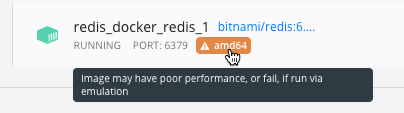
@ashtul I ran a test that crashes under bitnami/redis:6.2.6, and not under redisfab/redis:6.2.6-arm64v8-bionic, which seems to be due to bitnami use qemu.
Comment From: sundb
@bartkappenburg @ashtul I should have found the problem, it was indeed a bug caused by qemu. https://lists.nongnu.org/archive/html/qemu-devel/2020-05/msg03119.html https://github.com/jemalloc/jemalloc/pull/2005
I added an assertion to the 6.2.6 code and found that calloc does not zero out the memory, causing a crash.
# dict.c
n.table = zcalloc(realsize*sizeof(dictEntry*));
for (size_t i = 0; i < realsize; i++) {
    assert(n.table[i] == NULL);
}
crash log
=== REDIS BUG REPORT START: Cut & paste starting from here ===
41825:M 28 Feb 2022 10:39:43.987 # === ASSERTION FAILED ===
41825:M 28 Feb 2022 10:39:43.987 # ==> dict.c:176 'n.table[i] == NULL' is not true
Comment From: sundb
@oranagra Is it worthwhile to backport jemalloc 5.2.1 to 6 only for qemu?
Comment From: oranagra
so it's a bug on jemalloc that causes it to not zero memory on calloc only qemu over arm. i don't think we can afford to change the jemalloc version what we ship with redis on a patch-level release, but maybe we can backport just that fix. or we can just ask these users to upgrade to the latest redis (7.0). @yossigo WDYT?
Comment From: sundb
@oranagra I was wrong, this pr(jemalloc/jemalloc#2005) doesn't fix the qemu bug, it just gives a warning. And jemalloc 5.2.1 does not include the commit of this pr. My tests with unstable also crash.
Comment From: oranagra
So jemalloc doesn't have a fix for this (rather old) issue? and is practically unusable on qemu/arm?
Comment From: sundb
So jemalloc doesn't have a fix for this (rather old) issue? and is practically unusable on qemu/arm?
Yes. It is possible that not only arm, just using qemu can cause problems.
It looks like all we can do is remind users not to use it, or add a warning.
Clickhouse also encountered the same problem: https://github.com/ClickHouse-Extras/jemalloc/pull/1
Comment From: oranagra
another alternative is build redis with libc malloc.
Comment From: sundb
The awkward part is that the docker image doesn't know it's going to be running on qemu, it's already using jemalloc when building. Unless the user knows they want to run on qemu.
Comment From: oranagra
maybe someone needs to make another image just for that purpose 8-(
Comment From: oranagra
closing, see https://github.com/redis/redis/issues/10162#issuecomment-1072375709
Comment From: davidpenso
@bartkappenburg @sundb anyone know how to fix this issue?
Comment From: sundb
@davidpenso Use the docker images in comment https://github.com/redis/redis/issues/10162#issuecomment-1072359526.