Describe the bug
The Redis cluster looses configuration when nodes reboot.
- Both appendonly and rdb saves are enabled.
- Running in docker with network mode set to "host" and read-write volumes for storing data and config.
This is a 15 nodes cluster, running on 5 servers (so 3 nodes per server). Initiated with 2 replications per master (so there is 5 masters, 10 replicas) -- goal being that we can loose up to 2 servers.
When rebooting all hosts simultaneously, the configuration of the cluster has changed after the boot... some master node have now have 3 or 4 replicas, others only 1 replica...
The cluster has no data (it's being deployed and configured for future use), but I'm concerned to go in production without figuring this problem.
To reproduce
- Initiate a 5x3 nodes redis cluster with the docker-compose file below.
- Initiate cluster mode:
redis-cli --cluster create host:port... --cluster-replicas 2. - Reboot all servers.
Expected behavior
I expected each master to have 2 replicas after reboot (so my redundancy preference is kept).
Additional information
The docker-compose file used on all 5 servers, generated with Ansible.
---
version: '3.0'
services:

{% for db in databases %}
{% for i in [0, 1, 2] %}
  redis_{{ db }}{{ i }}:
    container_name: redis_{{ db }}{{ i }}
    restart: always
    image: redis:6-alpine
    network_mode: host
    volumes:
      - /opt/redis/data/{{ db }}{{ i }}:/data
      - /opt/redis/config/{{ db }}{{ i }}:/config
    command: >
      redis-server
      --save 600 1
      --appendonly yes
      --loglevel warning
      --bind {{ vlan0 }}
      --port {{ redis_port[db][i] }}
      --databases 1
      --cluster-enabled yes
      --cluster-config-file /config/nodes.conf

{% endfor %}
{% endfor %}
Comment From: hwware
Hi @j3k0 Can I understand you have the issue with the following config in a cluster?
5 master and 10 replicas, with enable appendonly and rdb saves options and the redis version is 6.0 or higher version such as 6.2 or 7.0?
Thanks
Comment From: j3k0
Yes, I attached the docker-compose file which shows the exact configuration and versions:
- Image:
redis:6-alpine(pulled a couple of days ago) - Command:
redis-server
      --save 600 1
      --appendonly yes
      --loglevel warning
      --bind {{ vlan0 }}
      --port {{ redis_port[db][i] }}
      --databases 1
      --cluster-enabled yes
      --cluster-config-file /config/nodes.conf
Comment From: j3k0
@hwware any idea what I should look at to figure out how the cluster configuration is lost?
Comment From: uvletter
hi @j3k0, can you post the cluster nodes outputs of problem node before and after the reboot?
Comment From: j3k0
This isn't 100% predictable. Happens only on some reboots.
To simplify the context, I disabled rdb saves, only appendonly is enabled (and dump files removed).
Here for example:
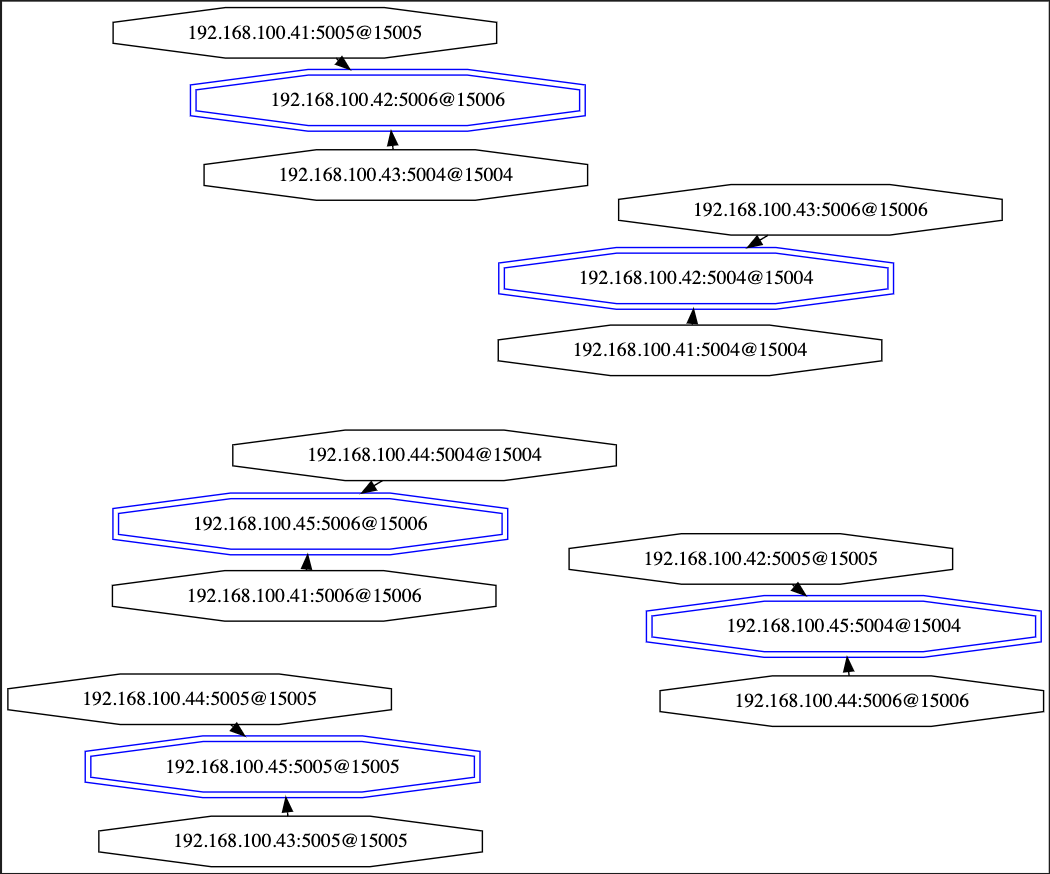
Before (masters in blue - nodes that changed config highlighted in color -- same as below graphs):
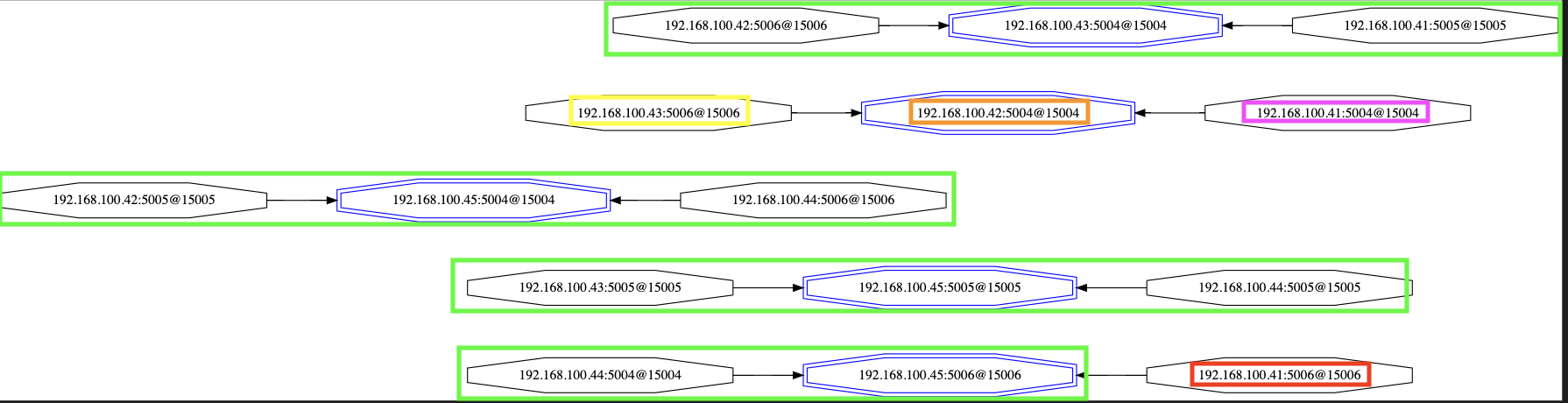
After rebooting all servers: Red node somehow joined a different group...
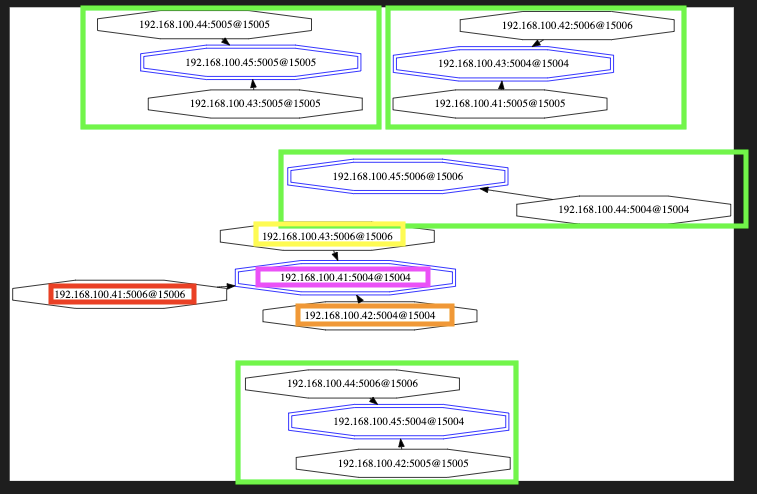
After rebooting only .41, .43 and .44: Red node now replicates a replica...
Comment From: uvletter
Thanks for your graphs, it's very vivid. As for the second graph, can you provide the log in the red node(i.e. 192.168.41:5006), it's a little bit odd that it joined a different group.
BTW, cluster nodes is a command to let redis tell the cluster topology, which shows a more detailed raw informations. It would be better if you can also provide this : )
Comment From: hwware
@j3k0 Sorry for delaying response for you. I need take some time to learn something about docker-compose because I am not familar with that part.
And Thanks for your picture. I summarize your network structure as below:
master: 192.168.100.43:5004 slave: 192.168.100.42:5006 192.168.100.41:5005
master: 192.168.100.42:5004 slave: 192.168.100.43:5006 192.168.100.41:5004
master: 192.168.100.45:5004 slave: 192.168.100.42:5005 192.168.100.44:5006
master: 192.168.100.45:5005 slave: 192.168.100.43:5005 192.168.100.44:5005
master: 192.168.100.44:5004 slave: 192.168.100.45:5006 192.168.100.41:5006
I found the group (master: 192.168.100.44:5004 slave: 192.168.100.45:5006 192.168.100.41:5006) changes after rebooting all nodes and other group still keeps as before: I have 2 questions for it:
- If the issue always happens in this group -- master: 192.168.100.44:5004 slave: 192.168.100.45:5006 192.168.100.41:5006
- If you do not use this group, and only includes 4 master nodes and 8 replicas node in the cluster, the issue still happens?
Thanks.
Comment From: j3k0
Sure.
Now we're in the buggy state, I'm running cluster nodes from .42:5004 and .41:5006.
# redis-cli -h 192.168.100.42 -p 5004 CLUSTER NODES
0b42f5d63a26f95e4d4061e6476099242efa29a2 192.168.100.42:5006@15006 master - 0 1653412310000 54 connected 6554-9829
894eb6eb357de3103a2e778b93358f23be7f68b5 192.168.100.41:5005@15005 slave 0b42f5d63a26f95e4d4061e6476099242efa29a2 0 1653412309923 54 connected
89b83937cb7e478bc97a1b7fa0ab12225eeaec1f 192.168.100.45:5004@15004 master - 0 1653412310524 23 connected 13107-16383
8b52c017790fcbc707d97a665573073ad1f618ca 192.168.100.42:5004@15004 myself,master - 0 1653412304000 55 connected 0-3276
95d46662312d464e6969c84e727932367b05032c 192.168.100.44:5006@15006 slave 89b83937cb7e478bc97a1b7fa0ab12225eeaec1f 0 1653412309000 23 connected
51dc2dc93c12dafede60c80fbc8c863f567ea471 192.168.100.41:5004@15004 slave 8b52c017790fcbc707d97a665573073ad1f618ca 0 1653412306000 55 connected
74a50110f6bf99d651fd029b0e1da4a1b2115044 192.168.100.43:5006@15006 slave 8b52c017790fcbc707d97a665573073ad1f618ca 0 1653412306000 55 connected
226106848958b59199f2c253966a14c39b0e1f38 192.168.100.42:5005@15005 slave 89b83937cb7e478bc97a1b7fa0ab12225eeaec1f 0 1653412309000 23 connected
e2e34814fa91b3ce49378210b2227d2b88f7c30f 192.168.100.43:5004@15004 slave 0b42f5d63a26f95e4d4061e6476099242efa29a2 0 1653412309000 54 connected
096e6fb32cc6ebe8ba2fe61def121f9b5c51216a 192.168.100.41:5006@15006 slave 51dc2dc93c12dafede60c80fbc8c863f567ea471 0 1653412310926 55 connected
a1fbcbff7da750ec8d33bf14a59b913dffeceb7f 192.168.100.45:5005@15005 master - 0 1653412308000 41 connected 3277-6553
45f0ac04929c8f6f9420cc36bb48274a1db46ba0 192.168.100.44:5005@15005 slave a1fbcbff7da750ec8d33bf14a59b913dffeceb7f 0 1653412307514 41 connected
c888ce5346a2458224b07dee3578870d74a91f46 192.168.100.44:5004@15004 slave fab0578f1a3890740b97453d2c5c70f4999f01e1 0 1653412311528 42 connected
fab0578f1a3890740b97453d2c5c70f4999f01e1 192.168.100.45:5006@15006 master - 0 1653412308000 42 connected 9830-13106
3640507d72415a87c5409b4ebc911abe43956a66 192.168.100.43:5005@15005 slave a1fbcbff7da750ec8d33bf14a59b913dffeceb7f 0 1653412310000 41 connected
# redis-cli -h 192.168.100.41 -p 5006 CLUSTER NODES
096e6fb32cc6ebe8ba2fe61def121f9b5c51216a 192.168.100.41:5006@15006 myself,slave 51dc2dc93c12dafede60c80fbc8c863f567ea471 0 1653412318000 55 connected
95d46662312d464e6969c84e727932367b05032c 192.168.100.44:5006@15006 slave 89b83937cb7e478bc97a1b7fa0ab12225eeaec1f 0 1653412320860 23 connected
a1fbcbff7da750ec8d33bf14a59b913dffeceb7f 192.168.100.45:5005@15005 master - 0 1653412318853 41 connected 3277-6553
226106848958b59199f2c253966a14c39b0e1f38 192.168.100.42:5005@15005 slave 89b83937cb7e478bc97a1b7fa0ab12225eeaec1f 0 1653412317000 23 connected
c888ce5346a2458224b07dee3578870d74a91f46 192.168.100.44:5004@15004 slave fab0578f1a3890740b97453d2c5c70f4999f01e1 0 1653412320559 42 connected
89b83937cb7e478bc97a1b7fa0ab12225eeaec1f 192.168.100.45:5004@15004 master - 0 1653412319856 23 connected 13107-16383
fab0578f1a3890740b97453d2c5c70f4999f01e1 192.168.100.45:5006@15006 master - 0 1653412318000 42 connected 9830-13106
894eb6eb357de3103a2e778b93358f23be7f68b5 192.168.100.41:5005@15005 slave 0b42f5d63a26f95e4d4061e6476099242efa29a2 0 1653412318000 54 connected
e2e34814fa91b3ce49378210b2227d2b88f7c30f 192.168.100.43:5004@15004 slave 0b42f5d63a26f95e4d4061e6476099242efa29a2 0 1653412321863 54 connected
8b52c017790fcbc707d97a665573073ad1f618ca 192.168.100.42:5004@15004 master - 0 1653412320000 55 connected 0-3276
51dc2dc93c12dafede60c80fbc8c863f567ea471 192.168.100.41:5004@15004 slave 8b52c017790fcbc707d97a665573073ad1f618ca 0 1653412316000 55 connected
45f0ac04929c8f6f9420cc36bb48274a1db46ba0 192.168.100.44:5005@15005 slave a1fbcbff7da750ec8d33bf14a59b913dffeceb7f 0 1653412316000 41 connected
0b42f5d63a26f95e4d4061e6476099242efa29a2 192.168.100.42:5006@15006 master - 0 1653412317848 54 connected 6554-9829
3640507d72415a87c5409b4ebc911abe43956a66 192.168.100.43:5005@15005 slave a1fbcbff7da750ec8d33bf14a59b913dffeceb7f 0 1653412317000 41 connected
74a50110f6bf99d651fd029b0e1da4a1b2115044 192.168.100.43:5006@15006 slave 8b52c017790fcbc707d97a665573073ad1f618ca 0 1653412319000 55 connected
Getting the cluster back in a correct state (each master having 2 replicas), by running:
# redis-cli -h 192.168.100.41 -p 5006 CLUSTER REPLICATE fab0578f1a3890740b97453d2c5c70f4999f01e1
Now here is the cluster nodes output:
# redis-cli -h 192.168.100.41 -p 5006 cluster nodes
096e6fb32cc6ebe8ba2fe61def121f9b5c51216a 192.168.100.41:5006@15006 myself,slave 51dc2dc93c12dafede60c80fbc8c863f567ea471 0 1653412318000 55 connected
95d46662312d464e6969c84e727932367b05032c 192.168.100.44:5006@15006 slave 89b83937cb7e478bc97a1b7fa0ab12225eeaec1f 0 1653412320860 23 connected
a1fbcbff7da750ec8d33bf14a59b913dffeceb7f 192.168.100.45:5005@15005 master - 0 1653412318853 41 connected 3277-6553
226106848958b59199f2c253966a14c39b0e1f38 192.168.100.42:5005@15005 slave 89b83937cb7e478bc97a1b7fa0ab12225eeaec1f 0 1653412317000 23 connected
c888ce5346a2458224b07dee3578870d74a91f46 192.168.100.44:5004@15004 slave fab0578f1a3890740b97453d2c5c70f4999f01e1 0 1653412320559 42 connected
89b83937cb7e478bc97a1b7fa0ab12225eeaec1f 192.168.100.45:5004@15004 master - 0 1653412319856 23 connected 13107-16383
fab0578f1a3890740b97453d2c5c70f4999f01e1 192.168.100.45:5006@15006 master - 0 1653412318000 42 connected 9830-13106
894eb6eb357de3103a2e778b93358f23be7f68b5 192.168.100.41:5005@15005 slave 0b42f5d63a26f95e4d4061e6476099242efa29a2 0 1653412318000 54 connected
e2e34814fa91b3ce49378210b2227d2b88f7c30f 192.168.100.43:5004@15004 slave 0b42f5d63a26f95e4d4061e6476099242efa29a2 0 1653412321863 54 connected
8b52c017790fcbc707d97a665573073ad1f618ca 192.168.100.42:5004@15004 master - 0 1653412320000 55 connected 0-3276
51dc2dc93c12dafede60c80fbc8c863f567ea471 192.168.100.41:5004@15004 slave 8b52c017790fcbc707d97a665573073ad1f618ca 0 1653412316000 55 connected
45f0ac04929c8f6f9420cc36bb48274a1db46ba0 192.168.100.44:5005@15005 slave a1fbcbff7da750ec8d33bf14a59b913dffeceb7f 0 1653412316000 41 connected
0b42f5d63a26f95e4d4061e6476099242efa29a2 192.168.100.42:5006@15006 master - 0 1653412317848 54 connected 6554-9829
3640507d72415a87c5409b4ebc911abe43956a66 192.168.100.43:5005@15005 slave a1fbcbff7da750ec8d33bf14a59b913dffeceb7f 0 1653412317000 41 connected
74a50110f6bf99d651fd029b0e1da4a1b2115044 192.168.100.43:5006@15006 slave 8b52c017790fcbc707d97a665573073ad1f618ca 0 1653412319000 55 connected
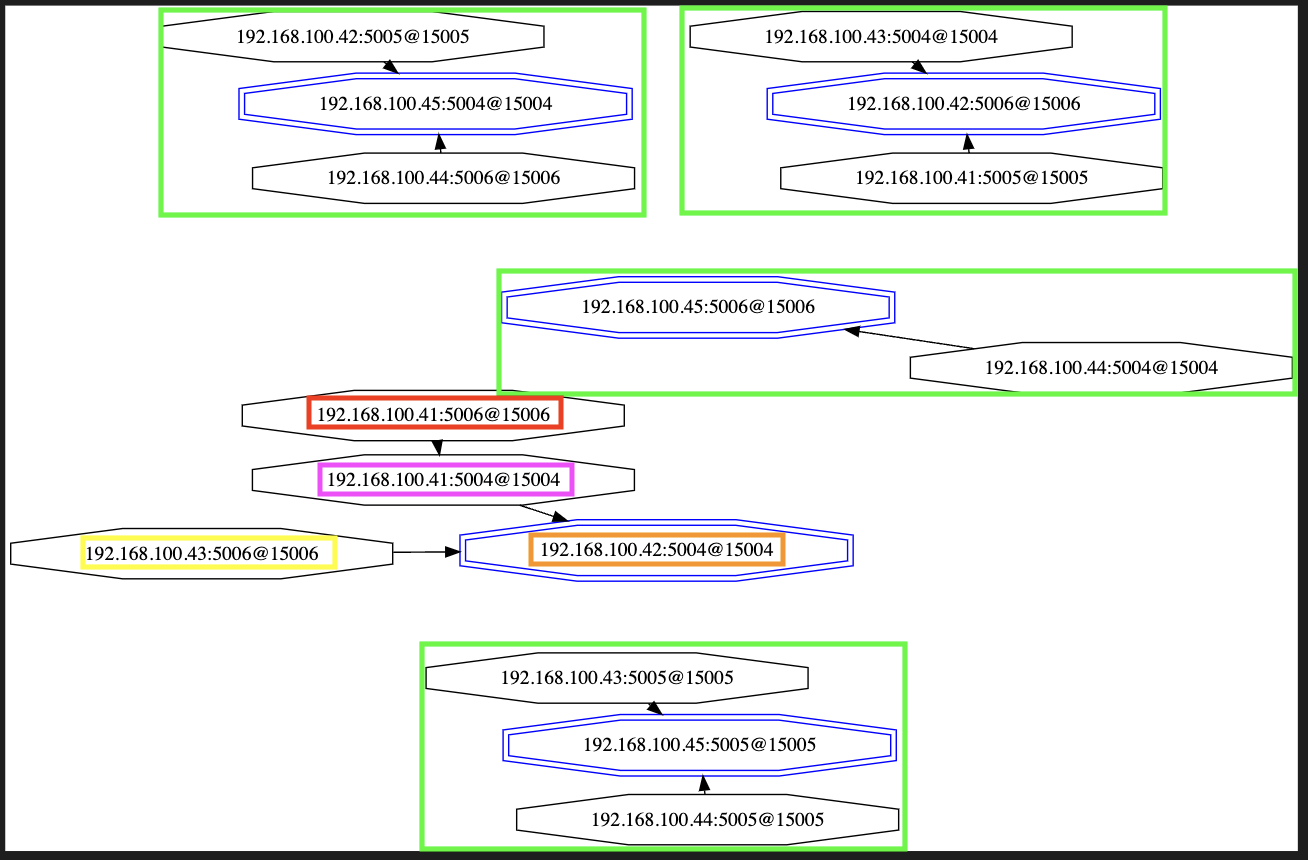
And a vivid graph :-)
After rebooting server .41
cluster nodes is still correct:
# redis-cli -h 192.168.100.41 -p 5006 cluster nodes
894eb6eb357de3103a2e778b93358f23be7f68b5 192.168.100.41:5005@15005 slave 0b42f5d63a26f95e4d4061e6476099242efa29a2 0 1653412876000 54 connected
74a50110f6bf99d651fd029b0e1da4a1b2115044 192.168.100.43:5006@15006 slave 8b52c017790fcbc707d97a665573073ad1f618ca 0 1653412878287 55 connected
51dc2dc93c12dafede60c80fbc8c863f567ea471 192.168.100.41:5004@15004 slave 8b52c017790fcbc707d97a665573073ad1f618ca 0 1653412877278 55 connected
e2e34814fa91b3ce49378210b2227d2b88f7c30f 192.168.100.43:5004@15004 slave 0b42f5d63a26f95e4d4061e6476099242efa29a2 0 1653412876000 54 connected
226106848958b59199f2c253966a14c39b0e1f38 192.168.100.42:5005@15005 slave 89b83937cb7e478bc97a1b7fa0ab12225eeaec1f 0 1653412875000 23 connected
c888ce5346a2458224b07dee3578870d74a91f46 192.168.100.44:5004@15004 slave fab0578f1a3890740b97453d2c5c70f4999f01e1 0 1653412875000 42 connected
0b42f5d63a26f95e4d4061e6476099242efa29a2 192.168.100.42:5006@15006 master - 0 1653412876580 54 connected 6554-9829
8b52c017790fcbc707d97a665573073ad1f618ca 192.168.100.42:5004@15004 master - 0 1653412875000 55 connected 0-3276
95d46662312d464e6969c84e727932367b05032c 192.168.100.44:5006@15006 slave 89b83937cb7e478bc97a1b7fa0ab12225eeaec1f 0 1653412876000 23 connected
fab0578f1a3890740b97453d2c5c70f4999f01e1 192.168.100.45:5006@15006 master - 0 1653412877590 42 connected 9830-13106
096e6fb32cc6ebe8ba2fe61def121f9b5c51216a 192.168.100.41:5006@15006 myself,slave fab0578f1a3890740b97453d2c5c70f4999f01e1 0 1653412873000 42 connected
a1fbcbff7da750ec8d33bf14a59b913dffeceb7f 192.168.100.45:5005@15005 master - 0 1653412876000 41 connected 3277-6553
89b83937cb7e478bc97a1b7fa0ab12225eeaec1f 192.168.100.45:5004@15004 master - 0 1653412875275 23 connected 13107-16383
3640507d72415a87c5409b4ebc911abe43956a66 192.168.100.43:5005@15005 slave a1fbcbff7da750ec8d33bf14a59b913dffeceb7f 0 1653412877000 41 connected
45f0ac04929c8f6f9420cc36bb48274a1db46ba0 192.168.100.44:5005@15005 slave a1fbcbff7da750ec8d33bf14a59b913dffeceb7f 0 1653412877585 41 connected
- rebooting server
.45,cluster nodesstill correct (same as above) - rebooting
.41and.45, cluster configuration is still correct. - rebooting
.41,.44and.45, cluster configuration is still correct. - rebooting all hosts... x2
- rebooting server
.42... finally got an inconsistency
Here's the output of cluster nodes:
# redis-cli -h 192.168.100.41 -p 5006 cluster nodes
a1fbcbff7da750ec8d33bf14a59b913dffeceb7f 192.168.100.45:5005@15005 master - 0 1653415037000 41 connected 3277-6553
fab0578f1a3890740b97453d2c5c70f4999f01e1 192.168.100.45:5006@15006 master - 0 1653415040552 42 connected 9830-13106
894eb6eb357de3103a2e778b93358f23be7f68b5 192.168.100.41:5005@15005 master - 0 1653415038000 57 connected 6554-9829
89b83937cb7e478bc97a1b7fa0ab12225eeaec1f 192.168.100.45:5004@15004 master - 0 1653415042158 23 connected 13107-16383
74a50110f6bf99d651fd029b0e1da4a1b2115044 192.168.100.43:5006@15006 slave 51dc2dc93c12dafede60c80fbc8c863f567ea471 0 1653415039147 56 connected
e2e34814fa91b3ce49378210b2227d2b88f7c30f 192.168.100.43:5004@15004 slave 894eb6eb357de3103a2e778b93358f23be7f68b5 0 1653415037641 57 connected
8b52c017790fcbc707d97a665573073ad1f618ca 192.168.100.42:5004@15004 slave 51dc2dc93c12dafede60c80fbc8c863f567ea471 0 1653415041556 56 connected
3640507d72415a87c5409b4ebc911abe43956a66 192.168.100.43:5005@15005 slave a1fbcbff7da750ec8d33bf14a59b913dffeceb7f 0 1653415041154 41 connected
51dc2dc93c12dafede60c80fbc8c863f567ea471 192.168.100.41:5004@15004 master - 0 1653415040000 56 connected 0-3276
226106848958b59199f2c253966a14c39b0e1f38 192.168.100.42:5005@15005 slave 89b83937cb7e478bc97a1b7fa0ab12225eeaec1f 0 1653415039000 23 connected
c888ce5346a2458224b07dee3578870d74a91f46 192.168.100.44:5004@15004 slave fab0578f1a3890740b97453d2c5c70f4999f01e1 0 1653415038544 42 connected
45f0ac04929c8f6f9420cc36bb48274a1db46ba0 192.168.100.44:5005@15005 slave a1fbcbff7da750ec8d33bf14a59b913dffeceb7f 0 1653415038143 41 connected
096e6fb32cc6ebe8ba2fe61def121f9b5c51216a 192.168.100.41:5006@15006 myself,slave 894eb6eb357de3103a2e778b93358f23be7f68b5 0 1653415036000 57 connected
0b42f5d63a26f95e4d4061e6476099242efa29a2 192.168.100.42:5006@15006 slave 894eb6eb357de3103a2e778b93358f23be7f68b5 0 1653415040151 57 connected
95d46662312d464e6969c84e727932367b05032c 192.168.100.44:5006@15006 slave 89b83937cb7e478bc97a1b7fa0ab12225eeaec1f 0 1653415040552 23 connected
Comment From: j3k0
@hwware I apologize for having you look into docker-compose, useful skill but might have not be necessary for this issue.
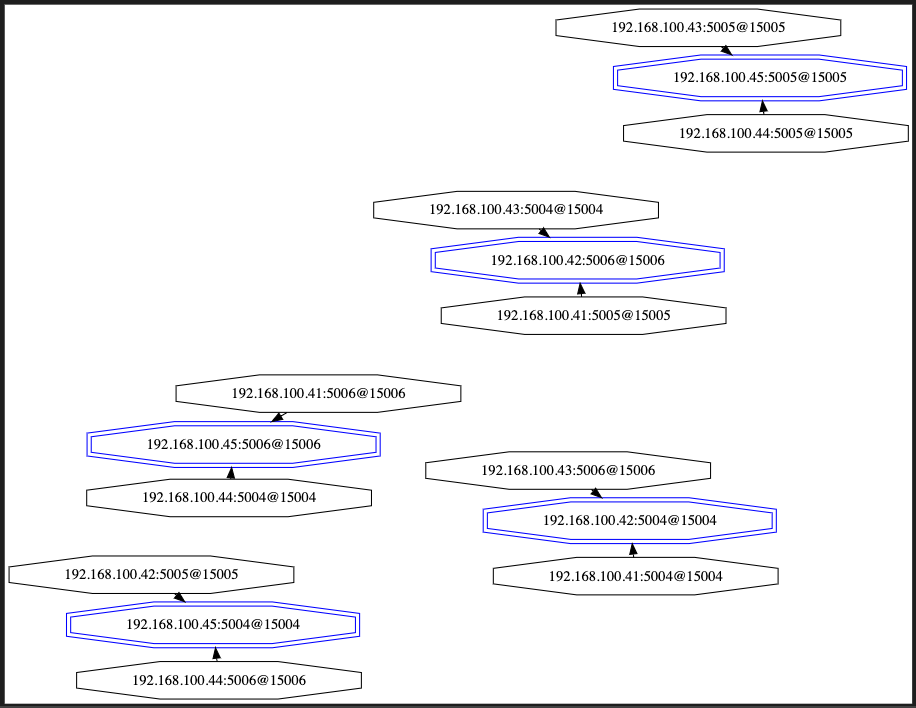
After having reproducing the issue, it's strange that the same "red" node x.41:5006 was again migrated (when rebooting a machine that has nothing to do with the x.44.5004,x.45:5006,x.41.5006 group (node x.42).
Vivid graph of the new configuration.

Annotated logs of node 41.5006:
Log starts when I rebooted all nodes:
1:signal-handler (1653414425) Received SIGTERM scheduling shutdown...
1:S 24 May 2022 17:47:05.967 # User requested shutdown...
1:S 24 May 2022 17:47:05.968 # Redis is now ready to exit, bye bye...
1:C 24 May 2022 17:48:23.600 # oO0OoO0OoO0Oo Redis is starting oO0OoO0OoO0Oo
Host going up...
1:C 24 May 2022 17:48:23.600 # Redis version=6.2.6, bits=64, commit=00000000, modified=0, pid=1, just started
1:C 24 May 2022 17:48:23.600 # Configuration loaded
1:M 24 May 2022 17:48:23.602 # Server initialized
1:M 24 May 2022 17:48:23.603 # Done loading RDB, keys loaded: 0, keys expired: 0.
1:S 24 May 2022 17:48:23.603 # Cluster state changed: ok
1:S 24 May 2022 17:48:38.864 # Error condition on socket for SYNC: Connection refused
1:S 24 May 2022 17:48:39.618 # Done loading RDB, keys loaded: 0, keys expired: 0.
Now rebooting host x.42.
1:S 24 May 2022 17:54:07.082 # Cluster state changed: fail
1:S 24 May 2022 17:54:07.954 # Cluster state changed: ok
1:S 24 May 2022 17:54:08.518 # Cluster state changed: fail
1:S 24 May 2022 17:54:09.369 # Cluster state changed: ok
1:S 24 May 2022 17:54:14.421 # Migrating to orphaned master 894eb6eb357de3103a2e778b93358f23be7f68b5
1:M 24 May 2022 17:54:14.421 # Connection with master lost.
1:S 24 May 2022 17:54:14.448 # Done loading RDB, keys loaded: 0, keys expired: 0.
2 things I notice:
- Cluster state changed: fail
- Migrating to orphaned master 894eb6eb357de3103a2e778b93358f23be7f68b5, which is the unwanted action taken by this node.
Comment From: uvletter
I think I grasp the reason, the key clue is Migrating to orphaned master 894eb6eb357de3103a2e778b93358f23be7f68b5, which means the reboot trigger the CLUSTER-slave-migration strategy unintentionally.
 * CLUSTER slave migration
 *
 * Slave migration is the process that allows a slave of a master that is
 * already covered by at least another slave, to "migrate" to a master that
 * is orpaned, that is, left with no working slaves.
Let me reproduce the process. After rebooting host x.42, now only node x.41:5006 is left in the group(x.43:5004 is also unavailable now as x.43 is in reboot), so node x.41:5006 is orphan. Slave node x.42:5006 found it and join the group x.41:5006 belongs to voluntarily. After x.43 and x.42 complete the rebooting, the node x.41:5006 will have 3 slaves.
As for the log Cluster state changed: fail, it's reported when there're unavailable master, e.g. the host where a master resides is in rebooting. It turn to Cluster state changed: ok when the failover is done and a slave is promoted to new master.
So if you wanna forbid the misjoin-like behavior, keeping every master with at least one slave should be ok
Comment From: j3k0
Thanks @uvletter!
It's still probably a bug that a replica ended up replicating another replica, or is this an acceptable behavior?
Anyway, I learned something (didn't know of that auto-migration behavior), which I believe I can prevent in my case by setting cluster-migration-barrier to 2, as such a replica won't ever found itself in a position it can decide to migrate automatically. My "requirement" is that I know I can always loose any 2 hosts and be fine. Auto-migrations break that requirement in my case.
Thanks again for looking into this.
Comment From: uvletter
I think the configuration cluster-allow-replica-migration satisfy your requirement :-)