Hey everybody, today i run the installation script again. i notice one pack got upgraded:
redis.x86_64 0:7.0.1-0.el7.remi
to
redis.x86_64 0:7.0.1-1.el7.remi
I start to get Warning in the logs:
WARNING overcommit_memory is set to 0! Background save may fail under low memory condition. To fix this issue add 'vm.overcommit_memory = 1' to /etc/sysctl.conf and then reboot or run the command 'sysctl vm.overcommit_memory=1' for this to take effect.
The wired thing is, sysctl.conf have already
overcommit_memory = 1
Any ideas?
Comment From: Yossifsolman
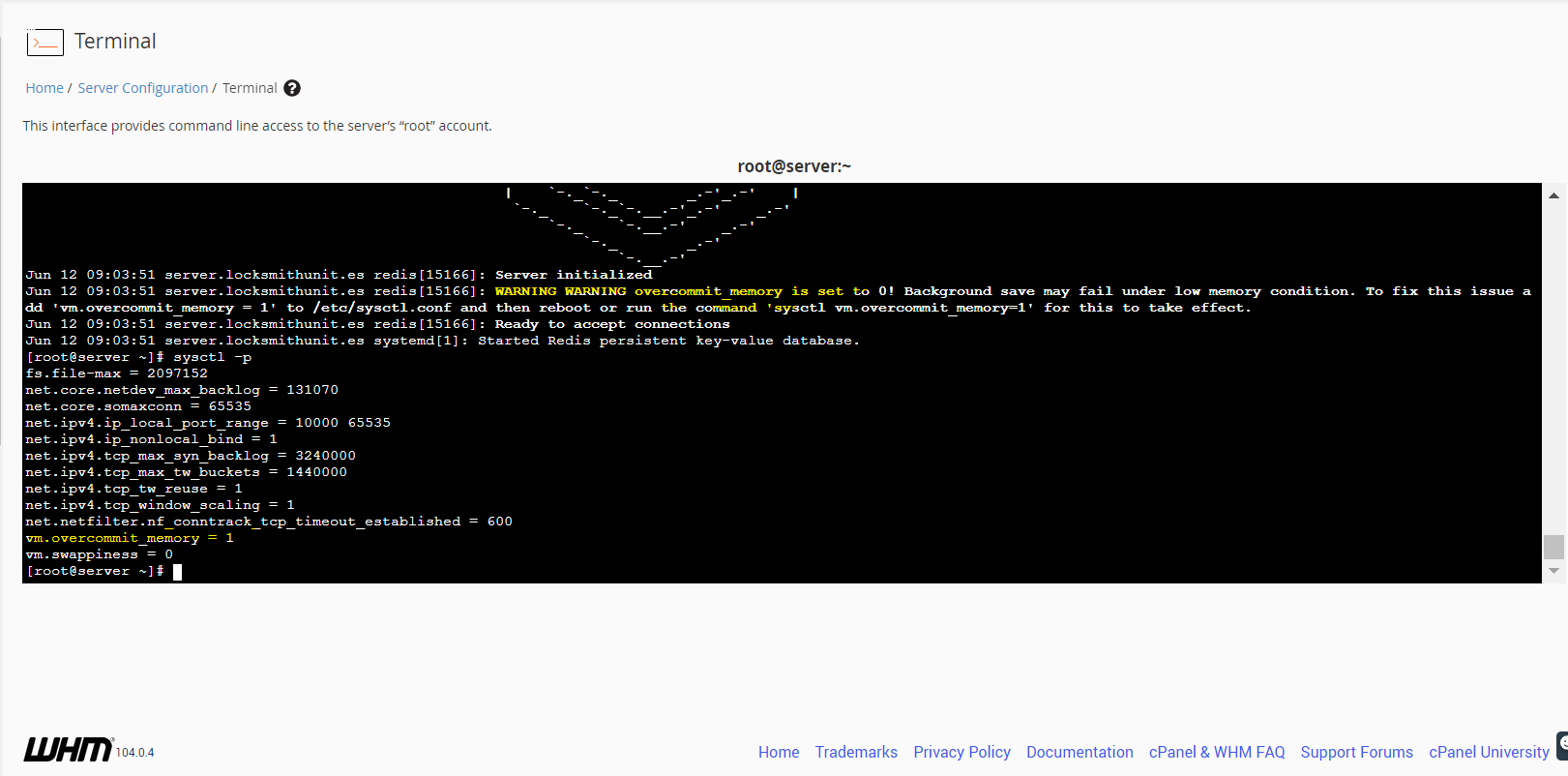
btw another issue ( i don't know if is series or maybe i wrong): when you restart Redis, you get Redis server name different from before :/ got suspect have 2 Redis? Or i am wrong and this normal behavior?
[root@server ~]# netstat -lnp | grep redis
tcp        0      0 127.0.0.1:6379          0.0.0.0:*               LISTEN      1134/redis-server 1
[root@server ~]# systemctl restart redis
[root@server ~]# netstat -lnp | grep redis
tcp        0      0 127.0.0.1:6379          0.0.0.0:*               LISTEN      16581/redis-server
Have 2 redis-server as you see... maybe its normal behavior between restarts? Everything little wired from the latest update of Redis to 7.0.1
Comment From: itamarhaber
Hello @Yossifsolman
This repo is used for managing Redis' documentation, whereas the project resides at https://github.com/redis/redis - I'm taking the liberty of moving the issue there.
That said, I couldn't reproduce this on a different OS.
Comment From: oranagra
@Yossifsolman there's a bug in 7.0.1, and the fix didn't make it into 7.0.2 (will be part of 7.0.3) https://github.com/redis/redis/pull/10841
Comment From: oranagra
regarding the other question about process name, which version did you use before the restart / upgrade?
Comment From: oranagra
ohh, i see you mention remi, so i guess this is Centos (not a package we maintain), maybe @remicollet can respond to the question about the process name.
Comment From: remicollet
ohh, i see you mention remi, so i guess this is Centos (not a package we maintain), maybe @remicollet can respond to the question about the process name.
This is a package from my repository, and right places to ask are: * https://forum.remirepo.net/ * https://github.com/remicollet/remirepo/issues
Comment From: oranagra
i suppose it's impossible for most people to know where a certain question should be asked. also, the main question was actually about a bug in the code redis. i'll close this issue here then, since the process name is not something we changed in 7.0.x AFAIK.
Comment From: Yossifsolman
Wow, this was amazing, hahaha. You even bring the "RAMI" developer to this post, huh, this incredible.
Super support huh i got impressed really, don't think i see something like that before in GitHub.
So from what i understand guys, the only option is to wait to 7.0.3 (i little afraid because Redis not read sysctl, after all sysctl is the operating system, Redis should and must read this file)
Btw i not suspect on Rami-repository, I think it's connected to configuration of Redis and the "APPEND" configuration.
"append" from my experience, its duplicate with extantion .append
Can be we have appended folder not communicate with sysctl... (it's only speculation).
Just in case you want to see the full installation script @oranagra
#!/bin/bash

# /**
#  * @version    2.0
#  * @package    Engintron for cPanel/WHM
#  * @author     Fotis Evangelou (https://kodeka.io)
#  * @url        https://engintron.com
#  * @copyright  Copyright (c) 2014 - 2022 Kodeka OÜ. All rights reserved.
#  * @license    GNU/GPL license: https://www.gnu.org/copyleft/gpl.html
#  */

# ~ NOTES
# Port 6379 (by default)
# Binds to localhost (by default)
#
# Memory configuration documentation:
# https://redis.io/topics/lru-cache

INITSYS=$(cat /proc/1/comm)
RELEASE=$(rpm -q --qf %{version} `rpm -q --whatprovides redhat-release` | cut -c 1)

clear

echo " **********************"
echo " *  Installing Redis  *"
echo " **********************"

echo ""

echo "# Stop & Disable Redis | Remove systemctl symlink (old Redis if have one on the system)"
systemctl stop redis
systemctl disable redis

echo ""

echo "# Search for old Redis DB (if have from old installation)"
sudo find / -name *.rdb
echo "# Removing old Redis DB"
sudo find / -name *.rdb -delete

echo ""

echo "# Hugepages / Karnel vs Redis | https://redis.io/docs/manual/admin/"
echo madvise > /sys/kernel/mm/transparent_hugepage/enabled
echo "madvise > /sys/kernel/mm/transparent_hugepage/enabled"

echo ""

sudo yum clean all
sudo yum install epel-release
sudo yum -y install https://rpms.remirepo.net/enterprise/remi-release-7.rpm
sudo yum clean all
sudo yum -y update
sudo yum -y install redis --enablerepo=remi --disableplugin=priorities

echo ""
echo ""

for php in $(whmapi1 php_get_installed_versions|grep -oE '\bea-php.*'); do
    echo "************************************************"
    echo "*  Installing PHP PECL extension for \"$php\"  *"
    echo "************************************************"
    echo ""
    echo -e "\n\n\n" | /opt/cpanel/"$php"/root/usr/bin/pecl install igbinary igbinary-devel redis
    echo ""
    echo "******************************************************"
    echo "*  PHP PECL extension for \"$php\" is now installed  *"
    echo "******************************************************"
    echo ""
    echo ""
    sleep 1
done

# Restart Apache & PHP-FPM
if [ "$(pstree | grep 'httpd')" ]; then
    echo "~ Restarting Apache..."
    /scripts/restartsrv apache_php_fpm
    /scripts/restartsrv_httpd
    sleep 1
    echo ""
    echo ""
fi

# Restart Nginx (if it's installed via Engintron)
if [ "$(pstree | grep 'nginx')" ]; then
    echo "~ Restarting Nginx..."
    service nginx restart
    sleep 1
    echo ""
    echo ""
fi

echo "~ Optimize Redis Config..."

# Connections
sed -i "s/bind 127.0.0.1 -::1/bind 127.0.0.1/" /etc/redis/redis.conf

sed -i "s/tcp-backlog 511/tcp-backlog 65535/" /etc/redis/redis.conf

# Logs - Redis Recommendation for Linux and systemd
sed -i "s/# supervised auto/supervised auto/" /etc/redis/redis.conf

sed -i "s/# syslog-enabled no/syslog-enabled yes/" /etc/redis/redis.conf

sed -i "s/# syslog-ident redis/syslog-ident redis/" /etc/redis/redis.conf

sed -i "s/# syslog-facility local0/syslog-facility local0/" /etc/redis/redis.conf

sed -i "s/# crash-log-enabled no/crash-log-enabled no/" /etc/redis/redis.conf

sed -i "s/# crash-memcheck-enabled no/crash-memcheck-enabled no/" /etc/redis/redis.conf

sed -i "s/always-show-logo no/always-show-logo yes/" /etc/redis/redis.conf

# Snapshots Redis - DB
sed -i "s/# save \"\"/save \"\"/" /etc/redis/redis.conf

# Memory System
sed -i "s/# maxclients 10000/maxclients 10000/" /etc/redis/redis.conf

sed -i "s/# maxmemory <bytes>/maxmemory 1gb/" /etc/redis/redis.conf

sed -i "s/# maxmemory-policy noeviction/maxmemory-policy allkeys-lru/" /etc/redis/redis.conf

echo "~ Enable and restart Redis..."

systemctl enable redis
systemctl restart redis

chkconfig redis on
service redis restart

sleep 1

echo ""
echo ""

# Print out useful info
echo ""
echo "********** Redis Info **********"
echo ""

echo "~ Check if Redis is installed..."
redis-cli ping
echo ""

sleep 1

echo "~ Show Redis version..."
redis-cli --version
echo ""

sleep 1

echo "~ Check Redis binds to localhost only (and port 6379)..."
netstat -lnp | grep redis
echo ""

sleep 1

echo "~ Show Redis memory configuration (\"maxmemory_human\" should report $CACHE_SIZE)..."
redis-cli info memory
echo ""

sleep 1

echo ""
echo "********** Redis PHP configuration **********"

echo ""

for php in $(whmapi1 php_get_installed_versions|grep -oE '\bea-php.*'); do
    echo "~ Confirm installation for PHP $php..."
    /opt/cpanel/"$php"/root/usr/bin/php -i | grep "Redis Support"
    echo ""
    echo ""
done

echo " ***********************************************"
echo " *         Redis installation complete         *"
echo " ***********************************************"

echo ""
In my script, have a bit of changes (sed -i). But i already with this script from Redis 7.0.0 and everything was fine. ( The same script work without the warning in the log )
About the old versions, you ask, i used only Redis 7.0.0 and i aware to the DB issue,
if you look on my script in the top. i create manual delete to all the Redis DB before the installation (script got edited by me)
echo "# Search for old Redis DB (if have from old installation)"
sudo find / -name *.rdb
echo "# Removing old Redis DB"
sudo find / -name *.rdb -delete
So, i not believe it's connected to the old DB from old installations.
I re-run the script couple of times, and even with default configuration of Redis error still showing up in the log:
WARNING overcommit_memory is set to 0! Background save may fail under low memory condition. To fix this issue add 'vm.overcommit_memory = 1' to /etc/sysctl.conf and then reboot or run the command 'sysctl vm.overcommit_memory=1' for this to take effect.
Hope this clarifies the issue better. @remicollet @itamarhaber @oranagra
I will wait for Redis 7.0.3 I hope you be able to fix it guys for Redis 7.0.2 (its not so serious, server work fine)
For now, everything work perfect on my server, even with this warning.
Comment From: oranagra
@Yossifsolman i'm sorry, i'm not sure i understood much of your post (for instance, i'm not sure what APPEND is). The fact is that the warning in 7.0.1 and 7.0.2 is broken, but it's just the warning that's broken, so please ignore it. if you have any other issues, please try to elaborate, or if they're about the packaging, open an issue in the link Remi provided earlier.