Hello guys, how are you? (Shalom)
I have issues with the swap and Redis. I have E2 Small (2x2) on GCP (google cloud). It's a shared core
My SSD disk is not local disk, but it's SSD.
From what i see online on Red Hat aware to the issue on clouds (i have Linux RHEL from what i see): https://www.redhat.com/sysadmin/cloud-swap
My cPanel server get series overload when server need to swap. What causing on and off of swap, even if the vm.swapiness = 1 I get a lot of swaps with Redis and CPU overload. (i tried a lot of values, included red hat default – 30)
Redis writing on the disk in the same time with the swap, what's causing on the shared core reach to 10 CPU when i have only 2…
Server survive, even in so high overload, but not crushing huh (i think it because the shared cores machine)
Now GCP (google cloud platform) offers instance on the same machine with Redis Enterprise. From what i see online, Redis Enterprise recommended turn swap off: https://docs.redis.com/latest/rs/installing-upgrading/configuring/linux-swap/
(I know they little different from the open source "Redis" i have, but still they are very strong on GCP marketplace, i believe have reason for this instruction)
From the other hand, when i see the OPEN SOURCE doc's, i see it recommended to keep swap for Redis: https://redis.io/docs/manual/admin/
i got confused. BTW server work better when i turn vm.swapiness = 0
But still, i prefer your advice guys what actually to do?
Comment From: oranagra
I suppose the advise in redis.io to enable swap is just so that on the rare case you run out of memory, the process isn't killed and you'll be able to notice the latency and fix the issues (change things so that swap is not really used).
In Redis Enterprise the software controls resource allocation / provisioning, runtime maxmemory adjustments, and oom-score-adj-values thresholds so that processes are not killed, and if one ends up being killed, it'll be less likely to cause real damage.
Title "[CRASH] ... crushing the server with Redis"
Redis writing on the disk in the same time with the swap, what's causing on the shared core reach to 10 CPU when i have only 2…
Server survive, even in so high overload, but not crushing huh (i think it because the shared cores machine)
i'm confused by a mismatch between the title and part of the body of your post.
Are you reporting that despite enabling swap, the OOM killer still kills your processes? or that using swap (together with additional disk activity, on a non-local disk) is slow?
i suppose it can also be related to your usage pattern and commands. try to figure out what you're doing on the moment it is killed, or at times it gets swapped out (it's surely a bad idea to really make sure of a non-local swap disk, if it's there it's just to avoid being killed on an extreme moment).
Comment From: Yossifsolman
Thanks, @oranagra on your response.
- Ok, i think i found the problem.
- I don't use Redis Enterprise, i use the open source.
- maxmemory is 1 GB and not default (80%) system of 2ram x 2cpu.
- I think the problem is:
echo never > /sys/kernel/mm/transparent_hugepage/enabled
Explanation: Ok. this cmd not stay every server reboot. This thing need startup script.
From what i see online and try by myself.
Have a file called rc.local
but TUNED application from Kernel, bring back the HUGEPAGE feature.
So the local boot script can't help.
Now, better if Redis was doing a script for this thing. 1. First, to activate rc.local file it's not recommended (this note on the script himself). 2. The Hugepage feature actually recommended, improve latency if Redis not installed. (this why the KERNEL put it as default)
I am trying to create the startup script from Google Cloud, i will back to you about that and if its work good.
But i think the best solution if Redis will do a startup script along to redis:
echo never > /sys/kernel/mm/transparent_hugepage/enabled
This because: Any time a client, me or you reboot any linux server / vm, the Huge page feature comeback by default.
So a client like me, want to UNINSTALL Redis, can do it EASY, I just reboot the server after uninstalling redis and puff magic. Everything comeback be default as should be, and recommended by KERNEL to have this feature on Linux, its only Redis not work well with that.
The must important question haha i almost forget: What is the best vm.swapiness for Redis ?
Value 1? Value 10? (Red Hat / Orcala distro recommended this value with Redis) Value default? (30 – it's a lot, i knows RHEL default go wild but its work fine) Value of 0?
Or maybe turn it off completely ( Redis Enterprise recommendation, say the SWAP very aggressive ): swapoff ?
What is the best SWAP VALUE for the open source Redis 7.0.2 on Linux?
Comment From: oranagra
Regarding transparent huge pages, nowadays (since redis 6.2), redis attempts to disable it specifically for the redis process, and may not warn or care if the system is not configured to disable THP, see #7381. please specify which version of redis are you using, and if the log file had a warning about that when you didn't disable it in the system.
Besides that, it is not redis's job to tune system global configs automaticlly, this is why neither redis, not any startup script will ever set it for you, and instead it only warns.
Regarding the swapiness, i'm sorry, but i don't have an answer for that.
Comment From: Yossifsolman
Ok, @oranagra thanks for your time.
- Solution for the start script, and i recommended you put it in redis.io and notified people why to do cronjob on reboot for that. i verified it, its works:
cron job:
# Transparent Hugepages (Disable CMD with ECHO) | Karnel vs Redis (Remove it if you remove Redis)
@reboot root echo never > /sys/kernel/mm/transparent_hugepage/enabled
- SWAP: I found a lot of articles recommended swapiness 1 or 10 but not disable it. OOM Killer is strong in the new kernel and this can lead to issue, for now, i pretty good with 30... the default of Red Hat.
But i checking it. If you can light me the way for the right VALUE, it will be awesome. If not, you can close the topic.
Thank you on your time.
Comment From: oranagra
@Yossifsolman which version of redis are you using? i wonder why THP was at all an issue..
Comment From: Yossifsolman
@oranagra still not sure if it's all the issue. But the CPU, it's very improved. I have the latest version 7.0.2
Comment From: oranagra
Before you disabled the THP in the system, did redis print a warning (log message) at startup about THP?
maybe it attempted to disable it (with prctl) and failed for some reason.
Comment From: Yossifsolman
No, it didn't print any error. And i notice only now, so all this time Redis was to work with this.
But still i have CPU problem and i think i understand why:
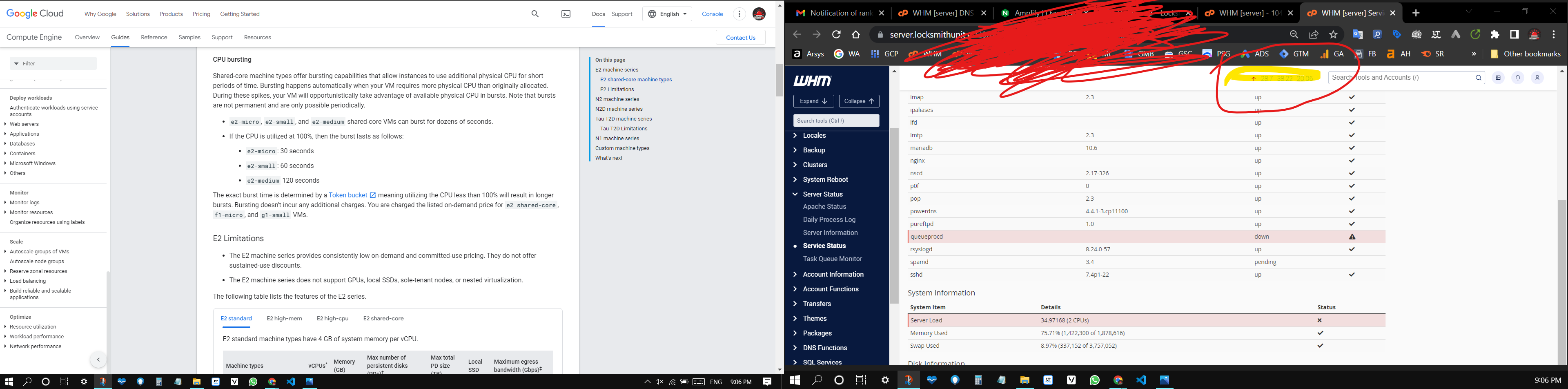
I don't know, but Redis and the swap create overload and Google have CPU burst.
Look at the screenshot. 20+ CPU and i have only 2 (have interface huh) I don't know, the swap is very expensive on the machine.
If you look on the swap in the bottom of the right screenshot you will see the swap grow in the process 300megabyte! And i set the swapiness to 1... (any swap partition is 256kb)
it's mean in this process was more than 300000kb : 256kb = 1,171.875
1171 swap process… It's insane and this not stop as you see… google give you the bursting. So the swaps continue with Redis on and on and on…
You see something like that before @oranagra ?
Btw, this is the machine page from Google: https://cloud.google.com/compute/docs/general-purpose-machines?hl=en#e2_machine_types
I have e2-small I have SSD too, but it's not Local SSD so i little bit got lost why Redis do this with the swap (it's like not have limits to swaps when Redis is active)
Help please
Comment From: Yossifsolman
Ok i think the problem is Redis memory, when i set up the memory for 128 mg it's much better (still have CPU burst, but it's not reaching the 5 CPUs…
I think is not actual CPU and processing issue.
I think it is a memory issue, and Redis finish the memory when have a swap Redis still use the memory.
What causing non stops of CPU Bursts, (its default by google for e2 machine) and Redis use the RAM in the same time.
Then, on all this actions of google and Redis, comes the time of Linux process SWAP. The machine got blow up haha but never turn on the OOM Killer. What causing 28 – 50 CPUs when i have only 2. (shows in my previous message here on the topic)
Another thing i suspect is timeout and keep alive timeout in Redis.
Timeout – of 0 (unlimited) and Keep alive timeout – of 300 sec
I think this what do the issue.
I think “timeout” maybe need to be 300 seconds (even less) and keep alive around the 5 – 10 seconds…
For my machine i think need to design the architecture of redis.conf I already changed the sysctl.conf and this help a lot too.
But still, i sure have a way on Google Cloud to use this machine with Redis and the swap of Linux. After all, you have Redis Enterprise based on those machines ( i not have Redis Enterprise, i just give an example )
Comment From: oranagra
Before you disabled the THP in the system, did redis print a warning (log message) at startup about THP? maybe it attempted to disable it (with prctl) and failed for some reason.
No, it didn't print any error. And i notice only now, so all this time Redis was to work with this.
so if disabling THP system-wide helped, and PR_SET_THP_DISABLE which redis does didn't, then i'm guessing THP affected something else in your system (not redis).
@pizhenwei you were involved with that (#7381), maybe you have some guess.
Comment From: Yossifsolman
Ok, server not crushing only because Redis.
You can close the case but still max memory of 128 work much better from default and from 1gb
1gb and even default. Overload the server.
https://github.com/munin-monitoring/munin/issues/1480
thank you on your time @oranagra