Describe the bug After enabling TLS, we meet a big performance downgrade.
To reproduce Setup a Redis6 server with the default setting but enable port 6379: no TLS port 6380: TLS
Use memtier_benchmark: * a single thread * a single client * 100000 requests * get/set 1:1
without TLS
memtier_benchmark -s localhost -p 6379 -t 1 -c 1 -R -n 100000 --ratio=1:1 --hide-histogram
ALL STATS
=========================================================================
Type         Ops/sec     Hits/sec   Misses/sec      Latency       KB/sec
-------------------------------------------------------------------------
Sets         6137.11          ---          ---      0.07900       472.79
Gets         6137.11        31.42      6105.68      0.07700       389.50
Waits           0.00          ---          ---      0.00000          ---
Totals      12274.21        31.42      6105.68      0.07800       862.29
with TLS
memtier_benchmark -s localhost -p 6380 --tls --tls-skip-verify -t 1 -n 100000 -c 1 -R --ratio=1:1 --hide-histogram
ALL STATS
=========================================================================
Type         Ops/sec     Hits/sec   Misses/sec      Latency       KB/sec
-------------------------------------------------------------------------
Sets         4735.50          ---          ---      0.10300       364.81
Gets         4735.50        24.25      4711.26      0.10100       185.27
Waits           0.00          ---          ---      0.00000          ---
Totals       9471.00        24.25      4711.26      0.10200       550.08
The throughput is only 77% and the latency is 1.28x after enabling TLS.
Expected behavior From my experience, TLS may introduce additional overhead. But comparing to other systems, like RDBMS or web server, Redis's performance is impacted too much. I'd like to confirm with the Redis team if it's expected or my misconfiguration. And it's better if there's an official benchmark about TLS on Redis 6
A description of what you expected to happen.
Additional information Redis server v=6.0.6 sha=00000000:0 malloc=jemalloc-5.1.0 bits=64 build=97204d6a2bf74d2c
Comment From: filipecosta90
Hi there Gong, good afternoon,
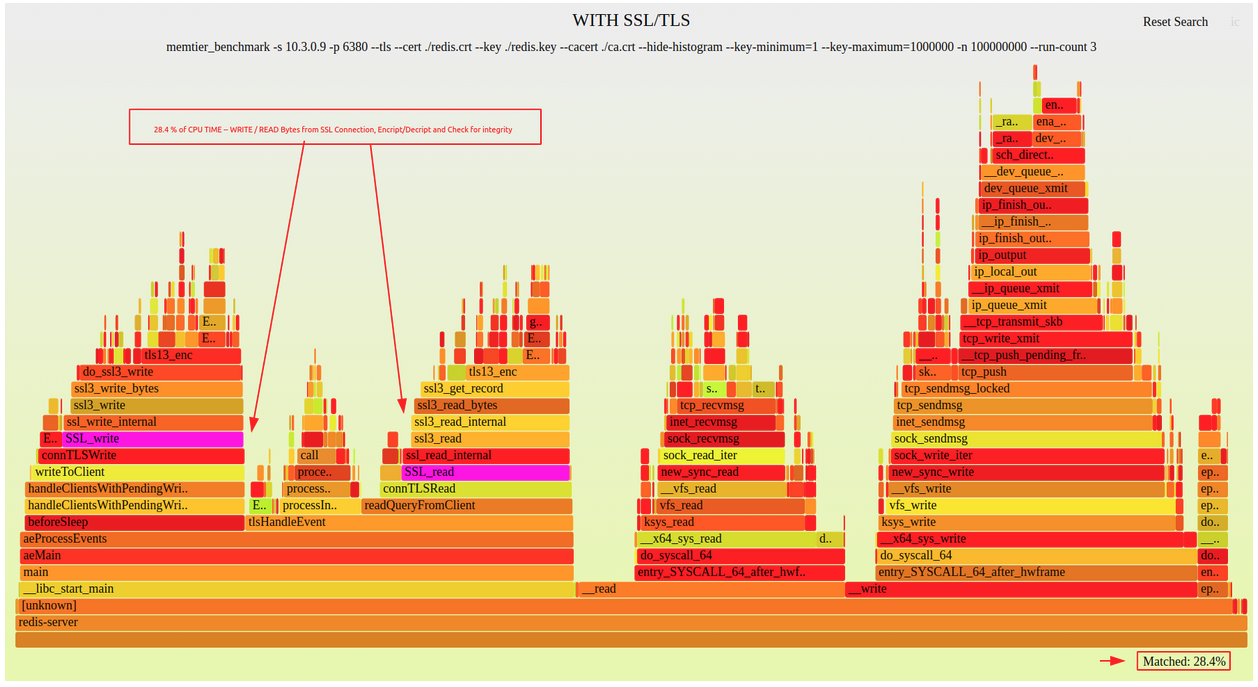
We've run a quick benchmark to document the entire process and get some results (we’ve used redis 6.0.6, and compiled redis, libssl, and opencripto in release mode but preserving the frame-pointers so that we could understand where does the degradation comes from).
As visible on the next image, the added SSL/TLS stack implies 28% CPU time devoted to it ( writing/reading bytes from ssl connetion, encrypt/decrypt and integrity check ).
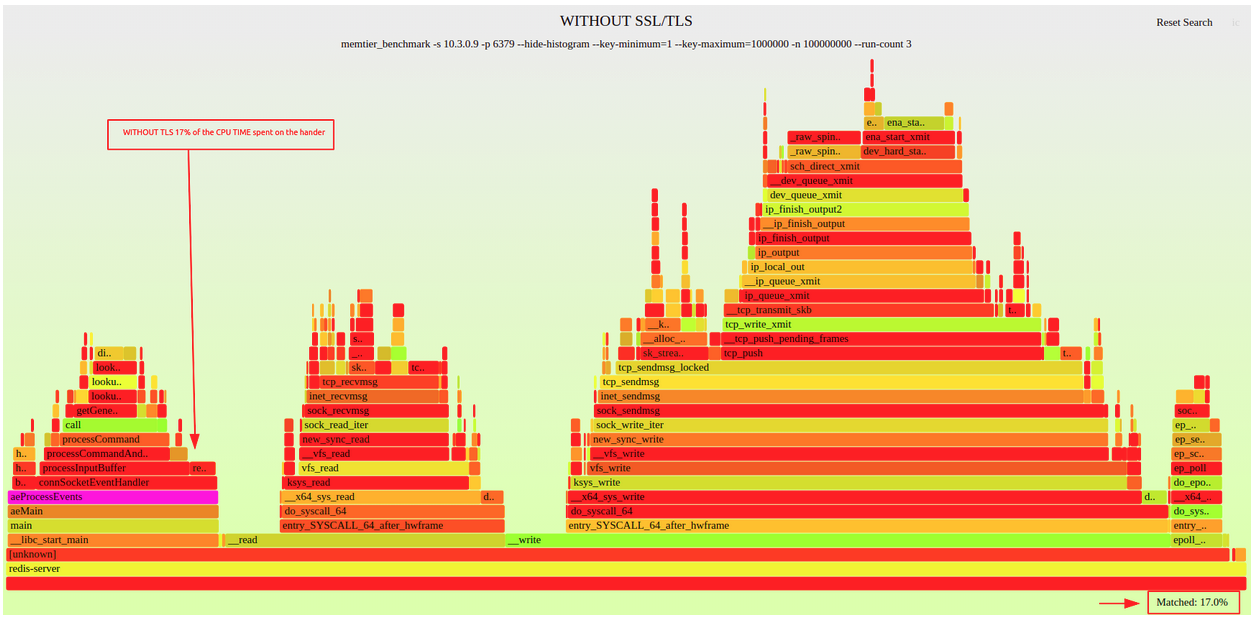
We've moved from spending 17% on the handler (see second flame graph) to spending 45% of the CPU time with tls.
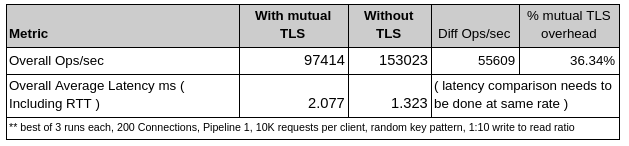
As expected the added SSL/TLS stack implies a drop in the overall achievable throughput per redis instance, given that on both scenarios we’ve used memtier to stress redis up to 100% CPU usage, and that the added stack extra computation will imply less CPU available for the remaining code that needs to be executed, and consequently less ops/sec and an increase in the average latency. If you agree I would recommend to close the issue. WDYT?
Comment From: topikachu
@filipecosta90. Your investigation is very helpful. That's fine to close this issue if no more actions now.
Thanks.
Comment From: itamarhaber
TL;DR TLS impacts performance - once I/O threads are stable this would be a good candidate for using them.
Comment From: ShouZhiDuan
Hello! Use Redis-TLS,but java client how to connect this redis-tls?
Comment From: filipecosta90
Hello! Use Redis-TLS,but java client how to connect this redis-tls?
Hi there @ShouZhiDuan , I believe you're looking for a Java client with TLS support correct? If so, please have a look at jedis and the following jedis client issue:
JedisPool constructor from 2.9 onwards has the option to use SSL through a URL: https://github.com/xetorthio/jedis/blob/master/src/main/java/redis/clients/jedis/JedisPool.java#L33 or via constructor parameters: https://github.com/xetorthio/jedis/blob/master/src/main/java/redis/clients/jedis/JedisPool.java#L51
Comment From: ShouZhiDuan
thank you
At 2020-10-26 21:07:21, "filipe oliveira" notifications@github.com wrote:
Hello! Use Redis-TLS,but java client how to connect this redis-tls?
Hi there @ShouZhiDuan , I believe you're looking for a Java client with TLS support correct? If so, please have a look at jedis and the following jedis client issue:
JedisPool constructor from 2.9 onwards has the option to use SSL through a URL: https://github.com/xetorthio/jedis/blob/master/src/main/java/redis/clients/jedis/JedisPool.java#L33 or via constructor parameters: https://github.com/xetorthio/jedis/blob/master/src/main/java/redis/clients/jedis/JedisPool.java#L51
— You are receiving this because you were mentioned. Reply to this email directly, view it on GitHub, or unsubscribe.
Comment From: ShouZhiDuan
Hello I had see https://github.com/redis/jedis/blob/master/src/test/java/redis/clients/jedis/tests/SSLJedisTest.java. But I am confused how can I generate this file(src/test/resources/truststore.jceks). I know redis-server will generate redis.crt redis.key ca.crt 3 files, so Is there a relationship between (src/test/resources/truststore.jceks) and (redis.crt redis.key ca.crt). thank you.
At 2020-10-26 21:07:21, "filipe oliveira" notifications@github.com wrote:
Hello! Use Redis-TLS,but java client how to connect this redis-tls?
Hi there @ShouZhiDuan , I believe you're looking for a Java client with TLS support correct? If so, please have a look at jedis and the following jedis client issue:
JedisPool constructor from 2.9 onwards has the option to use SSL through a URL: https://github.com/xetorthio/jedis/blob/master/src/main/java/redis/clients/jedis/JedisPool.java#L33 or via constructor parameters: https://github.com/xetorthio/jedis/blob/master/src/main/java/redis/clients/jedis/JedisPool.java#L51
— You are receiving this because you were mentioned. Reply to this email directly, view it on GitHub, or unsubscribe.
Comment From: shwetanks
after a lot of searching for related articles and possible solutions, i'd rather ask on this thread. we use redis 6.2 for major production workloads and have observations congruent to those shared here. i see redis taking as much as 85-90% CPU when we moved to TLS (client installation demands TLS) while even a higher workload in non-TLS redis runs at significantly less CPU (< 15-20%). i don't see any resolution on this thread or other discussions. may i request the maintainers to shed some light on the subject, why hasn't this gathered any interest or what have i missed. i don't see a mention of this in redis 7 release notes either. please comment
Comment From: filipecosta90
Hi there @shwetanks, for the same workload a difference of 15-20 to 85-90 is quite a large one. Can you describe your use-case both on Redis side but also used cypher etc...
Comment From: shwetanks
hi @filipecosta90 .. thanks for quick reply.. i had a look into this again from application perspective and it turned out the high CPU (apart from what TLS could contribute to) was also due to high number of clients/connections to redis. bringing that under control through pool config helped us here
however, i am curious about the original observations which i still true in my tests. i do see that CPU takes a hit of around 20%+ with TLS enabled. are there any recommendations to handle this or what's the way forward?