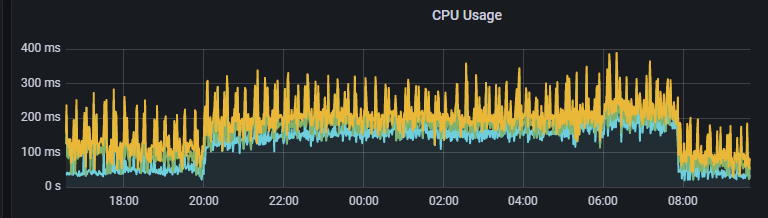
Hi, I've a redis cluster in k8s and I've seen high cpu consume during the night.
From 20:00h to 08:00h (GMT+2).
I don't know why happens this. My clients use the system from 8.00h-9.00h more or less to about 20.00h.
Anyone can help me or tell me anything about this fact?
This process repeats everyday.
Thank you!
PD: Add a capture of cpu usage.
Comment From: oranagra
Are there any relevant log lines from these times? maybe it's persisting a snapshot or doing defrag?
Any chance it's not password protected and someone is exploiting it?
Comment From: agosalvez
Not does a snapshot. The high consume, as you can see, it's for 12 hours everyday, after that, during the morning, the consume are stable and lower than night
Not does a scheduled process
It has password.
The app is inside of a k8s cluster.
Comment From: filipecosta90
@agosalvez are you using any specific Redis metric exporter? like for example https://github.com/oliver006/redis_exporter? Or is the CPU chart some general one from a node/k8s exporter info? If you're not using one specific exporter for redis then I suggest you start by adding it, so that you can have more metrics and we can help you further explain the patterns you're seeing.
Comment From: agosalvez
Yes, I use redis-exporter.
This picture is from prometheus, getting data from redis-exporter.
Comment From: filipecosta90
Yes, I use redis-exporter.
This picture is from prometheus, getting data from redis-exporter.
that is great given it means we more data to look at. - Can you confirm the throughput chart and see if you're detecting an increase on that timeframe. - Also, which version of redis are you using? Assuming version 6.2 or 7.0, you can also plot the error/failed commands over time ( please double check that you don't have any bad behaved user issuing wrong commands/unauthorized ones ). - If possible ( if you're using redis 7 ), plot the percentiles 50, 95 and 99 over time. Let's confirm if we see any latency increase on that timeframe ( and from which command ).
Comment From: agosalvez
I resolved this issue by my workmates and myself. Thanks!