i have download the latest version of redis 5.0.5 and make the build. after build i copied redis-server and redis-cli binary files from src folder to /usr/local/bin/ after this i have restated redis server.
I can able to see the redis-serverion to 5.0.5 and also same of redis-cli.
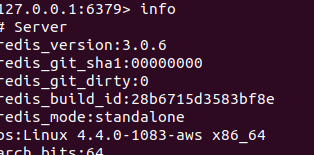
But i was open redis-cli and run the command "info" the it shows me older version of redis.
I am aatching screen shot here
Comment From: itamarhaber
Hello @rameshtathe
You have a senior redis-server still running. You can shut it down by issuing "SHUTDOWN" from the cli.
Comment From: antirez
Hello @rameshtathe
You have a senior redis-server still running. You can shut it down by issuing "SHUTDOWN" from the cli.
Itamar I understand this looks the obvious reason, however recently it was reported by several users that we introduced a bug in Redis 5.0.5 that has the effect of a personality disorder in Redis. We saw instances claiming to be older 3.0.6 (the equivalent of a grandfather basically), or even claiming to be an SQL server. I'm investigating the issue together with Susan Calvin, which I believe to be the most expert programmer in that field.
Comment From: abyssmedia
same problem with 6.0.3 redis-server -v show correct version 6.0.3 redis-cli -v show correct version 6.0.3 redid-cli INFO return version 3.2.12 (old install)
looks like INFO command return version from package manager
Comment From: itamarhaber
Hello @abyssmedia
The server process that's running is old - you can shut it down (e.g. SHUTDOWN from the cli).
Comment From: abyssmedia
Hello @abyssmedia
The server process that's running is old - you can shut it down (e.g.
SHUTDOWNfrom the cli).
No, process restarted, server rebooted several times. I checked this before writing comment.
Comment From: itamarhaber
In that case, you did not upgrade the the redis-server binary that is used by the server during boot/service restart.
Comment From: abyssmedia
In that case, you did not upgrade the the redis-server binary that is used by the server during boot/service restart.
Yeh, got it fixed. Wrong path in config pointed to the old version.
Comment From: itamarhaber
That's good news - kindly close this issue.
Comment From: abyssmedia
That's good news - kindly close this issue.
I can’t, the issue is not created by me.
Comment From: itamarhaber
This issue will now be closed - please feel free to reopen if needed.
Comment From: goldenking0412
same problem with 6.0.3 redis-server -v show correct version 6.0.3 redis-cli -v show correct version 6.0.3 redid-cli INFO return version 3.2.12 (old install)
looks like INFO command return version from package manager
Same here. redis-server -v shows 6.2.1 INFO in redis-clic return 3.0.6
What should I update in redis conf? I am on ubuntu and I found redis conf file. But not sure what to update /etc/redis/redis.conf
Comment From: itamarhaber
@goldenking0412 the old server is still up - use the SHUTDOWN command from redis-cli
Comment From: goldenking0412
I already did this in redis-cli but still shows 3.0.6 in INFO
Comment From: master3395
same problem with 6.0.3 redis-server -v show correct version 6.0.3 redis-cli -v show correct version 6.0.3 redid-cli INFO return version 3.2.12 (old install)
looks like INFO command return version from package manager
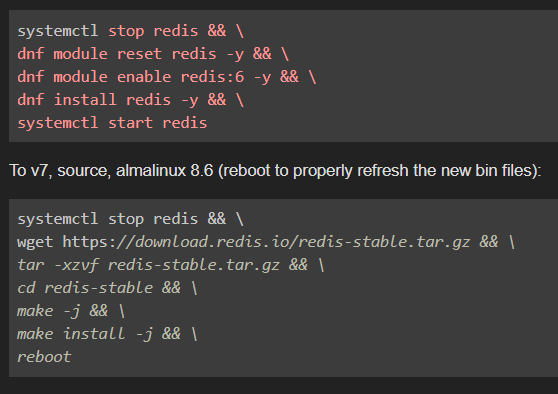
I got this issue my self. I have restarted the server, I have restarted redis. I have tried the tutorial below to change it to work on Almalinux 8.6
same problem with 6.0.9
redis-server -v show correct version:
Redis server v=7.0.4 sha=00000000:0 malloc=jemalloc-5.2.1 bits=64 build=210f83f4c4e52f78
redis-cli -v show version:
6.0.9
redis-cli info show:
redis_version 6.0.9
Comment From: NickCraver
A lot of times when we see this, it's another copy of Redis running on the box - can check your logs vs the run id from INFO to compare and make sure you're talking to the instance you think you are :)
Comment From: master3395
A lot of times when we see this, it's another copy of Redis running on the box - can check your logs vs the run id from INFO to compare and make sure you're talking to the instance you think you are :)
Fixed the latest by running the commands below once more. Then restart the server.
dnf module reset redis
sudo dnf install https://rpms.remirepo.net/enterprise/remi-release-8.rpm -y
dnf module enable redis:remi-7.0
dnf upgrade
systemctl restart redis