Hello,
We have a Redis master-slave setup utilizing the redis:7.2-rc Docker image. The Redis slave replicates data from the master over TLS, with an Nginx ingress managing routing to the appropriate master instance.
Both the Redis master and slave persist data in the /data directory.
The Redis slave's configuration is as follows:
maxmemory 0
maxmemory-samples 5
list-max-ziplist-size -2
list-compress-depth 0
repl-ping-slave-period 10
repl-timeout 60
repl-backlog-size 100m
repl-backlog-ttl 3600
maxclients 10000
slave-announce-port 0
min-slaves-to-write 0
min-slaves-max-lag 10
cluster-node-timeout 15000
cluster-migration-barrier 1
cluster-slave-validity-factor 10
cluster-require-full-coverage yes
protected-mode no
maxmemory-policy noeviction
supervised no
syslog-facility local0
daemonize no
tcp-backlog 511
port 6379
timeout 0
tcp-keepalive 300
loglevel notice
databases 16
stop-writes-on-bgsave-error no
rdbcompression yes
rdbchecksum yes
dbfilename dump.rdb
dir /data
slave-serve-stale-data yes
slave-read-only yes
repl-diskless-sync no
repl-diskless-sync-delay 5
repl-disable-tcp-nodelay no
slave-priority 100
appendonly no
appendfilename "appendonly.aof"

save 3600 1
save 300 100
save 60 1000
save 30 10000

appendfsync everysec
no-appendfsync-on-rewrite no
auto-aof-rewrite-percentage 100
auto-aof-rewrite-min-size 67108864
aof-load-truncated yes
lua-time-limit 5000
slowlog-log-slower-than 10000
slowlog-max-len 128
latency-monitor-threshold 0
notify-keyspace-events "AK"
hash-max-ziplist-entries 512
hash-max-ziplist-value 64
list-max-ziplist-entries 512
list-max-ziplist-value 64
set-max-intset-entries 512
zset-max-ziplist-entries 128
zset-max-ziplist-value 64
hll-sparse-max-bytes 3000
activerehashing yes
client-output-buffer-limit normal 0 0 0
client-output-buffer-limit slave 1gb 512mb 600
client-output-buffer-limit pubsub 32mb 8mb 60
hz 10
aof-rewrite-incremental-fsync yes
tls-port 6888
tls-cert-file /tls/redis.crt
tls-key-file /tls/redis.key
tls-ca-cert-file /tls/ca.crt
tls-protocols "TLSv1.2 TLSv1.3"
tls-replication yes
slaveof redis-master-host 443
The Redis slave uses an Azure File Persistent Volume Claim (PVC) with directory permissions set to 777, confirming that permissions are not the root cause of the issue.
The problem we're encountering is that when the Redis slave starts for the first time or the pod undergoes a restart, it throws an error:
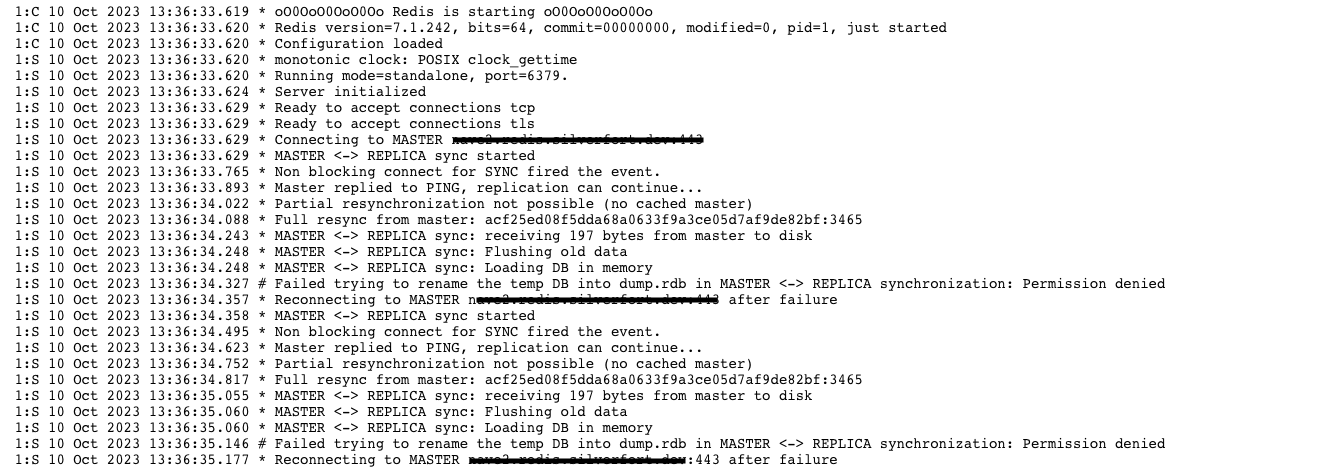
Subsequently, it repeatedly fails with a "permission denied" error. Interestingly, deleting the deployment and creating a new one (via ArgoCD) allows the slave to start successfully and function correctly until the next pod restart.
We have multiple environments like this and in part of the environments replication and saving works and others not. The network connectivity is stable.
Troubleshooting
- Attempting to stop the save operation, which revealed that Redis locks the database file when starting from scratch:
And we suppose that is the problem.
- Adjusting various configuration keys, such as repl-backlog-size and client-output-buffer-limit, Although these changes seem to work temporarily, the issue resurfaces after a restart or recreation of the deployment.
- Confirming that it is not a permission problem, as the Redis master and slave have identical architectures, except for the configuration file.
- Redis operates perfectly when it's not in a slave role.
- Manually running the Redis server within the pod, using different configurations and users, did not resolve the issue.
- Observing that the database files appear to lose their hard links after Redis attempts to save the temp database (the 0 after the permissions):
- running redis-cli sync failed with the error:
We found this issue, but we don't have a large db file and there is not a good answer there.
- Every operations on other files in the same directory works (mv, cp, echo into a file) with root and redis users.

We've encountered this issue across multiple environments, and network connectivity remains stable.
We appreciate your assistance in diagnosing and resolving this persistent problem.
Thank you.
Comment From: navesimchi
@madolson Hey, can you please help?