redis version is 6.0(used docker) the aclfile is empty and the requirepass is also configed my application use password "123456" also could connected the redis, please help me my config is
bind 0.0.0.0
protected-mode no
port 6379
timeout 0
save 900 1
save 300 10
save 60 10000
rdbcompression yes
dbfilename dump.rdb
dir /data
appendonly yes
appendfsync everysec
appendfilename "appendonly.aof"
requirepass 123456
aclfile /etc/redis/users.acl
docker compose is
version: '3.0'

services:
  redis:
    image: redis:6.0
    container_name: reids6
    restart: always
    networks:
      redis:
        aliases:
          - redis
    volumes:
      - ./redis/redis.conf:/redis.conf:rw
      - ./redis/data:/data:rw
      - ./redis/users.acl:/etc/redis/users.acl:rw
    ports:
      - 6379:6379
Comment From: madolson
Can you config get aclfile to see what Redis thinks is the configured acl filename? It looks like the only way we throw that error is when aclfile is an empty string, but your configuration looks fine.
Comment From: amrjlg
@madolson
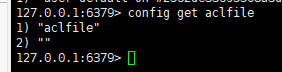
Comment From: ShooterIT
Could you make sure you used right config file instead of another one :)
Comment From: amrjlg
the file "users.acl" have no content
Comment From: amrjlg
i add some content in users.acl , it also report error
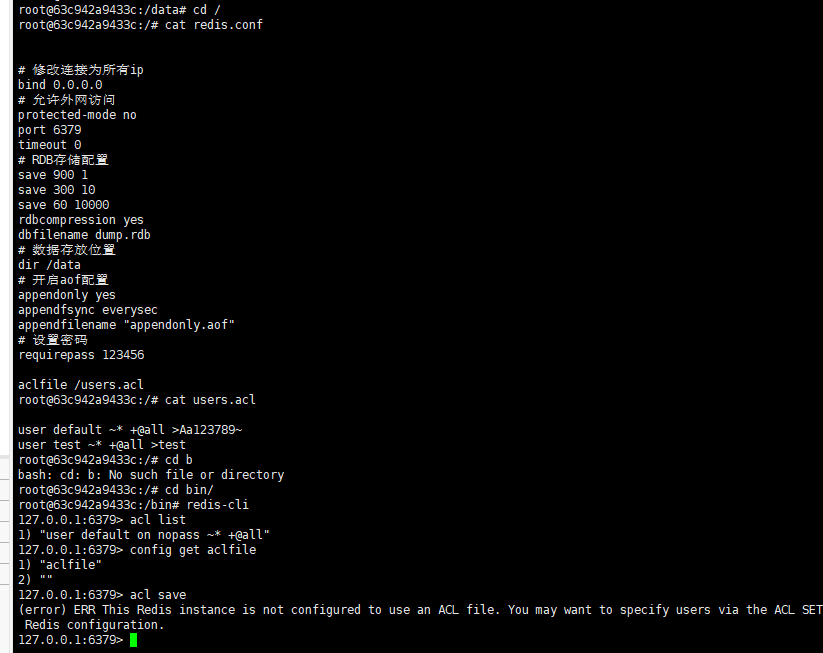
Comment From: amrjlg
use config get requirepass is also empty string
Comment From: madolson
Hey, it looks like something is not getting persisted correctly with your docker configuration. Github issues are for tracking bugs with the github project, here are some other places you can look into getting help: https://redis.io/community
Comment From: hwware
@amrjlg I think from your docker-compose file you did not use the configuration file, you need to specify the command section like this in your docker-compose.yml file:
command:
  - /redis.conf
Also make sure the config file exist in your host directory ./redis/redis.conf then it can map and share properly to the container volume, thanks
Comment From: amrjlg
@amrjlg I think from your docker-compose file you did not use the configuration file, you need to specify the command section like this in your docker-compose.yml file:
command:
  - /redis.conf
Also make sure the config file exist in your host directory ./redis/redis.conf then it can map and share properly to the container volume, thanks
yes , it is the problem. all fixed
Comment From: NicoDora
@amrjlg I think from your docker-compose file you did not use the configuration file, you need to specify the command section like this in your docker-compose.yml file:
command:
  - /redis.conf
Also make sure the config file exist in your host directory ./redis/redis.conf then it can map and share properly to the container volume, thanks
This was also an issue for me.
"docker-compose.yml" file did not use my "redis.conf" file when running redis with redis-server command.
Thank you!