Crash report
...
Mon, Apr 4 2022 9:35:15 pm | 1:X 05 Apr 2022 03:35:15.396 # -sdown sentinel 33f1828dea40e299b1c83d4824a2c329cc4e3ac7 redis1-node-1.redis1 30018 @ mymaster redis1-node-1.redis1 30019
Mon, Apr 4 2022 9:37:22 pm | 1:X 05 Apr 2022 03:37:22.709 # +tilt #tilt mode entered
Mon, Apr 4 2022 9:37:52 pm | 1:X 05 Apr 2022 03:37:52.796 # -tilt #tilt mode exited
Mon, Apr 4 2022 9:39:49 pm | 1:X 05 Apr 2022 03:39:49.641 # +tilt #tilt mode entered
Mon, Apr 4 2022 9:40:19 pm | 1:X 05 Apr 2022 03:40:19.698 # -tilt #tilt mode exited
Mon, Apr 4 2022 9:47:31 pm | 1:X 05 Apr 2022 03:47:31.739 # +tilt #tilt mode entered
Mon, Apr 4 2022 9:48:01 pm | 1:X 05 Apr 2022 03:48:01.793 # -tilt #tilt mode exited
Mon, Apr 4 2022 9:48:18 pm | 1:X 05 Apr 2022 03:48:18.242 # +sdown sentinel 034a2c242957d1854224b48c3583b3fb18173e51 redis1-node-2.redis1 30020 @ mymaster redis1-node-1.redis1 30019
Mon, Apr 4 2022 9:48:21 pm | 1:X 05 Apr 2022 03:48:21.916 # -sdown sentinel 034a2c242957d1854224b48c3583b3fb18173e51 redis1-node-2.redis1 30020 @ mymaster redis1-node-1.redis1 30019
Mon, Apr 4 2022 9:49:21 pm | 1:X 05 Apr 2022 03:49:21.832 # +sdown sentinel 33f1828dea40e299b1c83d4824a2c329cc4e3ac7 redis1-node-1.redis1 30018 @ mymaster redis1-node-1.redis1 30019
Mon, Apr 4 2022 9:49:35 pm | 1:X 05 Apr 2022 03:49:35.659 # -sdown sentinel 33f1828dea40e299b1c83d4824a2c329cc4e3ac7 redis1-node-1.redis1 30018 @ mymaster redis1-node-1.redis1 30019
Mon, Apr 4 2022 9:49:47 pm | 1:X 05 Apr 2022 03:49:47.207 # +tilt #tilt mode entered
Mon, Apr 4 2022 9:50:03 pm | 1:X 05 Apr 2022 03:50:03.126 # +tilt #tilt mode entered
Mon, Apr 4 2022 9:50:14 pm | 1:X 05 Apr 2022 03:50:14.364 # +tilt #tilt mode entered
Mon, Apr 4 2022 9:50:26 pm | 1:X 05 Apr 2022 03:50:26.260 # +tilt #tilt mode entered
Mon, Apr 4 2022 9:50:36 pm | 1:X 05 Apr 2022 03:50:36.989 # +tilt #tilt mode entered
Mon, Apr 4 2022 9:50:37 pm | 1:signal-handler (1649130637) Received SIGTERM scheduling shutdown...
Mon, Apr 4 2022 9:50:38 pm | 1:X 05 Apr 2022 03:50:38.052 # User requested shutdown...
Mon, Apr 4 2022 9:50:38 pm | 1:X 05 Apr 2022 03:50:38.052 # Sentinel is now ready to exit, bye bye..
Additional information
-
OS distribution and version Deployed onto k8s, issue appears on multiple k8s versions and OS's
-
Steps to reproduce (if any) Deploy bitnami helm chart, with simple values. Wait about an hour for sentinel to crash.
I first opened the issue on bitnami chart, https://github.com/bitnami/charts/issues/9689 For full information you can go to that issue and see additional info. However it should not be a chart issue, but an infra issue.
I am posting here hoping that someone has seen something like this before. Any help would be greatly appreciated.
Comment From: moticless
Hi @jonathon2nd, The logic of entering tilt mode is rather simple:
void sentinelCheckTiltCondition(void) {
    mstime_t now = mstime();
    mstime_t delta = now - sentinel.previous_time;

    if (delta < 0 || delta > sentinel_tilt_trigger) {
        sentinel.tilt = 1;
        sentinel.tilt_start_time = mstime();
        sentinelEvent(LL_WARNING,"+tilt",NULL,"#tilt mode entered");
    }
    sentinel.previous_time = mstime();
}
It enters either because the clock is negative compared to the last sample (server.hz=100msec by default) or because it is more than 2 seconds than last sample (mstime() simply calls gettimeofday()). Can you think of a reason why the setup experience such clock instability?
To isolate whether it is because negative clock or because process being delayed behind 2 seconds, you can change the 2sec default value with command SENTINEL DEBUG tilt-trigger <millisec>.
I do notice that your timing configuration of Sentinel might be too short: downAfterMilliseconds: 2000, failoverTimeout: 1000. I highly recommend to enlarge those values, or at least to better isolate the problem as first step.
Comment From: jonathon2nd
Hi @moticless Thanks for responding!
I will try modifying SENTINEL DEBUG tilt-trigger <millisec> and let you know how that goes.
During my testing I stripped the values file all the way down to the following, and the behavior still happens. I was thinking it may be something like downAfterMilliseconds or one of our other configurations, but sadly no.
---
image:
  debug: true
auth:
  password: "password"
replica:
  replicaCount: 3
  persistence:
    enabled: false
sentinel:
  enabled: true
  image:
    debug: true
  quorum: 2
Comment From: jonathon2nd
hmm. Not seeing how to run the command. I am connected to the sentinel port.
> SENTINEL DEBUG tilt-trigger 5000
(error) ERR Unknown subcommand or wrong number of arguments for 'DEBUG'. Try SENTINEL HELP.
> SENTINEL HELP
...
> SENTINEL DEBUG HELP
(error) ERR Unknown subcommand or wrong number of arguments for 'DEBUG'. Try SENTINEL HELP.
> SENTINEL CONFIG GET
(error) ERR Only SENTINEL CONFIG GET <option> / SET <option> <value> are supported.
> SENTINEL CONFIG GET tilt-trigger
(empty list or set)
Comment From: moticless
Your command is correct (SENTINEL DEBUG tilt-trigger 5000).
You need to connect to each sentinel instance, and not redis server, and change its default tilt-trigger value. For example, apply it to a sentinel on localhost and port 5001:
> redis-cli -p 5001
127.0.0.1:5001> SENTINEL DEBUG tilt-trigger 5000
OK
Comment From: jonathon2nd
I am 100% connected to the sentinel port. But I can not get that command to run. Any idea why that could happen?
> SENTINEL DEBUG tilt-trigger 5000
(error) ERR Unknown subcommand or wrong number of arguments for 'DEBUG'. Try SENTINEL HELP.
> SENTINEL tilt-trigger 5000
(error) ERR Unknown subcommand or wrong number of arguments for 'tilt-trigger'. Try SENTINEL HELP.
I tried a bunch of other things, they did not work obviously
> SENTINEL CONFIG SET tilt-trigger 5000
(error) ERR Invalid argument 'tilt-trigger' to SENTINEL CONFIG SET
> SENTINEL CONFIG GET tilt-trigger
(empty list or set)

> SENTINEL DEBUG
(error) ERR Unknown subcommand or wrong number of arguments for 'DEBUG'. Try SENTINEL HELP.
> SENTINEL DEBUG HELP
(error) ERR Unknown subcommand or wrong number of arguments for 'DEBUG'. Try SENTINEL HELP.
> SENTINEL HELP
 1) SENTINEL <subcommand> [<arg> [value] [opt] ...]. Subcommands are:
 2) CKQUORUM <master-name>
 3)     Check if the current Sentinel configuration is able to reach the quorum
 4)     needed to failover a master and the majority needed to authorize the
 5)     failover.
 6) CONFIG SET <param> <value>
 7)     Set a global Sentinel configuration parameter.
 8) CONFIG GET <param>
 9)     Get global Sentinel configuration parameter.
10) GET-MASTER-ADDR-BY-NAME <master-name>
11)     Return the ip and port number of the master with that name.
12) FAILOVER <master-name>
13)     Manually failover a master node without asking for agreement from other
14)     Sentinels
15) FLUSHCONFIG
16)     Force Sentinel to rewrite its configuration on disk, including the current
17)     Sentinel state.
18) INFO-CACHE <master-name>
19)     Return last cached INFO output from masters and all its replicas.
20) IS-MASTER-DOWN-BY-ADDR <ip> <port> <current-epoch> <runid>
21)     Check if the master specified by ip:port is down from current Sentinel's
22)     point of view.
23) MASTER <master-name>
24)     Show the state and info of the specified master.
25) MASTERS
26)     Show a list of monitored masters and their state.
27) MONITOR <name> <ip> <port> <quorum>
28)     Start monitoring a new master with the specified name, ip, port and quorum.
29) MYID
30)     Return the ID of the Sentinel instance.
31) PENDING-SCRIPTS
32)     Get pending scripts information.
33) REMOVE <master-name>
34)     Remove master from Sentinel's monitor list.
35) REPLICAS <master-name>
36)     Show a list of replicas for this master and their state.
37) RESET <pattern>
38)     Reset masters for specific master name matching this pattern.
39) SENTINELS <master-name>
40)     Show a list of Sentinel instances for this master and their state.
41) SET <master-name> <option> <value>
42)     Set configuration paramters for certain masters.
43) SIMULATE-FAILURE (CRASH-AFTER-ELECTION|CRASH-AFTER-PROMOTION|HELP)
44)     Simulate a Sentinel crash.
45) HELP
46)     Prints this help.
Comment From: jonathon2nd
~~I can only find this doc, with not that much information: https://redis.io/commands/debug/~~
And exec into the sentinel container does not help. Sentinel debug is not a command there either.
I have no name!@redis-node-1:/$ redis-cli -p 26379
127.0.0.1:26379> SENTINEL DEBUG tilt-trigger 5000
(error) ERR Unknown subcommand or wrong number of arguments for 'DEBUG'. Try SENTINEL HELP.
127.0.0.1:26379> SENTINEL DEBUG
(error) ERR Unknown subcommand or wrong number of arguments for 'DEBUG'. Try SENTINEL HELP.
Comment From: moticless
Sorry, i wasn't paying attention to your version. It is It isn't available on 6.2.6. Can you try please run sentinel with 7.0-rc3? You can still can stay with 6.2.6 for redis servers.
Comment From: jonathon2nd
AAAAAAAAAAAH, that explains that. https://hub.docker.com/r/bitnami/redis-sentinel/tags?page=1&ordering=last_updated
It does not appear that is an option with this chart.
Comment From: moticless
@jonathon2nd, Can you try please to build and test, as suggested above, with 7.0-rc3?
Comment From: jonathon2nd
The redis and the bitnami/redis images are not interchangeable. I attempted that yesterday and that did not work. I also do not see a way to built my own bitnami/redis image with different redis version.
I am attempting now to manually setup in k8s to be able to test, as are no charts or yamls I can find for that.
Comment From: moticless
I am totally unfamiliar with bitnami ... but I managed to do the following steps to have a modified image with sentinel redis-7.0-rc3 (please see if it makes sense or requires fine-tuning):
docker pull bitnami/redis
docker run --name bitnami --rm --user root --privileged  -ti bitnami/redis bash
Inside container:
cd /tmp
curl -L https://github.com/redis/redis/archive/refs/tags/7.0-rc3.tar.gz  | tar zx
apt-get update
apt-get install build-essential make
cd redis-7.0-rc3/
make MALLOC=libc
cp ./redis-sentinel /opt/bitnami/redis/bin/redis-sentinel
Outside container make docker commit and we have now a modified image.
Comment From: jonathon2nd
Something like that won't work for k8s. What I did do earlier to continue testing is create a manual deployment with the following. I created these items in the Rancher UI, but here are their yamls at the end.
With this I was able to setup single redis and redis sentinel. So far it has not sentinel tilt problem occurred, this could be because it is a problem with the bitnami image, or a single sentinel is not enough for the behavior to arise.
We are still looking into things
redis-0 sentinel log
Fri, Apr 8 2022 11:20:03 am | 9:X 08 Apr 2022 17:20:03.823 # oO0OoO0OoO0Oo Redis is starting oO0OoO0OoO0Oo
Fri, Apr 8 2022 11:20:03 am | 9:X 08 Apr 2022 17:20:03.823 # Redis version=6.9.242, bits=64, commit=00000000, modified=0, pid=9, just started
Fri, Apr 8 2022 11:20:03 am | 9:X 08 Apr 2022 17:20:03.823 # Configuration loaded
Fri, Apr 8 2022 11:20:03 am | 9:X 08 Apr 2022 17:20:03.824 * monotonic clock: POSIX clock_gettime
Fri, Apr 8 2022 11:20:03 am | 9:X 08 Apr 2022 17:20:03.825 * Running mode=sentinel, port=26379.
Fri, Apr 8 2022 11:20:03 am | 9:X 08 Apr 2022 17:20:03.825 # WARNING: The TCP backlog setting of 511 cannot be enforced because /proc/sys/net/core/somaxconn is set to the lower value of 128.
Fri, Apr 8 2022 11:20:03 am | 9:X 08 Apr 2022 17:20:03.841 * Sentinel new configuration saved on disk
Fri, Apr 8 2022 11:20:03 am | 9:X 08 Apr 2022 17:20:03.841 # Sentinel ID is 209285edbe46b79a38d29488944e2bbc5df29db8
Fri, Apr 8 2022 11:20:03 am | 9:X 08 Apr 2022 17:20:03.841 # +monitor master redismaster 127.0.0.1 6379 quorum 1
redis-0 redis log
1:C 08 Apr 2022 17:20:03.307 # oO0OoO0OoO0Oo Redis is starting oO0OoO0OoO0Oo
1:C 08 Apr 2022 17:20:03.307 # Redis version=6.9.242, bits=64, commit=00000000, modified=0, pid=1, just started
1:C 08 Apr 2022 17:20:03.307 # Warning: no config file specified, using the default config. In order to specify a config file use redis-server /path/to/redis.conf
1:M 08 Apr 2022 17:20:03.308 * monotonic clock: POSIX clock_gettime
1:M 08 Apr 2022 17:20:03.309 * Running mode=standalone, port=6379.
1:M 08 Apr 2022 17:20:03.309 # WARNING: The TCP backlog setting of 511 cannot be enforced because /proc/sys/net/core/somaxconn is set to the lower value of 128.
1:M 08 Apr 2022 17:20:03.309 # Server initialized
1:M 08 Apr 2022 17:20:03.309 * The AOF directory appendonlydir doesn't exist
1:M 08 Apr 2022 17:20:03.309 * Ready to accept connections
and with that I can connect to both
root@test-59d74889d7-gn45t:/# redis-cli -h redis-0.default.svc.cluster.local
redis-0.default.svc.cluster.local:6379>
root@test-59d74889d7-gn45t:/# redis-cli -h redis-0.default.svc.cluster.local -p 26379
redis-0.default.svc.cluster.local:26379>
yamls for deployment in k8s (this should be everything) Adding in case some unfortunate person needs it later.
---
apiVersion: apps/v1
kind: StatefulSet
metadata:
labels:
app: redis
workload.user.cattle.io/workloadselector: apps.statefulset-default-redis
name: redis
namespace: default
spec:
replicas: 1
selector:
matchLabels:
workload.user.cattle.io/workloadselector: apps.statefulset-default-redis
serviceName: redis-headless
template:
metadata:
labels:
app: redis
workload.user.cattle.io/workloadselector: apps.statefulset-default-redis
spec:
affinity: {}
containers:
- image: redis:7.0-rc3
imagePullPolicy: Always
name: redis
ports:
- containerPort: 6379
name: redis
protocol: TCP
- args:
- cp /redis/sentinel.conf /tmp/sentinel.conf; redis-server /tmp/sentinel.conf
--sentinel
command:
- sh
- -c
image: redis:7.0-rc3
imagePullPolicy: Always
name: sentinel
ports:
- containerPort: 26379
name: sentinel
protocol: TCP
volumeMounts:
- mountPath: /redis/
name: vol-luloi
volumes:
- configMap:
defaultMode: 511
name: redis-sentinel-test
optional: false
name: vol-luloi
---
apiVersion: v1
kind: Service
metadata:
name: redis-headless
namespace: default
spec:
ports:
- name: redis
port: 6379
protocol: TCP
targetPort: 6379
- name: sentinel
port: 26379
protocol: TCP
targetPort: 26379
selector:
app: redis
type: ClusterIP
---
apiVersion: v1
data:
sentinel.conf: |-
port 26379
dir /tmp
sentinel monitor redismaster 127.0.0.1 6379 1
sentinel down-after-milliseconds redismaster 5000
sentinel parallel-syncs redismaster 1
sentinel failover-timeout redismaster 5000
kind: ConfigMap
metadata:
name: redis-sentinel-test
namespace: default
---
apiVersion: v1
kind: Service
metadata:
name: redis-0
namespace: default
spec:
ports:
- name: redis
port: 6379
protocol: TCP
targetPort: 6379
- name: sentinel
port: 26379
protocol: TCP
targetPort: 26379
selector:
workload.user.cattle.io/workloadselector: apps.statefulset-default-redis
type: ClusterIP
---
apiVersion: v1
kind: Service
metadata:
name: redis
namespace: default
spec:
ports:
- name: redis
port: 6379
protocol: TCP
targetPort: 6379
- name: sentinel
port: 26379
protocol: TCP
targetPort: 26379
selector:
workload.user.cattle.io/workloadselector: apps.statefulset-default-redis
type: ClusterIP
```
**Comment From: jonathon2nd**
@moticless A single sentinel should be able to enter `tilt mode`, is that correct?
**Comment From: jonathon2nd**
At first we were thinking it was either host or hypervisor/vm related.
However, I deployed a node pool onto a public cloud, and setup a centos 7 node there. The problem still persists. So it could be a centos/rocky Linux thing, As the vms we use for our on prem k8s is rocky linux.
We are not sure yet, but it is very puzzling. Even doing full upgrades on the cloud node and on prem node did not help.
**Comment From: moticless**
Yes, a single instance can enter tilt mode.
Since a single instance doesn't enter into tilt mode, I assume there is nothing wrong with this VM (i.e., clocking issue). So we probably left with too long period of time delay between two sampling of the clock of sentinel periodic task, behind 2 seconds (server.hz=100msec by default).
Does the machine is loaded at some points that might starve Sentinel process, up-to 2 seconds or more?
If so, either try reduce load, or future upgrade to Redis 7.0 will give you the option to configure more relaxed threshold value to enter tilt period.
**Comment From: jonathon2nd**
That's the thing. The k8s workers have lots of spare util. They typically sit at around %200 total cpu util, and they have 6 cores each. They also have lots of spare memory.
Additionally, the public cloud node I mentioned before was a 16 core vm, and the only thing running on it other than the typical k8s overhead, was that redis pod.
So I am having a real hard time believing this has anything to do with node/vm load.
To test, I have downgraded the manual redis (not bitnami) deployment to 6.2.6, and it does not exhibit the issue either. My lead was thinking it may be because of redis 7.0 that was not tilting, so I wanted to try that out. Too soon to tell though, it is not tilting yet.
**Comment From: jurschel**
I'm in the same boat actually. Installed the bitnami redis helm chart with sentinel enabled. Things are tilting all over the place. What did you change over to exactly?
**Comment From: jonathon2nd**
@jurschel Is it on prem or cloud that you have deployed to? What OS is the worker running?
We have no solution yet. I have just manually setup using the official redis images using [these yamls](https://github.com/redis/redis/issues/10547#issuecomment-1093259568) that I created for testing. I really do not want to write my own chart for HA redis with sentinel so that is as far as I have gone for testing.
The only place we have deployed bitnami redis chart that does not tilt was OVH public managed k8s. Which looks like they use ubuntu, but I could be wrong.
During testing we have also deployed a node pool with OVH node driver, making a cluster hybrid with on prem and public cloud workers. The public worker was setup with centos 7, and it also tilts and dies. Our on prem workers use Rocky Linux 8.5.
**Comment From: jurschel**
We're on-prem. I'm starting to feel like my problem has more to do with timing than anything else. Tilt mode will start tilting if there's a drift of 2s or more I think I was reading. Mine aren't dying after the tilts just tilting an awful lot.
**Comment From: jonathon2nd**
Ok interesting development. I deployed an ubuntu vm into the test k8s cluster and the bitnami redis sentinel also tilted a bunch there. So my idea of it being a centos/rocky thing is out the window.
The only time redis sentinel did not tilt was when we had a remotely managed k8s as part of a multi cluster test setup. So I am thinking somehow it is a k8s thing that is causing? I have setup a new k8s cluster, all default and base setup, and I have deployed bitnami/redis there. ~~Going to see if the same behavior happens. ~~ The same behavior happens. Sentinel tilts and then dies.
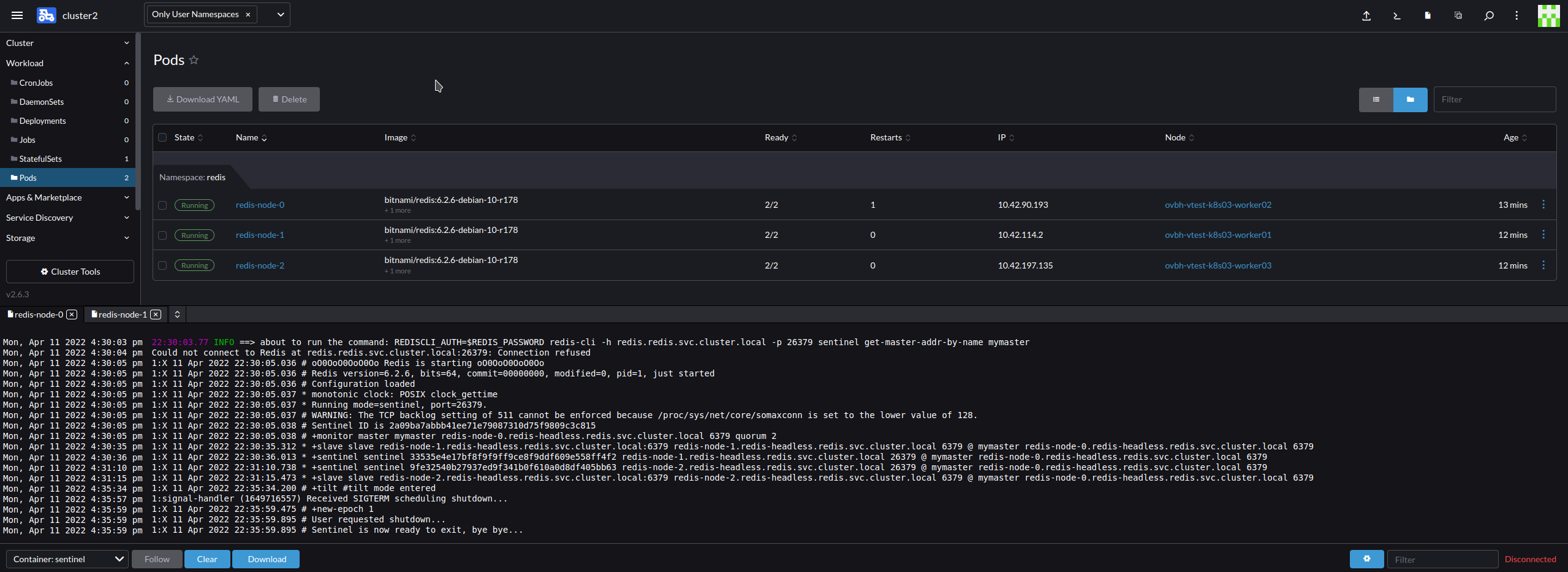
Disabling all health checks/probes did not remedy the behavior.
I would think it has something to do with out infra or host/vm setup/config, but it also happened on a beefy public cloud vm.
@jurschel What k8s platform/manager are you using? We are using Rancher and RKE managed clusters.
**Comment From: moticless**
@jonathon2nd, investigating the frequent tilt periods is one issue. Another issue that is interesting is to understand why sentinel crashes when it is having frequent tilt periods. Can you supply core dump of the crash? Thank you.
**Comment From: jonathon2nd**
Hi @moticless
The crashing seems to be because of health and live checks. We have removed them from a couple of deployments we are testing with. Tilting still continues, but the containers no longer restart.
So at some point the liveness check fails, and k8s restarts the container.
Edit: But the traffic / process is still being affected by something since we're seeing broken pipes from other client / sentinels when tilt mode is triggered, meaning the pod process is being halted for some time, and the healthcheck can't trigger, and connections are dropped.
**Comment From: jonathon2nd**
I setup a k3s cluster, and it has not tilted at all. All signs are currently pointing to this being an RKE problem somehow. This is on the same hosts, same vm template, same rancher management cluster.
@jurschel by change, did you use RKE?
**Comment From: jonathon2nd**
Yup, 17 hours later and redis sentinel in k3s has not tilted once. Deployed on the same infra with same vm template and terraform plan. Only difference is k3s instead of rke. Redis sentinels on other test cluster (rke) have been tilting away meanwhile.
So now can anyone else replica with Rancher RKE cluster I wonder?
**Comment From: jonathon2nd**
hmmm, tilting problem also happens with RKE2. Same infra and everything.

21:54:20.79 INFO ==> about to run the command: REDISCLI_AUTH=$REDIS_PASSWORD redis-cli -h redis.redis.svc.cluster.local -p 26379 sentinel get-master-addr-by-name mymaster
Wed, Apr 13 2022 3:54:21 pm | Could not connect to Redis at redis.redis.svc.cluster.local:26379: Connection refused Wed, Apr 13 2022 3:54:22 pm | 1:X 13 Apr 2022 21:54:22.065 # oO0OoO0OoO0Oo Redis is starting oO0OoO0OoO0Oo Wed, Apr 13 2022 3:54:22 pm | 1:X 13 Apr 2022 21:54:22.065 # Redis version=6.2.6, bits=64, commit=00000000, modified=0, pid=1, just started Wed, Apr 13 2022 3:54:22 pm | 1:X 13 Apr 2022 21:54:22.065 # Configuration loaded Wed, Apr 13 2022 3:54:22 pm | 1:X 13 Apr 2022 21:54:22.066 * monotonic clock: POSIX clock_gettime Wed, Apr 13 2022 3:54:22 pm | 1:X 13 Apr 2022 21:54:22.067 * Running mode=sentinel, port=26379. Wed, Apr 13 2022 3:54:22 pm | 1:X 13 Apr 2022 21:54:22.067 # WARNING: The TCP backlog setting of 511 cannot be enforced because /proc/sys/net/core/somaxconn is set to the lower value of 128. Wed, Apr 13 2022 3:54:22 pm | 1:X 13 Apr 2022 21:54:22.068 # Sentinel ID is 2a09ba7abbb41ee71e79087310d75f9809c3c815 Wed, Apr 13 2022 3:54:22 pm | 1:X 13 Apr 2022 21:54:22.068 # +monitor master mymaster redis-node-0.redis-headless.redis.svc.cluster.local 6379 quorum 2 Wed, Apr 13 2022 3:54:52 pm | 1:X 13 Apr 2022 21:54:52.188 * +slave slave redis-node-1.redis-headless.redis.svc.cluster.local:6379 redis-node-1.redis-headless.redis.svc.cluster.local 6379 @ mymaster redis-node-0.redis-headless.redis.svc.cluster.local 6379 Wed, Apr 13 2022 3:54:53 pm | 1:X 13 Apr 2022 21:54:53.166 * +sentinel sentinel 33535e4e17bf8f9f9ff9ce8f9ddf609e558ff4f2 redis-node-1.redis-headless.redis.svc.cluster.local 26379 @ mymaster redis-node-0.redis-headless.redis.svc.cluster.local 6379 Wed, Apr 13 2022 3:55:27 pm | 1:X 13 Apr 2022 21:55:27.437 * +slave slave redis-node-2.redis-headless.redis.svc.cluster.local:6379 redis-node-2.redis-headless.redis.svc.cluster.local 6379 @ mymaster redis-node-0.redis-headless.redis.svc.cluster.local 6379 Wed, Apr 13 2022 3:55:27 pm | 1:X 13 Apr 2022 21:55:27.439 # +tilt #tilt mode entered Wed, Apr 13 2022 3:55:32 pm | 1:X 13 Apr 2022 21:55:32.786 # +tilt #tilt mode entered Wed, Apr 13 2022 3:55:32 pm | 1:X 13 Apr 2022 21:55:32.786 # waitpid() returned a pid (204) we can't find in our scripts execution queue! Wed, Apr 13 2022 3:55:32 pm | 1:X 13 Apr 2022 21:55:32.786 # waitpid() returned a pid (214) we can't find in our scripts execution queue! Wed, Apr 13 2022 3:55:33 pm | 1:X 13 Apr 2022 21:55:33.125 # waitpid() returned a pid (223) we can't find in our scripts execution queue! Wed, Apr 13 2022 3:55:35 pm | 1:X 13 Apr 2022 21:55:35.283 * +sentinel sentinel 9fe32540b27937ed9f341b0f610a0d8df405bb63 redis-node-2.redis-headless.redis.svc.cluster.local 26379 @ mymaster redis-node-0.redis-headless.redis.svc.cluster.local 6379 Wed, Apr 13 2022 3:55:35 pm | 1:X 13 Apr 2022 21:55:35.342 * +sentinel-address-switch master mymaster redis-node-0.redis-headless.redis.svc.cluster.local 6379 ip redis-node-2.redis-headless.redis.svc.cluster.local port 26379 for 9fe32540b27937ed9f341b0f610a0d8df405bb63 Wed, Apr 13 2022 3:55:40 pm | 1:X 13 Apr 2022 21:55:40.667 * +sentinel sentinel 9fe32540b27937ed9f341b0f610a0d8df405bb63 redis-node-2.redis-headless.redis.svc.cluster.local 26379 @ mymaster redis-node-0.redis-headless.redis.svc.cluster.local 6379 Wed, Apr 13 2022 3:55:40 pm | 1:X 13 Apr 2022 21:55:40.708 * +sentinel-address-switch master mymaster redis-node-0.redis-headless.redis.svc.cluster.local 6379 ip redis-node-2.redis-headless.redis.svc.cluster.local port 26379 for 9fe32540b27937ed9f341b0f610a0d8df405bb63 Wed, Apr 13 2022 3:55:40 pm | 1:X 13 Apr 2022 21:55:40.784 * +sentinel sentinel 9fe32540b27937ed9f341b0f610a0d8df405bb63 redis-node-2.redis-headless.redis.svc.cluster.local 26379 @ mymaster redis-node-0.redis-headless.redis.svc.cluster.local 6379 Wed, Apr 13 2022 3:55:40 pm | 1:X 13 Apr 2022 21:55:40.800 # +tilt #tilt mode entered Wed, Apr 13 2022 3:55:40 pm | 1:X 13 Apr 2022 21:55:40.841 * +sentinel-address-switch master mymaster redis-node-0.redis-headless.redis.svc.cluster.local 6379 ip redis-node-2.redis-headless.redis.svc.cluster.local port 26379 for 9fe32540b27937ed9f341b0f610a0d8df405bb63 Wed, Apr 13 2022 3:55:40 pm | 1:X 13 Apr 2022 21:55:40.876 * +sentinel-address-switch master mymaster redis-node-0.redis-headless.redis.svc.cluster.local 6379 ip redis-node-2.redis-headless.redis.svc.cluster.local port 26379 for 9fe32540b27937ed9f341b0f610a0d8df405bb63 Wed, Apr 13 2022 3:55:41 pm | 1:X 13 Apr 2022 21:55:41.181 * +sentinel sentinel 9fe32540b27937ed9f341b0f610a0d8df405bb63 redis-node-2.redis-headless.redis.svc.cluster.local 26379 @ mymaster redis-node-0.redis-headless.redis.svc.cluster.local 6379 Wed, Apr 13 2022 3:55:41 pm | 1:X 13 Apr 2022 21:55:41.243 * +sentinel-address-switch master mymaster redis-node-0.redis-headless.redis.svc.cluster.local 6379 ip redis-node-2.redis-headless.redis.svc.cluster.local port 26379 for 9fe32540b27937ed9f341b0f610a0d8df405bb63 Wed, Apr 13 2022 3:55:41 pm | 1:X 13 Apr 2022 21:55:41.288 * +sentinel-address-switch master mymaster redis-node-0.redis-headless.redis.svc.cluster.local 6379 ip redis-node-2.redis-headless.redis.svc.cluster.local port 26379 for 9fe32540b27937ed9f341b0f610a0d8df405bb63 Wed, Apr 13 2022 3:55:41 pm | 1:X 13 Apr 2022 21:55:41.478 * +sentinel sentinel 9fe32540b27937ed9f341b0f610a0d8df405bb63 redis-node-2.redis-headless.redis.svc.cluster.local 26379 @ mymaster redis-node-0.redis-headless.redis.svc.cluster.local 6379 Wed, Apr 13 2022 3:55:41 pm | 1:X 13 Apr 2022 21:55:41.532 * +sentinel-address-switch master mymaster redis-node-0.redis-headless.redis.svc.cluster.local 6379 ip redis-node-2.redis-headless.redis.svc.cluster.local port 26379 for 9fe32540b27937ed9f341b0f610a0d8df405bb63 Wed, Apr 13 2022 3:55:41 pm | 1:X 13 Apr 2022 21:55:41.631 * +sentinel-address-switch master mymaster redis-node-0.redis-headless.redis.svc.cluster.local 6379 ip redis-node-2.redis-headless.redis.svc.cluster.local port 26379 for 9fe32540b27937ed9f341b0f610a0d8df405bb63 Wed, Apr 13 2022 3:55:41 pm | 1:X 13 Apr 2022 21:55:41.658 * +sentinel-address-switch master mymaster redis-node-0.redis-headless.redis.svc.cluster.local 6379 ip redis-node-2.redis-headless.redis.svc.cluster.local port 26379 for 9fe32540b27937ed9f341b0f610a0d8df405bb63 Wed, Apr 13 2022 3:55:41 pm | 1:X 13 Apr 2022 21:55:41.852 * +sentinel sentinel 9fe32540b27937ed9f341b0f610a0d8df405bb63 redis-node-2.redis-headless.redis.svc.cluster.local 26379 @ mymaster redis-node-0.redis-headless.redis.svc.cluster.local 6379 Wed, Apr 13 2022 3:55:41 pm | 1:X 13 Apr 2022 21:55:41.944 * +sentinel-address-switch master mymaster redis-node-0.redis-headless.redis.svc.cluster.local 6379 ip redis-node-2.redis-headless.redis.svc.cluster.local port 26379 for 9fe32540b27937ed9f341b0f610a0d8df405bb63 Wed, Apr 13 2022 3:55:42 pm | 1:X 13 Apr 2022 21:55:42.455 * +sentinel sentinel 9fe32540b27937ed9f341b0f610a0d8df405bb63 redis-node-2.redis-headless.redis.svc.cluster.local 26379 @ mymaster redis-node-0.redis-headless.redis.svc.cluster.local 6379 Wed, Apr 13 2022 3:55:42 pm | 1:X 13 Apr 2022 21:55:42.531 * +sentinel-address-switch master mymaster redis-node-0.redis-headless.redis.svc.cluster.local 6379 ip redis-node-2.redis-headless.redis.svc.cluster.local port 26379 for 9fe32540b27937ed9f341b0f610a0d8df405bb63 Wed, Apr 13 2022 3:55:42 pm | 1:X 13 Apr 2022 21:55:42.764 * +sentinel sentinel 9fe32540b27937ed9f341b0f610a0d8df405bb63 redis-node-2.redis-headless.redis.svc.cluster.local 26379 @ mymaster redis-node-0.redis-headless.redis.svc.cluster.local 6379 Wed, Apr 13 2022 3:55:42 pm | 1:X 13 Apr 2022 21:55:42.795 * +sentinel-address-switch master mymaster redis-node-0.redis-headless.redis.svc.cluster.local 6379 ip redis-node-2.redis-headless.redis.svc.cluster.local port 26379 for 9fe32540b27937ed9f341b0f610a0d8df405bb63 Wed, Apr 13 2022 3:55:42 pm | 1:X 13 Apr 2022 21:55:42.937 * +sentinel sentinel 9fe32540b27937ed9f341b0f610a0d8df405bb63 redis-node-2.redis-headless.redis.svc.cluster.local 26379 @ mymaster redis-node-0.redis-headless.redis.svc.cluster.local 6379 Wed, Apr 13 2022 3:55:42 pm | 1:X 13 Apr 2022 21:55:42.968 * +sentinel-address-switch master mymaster redis-node-0.redis-headless.redis.svc.cluster.local 6379 ip redis-node-2.redis-headless.redis.svc.cluster.local port 26379 for 9fe32540b27937ed9f341b0f610a0d8df405bb63 Wed, Apr 13 2022 3:55:43 pm | 1:X 13 Apr 2022 21:55:43.171 * +sentinel sentinel 9fe32540b27937ed9f341b0f610a0d8df405bb63 redis-node-2.redis-headless.redis.svc.cluster.local 26379 @ mymaster redis-node-0.redis-headless.redis.svc.cluster.local 6379 Wed, Apr 13 2022 3:55:43 pm | 1:X 13 Apr 2022 21:55:43.198 * +sentinel-address-switch master mymaster redis-node-0.redis-headless.redis.svc.cluster.local 6379 ip redis-node-2.redis-headless.redis.svc.cluster.local port 26379 for 9fe32540b27937ed9f341b0f610a0d8df405bb63 Wed, Apr 13 2022 3:55:43 pm | 1:X 13 Apr 2022 21:55:43.379 * +sentinel sentinel 9fe32540b27937ed9f341b0f610a0d8df405bb63 redis-node-2.redis-headless.redis.svc.cluster.local 26379 @ mymaster redis-node-0.redis-headless.redis.svc.cluster.local 6379 Wed, Apr 13 2022 3:55:43 pm | 1:X 13 Apr 2022 21:55:43.482 * +sentinel-address-switch master mymaster redis-node-0.redis-headless.redis.svc.cluster.local 6379 ip redis-node-2.redis-headless.redis.svc.cluster.local port 26379 for 9fe32540b27937ed9f341b0f610a0d8df405bb63 Wed, Apr 13 2022 3:55:43 pm | 1:X 13 Apr 2022 21:55:43.886 * +sentinel sentinel 9fe32540b27937ed9f341b0f610a0d8df405bb63 redis-node-2.redis-headless.redis.svc.cluster.local 26379 @ mymaster redis-node-0.redis-headless.redis.svc.cluster.local 6379 Wed, Apr 13 2022 3:55:43 pm | 1:X 13 Apr 2022 21:55:43.910 * +sentinel-address-switch master mymaster redis-node-0.redis-headless.redis.svc.cluster.local 6379 ip redis-node-2.redis-headless.redis.svc.cluster.local port 26379 for 9fe32540b27937ed9f341b0f610a0d8df405bb63 Wed, Apr 13 2022 3:55:43 pm | 1:X 13 Apr 2022 21:55:43.979 * +sentinel-address-switch master mymaster redis-node-0.redis-headless.redis.svc.cluster.local 6379 ip redis-node-2.redis-headless.redis.svc.cluster.local port 26379 for 9fe32540b27937ed9f341b0f610a0d8df405bb63 Wed, Apr 13 2022 3:55:44 pm | 1:X 13 Apr 2022 21:55:44.137 * +sentinel sentinel 9fe32540b27937ed9f341b0f610a0d8df405bb63 redis-node-2.redis-headless.redis.svc.cluster.local 26379 @ mymaster redis-node-0.redis-headless.redis.svc.cluster.local 6379 Wed, Apr 13 2022 3:55:44 pm | 1:X 13 Apr 2022 21:55:44.163 * +sentinel-address-switch master mymaster redis-node-0.redis-headless.redis.svc.cluster.local 6379 ip redis-node-2.redis-headless.redis.svc.cluster.local port 26379 for 9fe32540b27937ed9f341b0f610a0d8df405bb63 Wed, Apr 13 2022 3:55:44 pm | 1:X 13 Apr 2022 21:55:44.191 * +sentinel-address-switch master mymaster redis-node-0.redis-headless.redis.svc.cluster.local 6379 ip redis-node-2.redis-headless.redis.svc.cluster.local port 26379 for 9fe32540b27937ed9f341b0f610a0d8df405bb63 Wed, Apr 13 2022 3:55:44 pm | 1:X 13 Apr 2022 21:55:44.685 # +tilt #tilt mode entered Wed, Apr 13 2022 3:55:44 pm | 1:X 13 Apr 2022 21:55:44.685 # waitpid() returned a pid (270) we can't find in our scripts execution queue! Wed, Apr 13 2022 3:55:44 pm | 1:X 13 Apr 2022 21:55:44.685 # waitpid() returned a pid (261) we can't find in our scripts execution queue! Wed, Apr 13 2022 3:55:44 pm | 1:X 13 Apr 2022 21:55:44.740 * +sentinel-address-switch master mymaster redis-node-0.redis-headless.redis.svc.cluster.local 6379 ip redis-node-2.redis-headless.redis.svc.cluster.local port 26379 for 9fe32540b27937ed9f341b0f610a0d8df405bb63 Wed, Apr 13 2022 3:55:44 pm | 1:X 13 Apr 2022 21:55:44.785 * +sentinel-address-switch master mymaster redis-node-0.redis-headless.redis.svc.cluster.local 6379 ip redis-node-2.redis-headless.redis.svc.cluster.local port 26379 for 9fe32540b27937ed9f341b0f610a0d8df405bb63 Wed, Apr 13 2022 3:55:44 pm | 1:X 13 Apr 2022 21:55:44.880 * +sentinel-address-switch master mymaster redis-node-0.redis-headless.redis.svc.cluster.local 6379 ip redis-node-2.redis-headless.redis.svc.cluster.local port 26379 for 9fe32540b27937ed9f341b0f610a0d8df405bb63 Wed, Apr 13 2022 3:55:45 pm | 1:X 13 Apr 2022 21:55:45.077 * +sentinel sentinel 9fe32540b27937ed9f341b0f610a0d8df405bb63 redis-node-2.redis-headless.redis.svc.cluster.local 26379 @ mymaster redis-node-0.redis-headless.redis.svc.cluster.local 6379 Wed, Apr 13 2022 3:55:45 pm | 1:X 13 Apr 2022 21:55:45.109 * +sentinel-address-switch master mymaster redis-node-0.redis-headless.redis.svc.cluster.local 6379 ip redis-node-2.redis-headless.redis.svc.cluster.local port 26379 for 9fe32540b27937ed9f341b0f610a0d8df405bb63 Wed, Apr 13 2022 3:55:45 pm | 1:X 13 Apr 2022 21:55:45.198 * +sentinel-address-switch master mymaster redis-node-0.redis-headless.redis.svc.cluster.local 6379 ip redis-node-2.redis-headless.redis.svc.cluster.local port 26379 for 9fe32540b27937ed9f341b0f610a0d8df405bb63 Wed, Apr 13 2022 3:55:45 pm | 1:X 13 Apr 2022 21:55:45.283 * +sentinel-address-switch master mymaster redis-node-0.redis-headless.redis.svc.cluster.local 6379 ip redis-node-2.redis-headless.redis.svc.cluster.local port 26379 for 9fe32540b27937ed9f341b0f610a0d8df405bb63 Wed, Apr 13 2022 3:55:45 pm | 1:X 13 Apr 2022 21:55:45.314 * +sentinel-address-switch master mymaster redis-node-0.redis-headless.redis.svc.cluster.local 6379 ip redis-node-2.redis-headless.redis.svc.cluster.local port 26379 for 9fe32540b27937ed9f341b0f610a0d8df405bb63 Wed, Apr 13 2022 3:55:45 pm | 1:X 13 Apr 2022 21:55:45.382 * +sentinel-address-switch master mymaster redis-node-0.redis-headless.redis.svc.cluster.local 6379 ip redis-node-2.redis-headless.redis.svc.cluster.local port 26379 for 9fe32540b27937ed9f341b0f610a0d8df405bb63 Wed, Apr 13 2022 3:55:45 pm | 1:X 13 Apr 2022 21:55:45.489 * +sentinel sentinel 9fe32540b27937ed9f341b0f610a0d8df405bb63 redis-node-2.redis-headless.redis.svc.cluster.local 26379 @ mymaster redis-node-0.redis-headless.redis.svc.cluster.local 6379 Wed, Apr 13 2022 3:55:45 pm | 1:X 13 Apr 2022 21:55:45.521 * +sentinel-address-switch master mymaster redis-node-0.redis-headless.redis.svc.cluster.local 6379 ip redis-node-2.redis-headless.redis.svc.cluster.local port 26379 for 9fe32540b27937ed9f341b0f610a0d8df405bb63 Wed, Apr 13 2022 3:55:45 pm | 1:X 13 Apr 2022 21:55:45.635 * +sentinel sentinel 9fe32540b27937ed9f341b0f610a0d8df405bb63 redis-node-2.redis-headless.redis.svc.cluster.local 26379 @ mymaster redis-node-0.redis-headless.redis.svc.cluster.local 6379 Wed, Apr 13 2022 3:55:45 pm | 1:X 13 Apr 2022 21:55:45.701 * +sentinel-address-switch master mymaster redis-node-0.redis-headless.redis.svc.cluster.local 6379 ip redis-node-2.redis-headless.redis.svc.cluster.local port 26379 for 9fe32540b27937ed9f341b0f610a0d8df405bb63 Wed, Apr 13 2022 3:55:45 pm | 1:X 13 Apr 2022 21:55:45.730 * +sentinel-address-switch master mymaster redis-node-0.redis-headless.redis.svc.cluster.local 6379 ip redis-node-2.redis-headless.redis.svc.cluster.local port 26379 for 9fe32540b27937ed9f341b0f610a0d8df405bb63 Wed, Apr 13 2022 3:55:45 pm | 1:X 13 Apr 2022 21:55:45.810 * +sentinel sentinel 9fe32540b27937ed9f341b0f610a0d8df405bb63 redis-node-2.redis-headless.redis.svc.cluster.local 26379 @ mymaster redis-node-0.redis-headless.redis.svc.cluster.local 6379 Wed, Apr 13 2022 3:55:45 pm | 1:X 13 Apr 2022 21:55:45.896 * +sentinel-address-switch master mymaster redis-node-0.redis-headless.redis.svc.cluster.local 6379 ip redis-node-2.redis-headless.redis.svc.cluster.local port 26379 for 9fe32540b27937ed9f341b0f610a0d8df405bb63 Wed, Apr 13 2022 3:55:45 pm | 1:X 13 Apr 2022 21:55:45.982 * +sentinel-address-switch master mymaster redis-node-0.redis-headless.redis.svc.cluster.local 6379 ip redis-node-2.redis-headless.redis.svc.cluster.local port 26379 for 9fe32540b27937ed9f341b0f610a0d8df405bb63 Wed, Apr 13 2022 3:55:46 pm | 1:X 13 Apr 2022 21:55:46.032 * +sentinel sentinel 9fe32540b27937ed9f341b0f610a0d8df405bb63 redis-node-2.redis-headless.redis.svc.cluster.local 26379 @ mymaster redis-node-0.redis-headless.redis.svc.cluster.local 6379 Wed, Apr 13 2022 3:55:46 pm | 1:X 13 Apr 2022 21:55:46.057 * +sentinel-address-switch master mymaster redis-node-0.redis-headless.redis.svc.cluster.local 6379 ip redis-node-2.redis-headless.redis.svc.cluster.local port 26379 for 9fe32540b27937ed9f341b0f610a0d8df405bb63 Wed, Apr 13 2022 3:55:46 pm | 1:X 13 Apr 2022 21:55:46.139 * +sentinel-address-switch master mymaster redis-node-0.redis-headless.redis.svc.cluster.local 6379 ip redis-node-2.redis-headless.redis.svc.cluster.local port 26379 for 9fe32540b27937ed9f341b0f610a0d8df405bb63 Wed, Apr 13 2022 3:55:46 pm | 1:X 13 Apr 2022 21:55:46.169 * +sentinel-address-switch master mymaster redis-node-0.redis-headless.redis.svc.cluster.local 6379 ip redis-node-2.redis-headless.redis.svc.cluster.local port 26379 for 9fe32540b27937ed9f341b0f610a0d8df405bb63 Wed, Apr 13 2022 3:55:46 pm | 1:X 13 Apr 2022 21:55:46.265 * +sentinel sentinel 9fe32540b27937ed9f341b0f610a0d8df405bb63 redis-node-2.redis-headless.redis.svc.cluster.local 26379 @ mymaster redis-node-0.redis-headless.redis.svc.cluster.local 6379 Wed, Apr 13 2022 3:55:46 pm | 1:X 13 Apr 2022 21:55:46.329 * +sentinel-address-switch master mymaster redis-node-0.redis-headless.redis.svc.cluster.local 6379 ip redis-node-2.redis-headless.redis.svc.cluster.local port 26379 for 9fe32540b27937ed9f341b0f610a0d8df405bb63 Wed, Apr 13 2022 3:55:46 pm | 1:X 13 Apr 2022 21:55:46.527 * +sentinel-address-switch master mymaster redis-node-0.redis-headless.redis.svc.cluster.local 6379 ip redis-node-2.redis-headless.redis.svc.cluster.local port 26379 for 9fe32540b27937ed9f341b0f610a0d8df405bb63 Wed, Apr 13 2022 3:55:46 pm | 1:X 13 Apr 2022 21:55:46.673 * +sentinel sentinel 9fe32540b27937ed9f341b0f610a0d8df405bb63 redis-node-2.redis-headless.redis.svc.cluster.local 26379 @ mymaster redis-node-0.redis-headless.redis.svc.cluster.local 6379 Wed, Apr 13 2022 3:55:46 pm | 1:X 13 Apr 2022 21:55:46.742 * +sentinel-address-switch master mymaster redis-node-0.redis-headless.redis.svc.cluster.local 6379 ip redis-node-2.redis-headless.redis.svc.cluster.local port 26379 for 9fe32540b27937ed9f341b0f610a0d8df405bb63 Wed, Apr 13 2022 3:55:46 pm | 1:X 13 Apr 2022 21:55:46.771 # +tilt #tilt mode entered Wed, Apr 13 2022 3:55:46 pm | 1:X 13 Apr 2022 21:55:46.798 * +sentinel sentinel 9fe32540b27937ed9f341b0f610a0d8df405bb63 redis-node-2.redis-headless.redis.svc.cluster.local 26379 @ mymaster redis-node-0.redis-headless.redis.svc.cluster.local 6379 Wed, Apr 13 2022 3:55:46 pm | 1:X 13 Apr 2022 21:55:46.843 * +sentinel-address-switch master mymaster redis-node-0.redis-headless.redis.svc.cluster.local 6379 ip redis-node-2.redis-headless.redis.svc.cluster.local port 26379 for 9fe32540b27937ed9f341b0f610a0d8df405bb63 Wed, Apr 13 2022 3:55:46 pm | 1:X 13 Apr 2022 21:55:46.939 * +sentinel sentinel 9fe32540b27937ed9f341b0f610a0d8df405bb63 redis-node-2.redis-headless.redis.svc.cluster.local 26379 @ mymaster redis-node-0.redis-headless.redis.svc.cluster.local 6379 Wed, Apr 13 2022 3:55:46 pm | 1:X 13 Apr 2022 21:55:46.965 * +sentinel-address-switch master mymaster redis-node-0.redis-headless.redis.svc.cluster.local 6379 ip redis-node-2.redis-headless.redis.svc.cluster.local port 26379 for 9fe32540b27937ed9f341b0f610a0d8df405bb63 Wed, Apr 13 2022 3:55:47 pm | 1:X 13 Apr 2022 21:55:47.056 * +sentinel sentinel 9fe32540b27937ed9f341b0f610a0d8df405bb63 redis-node-2.redis-headless.redis.svc.cluster.local 26379 @ mymaster redis-node-0.redis-headless.redis.svc.cluster.local 6379 Wed, Apr 13 2022 3:55:47 pm | 1:X 13 Apr 2022 21:55:47.145 # waitpid() returned a pid (290) we can't find in our scripts execution queue! Wed, Apr 13 2022 3:55:47 pm | 1:X 13 Apr 2022 21:55:47.486 * +sentinel-address-switch master mymaster redis-node-0.redis-headless.redis.svc.cluster.local 6379 ip redis-node-2.redis-headless.redis.svc.cluster.local port 26379 for 9fe32540b27937ed9f341b0f610a0d8df405bb63 Wed, Apr 13 2022 3:55:47 pm | 1:X 13 Apr 2022 21:55:47.584 * +sentinel-address-switch master mymaster redis-node-0.redis-headless.redis.svc.cluster.local 6379 ip redis-node-2.redis-headless.redis.svc.cluster.local port 26379 for 9fe32540b27937ed9f341b0f610a0d8df405bb63 Wed, Apr 13 2022 3:55:47 pm | 1:X 13 Apr 2022 21:55:47.616 * +sentinel-address-switch master mymaster redis-node-0.redis-headless.redis.svc.cluster.local 6379 ip redis-node-2.redis-headless.redis.svc.cluster.local port 26379 for 9fe32540b27937ed9f341b0f610a0d8df405bb63 Wed, Apr 13 2022 3:55:49 pm | 1:X 13 Apr 2022 21:55:49.119 * +sentinel-address-switch master mymaster redis-node-0.redis-headless.redis.svc.cluster.local 6379 ip redis-node-2.redis-headless.redis.svc.cluster.local port 26379 for 9fe32540b27937ed9f341b0f610a0d8df405bb63 Wed, Apr 13 2022 3:55:49 pm | 1:X 13 Apr 2022 21:55:49.477 * +sentinel sentinel 9fe32540b27937ed9f341b0f610a0d8df405bb63 redis-node-2.redis-headless.redis.svc.cluster.local 26379 @ mymaster redis-node-0.redis-headless.redis.svc.cluster.local 6379 Wed, Apr 13 2022 3:55:51 pm | 1:X 13 Apr 2022 21:55:51.232 * +sentinel-address-switch master mymaster redis-node-0.redis-headless.redis.svc.cluster.local 6379 ip redis-node-2.redis-headless.redis.svc.cluster.local port 26379 for 9fe32540b27937ed9f341b0f610a0d8df405bb63 Wed, Apr 13 2022 3:55:51 pm | 1:X 13 Apr 2022 21:55:51.499 * +sentinel-address-switch master mymaster redis-node-0.redis-headless.redis.svc.cluster.local 6379 ip redis-node-2.redis-headless.redis.svc.cluster.local port 26379 for 9fe32540b27937ed9f341b0f610a0d8df405bb63 Wed, Apr 13 2022 3:55:51 pm | 1:X 13 Apr 2022 21:55:51.737 * +sentinel sentinel 9fe32540b27937ed9f341b0f610a0d8df405bb63 redis-node-2.redis-headless.redis.svc.cluster.local 26379 @ mymaster redis-node-0.redis-headless.redis.svc.cluster.local 6379 Wed, Apr 13 2022 3:55:57 pm | 1:X 13 Apr 2022 21:55:57.484 # +tilt #tilt mode entered Wed, Apr 13 2022 3:56:08 pm | 1:X 13 Apr 2022 21:56:08.506 # +tilt #tilt mode entered Wed, Apr 13 2022 3:56:08 pm | 1:X 13 Apr 2022 21:56:08.506 # waitpid() returned a pid (328) we can't find in our scripts execution queue! Wed, Apr 13 2022 3:56:08 pm | 1:X 13 Apr 2022 21:56:08.507 # waitpid() returned a pid (319) we can't find in our scripts execution queue! Wed, Apr 13 2022 3:56:08 pm | 1:X 13 Apr 2022 21:56:08.507 # waitpid() returned a pid (346) we can't find in our scripts execution queue! Wed, Apr 13 2022 3:56:08 pm | 1:X 13 Apr 2022 21:56:08.507 # waitpid() returned a pid (337) we can't find in our scripts execution queue! Wed, Apr 13 2022 3:56:09 pm | 1:X 13 Apr 2022 21:56:09.192 # waitpid() returned a pid (356) we can't find in our scripts execution queue! Wed, Apr 13 2022 3:56:09 pm | 1:X 13 Apr 2022 21:56:09.269 # waitpid() returned a pid (366) we can't find in our scripts execution queue! Wed, Apr 13 2022 3:56:17 pm | 1:X 13 Apr 2022 21:56:17.338 # +tilt #tilt mode entered Wed, Apr 13 2022 3:56:23 pm | 1:X 13 Apr 2022 21:56:23.206 # +tilt #tilt mode entered Wed, Apr 13 2022 3:56:23 pm | 1:X 13 Apr 2022 21:56:23.206 # waitpid() returned a pid (403) we can't find in our scripts execution queue! Wed, Apr 13 2022 3:56:23 pm | 1:X 13 Apr 2022 21:56:23.206 # waitpid() returned a pid (393) we can't find in our scripts execution queue! Wed, Apr 13 2022 3:56:28 pm | 1:X 13 Apr 2022 21:56:28.760 # +tilt #tilt mode entered Wed, Apr 13 2022 3:56:28 pm | 1:X 13 Apr 2022 21:56:28.760 # waitpid() returned a pid (422) we can't find in our scripts execution queue! Wed, Apr 13 2022 3:56:28 pm | 1:X 13 Apr 2022 21:56:28.760 # waitpid() returned a pid (413) we can't find in our scripts execution queue! Wed, Apr 13 2022 3:56:46 pm | 1:signal-handler (1649887006) Received SIGTERM scheduling shutdown... Wed, Apr 13 2022 3:56:54 pm | 1:X 13 Apr 2022 21:56:54.671 # User requested shutdown... Wed, Apr 13 2022 3:56:54 pm | 1:X 13 Apr 2022 21:56:54.671 # Sentinel is now ready to exit, bye bye...
**Comment From: moticless**

IMO, I see currently 2 directions of investigation:
1. **Configure Tilt period** - Manage to use 7.0-RC3 and have longer tilt period threshold which might be too aggressive for your setup.
2. **Reduce load** - Try to isolate environment (RKE/k3s/..). Try to isolate feature usage (avoid using scripts in sentinel, etc). Don't run additional heavy processes on the same VM or isolate sentinel on another VM.

But even taking the second path, once you identify that it is load issue  - you still probably goanna need configure more relaxed tilt period. So i guess there is no escape but to put an effort to have setup that run with 7.0-RC3  (or later...).

**Comment From: jonathon2nd**

> Reduce load - ... Don't run additional heavy processes on the same VM or isolate sentinel on another VM.

As mentioned before, I have setup a public cloud vm with 16 dedicated cores. This worker was tainted and the only workload on it was a redis pod. The sentinel container still tilted, and did it quickly at that.

> Configure Tilt period - Manage to use 7.0-RC3 ...

The bitnami/redis and redis images are not interchangeable. I have to wait till 7.0 is fully released and they come out with their own image. https://github.com/bitnami/charts/issues/9689#issuecomment-1094621694
I have a manual setup of one redis node using official redis image and it did not tilt.

The problem is somehow caused by an interaction between bitnami/redis and Rancher RKE.

At this point we do not think the problem has anything to do with redis, but modifications and scripts of bitnami's and some strange interaction with RKE.

**Comment From: moticless**

@jonathon2nd,  please keep us update with any new findings. Thanks.

**Comment From: jonathon2nd**

Nothing new yet, unfortunately.
@moticless , I do find it weird that sentinel will enter `tilt mode` multiple times. Is that standard redis behavior?
Mon, Apr 4 2022 9:49:47 pm | 1:X 05 Apr 2022 03:49:47.207 # +tilt #tilt mode entered Mon, Apr 4 2022 9:50:03 pm | 1:X 05 Apr 2022 03:50:03.126 # +tilt #tilt mode entered Mon, Apr 4 2022 9:50:14 pm | 1:X 05 Apr 2022 03:50:14.364 # +tilt #tilt mode entered Mon, Apr 4 2022 9:50:26 pm | 1:X 05 Apr 2022 03:50:26.260 # +tilt #tilt mode entered Mon, Apr 4 2022 9:50:36 pm | 1:X 05 Apr 2022 03:50:36.989 # +tilt #tilt mode entered ```
Comment From: moticless
It is not a standard behavior. It shouldn't happen that often within such short time, unless something ״significant״ is happening to the VM. Like I mentioned above the TILT logic is rather straightforward and tested over multiple environments.
Comment From: moticless
@jonathon2nd , any new findings?
Comment From: jonathon2nd
Kinda? We are still at a loss.
Was out sick last week, but before that I did some tests you can see here: https://github.com/bitnami/charts/issues/9689#issuecomment-1113846711
TLDR: It really seems to be a bitnami config/script/something that is cause the problem, and sentinel is tilting in an unexpected (maybe?). Single nodes of official redis or bitnami/redis do not tilt. Built out a 3 node manual official redis and it does not tilt. Deployed three node bitnami/redis onto the same vm and they do not tilt at the same time every time.
Others have chimed in that it is happening to them too.
Comment From: moticless
ok. Thanks for the update.
Comment From: jonathon2nd
@moticless , do you have any insight on how a single node will not tilt (bitnami or official), multi-node official does not tilt, but then multi node bitnami tilts?
Comment From: moticless
@jonathon2nd , I think we need here some level of profiling to understand why tilt mode is considerably delayed.
Comment From: lord-kyron
@moticless @jonathon2nd Did you guys found the core of the problem here? We are using bitnami redis helm chart 16.8.0 in GKE and sentinel is tilting as crazy. Nodes are Ubuntu based.
Comment From: Samgarr
Same issue here. Redis+Sentinel deployed on on-prem Kubernetes server.
Comment From: fmendez89
Same issue here. Redis+Sentinel deployed on on-prem Kubernetes server.
Are you using Bitnami's charts? I'm experiencing the same issue with the the latest version too. RKE2 + Rocky 8.6 in my case.
Comment From: jonathon2nd
Yeah this is not on redis problem. Manually build clusters using redis images never tilted. Somehow this is bitnami related, though we never figured out how. It does make no sense: https://github.com/bitnami/charts/issues/9689
For the most part, we are using redis-operator: https://github.com/spotahome/redis-operator It is currently less robust than bitnami's chart, but we have fully migrated into k8s, so no need for external access. It uses redis images, and so far we have encountered no tilting.
Comment From: Samgarr
Actually i'm using operator like @jonathon2nd on Debian 11 and it's tilting sometimes. There is no load on worker nodes running Sentinel pods. And because i don't have any other clues i'm trying to follow the ntpd if there is no sudden or large time offsets. No result so far.
Comment From: fmendez89
Yeah this is not on redis problem. Manually build clusters using redis images never tilted. Somehow this is bitnami related, though we never figured out how. It does make no sense: bitnami/charts#9689
For the most part, we are using redis-operator: https://github.com/spotahome/redis-operator It is currently less robust than bitnami's chart, but we have fully migrated into k8s, so no need for external access. It uses redis images, and so far we have encountered no tilting.
Thanks for the reply @jonathon2nd will try it.
Comment From: moticless
Most of the indications shows it is not core Redis issue but releted to bitnami project.
Comment From: fmendez89
@jonathon2nd @Samgarr We are testing now the Medium tutorial to see if tilts or does anything weird, but probably will be our next bet.
Thanks
Comment From: ChrisNoSim
@fmendez89 Any new findings in that regard? We have the same 'problem' with the "tilt mode entered" in GKE using the bitnami helm-chart and a 3 node sentiel setup..
Comment From: fmendez89
@fmendez89 Any new findings in that regard? We have the same 'problem' with the "tilt mode entered" in GKE using the bitnami helm-chart and a 3 node sentiel setup..
No @ChrisNoSim, we left the 3 node sentinel setup from Medium tutorial running for a while and had no problems nor warnings, but we haven't migrated it to production yet, we need to add the scripts for live and readiness probe first. We've had no time to do it because it's not a priority for us right now, but our first step will be the probes and then migrate to production.
Comment From: ChrisNoSim
Thanks for that kind of information @fmendez89! I have dropped my log lines in that issue, because as discussed here it is more a chart/image thingy..
Comment From: rsidhaarth
Hi All,
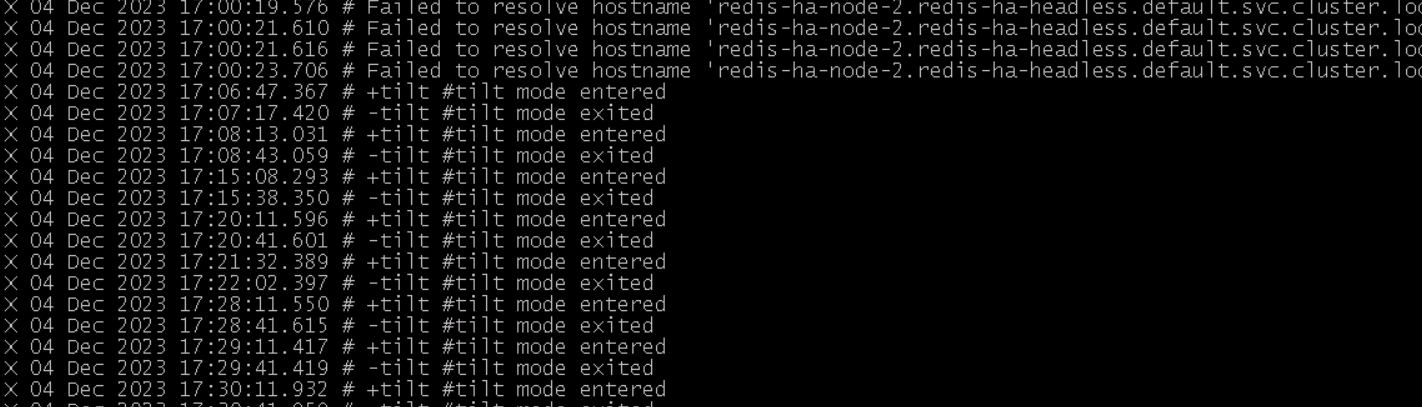
Is there any solution for tilt mode? I just deployed 6.2.11 version yesterday and have not even been using it. But today, I noticed reds sentinel keeps entering tilt mode and dies.
Comment From: SreCode6
Comment From: SreCode6
@moticless I had a similar problem today
Comment From: kamikaze
having same with bitnami/redis + k3s