I have a secured Spring Cloud Gateway application using ServerHttpSecurity.oauth2Login() that can successfully renew expired access tokens using the refresh token. However, when the refresh token also expires and the application tries to renew the access token with it, I get a 500 Internal Server Error [seems to be caused by a 400 Bad Request error just before it] with the following exception:
org.springframework.security.oauth2.client.ClientAuthorizationException: [invalid_grant] Token is not active
    at org.springframework.security.oauth2.client.RefreshTokenReactiveOAuth2AuthorizedClientProvider.lambda$authorize$0(RefreshTokenReactiveOAuth2AuthorizedClientProvider.java:97) ~[spring-security-oauth2-client-5.4.1.jar:5.4.1]
Full logs here: logs.txt
Only if I re-issue the request (refresh browser with the call to the secured endpoint), I will get redirected to the login page (desired behavior).
While debugging, I noticed that re-issuing the request after the 500 Internal Server Error under the hood results in the following exception:
org.springframework.security.oauth2.client.ClientAuthorizationRequiredException: [client_authorization_required] Authorization required for Client Registration Id: <client-id>.
and that is probably what causes the redirect to the login page.
Request execution details here:
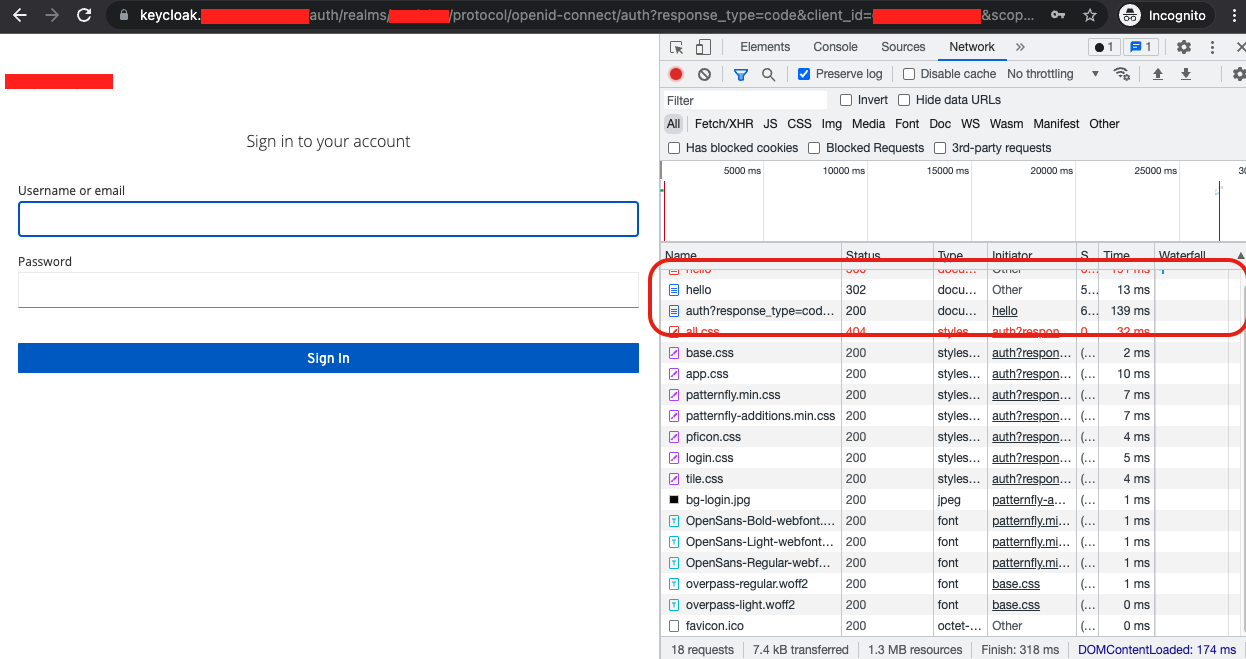
My question: Can I avoid getting the 500 Internal Server Error and instead be redirected to the login page? If yes, how can I accomplish that?
Environment details Spring Boot: 2.4.0 Spring Cloud: 2020.0.0 Spring Security: 5.4.1
Comment From: sjohnr
Hi @mikelemikelo. Would you be able to provide a minimal sample of the gateway project and the type of request that is failing?
I see you're using Keycloak, so I can set up my own local keycloak to test against. However, it would also be helpful if you could describe under what conditions the refresh token becomes inactive in keycloak, e.g. what configuration steps you take to get tokens that expire.
Comment From: mikelemikelo
Hi @sjohnr . Thank you for your response.
You should now have access to my minimal sample project. .
To reproduce the described issue:
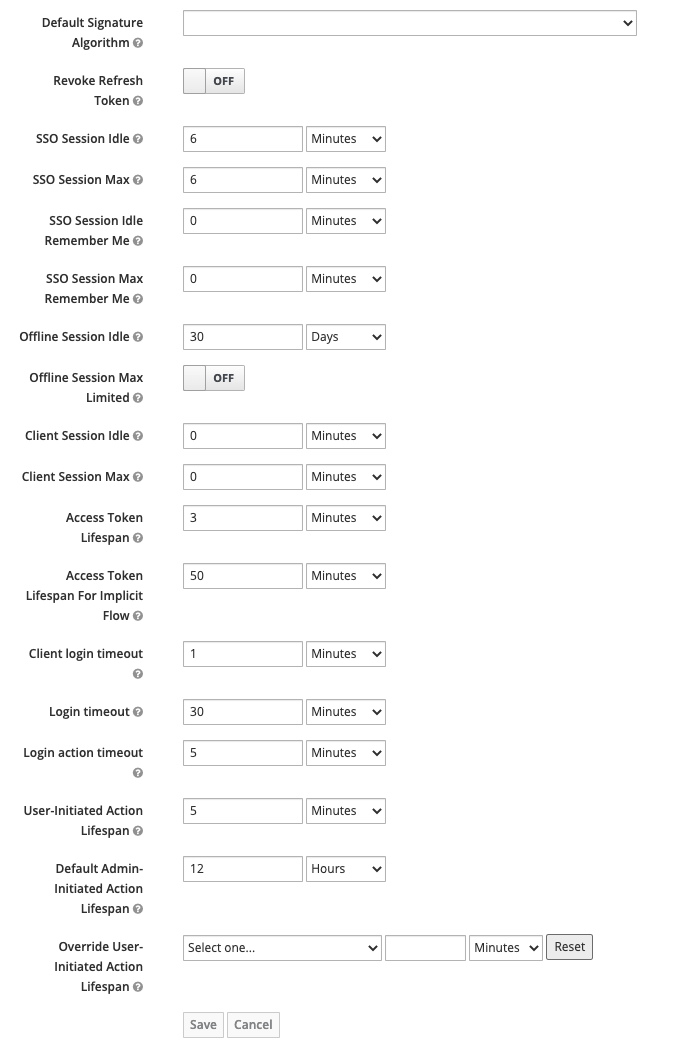
At Keycloak administration console -> Realm Settings -> Tokens, set:
- SSO Session Idle: 6 min
- SSO Session Max: 6 min
- Access Token Lifespan: 3 min
Current configurations here:
Services should start in the next order:
- eureka
- Gateway
- secured-client-one
Additional details here: https://github.com/mikelemikelo/oauth2-playground/blob/main/README.md
Steps to reproduce the issue:
1- Through the browser, issue a request to:
http://localhost:8090/client-one/hello
Once you authenticate you will see Hello, World!
2- Let the browser page sit idle for 8 minutes (SSO Session Max is reached and both the access token and refresh token are expired), then refresh the page:
The first refresh will cause a 500 Internal Server Error ( you will see additional error logs at the cloud-gateway logs) The second refresh will cause a redirect to the login page
Comment From: sjohnr
@mikelemikelo, thanks for the sample. I have run the sample and seen the issue happening. It's complicated enough that I wanted to make sure I could see it and trace it using your setup and version of the libraries just in case.
I believe the issue is simply that an invalid refresh token is not typically something that the client would always use to automatically trigger re-authorization as there are many possible reasons it could be invalid besides expiration. It could for example be revoked, which would result in more or less the same response.
I think your analysis is correct about the exceptions. This is confirmed by AuthorizationCodeReactiveOAuth2AuthorizedClientProvider which seems to indicate a reasonable way to trigger the behavior you're looking for.
You could potentially build a delegating implementation of ReactiveOAuth2AuthorizedClientManager that invokes AuthorizedClientServiceReactiveOAuth2AuthorizedClientManager and then handles the ClientAuthorizationException by mapping (onErrorMap()?) into ClientAuthorizationRequiredException. Does that help with a way forward?
Either way, since this doesn't seem to indicate a bug, I'm going to close the issue. We can continue to discuss it however, and reopen if there's something actionable. For reference, it is usually better to open these kinds of questions on Stack Overflow with a minimal sample (the sample you provided was not minimal).