Summary
I'm just switch from Spring Boot 1.5.4 to 2.0.0.BUILD-SNAPSHOT. Most functionality migrate seamless, but i meet strange behavior of BadCredentialsException handling. In Spring 4 it was show as all other exceptions, like
{
    "error": "Unauthorized",
    "message": "Bad credentials",
    "path": "/v1/admin/users",
    "status": 401,
    "timestamp": "2017-07-25T10:53:13+0000"
}
But now just empty response with code 401 produced. All other spring security exceptions like "Forbidden" shown as expected in JSON.
Actual Behavior
Just
HTTP/1.1 401
on BadCredentialsException
Expected Behavior
Full JSON body
{
    "error": "Unauthorized",
    "message": "Bad credentials",
    "path": "/v1/admin/users",
    "status": 401,
    "timestamp": "2017-07-25T10:53:13+0000"
}
on BadCredentialsException
Configuration
Only default spring security properties, no additional properties set
Version
Spring Boot 2.0.0 SNAPSHOT, Spring Framework 5.0.0.M3
Sample
Sorry, part of production project
Comment From: fred01
Solved by myself. In Spring Security 5.0 necessary to permit all access to /error endpoint, for all http methods
Comment From: mzgg
Hello, I have same problem, Could you explain that how are solve that in detail
Comment From: fred01
Hi! Actually it's Spring Boot 2 related issue, so i close it here. I meet this problem twice. First time i solved it by adding .antMatchers("/error").permitAll() Sometime later new Spring Boot 2 milestone broke it again. and second time it was broken completely. I make workaround then, but it was worst solution even i did. I'd intercept Spring Boot error controller and replace error in response.
Comment From: otidh
Thanks. Your workaround works for me.
Comment From: jzheaux
Actually, this was a proactive decision in the 2.x release of Boot, though I think we should do a better job of explaining the rationale (for which I've just logged a ticket to the Boot team).
The ticket also includes some of the reasoning, too, but I'll briefly summarize here:
- Spring Security secures all endpoints by default. (You can see this is the case by looking at the default implementation of
configureinWebSecurityConfigurerAdapter). It was surprising (and less secure) that somehow/errorwasn't included in the set of "all endpoints". - And the way that Spring Boot excluded
/errorfrom Spring Security was actually to bypass the filter chain altogether, meaning that secure headers, https redirect, and other important security protections were not invoked.
So, actually, yes, if you want the Spring Boot /error page to be permitted, then it is more secure for you to declaratively say so. This makes it clear in your app what security allowances you are making.
Comment From: bhartishradha
HI
I recently did upgrade of spring boot 2.1.7 and suddently I was not getting any error message ..I found some idea with this issue so to fix this ..i have given this antMatchers("/error").permitAll() but now I m getting the error message but message are coming different so previously before upgrade when i was putting wrong username/pwd ...the response was { "timestamp": 1571049553776, "status": 401, "error": "Unauthorized", "message": "Authentication Failed: {\"errorCode\":\"52e\",\"adminMail\":\"System Administrator\",\"role\":[]}", "path": "/login/auth" } and now after upgrade,this is the response { "timestamp": "2019-10-14T10:40:37.651+0000", "status": 401, "error": "Unauthorized", "message": "Unauthorized", "path": "/login/auth" }
Let me know if somebody can help me for this
Comment From: tjmjansen
HI
I recently did upgrade of spring boot 2.1.7 and suddently I was not getting any error message ..I found some idea with this issue so to fix this ..i have given this antMatchers("/error").permitAll() but now I m getting the error message but message are coming different so previously before upgrade when i was putting wrong username/pwd ...the response was { "timestamp": 1571049553776, "status": 401, "error": "Unauthorized", "message": "Authentication Failed: {"errorCode":"52e","adminMail":"System Administrator","role":[]}", "path": "/login/auth" } and now after upgrade,this is the response { "timestamp": "2019-10-14T10:40:37.651+0000", "status": 401, "error": "Unauthorized", "message": "Unauthorized", "path": "/login/auth" }
Let me know if somebody can help me for this
I have the same issue, did you find a solution?
Comment From: bhartishradha
HI I recently did upgrade of spring boot 2.1.7 and suddently I was not getting any error message ..I found some idea with this issue so to fix this ..i have given this antMatchers("/error").permitAll() but now I m getting the error message but message are coming different so previously before upgrade when i was putting wrong username/pwd ...the response was { "timestamp": 1571049553776, "status": 401, "error": "Unauthorized", "message": "Authentication Failed: {"errorCode":"52e","adminMail":"System Administrator","role":[]}", "path": "/login/auth" } and now after upgrade,this is the response { "timestamp": "2019-10-14T10:40:37.651+0000", "status": 401, "error": "Unauthorized", "message": "Unauthorized", "path": "/login/auth" } Let me know if somebody can help me for this
I have the same issue, did you find a solution?
No .. I am still trying to find the solution
Comment From: bhartishradha
HI I recently did upgrade of spring boot 2.1.7 and suddently I was not getting any error message ..I found some idea with this issue so to fix this ..i have given this antMatchers("/error").permitAll() but now I m getting the error message but message are coming different so previously before upgrade when i was putting wrong username/pwd ...the response was { "timestamp": 1571049553776, "status": 401, "error": "Unauthorized", "message": "Authentication Failed: {"errorCode":"52e","adminMail":"System Administrator","role":[]}", "path": "/login/auth" } and now after upgrade,this is the response { "timestamp": "2019-10-14T10:40:37.651+0000", "status": 401, "error": "Unauthorized", "message": "Unauthorized", "path": "/login/auth" } Let me know if somebody can help me for this
I have the same issue, did you find a solution?
HI I wrote a customefailure handler and with that it worked
Comment From: tjmjansen
How did you do that? I tried but exceptions are still coming out in the same manner
Comment From: rubensa
I'm facing this problem too. The most unexpected behavior is that if user credentials are not included at all then a 401 Unauthorized response that includes JSON response (like with any exception) is returned, but if wrong credentials are provided then a 401 Unauthorized is returned but without any JSON. I think this is not very "consistent" behavior.
Comment From: bhartishradha
no it wokred after applying some code. let me forward that code
Comment From: bhartishradha
i created an object of UsernamePasswordAuthenticationFilter and set setAuthenticationFailureHandler like below UsernamePasswordAuthenticationFilter authFilter = new UsernamePasswordAuthenticationFilter();
    AuthenticationProvider provider = initAuthenticationProvider();
    authFilter.setAuthenticationManager(new ProviderManager(Arrays.asList(provider)));

    // set redirect on success and submit form params
    SavedRequestAwareAuthenticationSuccessHandler authOkHandler =
        new SavedRequestAwareAuthenticationSuccessHandler();
    authOkHandler.setDefaultTargetUrl("/portal/index.html");
    authFilter.setAuthenticationSuccessHandler(authOkHandler);
    authFilter.setFilterProcessesUrl("/login/auth");
    authFilter.setUsernameParameter("username");
    authFilter.setPasswordParameter("password");
    authFilter.setAuthenticationFailureHandler(customAuthenticationFailureHandler());
the create a bean @Bean public AuthenticationFailureHandler customAuthenticationFailureHandler() { return new CustomAuthenticationFailureHandler(); }
and here is the implementation of CustomAuthenticationFailureHandler(i wrote according to the logic of my application
public class CustomAuthenticationFailureHandler implements AuthenticationFailureHandler{ private ObjectMapper objectMapper = new ObjectMapper(); private static final Logger log = LogManager.getLogger(CustomAuthenticationFailureHandler.class); public CustomAuthenticationFailureHandler() { log.info("CustomAuthenticationFailureHandler :started"); } @Override public void onAuthenticationFailure(HttpServletRequest request, HttpServletResponse response, AuthenticationException exception) throws IOException, ServletException {
    log.info("CustomAuthenticationFailureHandler :Method >>started");
    response.setStatus(HttpStatus.UNAUTHORIZED.value());
    Map<String, Object> data = new LinkedHashMap<String, Object>();
    data.put(
      "timestamp",
      Calendar.getInstance().getTime());

    data.put(
             "status",
             HttpStatus.UNAUTHORIZED.value());

    data.put(
             "error",
             HttpStatus.UNAUTHORIZED.getReasonPhrase());
    data.put(
             "message", "Authentication Failed: "+
             exception.getMessage());
    data.put("path", request.getRequestURI());

    response.getOutputStream()
      .println(objectMapper.writeValueAsString(data));

}
Comment From: rubensa
@bhartishradha thanks for your code but I was talking about the inconsistency in the "default" implementation (If you override the behavior you can do "almost" anything you want). I opened an issue here: https://github.com/spring-projects/spring-boot/issues/26356
Comment From: Sanskar49
Hey @bhartishradha I too am facing the same issue or could be a little different. I am getting a "org.springframework.security.authentication.BadCredentialsException: Bad credentials" when I hit my API through Postman(Post req) and eventhough my creds are correct, it still is giving me this error? Did you have the same problem? I saw your code.. The part where you created an object of UsernamePasswordAuthenticationFilter and then did all the authFilter.setAuthenticationSuccessHandler(authOkHandler); authFilter.setFilterProcessesUrl("/login/auth"); I wanted to ask where you did this? In your controller method or where speceficly? I am getting this error since 2 days.. If anyone could help that'd be great.
Comment From: brytkhalifa
@Sanskar49 Where you able to solve this problem?
Comment From: sebasira
I'm having the same problem!
I'm getting this: { "timestamp": "2019-10-14T10:40:37.651+0000", "status": 401, "error": "Unauthorized", "message": "Unauthorized", "path": "/login/auth" }
instead of the custom message I was having before. Could anyone help here?
Comment From: sebasira
I resolved by setting the AuthenticationFailureHandler in my JWTAuthenticationFilter that extends UsernamePasswordAuthenticationFilter
The answer from @bhartishradha give me a clue
Comment From: M0hammadUsman
Writing for you all spent 5hrs on the api solution, I am using spring security 6+ and spring boot 3.1.1 solved this issue for simple form login like this
` @AllArgsConstructor @EqualsAndHashCode @Configuration @EnableWebSecurity public class SecurityConfig {
private final UserDetailsService userDetailsService;
private final CustomAuthenticationFailureHandler failureHandler;
private final PasswordEncoder passwordEncoder;

@Bean
public SecurityFilterChain securityFilterChain(HttpSecurity http) throws Exception {

    http
        .authorizeHttpRequests(configurer ->
            configurer
// these requestMatchers here are for static resources as /static is allowed but the sub paths of static folder are not allowed by default .requestMatchers("/css/") .permitAll() .requestMatchers("/javascript/") .permitAll() // these are now controller endpoints .requestMatchers("/login/") .permitAll() .requestMatchers("/signup/") .permitAll() .requestMatchers("/forgot/**") .permitAll() .anyRequest() .authenticated() )
// here is the form login I am generating views using @Controller annotation in my controllers here
        .formLogin(configurer ->
            configurer
                .loginPage("/login")
                .loginProcessingUrl("/login")
// this is the custom faliure handler
                .failureHandler(failureHandler)
                .defaultSuccessUrl("/notes", true)
        )
        .authenticationProvider(daoAuthenticationProvider());

    return http.build();
}

@Bean
public DaoAuthenticationProvider daoAuthenticationProvider() {

    DaoAuthenticationProvider provider = new DaoAuthenticationProvider();
    provider.setUserDetailsService(userDetailsService);
    provider.setPasswordEncoder(passwordEncoder);

    return provider;
}
}
`
Here is the implementation of custom failure handler
`
@Component public class CustomAuthenticationFailureHandler extends SimpleUrlAuthenticationFailureHandler { @Override public void onAuthenticationFailure(HttpServletRequest request, HttpServletResponse response, AuthenticationException exception) throws IOException, ServletException {
    String exceptionName = exception.getClass().getSimpleName();
    StringBuilder failureUrl = new StringBuilder("/login?error=");

    for (int i = 0 ; i < exceptionName.length() ; i++) {
        char ch = exceptionName.charAt(i);
        if (Character.isUpperCase(ch)) {
            failureUrl.append(Character.toLowerCase(ch));
        }
    }

    getRedirectStrategy().sendRedirect(request, response, failureUrl.toString());
}
}
`
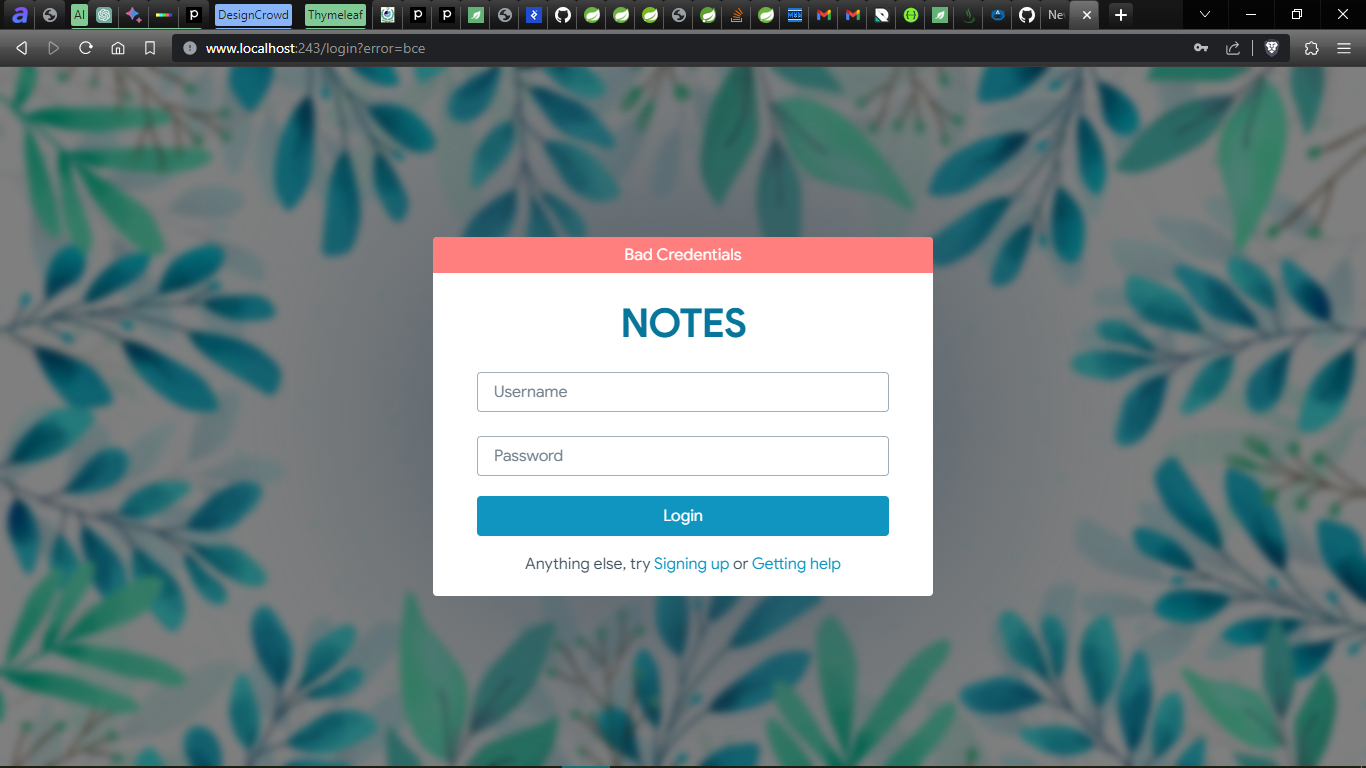
now from here user is redirected back to login page with added request param after that I am using thymeleaf
`
Bad Credentials
    <div data-th-class="${#strings.equals(param.error, 'aee')} ? alertNegative"
         data-th-if="${#strings.equals(param.error, 'aee')}"><p>Your Account is Expired</p></div>

    <div data-th-class="${#strings.equals(param.error, 'le')} ? alertNegative"
         data-th-if="${#strings.equals(param.error, 'le')}"><p>Your Account is disable, verify your email to
      enable it</p></div>

    <div data-th-class="${#strings.equals(param.error, 'de')} ? alertNegative"
         data-th-if="${#strings.equals(param.error, 'de')}"><p>Your Account is Disabled</p></div>

    <div data-th-class="${#strings.equals(param.error, 'cee')} ? alertNegative"
         data-th-if="${#strings.equals(param.error, 'cee')}"><p>Your Credentials are Expired</p></div>

    <div data-th-class="${errorMessage != null} ? alertNegative">
      <p data-th-text="${errorMessage} ?: _"></p>
    </div>
`
** What I did above was to generate views and for form login to handle exceptions for my custom implementation of login page **
like this attached image
For http basic auth and rest apis I did this duct taping below
here is my security config
`
@RequiredArgsConstructor @Configuration @EnableWebSecurity public class SecurityConfig {
private final AuthenticationProvider authenticationProvider;
private final CustomAuthenticationEntryPoint entryPoint;

@Bean
public SecurityFilterChain securityFilterChain(HttpSecurity http) throws Exception {

    return http
        .authorizeHttpRequests(customizer ->
            customizer
                .requestMatchers("/error")
                .permitAll()
                .requestMatchers("/letschat/auth/test", "/letschat/auth/update")
                .authenticated()
                .requestMatchers("/letschat/auth**")
                .permitAll()
                .anyRequest()
                .authenticated()
        )
        .csrf(AbstractHttpConfigurer::disable)
        .authenticationProvider(authenticationProvider)
        .httpBasic(customizer ->
            customizer
                .authenticationEntryPoint(entryPoint)
        )
        .build();
}
}
`
this is the important part above and also permitting the /error endpoint
** .httpBasic(customizer -> customizer .authenticationEntryPoint(entryPoint) )**
now this is the implementation of CustomAuthenticationEntryPoint
`
@Component public class CustomAuthenticationEntryPoint implements AuthenticationEntryPoint { @Override public void commence(HttpServletRequest request, HttpServletResponse response, AuthenticationException authException) throws IOException {
    if (authException instanceof BadCredentialsException) {
        response.sendError(HttpServletResponse.SC_UNAUTHORIZED, "Bad Credentials");

    } else if (authException instanceof LockedException ||
               authException instanceof DisabledException) {
        response.sendError(HttpServletResponse.SC_UNAUTHORIZED, "Account Locked, Unverified Email");

    } else {
        response.sendError(HttpServletResponse.SC_UNAUTHORIZED, "Unauthorized, Unknown Reasons");
    }
}
}
`
I said duct taping because you cannot change these status codes as they are static final int but you can change the messages as you see above I handled disabled exception above to tell the user that you haven't verified your email
so
BEFORE
{ "timestamp": "2023-08-25T00:16:13.723+00:00", "status": 401, "error": "Unauthorized", "message": "Unauthorised", "path": "/letschat/auth/test" }
AFTER
{ "timestamp": "2023-08-25T00:28:45.729+00:00", "status": 401, "error": "Unauthorized", "message": "Account Locked, Unverified Email", "path": "/letschat/auth/test" }