Expected Behavior
AS-IS - 1
- In the controller and spring-security settings, it is inconvenient to manage URLs for each authority redundantly.
Controller method
@PostMapping(value = "/user/login.do")
public HashMap<String, Object> actionLogin() throws Exception {
    // Login Action
}
SecurityFilterChain Config
private String[] AUTH_WHITELIST = {
        "/",
        "/user/login.do",
};

@Bean
protected SecurityFilterChain filterChain(HttpSecurity http) throws Exception {
    return http
    .authorizeHttpRequests(authorize -> authorize
        .antMatchers(AUTH_WHITELIST).permitAll()
        .anyRequest().authenticated()
    )
    .build();
}
AS-IS - 2
- There are annotations for authorization and authentication in each method, but special settings must be made.
- @PreAuthorize("hasRole('ROLE_USER') In this case, it is difficult to check errors caused by typos at runtime.
- When using annotations such as @PermitAll, authorizeHttpRequests() cannot be used in spring-security configuration.
- When using annotations such as @PermitAll, you need to set or remove special settings to authorizeHttpRequests() in your spring-security configuration.
@PermitAll
//@Secured({"ROLE_USER","ROLE_ADMIN"})
//@PreAuthorize("hasRole('ROLE_USER') and hasRole('ROLE_ADMIN')")
public HashMap<String, Object> actionLogin() throws Exception {
// Login Action
}
@EnableGlobalMethodSecurity(jsr250Enabled = true)
//@EnableMethodSecurity(securedEnabled = true ,  securedEnabled = true)
public class SecurityConfig {
    @Bean
    protected SecurityFilterChain filterChain(HttpSecurity http) throws Exception {
        return http
                .csrf(AbstractHttpConfigurer::disable)
                //.authorizeHttpRequests(authorize -> authorize
                //        .antMatchers(AUTH_WHITELIST).permitAll()
                //        .anyRequest().authenticated()
                //)
                .build();
    }
}
To-Be
- No special configuration is required to use the @SecurityPass annotation.
- SecurityPassUtils returns the API URLs of methods with the @SecurityPass annotation attached.
Controller method
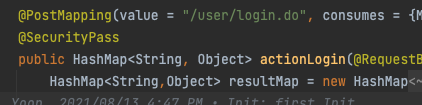
@PostMapping(value = "/user/login.do")
@SecurityPass
public HashMap<String, Object> actionLogin() throws Exception {
    //login action
}
SecurityPassConfig
@Configuration
public class SecurityPassConfig {

    @Bean
    protected SecurityPassUtils securityPassUtils(){
        return new SecurityPassUtils();
    }
}
SecurityFilterChain Config
@Autowired
SecurityPassUtils securityPassUtils

@Bean
protected SecurityFilterChain filterChain(HttpSecurity http) throws Exception {
    String[] permitAllUrls = securityPassUtils.getUrls(); // [ "/user/login.do" ]

    return http
    .authorizeHttpRequests(authorize -> authorize
        .antMatchers(permitAllUrls).permitAll()
        .anyRequest().authenticated()
    )
    .build();
}
Sample Code
@SecurityPass
@SecurityPass(role="admin")
@SecurityPass(role="user")
@SecurityPass(role={"user","admin"})
String[] permitAllUrls = securityPassUtils.getUrls();
String[] permitAdminrls = securityPassUtils.getUrls("admin");
String[] permitUserUrls = securityPassUtils.getUrls("user");
Previously, URLs that did not require authentication or were configured with permitAll() were manually managed by creating and maintaining an array. However, this method was inconvenient, required writing the same URL twice, and made it difficult to modify URLs.
Therefore, I thought it would be useful to have a feature that allows excluding authentication simply by attaching a special annotation to the method.
Current Behavior
Context
Comment From: Chung10Kr
Comment From: marcusdacoregio
Hi, @Chung10Kr. I don't think those changes make sense for a few reasons:
@PreAuthorize("hasRole('ROLE_USER') In this case, it is difficult to check errors caused by typos at runtime.
You can always create an annotation meta-annotated with @PreAuthorize to prevent typos.
@PreAuthorize("hasRole('USER')")
public @interface AuthorizeRoleUser {
}
When talking about security it is better to be explicit about the rules (one of the reasons Spring Security denies the requests by default), if you want to allow access to login you should permitAll() on /login. If you do not want to use security filters, you can omit them and add method security, you are free to choose, however, we recommend using both.