Summary:
Apple now forces app developers to provide Sign in with Apple if they want to submit apps that currently use oath2 with other providers. Spring Security should offer a default CommonOAuth2Provider.APPLE implementation to ease the configuration process.
    APPPLE {

        @Override
        public Builder getBuilder(String registrationId) {
            ClientRegistration.Builder builder = getBuilder(registrationId, ClientAuthenticationMethod.POST,
                    DEFAULT_REDIRECT_URL);
            builder.scope("openid", "name", "email");
            builder.authorizationUri("https://appleid.apple.com/auth/authorize?response_mode=form_post");
            builder.tokenUri("https://appleid.apple.com/auth/token");
            builder.jwkSetUri("https://appleid.apple.com/auth/keys");
            builder.clientName("Apple");
            return builder;
        }

    }
Note: At this time apple does not support userInfoUri. I believe information such as user email is only provided during the first authentication.
https://developer.apple.com/sign-in-with-apple/get-started/ https://developer.apple.com/documentation/sign_in_with_apple/sign_in_with_apple_rest_api
Comment From: jgrandja
Thanks for the suggestion @codeconsole
Spring Security should offer a default
CommonOAuth2Provider.APPLEimplementation to ease the configuration process
Alternatively, you could define this in your application.yml
spring:
  security:
    oauth2:
      client:
        registration:
          apple:
            client-id: apple-client-id
            client-secret: apple-client-secret
        provider:
          apple:
            authorization-uri: https://appleid.apple.com/auth/authorize?response_mode=form_post
            token-uri: https://appleid.apple.com/auth/token
            jwk-set-uri: https://appleid.apple.com/auth/keys
I believe this is simple enough. We also don't want to add too many standard providers in CommonOAuth2Provider since those endpoints may change and it would be much easier (and quicker) to change the configuration in application.yml instead of waiting for the next release of Spring Security that contains the update in CommonOAuth2Provider. I don't think we'll be adding further standard configurations in CommonOAuth2Provider given the ease of adding it in application.yml.
I'm going to close this issue based on the explanation as per above.
Comment From: SelanDeemantha
@codeconsole hi, I have faced with that same problem. Did you find out a way to configure the apple sign with spring security?
Comment From: codeconsole
@codeconsole hi, I have faced with that same problem. Did you find out a way to configure the apple sign with spring security?
yeah, just used the code I pasted above and it worked fine APPLE { ... }. The yml configuration works great too!
Comment From: SelanDeemantha
@codeconsole hi, I am really struggling to connect Apple Sign In with Spring Security .Can you share a sample working code how we can add APPLE { ... } to CommonOAuth2Provider and how we can use the authorization Code which are sent in body to token exchange and get logged user details.
Comment From: jgrandja
@SelanDeemantha @codeconsole It appears that Apple has changed their client authentication requirements from client_secret to private_key_jwt. See this comment for more details.
@codeconsole Does your code still work with client_secret?
Comment From: SelanDeemantha
@jgrandja, @thomas-corte Thanks for pointing out that. Even though I have changed client_secret to private_key_jwt, my code is not working. It always throws [invalid_client] exception and again redirect to login page after getting authorization_code by logging with Apple identity provider.
I am not sure whether I need to write a custom redirect handler with oauth2 client for access the code and continue, because Apple is used a post request and they send data in body.
https://developer.okta.com/blog/2019/06/04/what-the-heck-is-sign-in-with-apple
I used this below rubby script to generate client_secret.
require 'jwt'

key_file = 'key.txt'
team_id = ''
client_id = ''
key_id = ''

ecdsa_key = OpenSSL::PKey::EC.new IO.read key_file

headers = {
  'kid' => key_id
}

claims = {
    'iss' => team_id,
    'iat' => Time.now.to_i,
    'exp' => Time.now.to_i + 86400*180,
    'aud' => 'https://appleid.apple.com',
    'sub' => client_id,
}

token = JWT.encode claims, ecdsa_key, 'ES256', headers

puts token
I used below .yml configuration file.
spring:
  security:
    oauth2:
      client:
        registration:
          google:
            clientId: 429751581-------xxxxxxxx------sercontent.com
            clientSecret: bPVX-xxxxxxxx--ambXNVu
            redirectUri: "{baseUrl}/oauth2/callback/{registrationId}"
            scope:
              - email
              - profile
          facebook:
            clientId: 429751581-------xxxxxxxx------122334
            clientSecret: bPVX-xxxxxxxx--ambXNVu
            redirectUri: "{baseUrl}/oauth2/callback/{registrationId}"
            scope:
              - email
              - public_profile
          apple:
            clientId: com.xyz.dwd.id
            privateKeyJwt: eyJraWQiOiJBWkJYTYifQ.eyJpc3MiXXXXXXXOiJxNjE0MTYyNjYzLCXXXXXXXXXJleHAiOjE2Mjk3MTQ2NjMsImFS5jb20iLCJzdWIiOiJjb20uYVydXXXXXXXXmljZS5pZCJ9.HnSyBUKomO8Qa21e2nBuxuo5oe-XXvfywYQWiGO_ggWrK24qHA
            redirectUri: "{baseUrl}/oauth2/callback/{registrationId}"
            scope:
              - email
              - name
            authorizationGrantType: authorization_code
            responseMode: form_post
            responseType: code
        provider:
          facebook:
            authorizationUri: https://www.facebook.com/v3.0/dialog/oauth
            tokenUri: https://graph.facebook.com/v3.0/oauth/access_token
            userInfoUri: https://graph.facebook.com/v3.0/me?fields=id,first_name,middle_name,last_name,name,email,verified,is_verified,picture.width(250).height(250)
          apple:
            authorizationUri: https://appleid.apple.com/auth/authorize?response_mode=form_post
            tokenUri: https://appleid.apple.com/auth/token
            jwkSetUri: https://appleid.apple.com/auth/keys
Still I couldn't be able to connect Apple_Sign_In with oauth2 client. If someone can share a working code example, it's grateful.
Comment From: codeconsole
@jgrandja I use client-secret
Here is my working application.yml
spring:
    security:
        oauth2:
            client:
                registration:
                   apple:
                        client-id: apple-client-id
                        client-secret: apple-client-secret
                        authorization-grant-type: authorization_code
                        redirect-uri: '{baseUrl}/{action}/oauth2/code/{registrationId}'
                        scope: openid, name, email
                        client-name: Apple
                        client-authentication-method: post
                provider:
                    apple:
                        authorization-uri: https://appleid.apple.com/auth/authorize?response_mode=form_post
                        token-uri: https://appleid.apple.com/auth/token
                        jwk-set-uri: https://appleid.apple.com/auth/keys
                        user-name-attribute: sub
It is important to note that without client-authentication-method: post you will get invalid_client because Apple does not accept get requests.
Comment From: SelanDeemantha
@codeconsole Thank you very much for quick response. After adding client-authentication-method: post to.yml file invalid_client exception has gone. I have to write custom redirect handler to getUserInfo via DefaultOidcUser. Finally, I was able to integrate Apple also as an Authentication Provider.
Comment From: vinkumdev
Hi @SelanDeemantha
Do you mind sharing your custom filter, initially had same issue invalid_client
I added client-authentication-method: post
which solved that issue but getting missing_user_info_uri
If i add openid in scope i get other error oidc_provider_not_configured
my config looks like this:
spring.security.oauth2.client.registration.apple.client-id=com.******.login
spring.security.oauth2.client.registration.apple.client-secret= *****
spring.security.oauth2.client.registration.apple.authorization-grant-type= authorization_code
spring.security.oauth2.client.registration.apple.redirect-uri= {baseUrl}/oauth2/callback/{registrationId}
spring.security.oauth2.client.registration.apple.scope=name, email
spring.security.oauth2.client.registration.apple.client-authentication-method= post
spring.security.oauth2.client.registration.apple.client-name= Apple

spring.security.oauth2.client.provider.apple.authorization-uri=https://appleid.apple.com/auth/authorize?response_mode=form_post
spring.security.oauth2.client.provider.apple.token-uri=https://appleid.apple.com/auth/token
spring.security.oauth2.client.provider.apple.jwk-set-uri=https://appleid.apple.com/auth/keys
spring.security.oauth2.client.provider.apple.user-name-attribute=sub
Comment From: codeconsole
@kirvinod You need to create your own user details service. Apple does not have a a user info uri.
Comment From: vinkumdev
@codeconsole thanks for help. I have created user details service already. For other providers facebook, google etc I am not getting any error. Below returns null for apple along with missing_user_info_uri
For reference I am using this tutorial: https://www.callicoder.com/spring-boot-security-oauth2-social-login-part-1/
 private OAuth2User processOAuth2User(OAuth2UserRequest oAuth2UserRequest, OAuth2User oAuth2User) {
        System.out.println(oAuth2User.getAttributes());
}
Comment From: codeconsole
@codeconsole thanks for help. I have created user details service already. For other providers facebook, google etc I am not getting any error. Below returns null for apple along with missing_user_info_uri
For reference I am using this tutorial: https://www.callicoder.com/spring-boot-security-oauth2-social-login-part-1/
private OAuth2User processOAuth2User(OAuth2UserRequest oAuth2UserRequest, OAuth2User oAuth2User) {
        System.out.println(oAuth2User.getAttributes());
}
@kirvinod Apple is an OidcUserRequest
Comment From: ftore
@codeconsole I am trying to implement Apple sign-in as per your suggestion, and I am getting authorization_request_not_found error. The HttpSession is being dropped after redirecting to https://appleid.apple.com/auth/authorize website. Here is my config:
spring:
  security:
    oauth2:
      client:
        registration:
          apple:
            client-id: ${APPLE_CLIENT_ID}
            client-secret: ${APPLE_CLIENT_SECRET}
            client-authentication-method: post
            authorization-grant-type: authorization_code
            redirect-uri: "{baseUrl}/api/login/oauth2/code/{registrationId}"
            scope: openid,name,email
            client-name: Apple
        provider:
          apple:
            authorization-uri: https://appleid.apple.com/auth/authorize?response_mode=form_post
            token-uri: https://appleid.apple.com/auth/token
            jwk-set-uri: https://appleid.apple.com/auth/keys
            user-name-attribute: sub
also, I created custom CustomOidcUserService that does custom logic. So far, Google auth is working just fine, no issue with session, but Apple is not working. Have you had an issue with session and Apple sign-in?
Comment From: ftore
The above configuration worked for me. My problem with sessions was the introduction of SameSite in chrome. Because of SmaeSite=Lax settings in spring session, all the session cookies were being dropped by the browser if they are cross-site (from apple authorize endpoint -> my redirectUrl) and redirect was being by HTTP Post (apple is using POST to redirect).
My solution was to configure default cookies with SameSite=None and Secure=true in spring boot. Also, Apple sends user details (firstName, lastName and email) in the first ever request. All other request is missing this information, so in order to save user information in my database, I created a custom filter that checks, whether request params contain user info and saves it into db. I put this filter right before OAuth2LoginAuthenticationFilter filter in my filter chain.
Comment From: lpedrosa
I'm actually very confused with how everyone in this thread so far seems to be resolving the response code sent by Apple to the redirect-uri, seeing that the default spring security oauth2 redirect URI handler doesn't support POST requests.
I don't know if there's a config flag somewhere that allows POST requests, but I couldn't find anything in the docs.
For context, Apple sends the default redirection parameters (e.g. code, state, etc.) through POST rather than GET because of this special query parameter response_mode sent during the initial auth request. From this article on the apple developer website, the purpose of that query parameter is:
response_mode- The type of response mode expected. Valid values arequery,fragment, andform_post. If you requested any scopes, the value must beform_post.
Am I missing something (config flag, extra security builder code, etc.) to make this work? I am trying to work with response_mode=query instead, but I'm not being very successful.
Comment From: codeconsole
@lpedrosa response_mode=query won't work if you are passing a scope parameter.
If you requested any scopes, the value must be form_post.
Another thing worth mentioning about the configuration is that
spring.security.oauth2.client.registration.apple.client-secret will expire every 6 months
https://developer.apple.com/documentation/sign_in_with_apple/generate_and_validate_tokens#3262048
exp | The expiration time registered claim identifies the time on or after which the client secret will expire. The value must not be greater than 15777000 (6 months in seconds) from the Current UNIX Time on the server.
Comment From: codeconsole
@lpedrosa I just checked my configuration and it still works fine. How are you concluding that the URI handler doesn't support POST requests?
I just stepped through my configuration and I verified that the apple response works fine:
Request URL: https://appleid.apple.com/appleauth/auth/oauth/authorize
Request Method: POST
->
Request URL: https://MYWEBISTE/login/oauth2/code/apple
Request Method: POST
Comment From: lpedrosa
I apologise @codeconsole, I wasn't using the default redirect URI handler 🤦♂️. You are right about the default handler supporting POST requests.
I did manage to get it working with response_mode=query. Turns out if you send scope=openid, Apple will ignore that scope but spring security will interpret the whole flow as being an OpenID flow.
The ID token wont have much information, but if you are only interested in the sub claim to identify your users, that should be good enough.
I will change a couple of things in my custom handler to be able to support the response_mode=form_post flow.
Another thing worth mentioning about the configuration is that
spring.security.oauth2.client.registration.apple.client-secretwill expire every 6 months
Thanks for pointing this out 😄
Comment From: shaker4k
Hi, guys! I've requested email, name, openid scopes, but I haven't got user info, I've got only email. What's the problem? P.S. I use default redirect uri handler
Comment From: codeconsole
Hi @shaker4k
Reading the docs:
The modified name is only shared with your app and not with Apple, and hence isn’t included in the ID token.
OidcAuthorizationCodeAuthenticationProvider L170
https://appleid.apple.com/auth/token returns:
{"access_token":"...","token_type":"Bearer","expires_in":3600,"refresh_token":"...","id_token":"..."}
Since it's not in the id_token, and nothing else is provided that would include it, I don't think it's available anymore.
Comment From: rasenderhase
As @ftore states, the user information (first name, last name) is provided in the very first request to your application only, when the user's account is created:
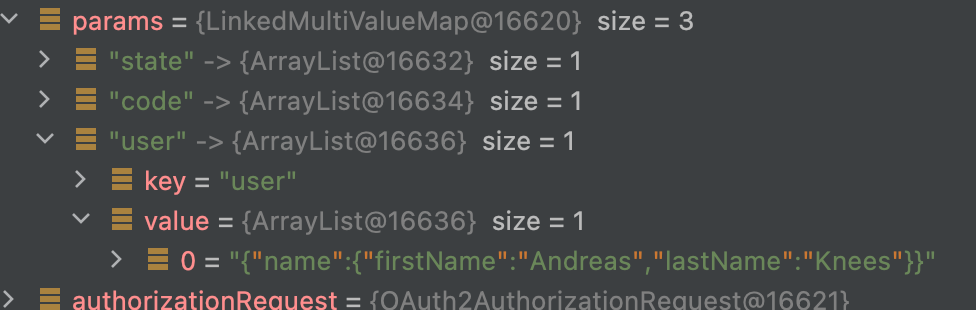
It's a request parameter of the request that is handled in OAuth2LoginAuthenticationFilter.attemptAuthentication(HttpServletRequest, HttpServletResponse).
So the idea to extract the data in a filter prior to OAuth2LoginAuthenticationFilter is the solution. The values must be stored somewhere until they can be retrieved in your implementation of OidcUserService.
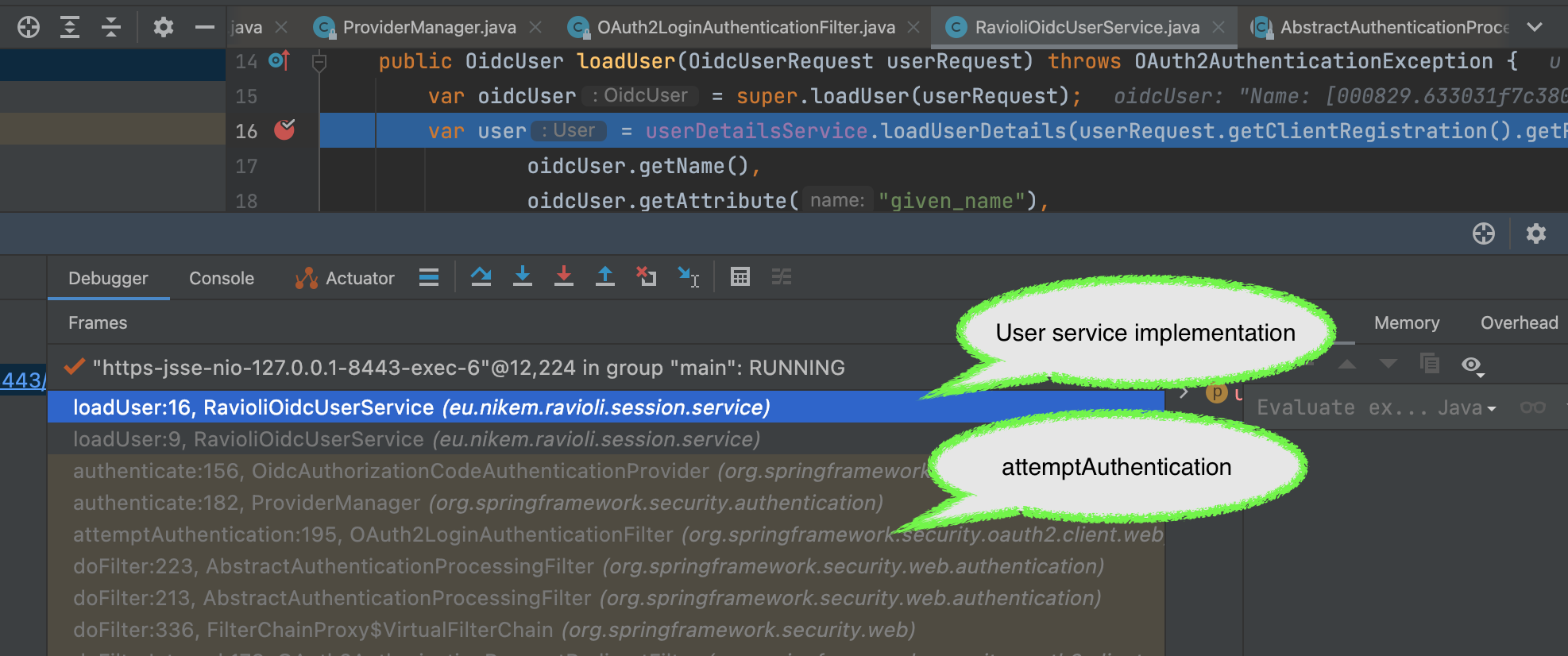
Comment From: codeconsole
Ahh, yeah, I found it. I since changed my original implementation. I can confirm all the information is stored in:
request.getParameter("user");
You can reset your apple id to behave like first time by going here: https://appleid.apple.com/account/manage then "Sign in With Apple" then select your App and click the button "Stop using Sign in with Apple"
Comment From: varpa89
@codeconsole @rasenderhase but how/where do you store user data that is accessible in OAuth2LoginAuthenticationFilter?
Comment From: rasenderhase
@varpa89 , I store it in a ThreadLocal. I put the files into a Gist: https://gist.github.com/rasenderhase/ec4682d62bb77b27b8a24118eea381b1 Hope this helps. Best regards Andy
Comment From: bsautel
With Spring Security 6 (and thus Spring Boot 3), the client-authentication-method: post configuration no longer works.
As we can see here, the entry which was called postno longer exists. It is now called client_secret_post as we can see here.
The new configuration to use is client-authentication-method: client_secret_post.
Comment From: ChernoVl
@jgrandja, @thomas-corte Thank you all very much for your detailed description of how to solve the problem with [invalid_client]. Unfortunately I am getting this exception to this day. I can't figure out what my problem is. As always, Google authorization works fine, but not Apple.
application.properties :
spring.security.oauth2.client.registration.apple.client-id=base.url.com
spring.security.oauth2.client.registration.apple.client-secret=-----BEGIN PRIVATE KEY-----setOfLetters--END PRIVATE KEY-----
spring.security.oauth2.client.registration.apple.authorization-grant-type=authorization_code
spring.security.oauth2.client.registration.apple.redirect-uri={baseUrl}/login/oauth2/code/apple
spring.security.oauth2.client.registration.apple.scope=openid, name ,email
spring.security.oauth2.client.registration.apple.client-name=Apple
spring.security.oauth2.client.registration.apple.client-authentication-method=client_secret_post

spring.security.oauth2.client.provider.apple.authorization-uri=https://appleid.apple.com/auth/authorize?response_mode=form_post
spring.security.oauth2.client.provider.apple.token-uri=https://appleid.apple.com/auth/token
spring.security.oauth2.client.provider.apple.jwk-set-uri=https://appleid.apple.com/auth/keys
spring.security.oauth2.client.provider.apple.user-name-attribute=sub
I also tried setting SameSite cookies:
server.servlet.session.cookie.same-site=none
SecurityFilterChain:
http
        .securityMatcher("/oauth2/**", "/login/**")
        .httpBasic()
        .and()
        .oauth2Login()
        .loginPage("/login")
        .userInfoEndpoint(userInfo -> userInfo.userService(oauth2UserService))
        .successHandler(new OAuth2AuthenticationSuccessHandler(customerRepository, sessionService))
        .and()
        .csrf().disable();
debuged it to this place where I get [invalid_client]
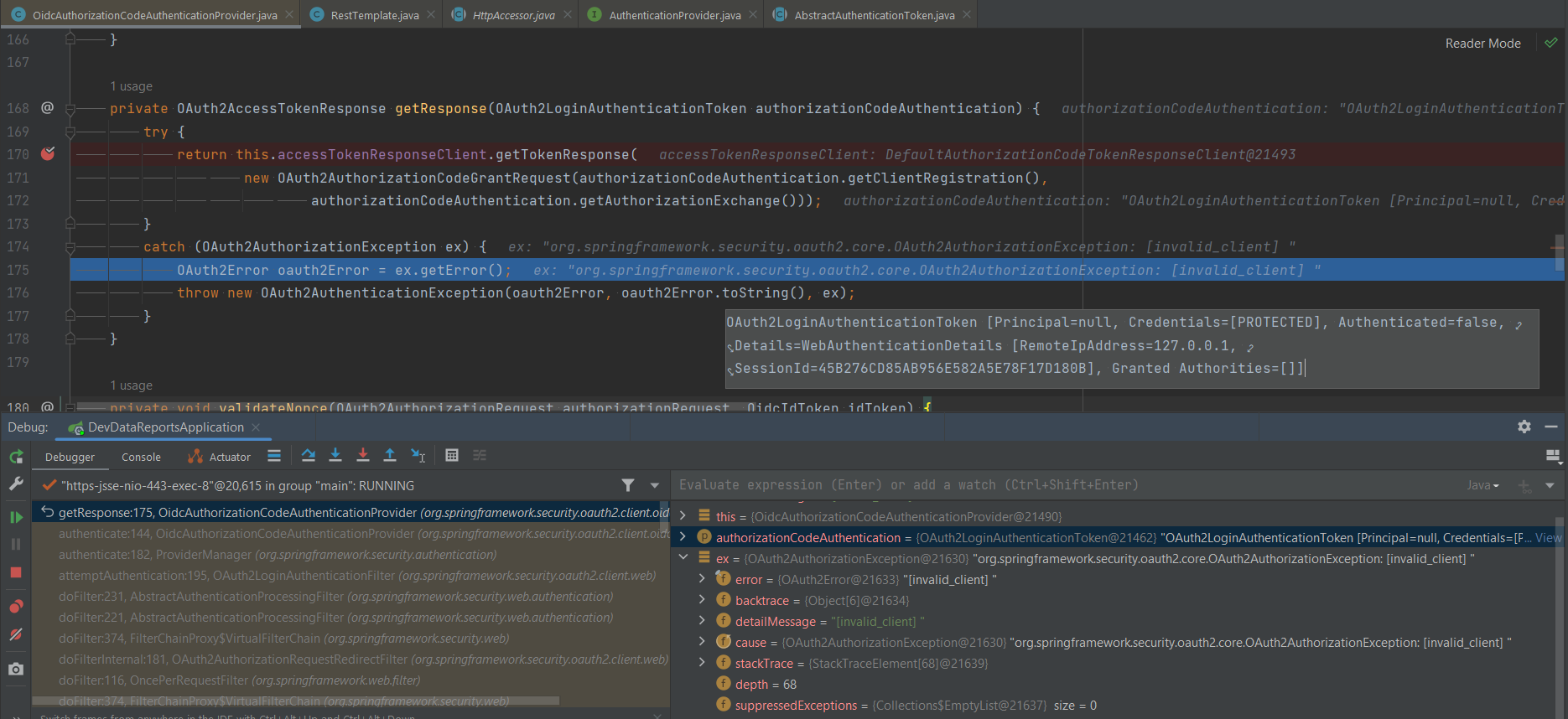
Launched locally Appreciate any advice
Comment From: vinkumdev
@ChernoVl have you tried adding post method?
spring.security.oauth2.client.registration.apple.client-authentication-method=post
I remember it solved the issue for me.
Comment From: varpa89
@ChernoVl just curious, how do you debug, is it localhost? does apple allow to test with localhost?
Comment From: ChernoVl
@ChernoVl have you tried adding post method?
spring.security.oauth2.client.registration.apple.client-authentication-method=post
I remember it solved the issue for me.
@kirvinkum yes, i have. But that doesn't work anymore, does it? It was also mentioned here
@ChernoVl just curious, how do you debug, is it localhost? does apple allow to test with localhost?
@varpa89 No, but I use in the redirect link base.url.com. I was able to achieve this by setting in the properties and changing in the hosts file, just added 127.0.0.1 base.url.com. So this redirects to the apple website, I pass authorization normally, but when Apple sends a post request back to website, I get this exception [invalid_client]
Comment From: lalo-mx
Do we have an alternative for dynamic configuration? (Java not XML or properties)
Comment From: issaghaBarry
hello, excuse my english, i have the same error invalid_client i use oauth2, how do you get client-secret with apple? additional information i use ngrok locally for spring, and to just type this url on the browser https://xxx.ngrok-free.app/oauth2/authorization/apple
spring.security.oauth2.client.registration.apple.client-id=com.xxx.login
spring.security.oauth2.client.registration.apple.client-secret=xxx
spring.security.oauth2.client.registration.apple.authorization-grant-type=authorization_code
spring.security.oauth2.client.registration.apple.scope=openid,name,email
spring.security.oauth2.client.registration.apple.redirect-uri=${baseClientUrl}/login/oauth2/code/{registrationId}
spring.security.oauth2.client.registration.apple.client-authentication-method=client_secret_post
spring.security.oauth2.client.registration.apple.client-name=Apple
spring.security.oauth2.client.provider.apple.authorization-uri=https://appleid.apple.com/auth/authorize?response_mode=form_post
spring.security.oauth2.client.provider.apple.token-uri=https://appleid.apple.com/auth/token
spring.security.oauth2.client.provider.apple.user-info-uri=https://appleid.apple.com/auth/userinfo
spring.security.oauth2.client.provider.apple.jwk-set-uri=https://appleid.apple.com/auth/keys
spring.security.oauth2.client.provider.apple.user-name-attribute=sub
Comment From: Hologos
For those that still get invalid_client error and are on lower versions of Spring Boot v2, the problem is that client-secret has to be manually created, you can't just paste the content of the private key. You have to program the proces of generating JWT that is used as client_secret from the key (as per documentation).
I followed this article that implements the mechanism of generating the client_secret.
You have to do either this or upgrade Spring Boot. It's been implemented in Spring Security v5.5.
Comment From: techiesnarender
apple-client-secret
where I can find client secret plz help and also format of secret
Comment From: quotentiroler
@techiesnarender The client secret can be generated like this:
import jwt
import time
from datetime import timedelta

# Variables
key_id = 'KeyID'
team_id = 'TeamID'
client_id = 'com.myApp.app'
private_key_file = 'AuthKey_FILE.p8'

# Read the .p8 file
with open(private_key_file, 'r') as f:
    private_key = f.read()

# Prepare the payload
now = int(time.time())
payload = {
    'iss': team_id,
    'iat': now,
    'exp': now + int(timedelta(days=180).total_seconds()),  # The token is valid for 180 days
     # TODO: recreate the token when it expires
    'aud': 'https://appleid.apple.com',
    'sub': client_id,
}

# Generate the client secret
client_secret = jwt.encode(payload, private_key, algorithm='ES256', headers={'kid': key_id})

print(client_secret)
But for some reason, I cannot overcome the issue "invalid redirect uri".
Comment From: gab78
Hi, i'm getting crazy trying to get Login with AppleID working with Spring Authorization Server.
My auth-server needs to support different Idp and also login with username/password Authentication with Username/Password and with Google works perfectly, but AppleId is a pain.
I'm stuck at the point in which apple calls me back to my /login/oauth2/code/apple url. I've tried to write a custom filter responding at /login/oauth2/code/apple as suggested by @rasenderhase, but after the filter application, I got a redirection to /login?error (it seems to me that no authentication is performed)
I think i'm missing something in my Spring Security Configuration but I can't understand what's happening and what's missing...
Here is code of the filter:
public class AppleOidcUserFilter implements Filter {

private final ObjectMapper objectMapper;

@Value("${spring.security.oauth2.client.registration.apple.client-id:}")
String clientId;


@Autowired
private AppleUserStore appleUserStore;

public AppleOidcUserFilter() {
    objectMapper = new ObjectMapper();
    objectMapper.disable(DeserializationFeature.FAIL_ON_UNKNOWN_PROPERTIES);
}

//Path: /login/oauth2/code/apple

@Override
public void doFilter(ServletRequest request, ServletResponse response, FilterChain chain) throws IOException, ServletException {
    try {

        Map<String,String[]> parameters = request.getParameterMap();
        for(String k : parameters.keySet()) {
            log.info("param:"+k+" value: "+parameters.get(k));
        }

        if(parameters.get("id_token")!=null) {

            String idToken = parameters.get("id_token")[0];
            log.info("ID TOken:"+idToken);

            HttpsJwks httpsJkws = new HttpsJwks("https://appleid.apple.com/auth/keys");

            HttpsJwksVerificationKeyResolver httpsJwksKeyResolver = new HttpsJwksVerificationKeyResolver(httpsJkws);

            JwtConsumer jwtConsumer = new JwtConsumerBuilder()
                      .setVerificationKeyResolver(httpsJwksKeyResolver)
                      .setExpectedIssuer("https://appleid.apple.com")
                      .setExpectedAudience(clientId)
                      .build();

            JwtClaims claims = jwtConsumer.processToClaims(idToken);


            log.info(""+claims.getClaimValueAsString("sub"));
            log.info(""+claims.getClaimValueAsString("email"));

            String eml = claims.getClaimValueAsString("email");

            AppleUser user = new AppleUser();
            user.setEmail(eml);
            user.setUsername(eml);
            appleUserStore.setAppleUser(user);
        }
    } catch (Exception e) {
        log.error("JSON parse error of user attribute", e);
    } finally {
        chain.doFilter(request, response);
        //appleUserStore.removeAppleUser();
    }
}
}
My application.yml configuration:
security: oauth2: client: registration: google-idp: provider: google client-id: *** client-secret: *** scope: openid, https://www.googleapis.com/auth/userinfo.profile, https://www.googleapis.com/auth/userinfo.email client-name: TestOAuth2-Web-Client redirect-uri: "https://superb-boa-winning.ngrok-free.app/login/oauth2/code/google-idp" apple: provider: apple client-id: com.omnys.lamarssotest client-secret: *** authorization-grant-type: authorization_code scope: openid, name, email client-name: Apple client-authentication-method: client_secret_post redirect-uri: "https://superb-boa-winning.ngrok-free.app/login/oauth2/code/apple" redirect-path: "/login/oauth2/code/apple" provider: google: user-name-attribute: email apple: authorization-uri: https://appleid.apple.com/auth/authorize?response_mode=form_post&response_type=code+id_token&scope=name%20email token-uri: https://appleid.apple.com/auth/token jwk-set-uri: https://appleid.apple.com/auth/keys user-name-attribute: sub
and my Spring Security configuration
@Configuration(proxyBeanMethods = false)
@EnableWebSecurity
public class SecurityConfig {

@Autowired
LamarUserService lamarUserService;

@Autowired
AppleUserStore appleUserStore;

@Bean
@Order(Ordered.HIGHEST_PRECEDENCE)
public SecurityFilterChain authorizationServerSecurityFilterChain(HttpSecurity http) throws Exception {
    OAuth2AuthorizationServerConfiguration.applyDefaultSecurity(http);
    http.getConfigurer(OAuth2AuthorizationServerConfigurer.class)
        .oidc(Customizer.withDefaults());   // Enable OpenID Connect 1.0

    http
        // Redirect to the login page when not authenticated from the
        // authorization endpoint
        .exceptionHandling((exceptions) -> exceptions
            .defaultAuthenticationEntryPointFor(
                new LoginUrlAuthenticationEntryPoint("/login"),
                new MediaTypeRequestMatcher(MediaType.TEXT_HTML)
            )
        );

    // Accept access tokens for User Info and/or Client Registration
    http.oauth2ResourceServer((oauth2) -> oauth2.jwt(Customizer.withDefaults()));


    http.cors(Customizer.withDefaults());

    return http.build();
}

private AuthenticationSuccessHandler authenticationSuccessHandler() {
    return new FederatedIdentityAuthenticationSuccessHandler(lamarUserService);
}

@Bean
@Order(2)
public SecurityFilterChain defaultSecurityFilterChain(HttpSecurity http) throws Exception {
    http
        .authorizeHttpRequests((authorize) -> authorize
            .requestMatchers(
                "/error","/login/**","/h2-console/**"
            ).permitAll()
            .anyRequest().authenticated()
        )
        // Form login handles the redirect to the login page from the
        // authorization server filter chain
        .formLogin(formLogin -> formLogin.loginPage("/login").permitAll())
        .oauth2Login(oauth2Login -> oauth2Login.loginPage("/login").successHandler(authenticationSuccessHandler())
            .userInfoEndpoint().oidcUserService(new AppleOidcUserService(appleUserStore))
        );


    http.csrf().disable();
    //Fix displays of H2 console
    http.headers(headers -> headers.frameOptions(frameOption -> frameOption.sameOrigin()));

    //http.headers().frameOptions().disable();

    return http.cors(Customizer.withDefaults()).build();
}

@Bean
UserDetailsService userDetailsService() {
    return new UserDetail(lamarUserService);
}

@Bean
public PasswordEncoder passwordEncoder() {
    return new BCryptPasswordEncoder();
}

@Bean
public AuthenticationProvider daoAuthenticationProvider() {
    DaoAuthenticationProvider provider = new DaoAuthenticationProvider();
    provider.setPasswordEncoder(passwordEncoder());
    provider.setUserDetailsService(userDetailsService());
    return provider;
}

@Bean
WebSecurityCustomizer webSecurityCustomizer() {
    return (web) -> web.debug(true)
            .ignoring()
            .requestMatchers("/webjars/**", "/images/**", "/css/**", "/assets/**", "/favicon.ico");
}

@Bean
public CorsConfigurationSource corsConfigurationSource() {
    UrlBasedCorsConfigurationSource source = new UrlBasedCorsConfigurationSource();
    CorsConfiguration config = new CorsConfiguration();
    config.addAllowedHeader("*");
    config.addAllowedMethod("*");
    //config.addAllowedOrigin("http://localhost:3000");
    //config.addAllowedOrigin("https://superb-boa-winning.ngrok-free.app");
    config.addAllowedOrigin("*");
    //config.setAllowCredentials(true);
    source.registerCorsConfiguration("/**", config);
    return source;
}

@Bean
public OAuth2TokenCustomizer<JwtEncodingContext> jwtTokenCustomizer() {
    return (context) -> {
        if (OAuth2TokenType.ACCESS_TOKEN.equals(context.getTokenType())) {

            context.getClaims().claims((claims) -> {
                Set<String> roles = AuthorityUtils.authorityListToSet(context.getPrincipal().getAuthorities());
                Set<String> modifiedRoles = new HashSet<String>();
                if(context.getPrincipal().getPrincipal() instanceof OidcUser) {
                    modifiedRoles.add("USER");
                }
                else {
                    for(String r : roles) {
                        modifiedRoles.add(r.replaceFirst("^ROLE_", ""));
                    }
                }
                claims.put("roles", modifiedRoles);
            });
        }
    };
}


@Bean
public SessionRegistry sessionRegistry() {
    return new SessionRegistryImpl();
}

@Bean
public HttpSessionEventPublisher httpSessionEventPublisher() {
    return new HttpSessionEventPublisher();
}

}
Thanks for any help!