Summary
I am using spring security 5.0.7 with spring boot 2.0.4.RELEASE for login with Google and Login with Microsoft feature.
I meet the same issue of OidcAuthorizationCodeAuthenticationProvider maxIssuedAt which is closed without any enhancement
Actual Behavior
Today, when i login with Google account in one of my testing machine, I meet the issue with follow error message: c.c.w.g.c.SecurityConfiguration$2 - Authentication request failed: org.springframework.security.oauth2.core.OAuth2AuthenticationException: [invalid_id_token]
it does not output the detail reason why id token is invalid: like aud is null or audience is not same with client id or idToken is expired etc.
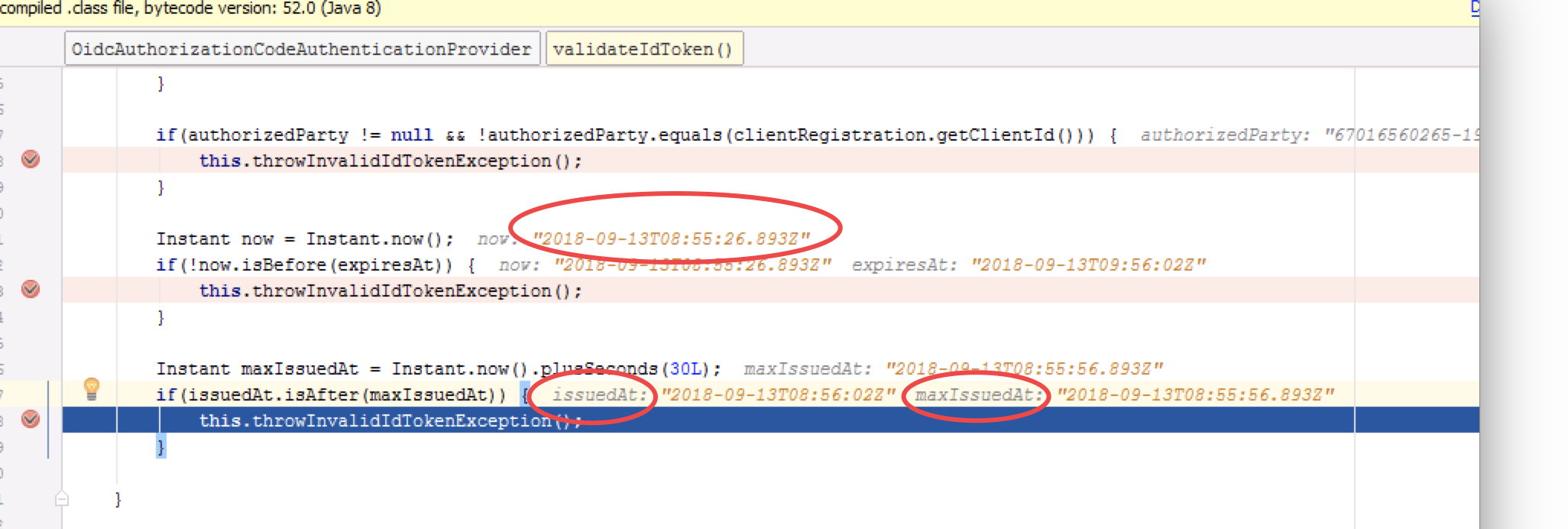
After debug, I find that the failure reason is because of issuedAt.isAfter(maxIssuedAt) check failure, you can see detail error reason in the following screen shots:
Expected Behavior
Login with Microsoft and Google account should be successful in all different machines with some grace time
Please notice Login with Microsoft account with ID token is successful in the same machine. Login with Google account with ID token is failure because of issuedAt.isAfter(maxIssuedAt) check failure Login with Microsoft and Google account with ID token are both successful in other testing machines
Since we can not control the issuedAt value which generated by Microsoft or Google and issuedAt generated by Microsoft and Google is obviously different in my testing machine.
Enhance request 1: add detail error reason in exception when id_tioken validate failure Enhance request 2: default 30 second in the check of issuedAt.isAfter(maxIssuedAt) becomes configurable Suggestion to fix with existing spring security version : And for current spring security version without previous enhance support, how can I do to change the value of 30 to 300s, do we have some extension point for it without change sourcecode in jar?
Configuration
no special configuration, the issue is just related with id token check logic in OidcAuthorizationCodeAuthenticationProvider
Version
 <dependency>
        <groupId>org.springframework.boot</groupId>
        <artifactId>spring-boot-starter-security</artifactId>
    </dependency>
    <dependency>
        <groupId>org.springframework.security</groupId>
        <artifactId>spring-security-oauth2-client</artifactId>
    </dependency>
    <dependency>
        <groupId>org.springframework.security</groupId>
        <artifactId>spring-security-oauth2-jose</artifactId>
    </dependency>
Sample
no special configuration, the issue is just related with id token check logic in OidcAuthorizationCodeAuthenticationProvider
Comment From: jgrandja
@zcwang3 You've tested 3 different scenarios with 2 passing and 1 failing so this suggests a possible environment issue. I took a look at the debug screenshot you provided and it looks like you have a clock sync issue between the computer you're testing on and Google's clock.
2018-09-13T08:55:26.893Z - Now (Testing machine clock) 2018-09-13T08:56:02Z - IssuedAt (Google's clock)
As you can see, the clock on your testing machine is not in sync with Google's clock. Looks like the testing machine clock is approx. 36 secs behind Google's clock. Can you adjust the clock on the testing machine and re-test?
Please also see this comment for more info.
There is no current way for a user to configure maxIssuedAt at the moment. So to get around this issue you'll need to ensure the clocks in your application environments are in sync (or close) with the Provider environments.
We can look at adding this support in a future release. And I also feel that a more detailed exception message for ID Token validation failures is needed.
Comment From: zcwang3
@jgrandja Thanks for you checking.
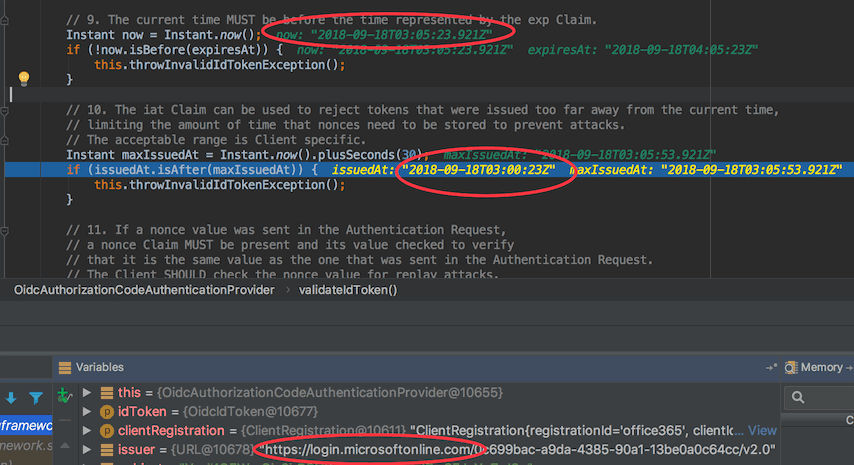
Please notice: in the same test machine, Microsoft ID token verification is pass and Google ID token verification is failure because of maxIssuedAt check issue. it means that the clock on my testing machine is sync with Microsoft's clock, and it is not sync with Google's clock.
After I have sync clock on my testing machine with ntp command, the same issue still exists.
So i think clock out of sync issue should exist in Google and I can do nothing for that.
So, I need increate grace time of maxIssuedAt check to avoid potential production issue caused by clock out of sync in OpenID provider (like Microsoft / Google / etc...)
Comment From: jgrandja
@zcwang3
in the same test machine, Microsoft ID token verification is pass and Google ID token verification is failure because of maxIssuedAt check issue. it means that the clock on my testing machine is sync with Microsoft's clock, and it is not sync with Google's clock.
Can you please provide another sceenshot from the test machine for Microsoft and Google. I'd like to see what the issueAt and now times are.
Thanks.
Comment From: zcwang3
Hi @jgrandja
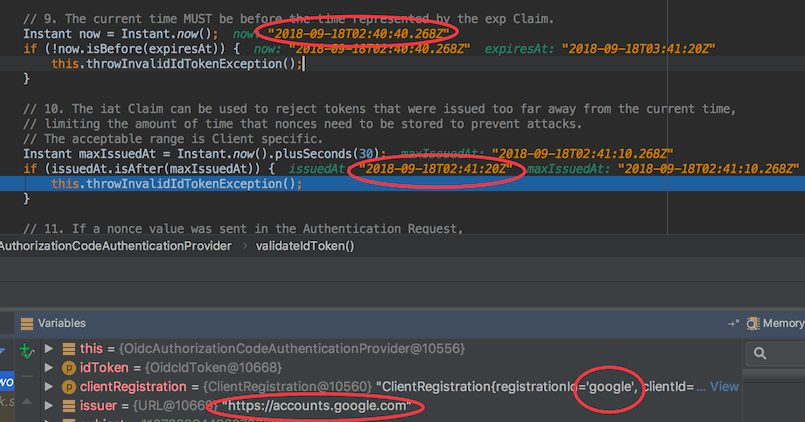
here is the attached screen shots for Microsoft / Google id token verification
Google ID token verification: Google clock is about 40s faster than our server
BTW: as work around solution to avoid potential production issue, i copy code from OidcAuthorizationCodeAuthenticationProvider and then generate a new class MyOidcAuthorizationCodeAuthenticationProvider, in this new class i have change value from 30 to 300 and add detail error reason when token is invalid. You can refer to the following source code
private void validateIdToken(OidcIdToken idToken, ClientRegistration clientRegistration) { // 3.1.3.7 ID Token Validation // http://openid.net/specs/openid-connect-core-1_0.html#IDTokenValidation
    // Validate REQUIRED Claims
    URL issuer = idToken.getIssuer();
    if (issuer == null) {
        this.throwInvalidIdTokenException("issuer is null");
    }
    String subject = idToken.getSubject();
    if (subject == null) {
        this.throwInvalidIdTokenException("subject is null");
    }
    List<String> audience = idToken.getAudience();
    if (CollectionUtils.isEmpty(audience)) {
        this.throwInvalidIdTokenException("audience is empty");
    }
    Instant expiresAt = idToken.getExpiresAt();
    if (expiresAt == null) {
        this.throwInvalidIdTokenException("expiresAt is null");
    }
    Instant issuedAt = idToken.getIssuedAt();
    if (issuedAt == null) {
        this.throwInvalidIdTokenException("issuedAt is null");
    }

    // 2. The Issuer Identifier for the OpenID Provider (which is typically obtained during Discovery)
    // MUST exactly match the value of the iss (issuer) Claim.
    // TODO Depends on gh-4413

    // 3. The Client MUST validate that the aud (audience) Claim contains its client_id value
    // registered at the Issuer identified by the iss (issuer) Claim as an audience.
    // The aud (audience) Claim MAY contain an array with more than one element.
    // The ID Token MUST be rejected if the ID Token does not list the Client as a valid audience,
    // or if it contains additional audiences not trusted by the Client.
    if (!audience.contains(clientRegistration.getClientId())) {
        this.throwInvalidIdTokenException("client id does not match with audience, audience is " + audience);
    }

    // 4. If the ID Token contains multiple audiences,
    // the Client SHOULD verify that an azp Claim is present.
    String authorizedParty = idToken.getAuthorizedParty();
    if (audience.size() > 1 && authorizedParty == null) {
        this.throwInvalidIdTokenException("authorizedParty is null");
    }

    // 5. If an azp (authorized party) Claim is present,
    // the Client SHOULD verify that its client_id is the Claim Value.
    if (authorizedParty != null && !authorizedParty.equals(clientRegistration.getClientId())) {
        this.throwInvalidIdTokenException("client id does not match with authorizedParty, authorizedParty is " + authorizedParty);
    }

    // 7. The alg value SHOULD be the default of RS256 or the algorithm sent by the Client
    // in the id_token_signed_response_alg parameter during Registration.
    // TODO Depends on gh-4413

    // 9. The current time MUST be before the time represented by the exp Claim.
    Instant now = Instant.now();
    if (!now.isBefore(expiresAt)) {
        this.throwInvalidIdTokenException(**"token is expired, now is " + now + ", expiresAt is " + expiresAt**);
    }

    // 10. The iat Claim can be used to reject tokens that were issued too far away from the current time,
    // limiting the amount of time that nonces need to be stored to prevent attacks.
    // The acceptable range is Client specific.
    Instant maxIssuedAt = Instant.now().plusSeconds(**300**);
    if (issuedAt.isAfter(maxIssuedAt)) {
        this.throwInvalidIdTokenException(**"maxIssuedAt check failure, now is " + now + ", issuedAt is " + issuedAt  + ", maxIssuedAt is " + maxIssuedAt**);
    }

    // 11. If a nonce value was sent in the Authentication Request,
    // a nonce Claim MUST be present and its value checked to verify
    // that it is the same value as the one that was sent in the Authentication Request.
    // The Client SHOULD check the nonce value for replay attacks.
    // The precise method for detecting replay attacks is Client specific.
    // TODO Depends on gh-4442

}

private void throwInvalidIdTokenException(**String errorReason**) {
    OAuth2Error invalidIdTokenError = new OAuth2Error(INVALID_ID_TOKEN_ERROR_CODE);
    throw new OAuth2AuthenticationException(invalidIdTokenError, invalidIdTokenError.toString() + ":" + errorReason);
}
Comment From: zcwang3
Hi @jgrandja
Do we have any conclusion/plan for this issue?
Comment From: jgrandja
@zcwang3 Apologies for the delayed response. We were quite busy leading up to the 5.1 release and SpringOne last week.
I do have a plan on how to provide a configurable clock skew value for maxIssuedAt. I'm quite busy with other priorities at the moment though.
Would you be interested in submitting a PR for this? I could guide you through the process and detail the plan/idea I have for this change.
Comment From: zcwang3
@jgrandja Sorry for late response because of holiday leave. I can have a try to fix this issue. Could you please help to share the information you mentioned? And which location is suggested for configuration of maxIssuedAt?
Comment From: jgrandja
@zcwang3 There are 2 issues that will address this #5930 and #5717.
I started on #5717 but ran into a design issue so it didn't make it into 5.1. I'll get back to this one soon.
What are your thoughts on working on #5930?
Comment From: zcwang3
@jgrandja I am work overtime for my daily work and not have time to work on #5930 now. May be I will try to pick it up later if I have time.
Thanks
Comment From: jgrandja
@zcwang3 No worries. I'll try to get to it soon as well. If you get to it before me please let me know. Thanks.
Comment From: rwinch
@jgrandja In the meantime should we rename this to be something like...OidcAuthorizationCodeAuthenticationProvider should support clock skew?
Comment From: jgrandja
@rwinch Yes, thanks for pointing that out. I renamed it to be more specific to ID Token validation.
Comment From: gburboz
@jgrandja clock skew is just one of the many factors due to which this check would fail (e.g. network latency). I'd recommend to name this client config as issuedWithin
Additionally, clock skew is applicable not just to issuedAt but also to expiresAt. I'd recommend to have additional provider level property allowedClockSkew with some default value which can be overridden from config and be used anywhere such comparison is required.
Instant now = Instant.now();
...
Instant maxExpiresAt = now.plusSeconds(allowedClockSkew);
...
Instant maxIssuedAt = now.plusSeconds(issuedWithin + allowedClockSkew);
...
Comment From: jgrandja
@gburboz Thanks for the feedback. I'll consider your points when I get to this issue.
Comment From: yannick-fernand
Hi @jgrandja i have the same issue. when do you think you will resolve it. thanks
Comment From: jgrandja
@yannick-fernand This is scheduled for 5.2.0.M1 as indicated in the ticket. However, given that M1 is scheduled for Jan 15, it might not make it until M2. I'm trying to catch up with things since the break. I'll do my best.
Comment From: jgrandja
@zcwang3 @gburboz @yannick-fernand Clock skew can now be configured via OidcIdTokenValidator.setClockSkew(). However, it's not that easy to configure at the moment as it will require some code duplication on the user's end. This is being addressed in #6379. I'm in the process of putting together a PR for this. After #6379 is resolved, it should be fairly straight forward to configure a clock skew per ClientRegistration - which implicitly supports per provider.
Comment From: jgrandja
@zcwang3 @gburboz @yannick-fernand #6379 has been resolved which allows the user to configure the clock skew (per provider) in a straight forward way. The following example demonstrates a custom clock skew setting for google and okta - all other providers default to 60.
@Configuration
public class OAuth2LoginConfig {

    @Bean
    public JwtDecoderFactory<ClientRegistration> idTokenDecoderFactory() {
        OidcIdTokenDecoderFactory idTokenDecoderFactory = new OidcIdTokenDecoderFactory();

        idTokenDecoderFactory.setJwtValidatorFactory(clientRegistration -> {
            OidcIdTokenValidator idTokenValidator = new OidcIdTokenValidator(clientRegistration);
            if (clientRegistration.getRegistrationId().equals("google")) {
                idTokenValidator.setClockSkew(Duration.ofSeconds(30));
            } else if (clientRegistration.getRegistrationId().equals("okta")) {
                idTokenValidator.setClockSkew(Duration.ofSeconds(45));
            }
            return idTokenValidator;
        });

        return idTokenDecoderFactory;
    }
}
NOTE: Please be aware that OidcIdTokenDecoderFactory may be renamed depending on the outcome of #6425. This will be decided before 5.2.0.RC1.
Comment From: OdDev26
Hello @jgrandja, how can this new method be used?: idTokenDecoderFactory()