After updating Spring Security version to 6, I can no longer change the error message on failed login attempts.
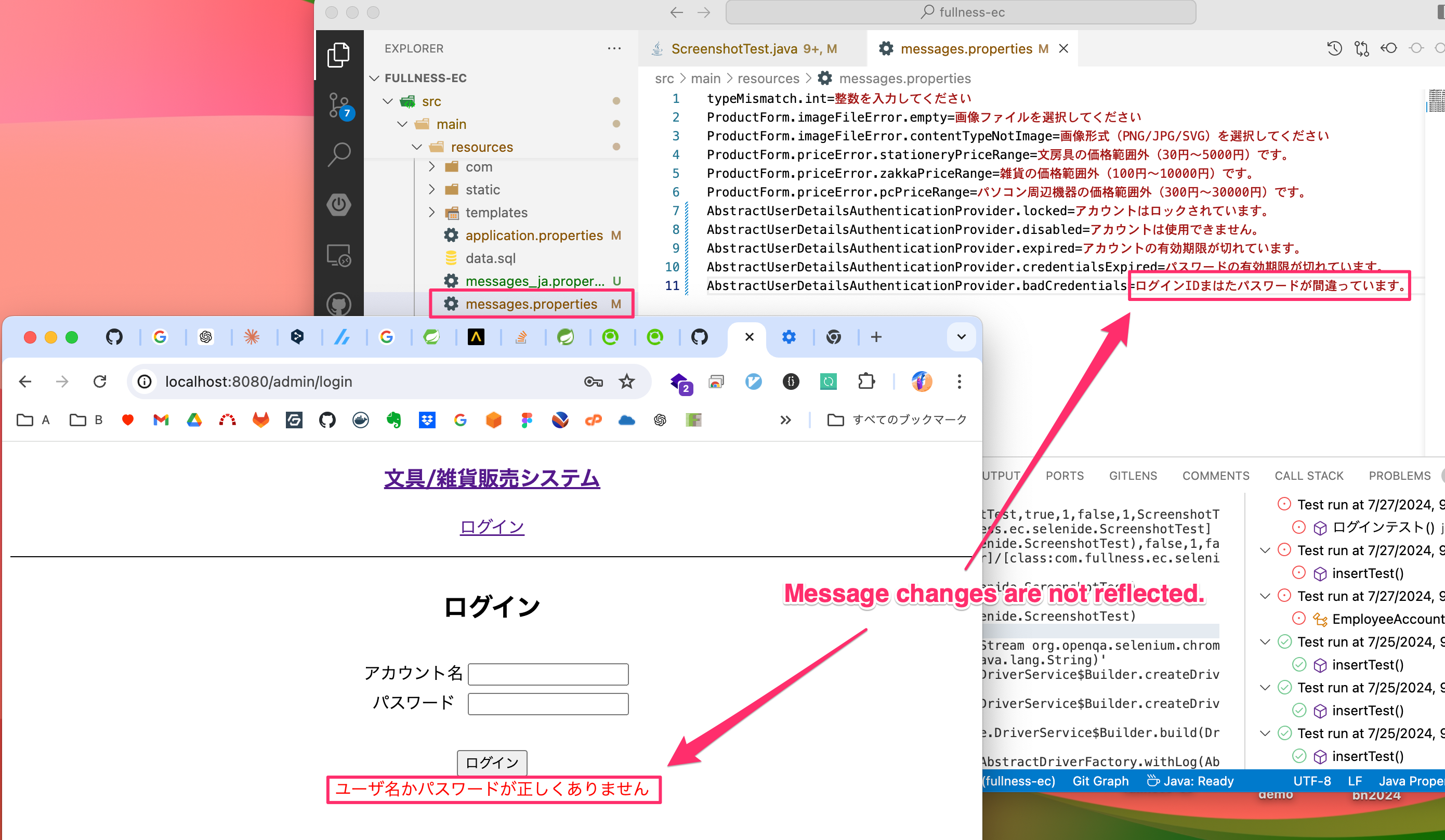
Up to version 5.6 of Spring Security, the error message specified in “AbstabsTrustUserDetailsAuthenticationProvider.badCredentials” in messages.properties was displayed on the screen. However, after updating to Spring Security 6, the default error message is displayed and cannot be changed to the message specified in messages.properties.
To Reproduce
- Updating Spring Security version to 6
Expected behavior
- I would like the message specified in “AbstractUserDetailsAuthenticationProvider.badCredentials” in messages.properties to be displayed as before.
Comment From: imagepit
Sorry about that. I was able to change the message successfully by modifying the Spring Security config file as follows
Remove the following method,
@Configuration
@EnableWebSecurity
@EnableMethodSecurity
public class SecurityConfig {

    @Bean
    public AuthenticationManager authenticationManager(UserDetailsService userDetailsService,PasswordEncoder passwordEncoder) {
        DaoAuthenticationProvider authenticationProvider = new DaoAuthenticationProvider();
        authenticationProvider.setUserDetailsService(service);
        authenticationProvider.setPasswordEncoder(passwordEncoder;); authenticationProvider.
        return new ProviderManager(authenticationProvider); }
    }

}
The following modification allows the message to be changed.
@Configuration
@EnableWebSecurity
@EnableMethodSecurity
public class SecurityConfig {

    @Autowired
    protected void configure(AuthenticationManagerBuilder auth) throws Exception {
            auth.userDetailsService(service).passwordEncoder(passwordEncoder);
    }

}
Thank you for your patience. We will close this case.
Translated with DeepL.com (free version)
Comment From: vahidhedayati
The suggestion made still causes a warning on spring boot 3 spring security 6.
This seems to fix as in remove the warning that appears and allows daoAuthentication to be declared as a bean locally:
Remove everything else configure and existing authenticationManager and try this, the myUserDetailsService is the specific userDetailService bound to the given project which implements UserDetailsService
@Bean
    public List<GlobalAuthenticationConfigurerAdapter> globalAuthenticationConfigurers() {
        List<GlobalAuthenticationConfigurerAdapter> configurers = new ArrayList<>();
        configurers.add(new GlobalAuthenticationConfigurerAdapter() {
            @Override
            public void configure(AuthenticationManagerBuilder auth) throws Exception {
                auth.authenticationProvider(daoAuthenticationProvider());
            }
        });
        return configurers;
    }

    @Bean
    public AuthenticationManager authenticationManager(AuthenticationConfiguration authConfig) throws Exception {
        authConfig.setGlobalAuthenticationConfigurers(globalAuthenticationConfigurers());
        return authConfig.getAuthenticationManager();
    }

    @Bean
    public DaoAuthenticationProvider daoAuthenticationProvider() {
        DaoAuthenticationProvider provider = new DaoAuthenticationProvider();
        provider.setUserDetailsService(myUserDetailsService);
        provider.setPasswordEncoder(bCryptPasswordEncoder);
        return provider;
    }